
1. บทนำ
This manual provides detailed instructions for the installation, operation, and maintenance of your PLKEQS M300S Android 14 Car Stereo. This multimedia player is designed specifically for Ford Fiesta models manufactured between 2009 and 2017, offering advanced features such as wireless CarPlay, wired Android Auto, GPS navigation, FM RDS radio, Bluetooth 5.0, and steering wheel control integration. Please read this manual thoroughly before using the product to ensure proper functionality and safety.
2. เนื้อหาบรรจุภัณฑ์
โปรดตรวจสอบว่าสินค้าทั้งหมดที่ระบุไว้ด้านล่างนี้รวมอยู่ในแพ็คเกจของคุณแล้ว หากมีสินค้าใดสูญหายหรือเสียหาย โปรดติดต่อฝ่ายสนับสนุนลูกค้า
- Host Screen (Main Unit) ×1
- Cables and Frame required for installation ×1 set
- 4LED Reversing Camera ×1 (Gift)
- Disassembly Tool ×1 (Gift)
- External Microphone ×1 (Gift)
- สายไฟ× 1
- 4-Pin USB Cable ×1
- 6-Pin USB Cable ×1
- เสาอากาศ GPS ×1
- RCA Cable Set ×1
- Reverse Input Cable ×1
- Camera Video Line ×1
- Camera Power Cable ×1
- RCA Harness with 4G SIM Card Slot (for 4G version only) ×1
- RCA Harness (for WiFi version only) ×1
- 4G LTE Antenna (for 4G version only) ×1
- Canbus Decoder ×1
- Radio Antenna Adapter Cable ×1
- Rear Camera Input RCA Cable ×1

This image displays the complete contents of the product package. It shows the main head unit, various cables (power, USB, RCA, camera), antennas (GPS, 4G LTE), external microphone, Canbus decoder, and the reverse camera. Each component is numbered and labeled for easy identification, providing a clear overview of what is included.
3. ข้อมูลจำเพาะ
| คุณสมบัติ | Specification (M300S Model) |
|---|---|
| ระบบปฏิบัติการ | แอนดรอยด์ 14.0 |
| โปรเซสเซอร์ | 8-core 8581 chip (4*A55 @ 1.6GHz, 4*A55 @ 1.2GHz) |
| แรม / รอม | แรม 4GB / รอม 64GB |
| ความละเอียดการแสดงผล | 1280*720 |
| ประเภทหน้าจอ | IPS High-Definition Multi-touch Screen |
| การเชื่อมต่อเครือข่าย | 5G WiFi, 4G, USB, Hotspot |
| เวอร์ชันบลูทูธ | 5.0 |
| คาร์เพลย์ | ไร้สาย |
| แอนดรอยด์ออโต้ | มีสาย |
| โปรเซสเซอร์เสียงดิจิตอล (DSP) | ใช่ |
| วิทยุระบบข้อมูล (RDS) | ใช่ |
| พัดลมระบายความร้อน | ในตัว |
| รูปแบบสื่อที่รองรับ | Mp3, Mp4, WMA, JPEG |
| Supported Optional Accessories | TPMS, DAB, OBD, DVR |
| หมายเลขรุ่น | M300S (66538279-M300S) |
| ผู้ผลิต | PLKEQS |
| ประเทศต้นกำเนิด | จีน |

This table provides a detailed comparison of technical specifications across various PLKEQS car stereo models, including M100S, M120S, M150S, M200S, M300S, M400S, M500S, M600S, and M700S. It lists differences in internet connectivity, operating system, core processor, RAM/ROM configurations, Bluetooth module, screen resolution, screen type, cooling fan presence, full AV output, DSP, and RDS features. The M300S model is highlighted with 4G internet, Android 14, 8-core 8581 chip, 4G+64G RAM/ROM, Bluetooth 5.0, 1280*720 IPS screen, built-in cooling fan, optional full AV output, DSP, and RDS.
4. การตั้งค่าและการติดตั้ง
Installing the PLKEQS M300S car stereo requires specific technical skills and knowledge. It is highly recommended to seek assistance from professional installation engineers at a certified car conversion workshop to ensure correct and safe installation.
รายการตรวจสอบก่อนการติดตั้ง:
- ความเข้ากันได้ของยานพาหนะ: Ensure your Ford Fiesta is from the 2009-2017 model years.
- ส่วนประกอบที่จำเป็น: Confirm you have the correct radio frame bezel and the original car cable plug adapter for your vehicle.
- เครื่องมือ: Gather necessary tools, including the provided disassembly tool.
- ความปลอดภัย: ถอดแบตเตอรี่รถยนต์ออกก่อนเริ่มงานเกี่ยวกับระบบไฟฟ้าใดๆ
ขั้นตอนการติดตั้ง (คำแนะนำทั่วไป):
- Carefully remove the original car radio and dashboard trim using appropriate tools.
- ต่อสายไฟที่ให้มาเข้ากับสายไฟเดิมของรถ ตรวจสอบให้แน่ใจว่าการเชื่อมต่อทั้งหมดแน่นหนาดี
- Install the GPS antenna, 4G LTE antenna (if applicable), and external microphone in suitable locations.
- If installing a reverse camera, route the camera cable and connect it to the 'CAM-IN' port on the stereo. Refer to the wiring diagram for correct connections.
- Mount the PLKEQS M300S head unit into the dashboard opening, securing it with the appropriate frame and brackets.
- Reconnect the car battery and test all functions of the new stereo.
- ประกอบชิ้นส่วนตกแต่งแผงหน้าปัดกลับเข้าที่เดิม
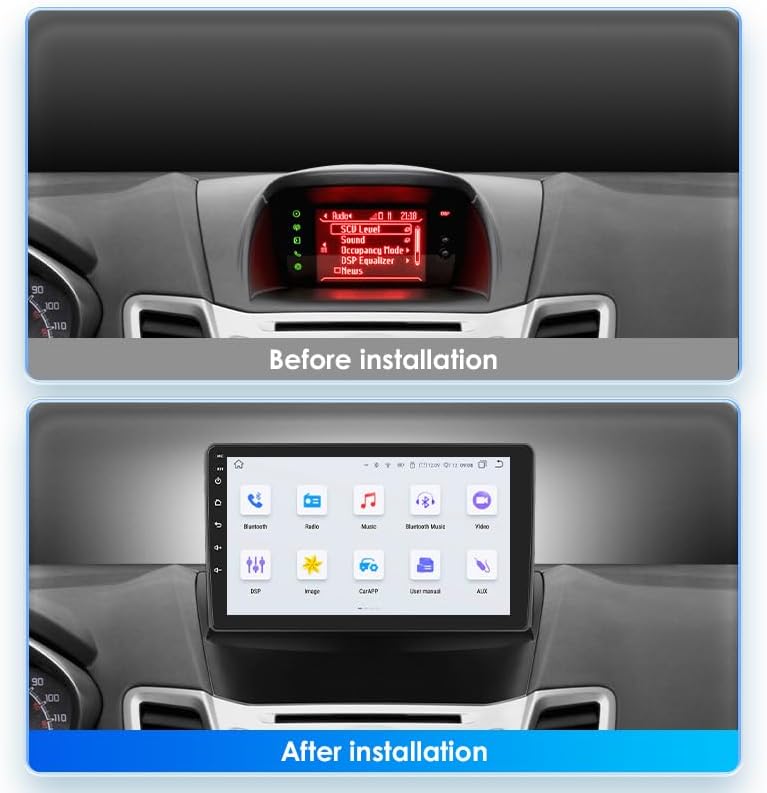
This image illustrates the visual transformation of the car's dashboard. The top panel shows the original car radio display before installation, while the bottom panel displays the new 9-inch PLKEQS M300S car stereo seamlessly integrated into the dashboard, showing its main interface.

This image explains the reverse camera functionality. It includes a wiring diagram for connecting the reverse camera to the car stereo and a clear display of the reverse camera's view on the stereo screen, complete with parking guidelines, enhancing safety during reversing maneuvers.
5. คู่มือการใช้งาน
5.1. CarPlay แบบไร้สายและ Android Auto แบบมีสาย
The PLKEQS M300S supports both wireless Apple CarPlay and wired Android Auto, allowing seamless integration with your smartphone for navigation, communication, and entertainment.
- CarPlay ไร้สาย: Connect your iPhone via Bluetooth for a wireless CarPlay experience. Once paired, CarPlay will launch automatically, mirroring essential iPhone apps to your car stereo screen. Use Siri voice control for hands-free operation.
- Android Auto แบบมีสาย: Connect your Android phone via a USB cable to activate Android Auto. This provides access to Google Maps, Google Assistant, and other compatible apps directly on the stereo display.

This image highlights the compatibility of the car stereo with both Apple CarPlay and Android Auto. The main screen shows various app icons, while smaller insets demonstrate the user interfaces for CarPlay (via Bluetooth or USB cable) and Android Auto (via Bluetooth or USB cable), including navigation, calls, and music playback.
5.2. ระบบนำทาง GPS
The stereo comes with pre-installed offline maps and supports online navigation when connected to the internet.
- การนำทางแบบออฟไลน์: Use the pre-loaded maps for navigation without an internet connection.
- การนำทางออนไลน์: Connect to 5G WiFi or your phone's hotspot to access real-time traffic updates and download additional map data from the app store.
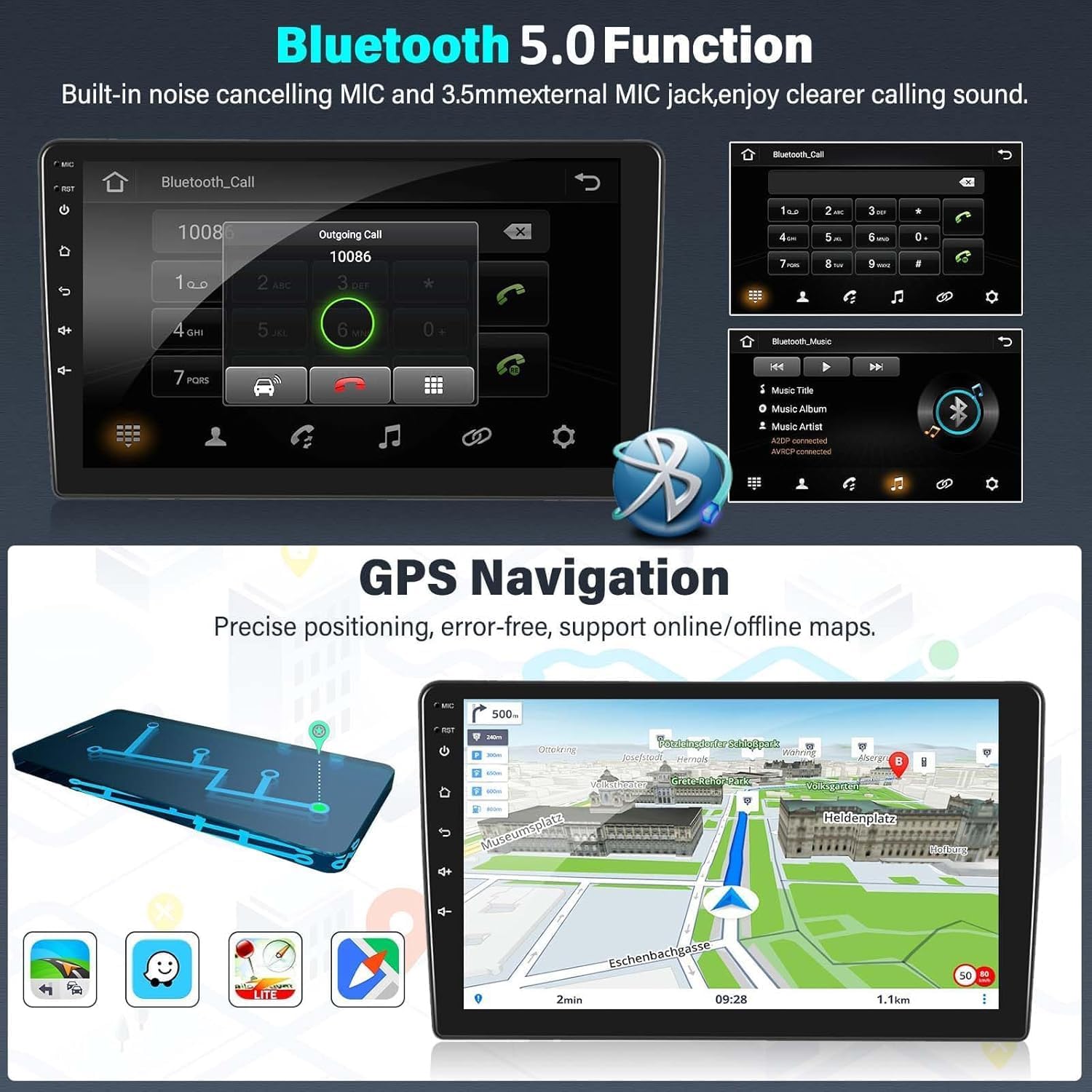
This image displays two key features: the Bluetooth 5.0 function for hands-free calling, showing a dial pad and call interface, and the GPS navigation system, illustrating a detailed map with route information and various navigation icons.
5.3. Bluetooth 5.0 Functionality
Connect your smartphone via Bluetooth 5.0 for hands-free calling and audio streaming.
- การโทรแบบแฮนด์ฟรี: Pair your phone to make and receive calls directly from the stereo. The built-in noise-canceling microphone ensures clear audio.
- เพลงบลูทูธ: Stream audio from your phone to the car stereo for high-quality sound playback.
5.4. FM RDS Radio
Enjoy your favorite radio stations with the integrated FM/AM tuner, featuring RDS for enhanced information display.
- การปรับจูนอัตโนมัติ: Scan and save radio stations automatically.
- คุณสมบัติของ RDS: Display station name, program type, and other information where available.
- DAB Support: Compatible with external DAB devices for access to digital radio stations.

This image demonstrates the FM RDS radio interface, showing frequency tuning and station information. It also illustrates the steering wheel control feature, with an inset showing a hand interacting with car steering wheel buttons, indicating seamless integration with the vehicle's original controls.
5.5. ระบบควบคุมพวงมาลัย (SWC)
The stereo supports the original car's steering wheel controls, allowing you to manage audio, calls, and other functions without taking your hands off the wheel. Configuration may be required in the system settings to map the buttons correctly.
5.6. Reverse Image Input
When the vehicle is shifted into reverse gear, the stereo automatically switches to the reverse camera display, providing a clear view of the area behind your car for safer parking and maneuvering.
5.7. คุณสมบัติอื่น ๆ
- 5G WiFi & 4G Connectivity: For fast internet access and online services.
- การเล่นวิดีโอความละเอียด 1080P: Enjoy high-definition video content.
- การเชื่อมต่อ USB: Play media from USB drives or connect compatible devices.
- Picture-in-Picture & Split Screen: Multitask by viewing two applications simultaneously.
- รองรับหลายภาษา: Operate the system in your preferred language.
- ลิงค์มิเรอร์: Mirror your smartphone screen to the stereo display.
- การรองรับ DVR: Connect an external DVR for recording driving footage.
6. การบำรุงรักษา
To ensure the longevity and optimal performance of your PLKEQS M300S car stereo, follow these maintenance guidelines:
- การทำความสะอาดหน้าจอ: ใช้ผ้านุ่มไม่เป็นขุยเช็ดหน้าจอสัมผัสเบาๆ สำหรับรอยเปื้อนฝังแน่น ให้เช็ดเบาๆampชุบผ้าด้วยน้ำหรือน้ำยาทำความสะอาดที่ปลอดภัยต่อหน้าจอ หลีกเลี่ยงสารเคมีรุนแรงหรือวัสดุที่มีฤทธิ์กัดกร่อน
- การอัปเดตซอฟต์แวร์: ตรวจสอบการอัปเดตซอฟต์แวร์เป็นระยะผ่านการตั้งค่าระบบหรือของผู้ผลิต webไซต์เพื่อให้แน่ใจว่าคุณมีคุณลักษณะล่าสุดและการแก้ไขจุดบกพร่อง
- สภาพแวดล้อม : หลีกเลี่ยงการให้เครื่องสัมผัสกับอุณหภูมิที่สูงหรือต่ำเกินไป แสงแดดโดยตรงเป็นเวลานาน หรือความชื้นที่มากเกินไป
- การเชื่อมต่อสายเคเบิล: ตรวจสอบการเชื่อมต่อสายเคเบิลทั้งหมดเป็นระยะๆ เพื่อให้แน่ใจว่ามีความปลอดภัยและไม่มีความเสียหาย
7 การแก้ไขปัญหา
If you encounter issues with your PLKEQS M300S car stereo, please refer to the following common troubleshooting steps:
- ไม่มีไฟฟ้า: Check the power cable connections and ensure the car battery is properly connected. Verify the car's fuse box for any blown fuses related to the stereo.
- ไม่มีเสียง: Check speaker connections. Ensure the volume is not muted or set too low. Verify audio settings in the system.
- หน้าจอสัมผัสไม่ตอบสนอง: ลองรีสตาร์ทเครื่อง หากปัญหายังคงอยู่ อาจจำเป็นต้องรีเซ็ตเป็นค่าโรงงาน (หมายเหตุ: การดำเนินการนี้จะลบข้อมูลผู้ใช้ทั้งหมด)
- GPS ไม่ทำงาน: ตรวจสอบให้แน่ใจว่าติดตั้งเสาอากาศ GPS อย่างถูกต้องและมีความชัดเจน view ของท้องฟ้า ตรวจสอบการตั้งค่า GPS ในระบบ
- ปัญหาการเชื่อมต่อบลูทูธ: ตรวจสอบให้แน่ใจว่าได้เปิดใช้งานบลูทูธทั้งบนเครื่องเสียงและโทรศัพท์ของคุณแล้ว ลบการจับคู่ก่อนหน้าและลองเชื่อมต่อใหม่
- CarPlay/Android Auto ไม่เชื่อมต่อ: For CarPlay, ensure Wi-Fi and Bluetooth are on. For Android Auto, try a different USB cable. Ensure your phone's operating system is up to date.
- การควบคุมพวงมาลัยไม่ทำงาน: Access the SWC learning function in the system settings and reconfigure the buttons.
If these steps do not resolve the issue, please contact PLKEQS customer support for further assistance.
8. การรับประกันและการสนับสนุน
PLKEQS offers a warranty for this product during the specified warranty period. For detailed information regarding warranty terms, conditions, and duration, please refer to the product description or contact PLKEQS customer service directly.
For technical support, installation inquiries, or any other questions, please reach out to PLKEQS customer support. Contact information can typically be found on the product packaging or the official PLKEQS webเว็บไซต์.