
1. บทนำ
This manual provides detailed instructions for the installation, operation, and maintenance of your Roinvou 4G+64G Android 15 Autoradio. This unit is designed for specific vehicle models: Fiat Ducato, Peugeot Boxer, and Citroen Jumper manufactured between 2006 and 2023. Please read this manual thoroughly before installation and use to ensure proper functionality and safety.
2. เนื้อหาบรรจุภัณฑ์
Before beginning installation, verify that all components listed below are present in your package. Refer to the 'Package List' image for visual confirmation of the included items.
- Autoradio Unit (9-inch Incell Touchscreen)
- สายไฟคู่
- สาย USB ของแท้
- เสาอากาศวิทยุ
- ตัวถอดรหัส CANBUS
- อาร์ซีเอเคเบิ้ล
- สายเคเบิลอินพุตกล้องด้านหลัง
- เสาอากาศ GPS
- Double USB Cable
- หลัง View กล้อง
- ไมโครโฟนภายนอก
- เครื่องมือติดตั้ง
- คู่มือการใช้งาน (เอกสารนี้)

3. การตั้งค่าและการติดตั้ง
3.1. Vehicle Compatibility Check
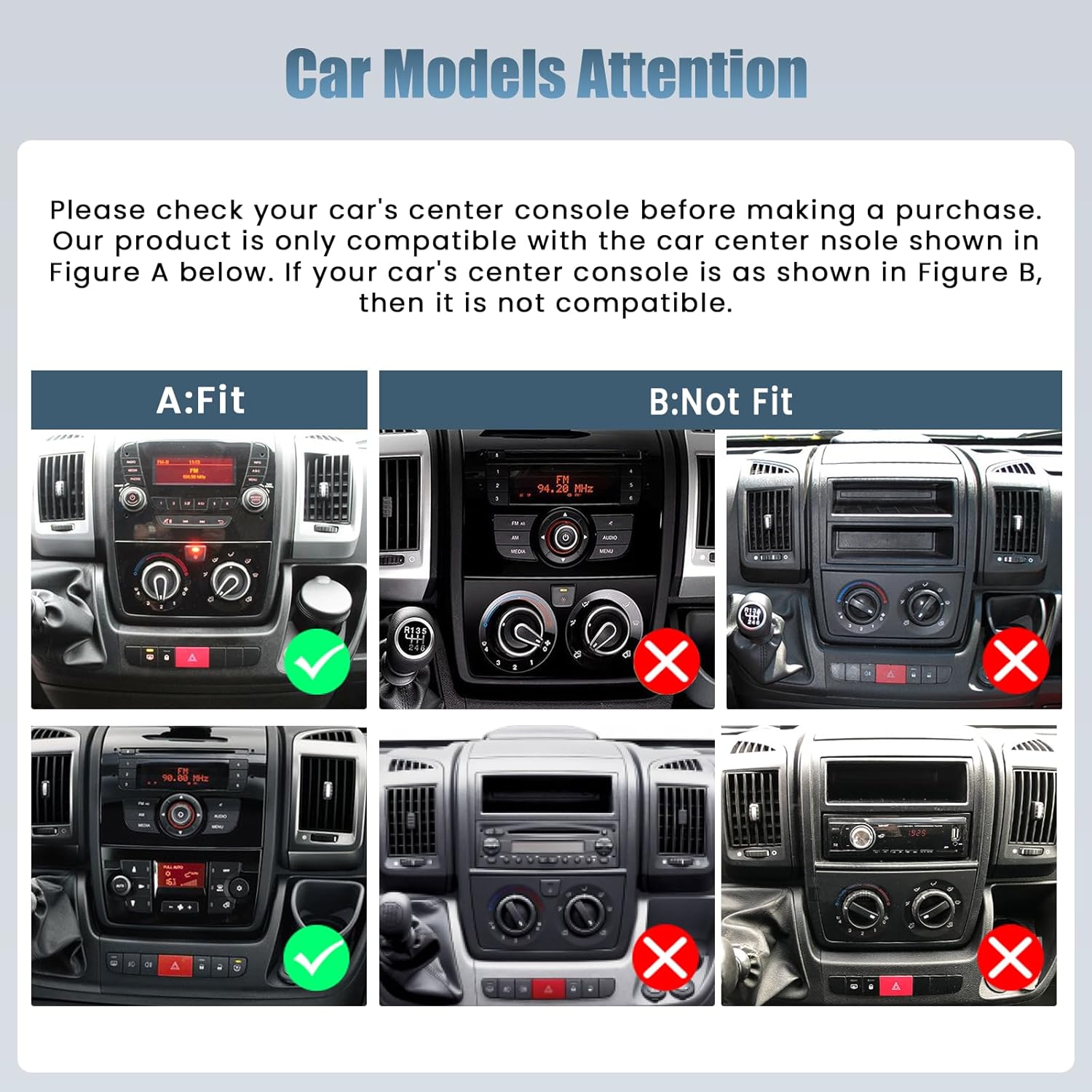
It is crucial to verify your vehicle's center console design before installation. This autoradio is specifically designed for Fiat Ducato, Peugeot Boxer, and Citroen Jumper models from 2006-2023. Compare your vehicle's dashboard with the provided images to ensure compatibility.

3.2. ขั้นตอนก่อนการติดตั้ง
- ถอดแบตเตอรี่: ควรตัดการเชื่อมต่อขั้วลบของแบตเตอรี่รถยนต์ทุกครั้งก่อนเริ่มงานเกี่ยวกับระบบไฟฟ้า เพื่อป้องกันการลัดวงจร
- ถอดหน่วยเก่าออก: Carefully remove your existing car radio or blank panel using the provided installation tool.
- ทดสอบความพอดี: Temporarily place the new autoradio unit into the dashboard opening to ensure a proper fit.
3.3. การเชื่อมต่อสายไฟ
เชื่อมต่อสายเคเบิลดังต่อไปนี้:
- สายไฟ: Connect the double power cable to the vehicle's wiring harness. Ensure all connections are secure.
- สาย USB: Connect the original USB cable and the additional double USB cable for data transfer and charging.
- เสาอากาศวิทยุ: Connect the radio antenna for FM/RDS reception.
- แคนบัส: Connect the CANBUS decoder. This is essential for integrating with vehicle features like steering wheel controls.
- สาย RCA: Connect the RCA cable for audio output to external amplifiers or subwoofers, if applicable.
- กล้องหลัง: Connect the rear camera input cable and the rear view กล้องช่วยจอดรถ
- เสาอากาศ GPS: ติดตั้งเสาอากาศ GPS ในตำแหน่งที่มีสัญญาณชัดเจน view ของท้องฟ้าเพื่อการรับสัญญาณที่ดีที่สุด
- ไมโครโฟนภายนอก: เชื่อมต่อไมโครโฟนภายนอกเพื่อคุณภาพการโทรที่ดีขึ้น
3.4. การตรวจสอบหลังการติดตั้ง
After making all connections, reconnect the vehicle's battery. Turn on the ignition and test the unit's basic functions: power on/off, audio, touchscreen response, and radio reception. Ensure the unit is securely mounted in the dashboard.
4. คู่มือการใช้งาน
4.1. อินเทอร์เฟซหน้าจอสัมผัส
The unit features a 9-inch Incell touchscreen with a 1280x720 resolution. This technology provides a fast response, true color reproduction, and high saturation for a clear and responsive user experience.

4.2. CarPlay แบบไร้สายและ Android Auto
Connect your iPhone or Android smartphone wirelessly to access navigation, make calls, send messages, and play music directly on the autoradio screen. The unit also supports wired and wireless Mirror Link functionality.

4.3. System Performance and Connectivity
The autoradio runs on Android 15, powered by a 4-core processor with 4GB RAM and 64GB of internal storage. It supports 5G WiFi for fast internet access and a wide range of applications. Bluetooth and GPS functionalities are integrated for seamless connectivity and navigation.

4.4. Audio and Customization
Utilize the equalization (EQ) settings to fine-tune your audio experience. The FM/RDS radio ensures clear sound and easy access to your preferred stations. The user-friendly interface supports split-screen functionality, allowing you to run navigation and music simultaneously. Multiple UI options are available for personalization.

4.5. คุณสมบัติด้านความปลอดภัย
The included rear camera provides a clear, wide-angle view for safer parking and reversing. The unit also supports steering wheel controls (SWC), allowing you to manage audio and other functions without taking your hands off the wheel. Ensure SWC is configured correctly via the CANBUS settings.

5. การบำรุงรักษา
To ensure the longevity and optimal performance of your Roinvou Autoradio, follow these maintenance guidelines:
- การทำความสะอาดหน้าจอ: ใช้ผ้านุ่มไม่เป็นขุยเช็ดหน้าจอสัมผัสเบาๆ สำหรับรอยเปื้อนฝังแน่น ให้เช็ดเบาๆampชุบผ้าด้วยน้ำหรือน้ำยาทำความสะอาดที่ปลอดภัยต่อหน้าจอ หลีกเลี่ยงสารเคมีรุนแรงหรือวัสดุที่มีฤทธิ์กัดกร่อน
- การทำความสะอาดทั่วไป: รักษาตัวเครื่องให้ปราศจากฝุ่นและสิ่งสกปรก ใช้แปรงขนนุ่มหรือลมเป่าทำความสะอาดช่องระบายอากาศและซอกต่างๆ
- การควบคุมอุณหภูมิ: หลีกเลี่ยงการเปิดเผยเครื่องในอุณหภูมิที่สูงหรือต่ำเกินไป ทั้งร้อนและเย็น เป็นระยะเวลานาน
- การอัปเดตซอฟต์แวร์: Periodically check for available software updates to ensure you have the latest features and bug fixes. Follow the on-screen prompts or consult the manufacturer's webเว็บไซต์สำหรับอัปเดตขั้นตอนต่างๆ
- การเชื่อมต่อสายเคเบิล: Occasionally check all cable connections to ensure they remain secure and free from damage.
6 การแก้ไขปัญหา
If you encounter issues with your Roinvou Autoradio, refer to the following troubleshooting steps:
- หน่วยไม่เปิดเครื่อง:
- Check the power cable connections to ensure they are securely attached.
- Verify the vehicle's fuse box for any blown fuses related to the radio.
- ตรวจสอบให้แน่ใจว่าแบตเตอรี่รถยนต์เชื่อมต่ออย่างถูกต้องและชาร์จไฟเต็มแล้ว
- หน้าจอสัมผัสไม่ตอบสนอง:
- Restart the autoradio unit.
- ตรวจสอบให้แน่ใจว่าหน้าจอสะอาดและไม่มีสิ่งกีดขวาง
- If the issue persists, a factory reset might be necessary (consult the settings menu).
- ไม่มีเอาต์พุตเสียง:
- ตรวจสอบการเชื่อมต่อสายลำโพง
- Verify volume levels and mute settings on the unit.
- Ensure EQ settings are not configured to an extreme that might cause silence.
- การควบคุมพวงมาลัยไม่ทำงาน:
- Confirm the CANBUS decoder is correctly installed and configured for your specific vehicle model (e.g., Fiat Ducato).
- Access the steering wheel control learning function in the unit's settings and re-program the buttons.
- ปัญหาสัญญาณ GPS:
- Ensure the GPS antenna is mounted in a location with a clear, unobstructed view ของท้องฟ้า
- ตรวจสอบการเชื่อมต่อเสาอากาศ GPS กับอุปกรณ์
- Incompatibility with Vehicle:
- Double-check the vehicle's make, model, and year against the product's compatibility list.
- Re-examine the center console design against the compatibility images provided in Section 3.1.
7. ข้อมูลจำเพาะ
| คุณสมบัติ | ข้อมูลจำเพาะ |
|---|---|
| ยี่ห้อ | รินวู |
| หมายเลขรุ่น | 23920b85-757e-46af-a079-f66fe345e532 |
| ระบบปฏิบัติการ | แอนดรอยด์ 15 |
| แรม | 4GB |
| พื้นที่จัดเก็บ | 64GB |
| ประเภทหน้าจอ | 9-inch Incell Touchscreen |
| ความละเอียดหน้าจอ | ขนาด 1280x720 |
| เทคโนโลยีการเชื่อมต่อ | RCA, USB, Bluetooth, WiFi |
| เทคโนโลยีไร้สาย | Bluetooth, WiFi (5G) |
| คุณสมบัติพิเศษ | CarPlay, Android Auto, Mirror Link, EQ, FM/RDS, GPS, UI, SWC, Rear Camera Support |
| อุปกรณ์ที่รองรับ | สมาร์ทโฟน |
| โหมดเอาต์พุตเสียง | สเตอริโอ |
| ช่องเสียงรอบทิศทาง | 4 |
| กำลังขับ | 45 วัตต์ |
| Digital Media Format Support | AVI, WAV, WMA, MKV, RMVB, MP4, MDV |
| ประเทศต้นกำเนิด | จีน |
8. การรับประกันและการสนับสนุน
8.1. ข้อมูลการรับประกัน
This Roinvou Autoradio comes with a รับประกัน 24 เดือน นับจากวันที่ซื้อ การรับประกันนี้ครอบคลุมข้อบกพร่องจากการผลิตและการทำงานผิดปกติภายใต้การใช้งานปกติ โปรดเก็บหลักฐานการซื้อไว้เพื่อขอรับสิทธิ์การรับประกัน
8.2. การสนับสนุนลูกค้า
For any inquiries, technical assistance, or warranty claims, Roinvou offers lifetime online support. Our support team aims to respond to all inquiries within 24 hours. Please refer to the contact information provided with your purchase or visit the official Roinvou webเว็บไซต์สำหรับรายละเอียดการสนับสนุน