
1. ยินดีต้อนรับ
Thank you for choosing the AWEI T1 Pro Wireless Bluetooth Headphones. This manual provides detailed instructions for setting up, operating, and maintaining your new earbuds. Please read this manual carefully before use to ensure optimal performance and longevity of your device.
2. สินค้าหมดview
2.1. เนื้อหาบรรจุภัณฑ์
- หูฟังไร้สาย (ซ้ายและขวา)
- เคสชาร์จไฟ
- สายชาร์จ USB
- จุกหูฟัง (ขนาดต่างๆ)
- คู่มือการใช้งาน
2.2. Earbud and Charging Case Components
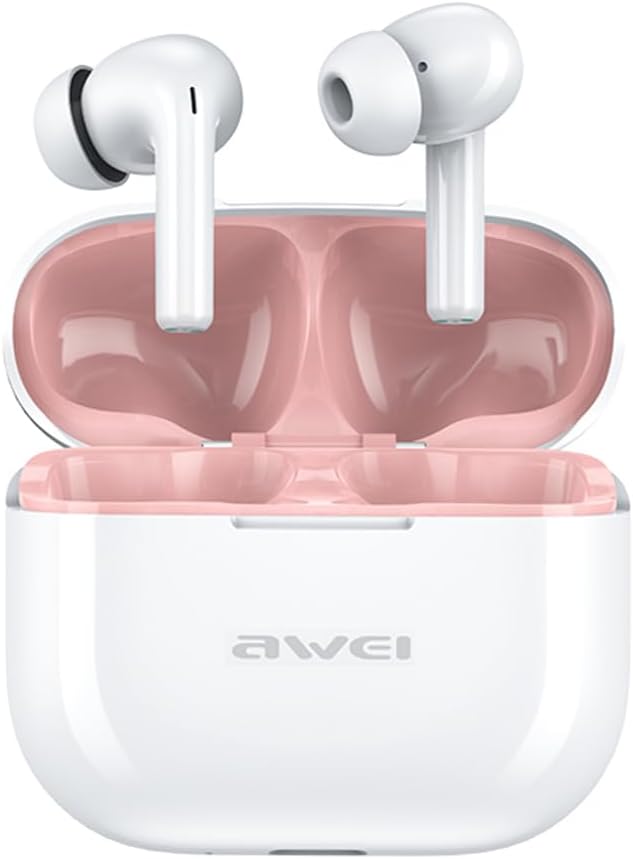
Image: The AWEI T1 Pro wireless earbuds are shown in their open charging case. The earbuds are white with a stem design, and the interior of the charging case is a light pink color. The AWEI logo is visible on the front of the white charging case.
The AWEI T1 Pro earbuds feature an ergonomic in-ear design for a comfortable and secure fit. The compact charging case not only protects the earbuds but also provides multiple charges on the go.
2.3. คุณสมบัติหลัก
- คุณภาพเสียง Hi-Fi: Equipped with 13mm speakers for an immersive audio experience and clear call performance.
- เทคโนโลยีบลูทูธ 5.4: Ensures a faster, more stable signal transmission with low latency and a wireless range of up to 10 meters. (Note: Some packaging may indicate Bluetooth 5.3, but the device supports 5.4 for enhanced performance).
- การควบคุมแบบสัมผัสอัจฉริยะ: Intuitive touch sensors on each earbud allow for easy control of music playback, calls, and voice assistant activation.
- อายุการใช้งานแบตเตอรี่ยาวนาน: Enjoy up to 7 hours of continuous playback per charge. The 300mAh charging case extends total playtime to 36 hours in dual-ear mode or up to 60 hours in single-ear mode. The case fully charges in approximately 1 hour via Type-C.
- การออกแบบกันน้ำ IPX6: Resistant to sweat and rain, making them suitable for sports and outdoor activities.

Image: A detailed diagram illustrating the internal components of an earbud speaker, labeled as 'Drive Units HiFi Stereo', highlighting the layered structure of the audio driver for high-fidelity sound.

Image: A stylized depiction of a microchip labeled '5.3 Bluetooth', surrounded by circuit board elements, emphasizing lower latency and increased stability in wireless communication.

Image: A black earbud is shown next to a smartphone displaying a music player interface. Text indicates 'Touch Control Wake up Voice Assistant', illustrating how touch gestures on the earbud can control phone functions like answering calls or activating a voice assistant.

Image: A smartphone displaying a music player is shown alongside a transparent block, symbolizing extended power. Text highlights 'Full of Energy Long Battery Life', indicating the 300mAh charging case provides 7 hours of continuous use per charge.

Image: Two black earbuds are depicted, one dry and the other surrounded by water droplets, illustrating the 'No Fear of Sweat & Rain IPX6 Waterproof Rate' feature, which prevents water penetration during sports.
3. การตั้งค่า
3.1. การชาร์จครั้งแรก
- ก่อนใช้งานครั้งแรก ให้ใส่หูฟังทั้งสองข้างลงในกล่องชาร์จ
- Connect the provided USB Type-C charging cable to the charging port on the case and a power source (e.g., USB wall adapter, computer USB port).
- The indicator lights on the charging case will show charging status. A full charge for the case takes approximately 1 hour.
- โปรดตรวจสอบให้แน่ใจว่าหูฟังชาร์จเต็มแล้วก่อนทำการจับคู่ครั้งแรก
3.2. การจับคู่กับอุปกรณ์
- เปิดกล่องชาร์จ หูฟังจะเปิดอัตโนมัติและเข้าสู่โหมดจับคู่
- บนอุปกรณ์ของคุณ (สมาร์ทโฟน แท็บเล็ต แล็ปท็อป) ให้เปิดใช้งาน Bluetooth
- ค้นหา อุปกรณ์บลูทูธที่พร้อมใช้งาน
- Select "AWEI T1 Pro" from the list of devices.
- เมื่อเชื่อมต่อแล้ว คุณจะได้ยินเสียงยืนยัน และหูฟังจะพร้อมใช้งาน
- เมื่อนำเอียร์บัดออกจากเคส เอียร์บัดจะเชื่อมต่อกับอุปกรณ์ที่จับคู่ไว้ครั้งล่าสุดโดยอัตโนมัติ หากเปิดใช้งาน Bluetooth บนอุปกรณ์
4. คู่มือการใช้งาน
4.1. เปิด/ปิดเครื่อง
- เปิดเครื่อง: เปิดเคสชาร์จ หรือกดบริเวณสัมผัสบนหูฟังทั้งสองข้างค้างไว้ 3 วินาที
- หมดแรง: วางหูฟังกลับเข้าไปในกล่องชาร์จและปิดฝา หรือกดบริเวณสัมผัสบนหูฟังทั้งสองข้างค้างไว้ 5 วินาที
4.2. การควบคุมแบบสัมผัส
| การทำงาน | การกระทำ |
|---|---|
| เล่น/หยุดเพลง | แตะครั้งเดียวที่หูฟังเอียร์บัดข้างใดข้างหนึ่ง |
| เพลงต่อไป | แตะสองครั้งที่หูฟังด้านขวา |
| เพลงก่อนหน้า | แตะสองครั้งที่หูฟังด้านซ้าย |
| เพิ่มระดับเสียง | แตะสามครั้งที่หูฟังด้านขวา |
| ลดระดับเสียง | แตะสามครั้งที่หูฟังข้างซ้าย |
| รับสาย/วางสาย | แตะครั้งเดียวที่หูฟังเอียร์บัดข้างใดข้างหนึ่ง |
| ปฏิเสธการรับสาย | กดหูฟังข้างใดข้างหนึ่งค้างไว้ 2 วินาที |
| เปิดใช้งานผู้ช่วยเสียง | Long press on either earbud for 2 seconds (when not on a call) |
4.3. การโทรออกและรับสาย
When a call comes in, you can answer or reject it using the touch controls as described above. During a call, a single tap will end the conversation.
4.4. การเล่นเพลง
Control your music directly from the earbuds. Use single, double, or triple taps to play, pause, skip tracks, or adjust volume.
5. การบำรุงรักษา
5.1. การทำความสะอาด
- ทำความสะอาดหูฟังและกล่องชาร์จเป็นประจำด้วยผ้าแห้งนุ่มที่ไม่เป็นขุย
- ห้ามใช้สารทำความสะอาดที่มีฤทธิ์กัดกร่อน แอลกอฮอล์ หรือตัวทำละลายเคมี
- Gently remove any earwax or debris from the earbud mesh and charging contacts using a dry cotton swab or a small, soft brush.
5.2. การจัดเก็บ
- เมื่อไม่ใช้งาน ควรเก็บหูฟังไว้ในกล่องชาร์จเสมอ เพื่อป้องกันฝุ่นละอองและความเสียหาย
- เก็บอุปกรณ์ไว้ในที่แห้งและเย็น หลีกเลี่ยงอุณหภูมิที่สูงและแสงแดดโดยตรง
5.3. ความทนทานต่อน้ำ
The AWEI T1 Pro earbuds are rated IPX6 waterproof, meaning they are protected against high-pressure water jets from any direction. This makes them suitable for workouts and light rain. However, they are not designed for swimming or submersion in water. Ensure the earbuds are dry before placing them back into the charging case to prevent damage.
6 การแก้ไขปัญหา
6.1. ปัญหาทั่วไปและวิธีแก้ไข
- หูฟังไม่จับคู่กับอุปกรณ์:
Ensure both earbuds are charged. Turn off and on your device's Bluetooth. Forget "AWEI T1 Pro" from your device's Bluetooth list and try pairing again. - มีหูฟังเพียงข้างเดียวที่ใช้งานได้:
Place both earbuds back into the charging case, close the lid, wait a few seconds, then open the lid and take them out. This should reset their connection. If the issue persists, try resetting the earbuds (refer to manufacturer's webไซต์สำหรับคำแนะนำการรีเซ็ตเฉพาะหากจำเป็น) - ไม่มีเสียงหรือระดับเสียงต่ำ:
Check the volume level on both your device and the earbuds. Ensure the earbuds are properly seated in your ears. Try cleaning the earbud mesh for any obstructions. - กล่องชาร์จไม่ชาร์จ:
Ensure the USB cable is securely connected to both the case and the power source. Try a different charging cable or power adapter. - หูฟังไม่ชาร์จในกรณี:
Ensure the charging contacts on both the earbuds and the case are clean and free of debris. Make sure the earbuds are correctly seated in the case.
7. ข้อมูลจำเพาะ

Image: A graphic displaying the technical specifications of the AWEI T1 Pro, including basic information, horn details, Bluetooth version, and battery capacities.
| ข้อมูลทั่วไป | |
|---|---|
| ชื่อรุ่น | ที1 โปร |
| ประเภทสินค้า | หูฟังสเตอริโอ TWS |
| น้ำหนักสุทธิ | 36กรัม |
| มิติ (กรณี) | 58*50*24มม. |
| การวางตำแหน่งหู | ในหู |
| ประเภทการควบคุม | การควบคุมแบบสัมผัส |
| ระดับความต้านทานต่อน้ำ | กันน้ำระดับ IPX6 |
| การควบคุมเสียงรบกวน | ระบบตัดเสียงรบกวนแบบปรับได้ |
| ข้อมูลจำเพาะด้านเสียง | |
| เส้นผ่านศูนย์กลางของลำโพง | 13มม. |
| ความไวต่อความรู้สึก | 100±3เดซิเบล |
| ช่วงตอบสนองความถี่ | 20Hz~20,000Hz |
| อิมพีแดนซ์ | 32 โอห์ม |
| การเชื่อมต่อ | |
| เวอร์ชันบลูทูธ | 5.4 (Image shows 5.3) |
| ช่วงสาย | สูงสุด 10 เมตร |
| โปรโตคอลที่รองรับ | HSP, HFP, A2DP, AVRCP |
| อุปกรณ์ที่รองรับ | แล็ปท็อป แท็บเล็ต โทรศัพท์มือถือ |
| แบตเตอรี่และการชาร์จ | |
| เคสชาร์จแบตเตอรี่ | 300mAh/3.7V |
| ความจุแบตเตอรี่เอียร์บัด | 45mAh*2 |
| เวลาเล่นเพลง | ใช้งานได้นานสูงสุด 7 ชั่วโมง (ต่อการชาร์จหนึ่งครั้ง) |
| เวลาสนทนา | นานถึง 8 ชั่วโมง |
| เวลาสแตนด์บาย | นานถึง 300 ชั่วโมง |
| ระยะเวลาในการชาร์จ (เคส) | ประมาณ 1 ชั่วโมง |
| พอร์ตชาร์จ | ยูเอสบี ไทป์ ซี |
8. การรับประกันและการสนับสนุน
AWEI products are designed and manufactured to the highest quality standards. For information regarding warranty coverage, please refer to the warranty card included in your product packaging or visit the official AWEI website. If you encounter any issues or require technical assistance, please contact AWEI customer support through the contact information provided on the official webไซต์หรือแพลตฟอร์มการซื้อของคุณ