
1. บทนำ
This user manual provides essential information for the safe and efficient operation of the PABVRPYT TY310MCT Multifunctional Three-Phase Integrated Rail Electricity Meter. This device is designed for accurate measurement of electrical parameters in three-phase systems, featuring an integrated design for rail mounting and an LCD display for clear readings.
2. ข้อมูลด้านความปลอดภัย
คำเตือน: Installation and maintenance of this device should only be performed by qualified personnel. Failure to follow these instructions may result in electric shock, fire, or serious injury.
- ควรตัดกระแสไฟก่อนทำการติดตั้ง เดินสายไฟ หรือบำรุงรักษาทุกครั้ง
- Ensure all connections are secure and correctly wired according to local electrical codes.
- ห้ามใช้งานอุปกรณ์หากพบว่าได้รับความเสียหาย
- ควรเก็บอุปกรณ์ให้ห่างจากความชื้นและอุณหภูมิที่สูงหรือต่ำเกินไป
3. สินค้าหมดview
The PABVRPYT TY310MCT is a compact and versatile electricity meter. Below are images illustrating its design and key features.

รูปที่ 3.1 : ด้านหน้า view of the TY310MCT meter, displaying the LCD screen, navigation buttons, and status indicators for active and reactive power, alarm, and run status. The model number TY310MCT is visible on the left.
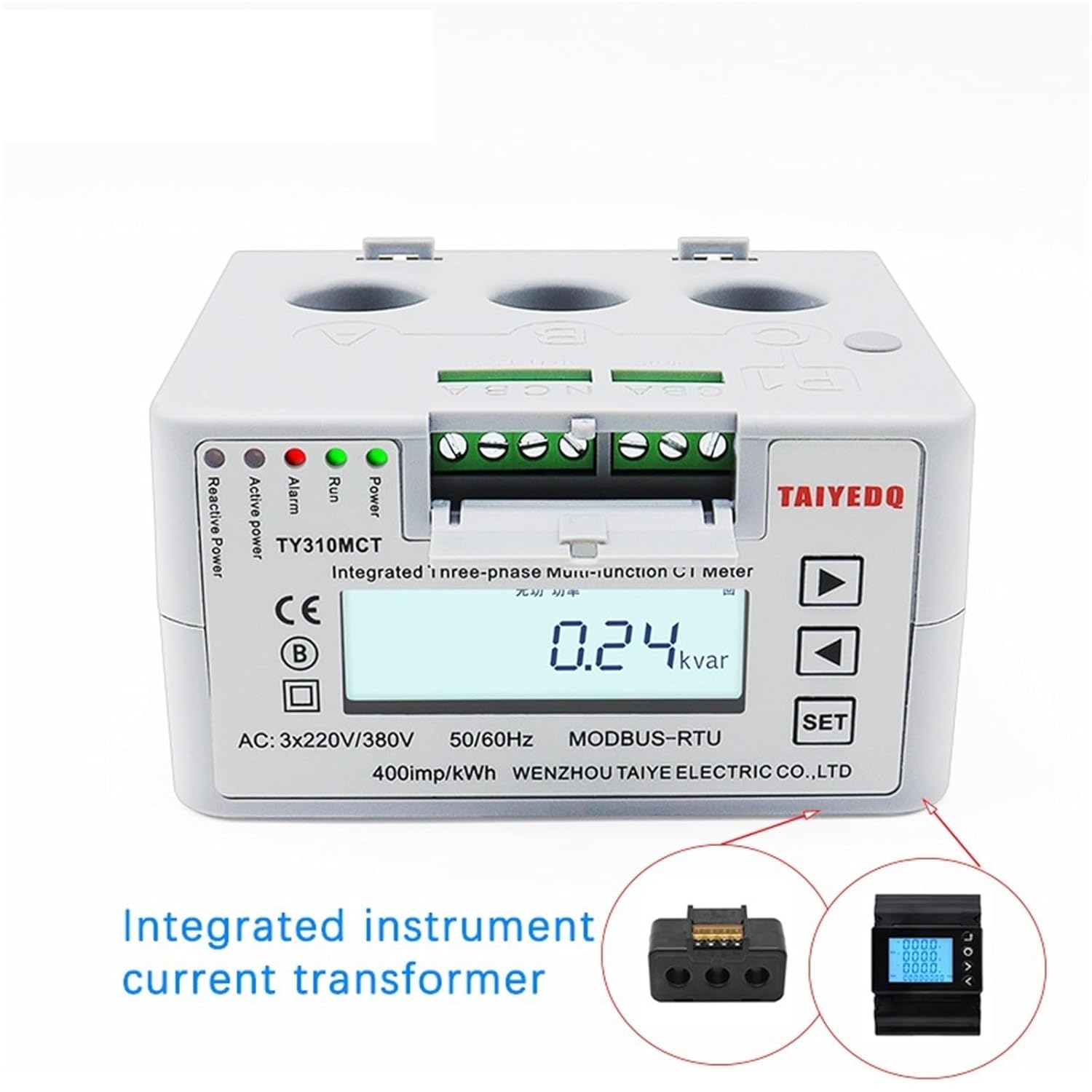
Figure 3.2: The meter with its front cover opened, exposing the integrated current transformer connections and the main display. This view highlights the compact design and the accessibility of the wiring terminals.

Figure 3.3: Side perspective of the meter, clearly showing the three circular openings for current transformer (CT) inputs, labeled P1, P2, and P3 (or A, B, C as per image text), which are essential for three-phase current measurement.

รูปที่ 3.4: มุมเอียง view from the top, providing a comprehensive look at the meter's compact dimensions and the integrated rail-mounting mechanism, designed for easy installation in electrical panels.
4. ข้อมูลจำเพาะ
| พารามิเตอร์ | ค่า |
|---|---|
| หมายเลขรุ่น | TY310MCT |
| จัดอันดับVoltage | 3*220/380V (AC) |
| ความถี่ในการใช้งาน | 50 เฮิรตซ์ |
| กระแสไฟฟ้าทำงานสูงสุด | 80A - 99A (Note: Product title indicates 60A, refer to device markings for specific rating) |
| อุณหภูมิในการทำงาน | -10°C ถึง +45°C |
| อินเทอร์เฟซการสื่อสาร | อาร์เอส485 |
| ประเภทจอภาพ | จอแอลซีดี |
| ระดับความแม่นยำ | 0.5 |
| เฟส | สามเฟส |
| ขนาด | 106 x 56 x 89 มม. |
| แรงผลักดัน/กิโลวัตต์-ชั่วโมง | 400imp / กิโลวัตต์ต่อชั่วโมง |
5. การตั้งค่าและการติดตั้ง
This meter is designed for DIN rail mounting. Proper installation is crucial for accurate readings and safe operation. It is highly recommended that installation be performed by a certified electrician.
5.1 การติดตั้ง
- Ensure the mounting location is dry, well-ventilated, and free from excessive vibration or direct sunlight.
- Snap the meter onto a standard 35mm DIN rail. Ensure it is securely fastened.
5.2 การเดินสายไฟ
Refer to the wiring diagram provided on the device or in the packaging for precise connection details. General wiring steps include:
- Connect the three-phase voltage inputs (L1, L2, L3) and neutral (N) to the designated terminals.
- Pass the current-carrying conductors through the integrated current transformer (CT) holes (P1, P2, P3 or A, B, C) as indicated. Ensure correct directionality for accurate current measurement.
- If utilizing the RS485 communication interface, connect the A and B terminals to your communication network.
- Verify all connections are tight and insulated.
- Once wiring is complete, close the terminal cover securely.
6. การดำเนินการ
After successful installation and power-up, the meter's LCD display will illuminate. The display cycles through various parameters or can be manually navigated.
6.1 การนำทางบนหน้าจอแสดงผล
- ใช้ Up และ ลง arrow buttons (▲ and ▼) to scroll through different measurement parameters such as voltage, current, active power, reactive power, power factor, frequency, and total energy consumption (kWh).
- การ ชุด button may be used to enter configuration menus or confirm selections, depending on the specific firmware version. Refer to the on-screen prompts.
6.2 ตัวบ่งชี้สถานะ
- วิ่ง: Indicates the meter is operating normally.
- เตือน: Illuminates if an abnormal condition or error is detected. Consult the troubleshooting section.
- Active Power / Reactive Power: These LEDs flash to indicate energy consumption.
7. การบำรุงรักษา
The PABVRPYT TY310MCT meter requires minimal maintenance. Regular checks can help ensure its longevity and accuracy.
- การทำความสะอาด: เช็ดหน้าจอเบาๆ และ casinเช็ดด้วยผ้านุ่มและแห้ง ห้ามใช้น้ำยาทำความสะอาดที่มีฤทธิ์กัดกร่อนหรือตัวทำละลาย
- การตรวจสอบ: Periodically inspect wiring connections for tightness and signs of wear or damage. Ensure the meter is free from dust accumulation.
- สิ่งแวดล้อม: ตรวจสอบให้แน่ใจว่าสภาพแวดล้อมการทำงานยังคงอยู่ในช่วงอุณหภูมิและความชื้นที่กำหนด
8 การแก้ไขปัญหา
หากคุณพบปัญหาเกี่ยวกับมิเตอร์ โปรดดูปัญหาและวิธีแก้ไขที่พบบ่อยต่อไปนี้:
| ปัญหา | สาเหตุที่เป็นไปได้ | สารละลาย |
|---|---|---|
| No display / Meter off | No power supply; Incorrect wiring; Internal fault. | Check power source and circuit breaker. Verify wiring connections. If problem persists, contact support. |
| การอ่านไม่ถูกต้อง | Incorrect CT wiring direction; Loose connections; Meter calibration issue. | Ensure CTs are installed in the correct direction. Check all wiring for tightness. If readings are consistently off, professional calibration may be required. |
| Alarm LED illuminated | Overload; Wiring error; Internal fault. | Check for overcurrent conditions. Re-verify wiring. If no obvious cause, contact support. |
| ความล้มเหลวในการสื่อสาร RS485 | Incorrect wiring; Address conflict; Software issue. | Verify RS485 A/B connections. Check device address settings. Ensure communication software is correctly configured. |
For issues not listed above or if solutions do not resolve the problem, please contact PABVRPYT customer support.
9. การรับประกันและการสนับสนุน
Specific warranty terms and conditions for the PABVRPYT TY310MCT meter are typically provided with the product packaging or available from the point of purchase. Please retain your proof of purchase for warranty claims.
For technical support, troubleshooting assistance, or warranty inquiries, please contact PABVRPYT customer service through their official webไซต์หรือข้อมูลการติดต่อที่ให้มาพร้อมกับผลิตภัณฑ์ของคุณ