
1. บทนำ
This manual provides essential instructions for the safe and efficient use of your Samsung Smart FHD 43'' TV, model LS43F6000FGXZD. Please read this manual thoroughly before operating the device and retain it for future reference. Your new television features Full HD resolution, HDR technology, PurColor, and the Tizen™ operating system for a rich viewการสร้างประสบการณ์
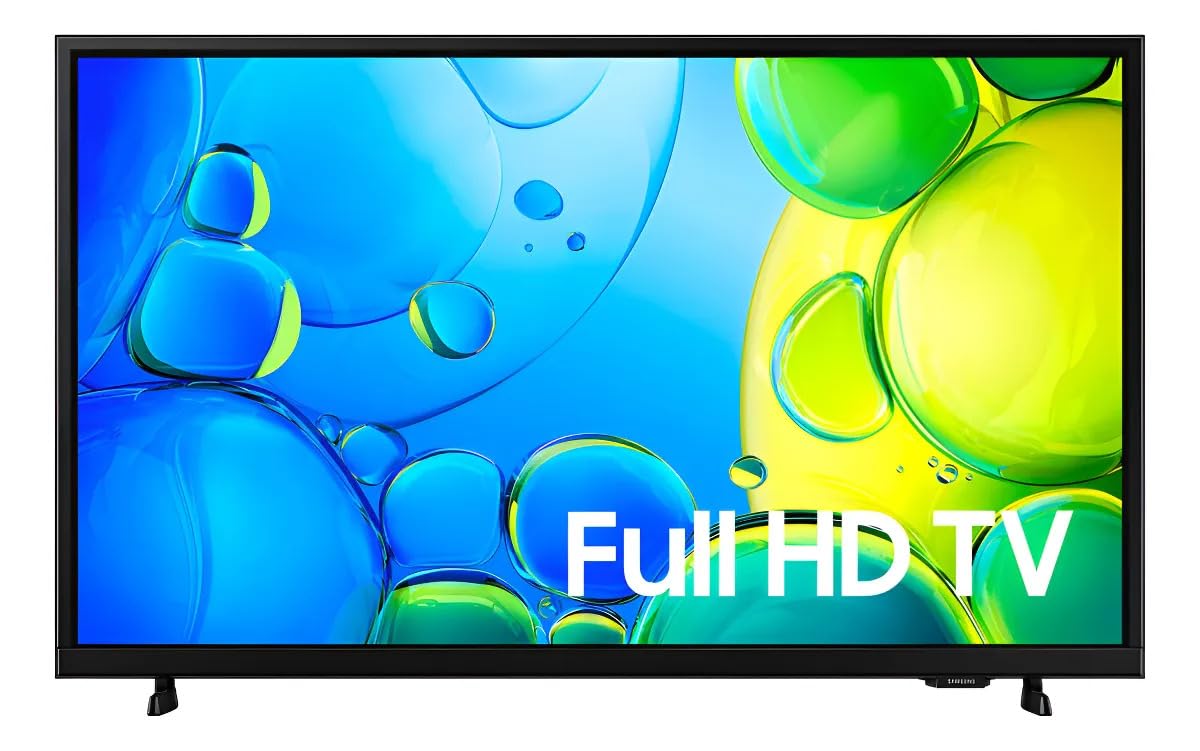
รูปที่ 1 : ด้านหน้า view of the Samsung Smart FHD 43'' TV.
2. ข้อมูลด้านความปลอดภัย
ควรปฏิบัติตามข้อควรระวังด้านความปลอดภัยขั้นพื้นฐานเหล่านี้เสมอ เพื่อลดความเสี่ยงจากไฟไหม้ ไฟฟ้าช็อต และการบาดเจ็บ
- อย่าให้อุปกรณ์นี้โดนฝนหรือความชื้น
- อย่าปิดกั้นช่องระบายอากาศใดๆ ติดตั้งตามคำแนะนำของผู้ผลิต
- ห้ามติดตั้งใกล้แหล่งความร้อน เช่น หม้อน้ำ เครื่องทำความร้อน เตา หรืออุปกรณ์อื่น ๆ (รวมถึง ampเครื่องให้ความร้อน) ที่ผลิตความร้อน
- ปกป้องสายไฟไม่ให้ถูกเหยียบหรือถูกหนีบ โดยเฉพาะที่ปลั๊ก เต้ารับไฟฟ้า และจุดที่สายไฟออกจากเครื่อง
- ใช้เฉพาะอุปกรณ์เสริม/สิ่งที่แนบตามที่ผู้ผลิตกำหนดเท่านั้น
- ส่งต่อการบริการทั้งหมดไปยังช่างบริการที่ผ่านการรับรอง จำเป็นต้องเข้ารับบริการเมื่ออุปกรณ์ได้รับความเสียหายแต่อย่างใด
- Ensure the TV is placed on a stable surface or securely mounted to prevent tipping.
3. อะไรอยู่ในกล่อง
Carefully unpack your TV and ensure all components are present. If any items are missing or damaged, contact your retailer.
- Samsung Smart FHD 43'' TV
- รีโมทคอนโทรล (ต้องใช้แบตเตอรี่ AA 2 ก้อน ไม่ได้รวมมาให้เสมอไป)
- สายไฟ
- Video Adapter (if applicable)
- Stand Components (Base/Feet)
- คู่มือการใช้งาน (เอกสารนี้)
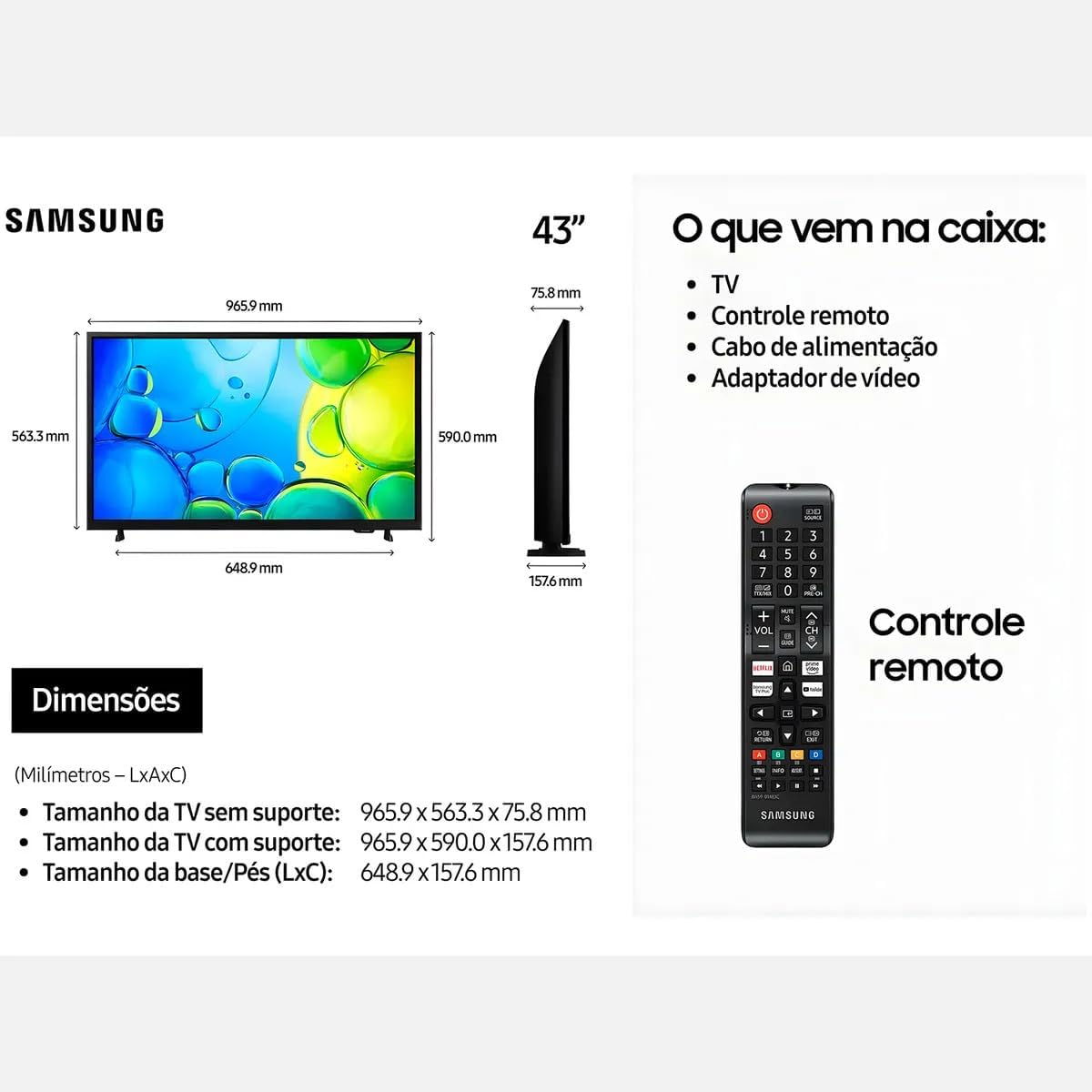
Figure 2: Illustration of items typically included in the product packaging, along with TV dimensions.
4. การตั้งค่า
4.1 การแกะกล่อง
Remove the TV and all accessories from the packaging. It is recommended to keep the original packaging for future transport or servicing.
4.2 การติดตั้งขาตั้ง
If you are placing the TV on a table or cabinet, attach the included stand. Follow the instructions provided in the stand assembly guide. Ensure all screws are tightened securely.
4.3 การติดตั้งบนผนัง
For wall mounting, use a VESA-compliant wall mount kit (100 x 200 mm, sold separately). Consult a professional for wall mounting to ensure proper installation and safety.
4.4 การเชื่อมต่ออุปกรณ์ต่อพ่วง
เชื่อมต่ออุปกรณ์ภายนอกของคุณกับทีวีโดยใช้พอร์ตที่เหมาะสม
- ช่องต่อ HDMI: เชื่อมต่อเครื่องเล่นบลูเรย์ คอนโซลเกม หรือกล่องรับสัญญาณทีวีเข้ากับพอร์ต HDMI ทีวีนี้มีพอร์ต HDMI 2 พอร์ต
- ยูเอสบี: Connect USB storage devices for media playback to the USB 3.0 port. This TV has 1 USB 3.0 port.
- เครือข่าย (แลน): สำหรับการเชื่อมต่ออินเทอร์เน็ตแบบใช้สาย ให้เชื่อมต่อสายอีเทอร์เน็ตเข้ากับพอร์ต LAN
- เสาอากาศ/สายเคเบิล: เชื่อมต่อเสาอากาศหรือฟีดเคเบิลทีวีของคุณ
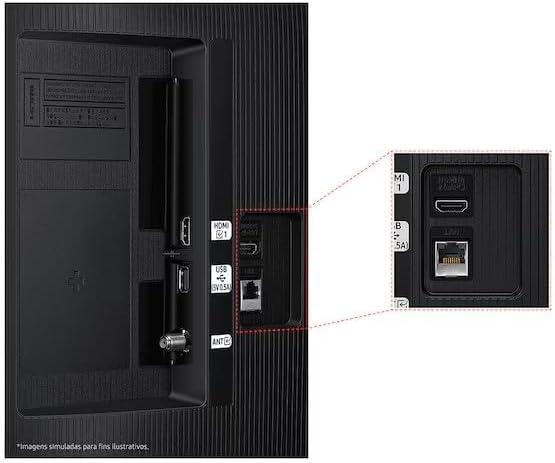
Figure 3: Rear panel connections, highlighting HDMI, USB, and LAN ports.
4.5 ตัวช่วยเปิดเครื่องและการตั้งค่าเบื้องต้น
After connecting all necessary cables, plug the power cord into an electrical outlet. The TV will power on and guide you through the initial setup wizard, which includes language selection, network connection (Wi-Fi or wired), channel scanning, and smart features configuration.
5. การใช้งานทีวี
5.1 การควบคุมระยะไกลจบลงview
Insert two AA batteries into the remote control. The remote allows you to navigate menus, change channels, adjust volume, and access smart features. Refer to the diagram on the remote control for button functions.
5.2 ฟังก์ชั่นทีวีพื้นฐาน
- พลัง: กดปุ่มเปิด/ปิดบนรีโมทเพื่อเปิดหรือปิดทีวี
- ปริมาณ: ใช้ปุ่มเพิ่ม/ลดระดับเสียงเพื่อปรับระดับเสียง
- ช่อง: ใช้ปุ่มช่องขึ้น/ลงเพื่อเปลี่ยนช่อง
- แหล่งที่มา: Press the Source button to switch between connected input devices (HDMI 1, HDMI 2, TV, etc.).
5.3 คุณสมบัติของสมาร์ททีวี (ระบบปฏิบัติการ Tizen)
Your Samsung Smart TV runs on the Tizen™ operating system, providing access to a wide range of applications and services. Connect your TV to the internet via Wi-Fi or Ethernet to utilize these features.
- แอปสโตร์: Download and install various applications like Netflix, YouTube, and Amazon Prime Video.
- Web เบราว์เซอร์: ท่องอินเทอร์เน็ตโดยตรงจากทีวีของคุณ
- สมาร์ทฮับ: Access all your smart features, apps, and connected devices from one central location.

Figure 4: The Tizen operating system interface, showing available applications.
The TV also features Knox Security, ensuring your data and privacy are protected.
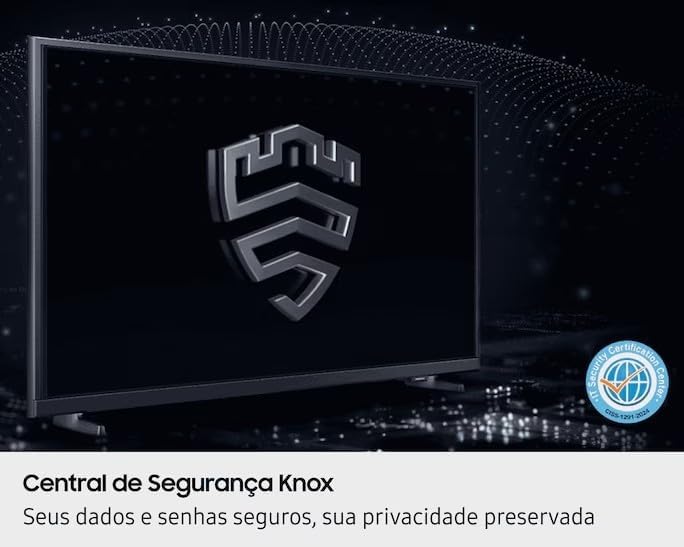
Figure 5: Knox Security Central, highlighting data and privacy protection.
5.4 การตั้งค่าภาพ
ปรับการตั้งค่าภาพเพื่อให้ได้ภาพที่ดีที่สุด viewการสร้างประสบการณ์
- โหมดภาพ: Select from various preset modes (Standard, Dynamic, Movie, etc.) or customize your own.
- ความสว่าง/คอนทราสต์: Adjust these settings to suit your environment.
- เทคโนโลยี HDR: This TV supports HDR10+, providing greater depth in details, even in very bright or dark scenes.
- สีบริสุทธิ์: Enhances color accuracy and vibrancy for a more lifelike image.
- ตัวเพิ่มความคมชัด: Automatically adjusts contrast for improved picture depth.

Figure 6: HDR Technology in action, showing enhanced detail in both bright and dark areas.
5.5 การตั้งค่าเสียง
Customize audio output through the sound settings menu. Options may include sound modes, equalizer settings, and audio output selection (TV speakers, external soundbar, Bluetooth audio).
5.6 การเชื่อมต่อ
- บลูทูธ: Connect compatible Bluetooth devices such as headphones or soundbars wirelessly.
- ไวไฟ : Connect to your home wireless network for internet access and smart features.
6. การบำรุงรักษา
6.1 การทำความสะอาดทีวี
- หน้าจอ: เช็ดหน้าจอเบาๆ ด้วยผ้านุ่มที่ไม่เป็นขุย สำหรับรอยฝังแน่น ให้เช็ดเบาๆampชุบผ้าด้วยน้ำหรือน้ำยาทำความสะอาดหน้าจอโดยเฉพาะ ห้ามฉีดน้ำยาลงบนหน้าจอโดยตรง
- ตัวเครื่องทีวี: Use a soft, dry cloth to wipe dust from the TV's frame and back panel.
- สำคัญ: ควรถอดปลั๊กทีวีออกจากเต้ารับไฟฟ้าทุกครั้งก่อนทำความสะอาด
6.2 การอัปเดตซอฟต์แวร์
Your TV may receive software updates to improve performance and add new features. You can usually configure the TV to update automatically or check for updates manually through the settings menu (typically under Support > Software Update).
7 การแก้ไขปัญหา
หากคุณพบปัญหาเกี่ยวกับทีวี โปรดดูวิธีแก้ไขทั่วไปต่อไปนี้ก่อนติดต่อฝ่ายสนับสนุน
| ปัญหา | วิธีแก้ปัญหาที่เป็นไปได้ |
|---|---|
| ไม่มีไฟฟ้า | ตรวจสอบให้แน่ใจว่าสายไฟเสียบเข้ากับทีวีและเต้ารับไฟฟ้าที่ใช้งานได้สนิทดีแล้ว ลองทดสอบเต้ารับกับอุปกรณ์อื่นดูก่อน |
| ไม่มีภาพแต่มีเสียง | ตรวจสอบแหล่งสัญญาณเข้า ตรวจสอบให้แน่ใจว่าอุปกรณ์ที่เชื่อมต่อเปิดอยู่และทำงานได้อย่างถูกต้อง ลองใช้สาย HDMI เส้นอื่น |
| ไม่มีเสียงแต่มีภาพ | Check the volume level and ensure the TV is not muted. Verify audio output settings. If using external speakers, check their connections and power. |
| รีโมตคอนโทรลไม่ทำงาน | Replace the batteries (AA type). Ensure there are no obstructions between the remote and the TV's IR sensor. |
| ไม่สามารถเชื่อมต่อ Wi-Fi ได้ | Ensure your router is on and functioning. Re-enter the Wi-Fi password. Try restarting both the TV and your router. |
| ปัญหาคุณภาพของภาพ (เช่น ภาพเบลอ ภาพบิดเบี้ยว) | ตรวจสอบความละเอียดของแหล่งที่มา ปรับการตั้งค่าภาพ (ความสว่าง คอนทราสต์ ความคมชัด) ตรวจสอบให้แน่ใจว่าเชื่อมต่อสายเคเบิลอย่างแน่นหนา |
8. ข้อมูลจำเพาะ
Key technical specifications for the Samsung Smart FHD 43'' TV (Model: LS43F6000FGXZD).
| คุณสมบัติ | รายละเอียด |
|---|---|
| หมายเลขรุ่น | LS43F6000FGXZD |
| ขนาดหน้าจอ | 43 นิ้ว |
| เทคโนโลยีการแสดงผล | FHD (ความคมชัดสูงเต็มรูปแบบ) |
| ปณิธาน | FHD (1920 x 1080 pixels) |
| อัตราการรีเฟรช | 60 เฮิรตซ์ |
| ระบบปฏิบัติการ | ไทเซน™ |
| รองรับ HDR | HDR10+ |
| การเพิ่มประสิทธิภาพภาพ | HDR Technology, PurColor, Contrast Enhancer |
| การเชื่อมต่อ | Bluetooth, Wi-Fi, 2x HDMI, 1x USB 3.0 |
| บริการอินเทอร์เน็ตที่รองรับ | Netflix, YouTube, Amazon Prime |
| มาตรฐาน VESA Mount | 100 x 200 มม. |
| Dimensions (W x D x H) without stand | 965.9 x 75.8 x 563.3 มม. |
| Dimensions (W x D x H) with stand | 965.9 x 157.6 x 590.0 มม. |
| น้ำหนัก (ไม่รวมขาตั้ง) | 6.5 กก. |
| เล่มที่tage | 110-220 Volts (check product label for specific range) |
| ประเภทแบตเตอรี่รีโมทคอนโทรล | AA (x2) |
9. การรับประกันและการสนับสนุน
9.1 การรับประกันสินค้า
This Samsung Smart FHD 43'' TV (Model: LS43F6000FGXZD) comes with a รับประกันจำกัด 12 เดือน from the date of purchase. This warranty covers manufacturing defects and malfunctions under normal use. Please retain your proof of purchase for warranty claims. For detailed terms and conditions, refer to the warranty card included with your product or visit the official Samsung support webเว็บไซต์.
9.2 การสนับสนุนลูกค้า
For technical assistance, troubleshooting beyond this manual, or warranty service, please contact Samsung Customer Support. You can find contact information (phone numbers, chat support, service center locations) on the official Samsung webเว็บไซต์สำหรับภูมิภาคของคุณ
When contacting support, please have your TV's model number (LS43F6000FGXZD) and serial number ready. The serial number is typically located on a sticker on the back of the TV.