
การแนะนำ
Thank you for choosing the xdobo Luxe Portable Bluetooth Speaker. This manual provides essential information for setting up, operating, and maintaining your speaker to ensure optimal performance and longevity. Please read this manual thoroughly before using the product.
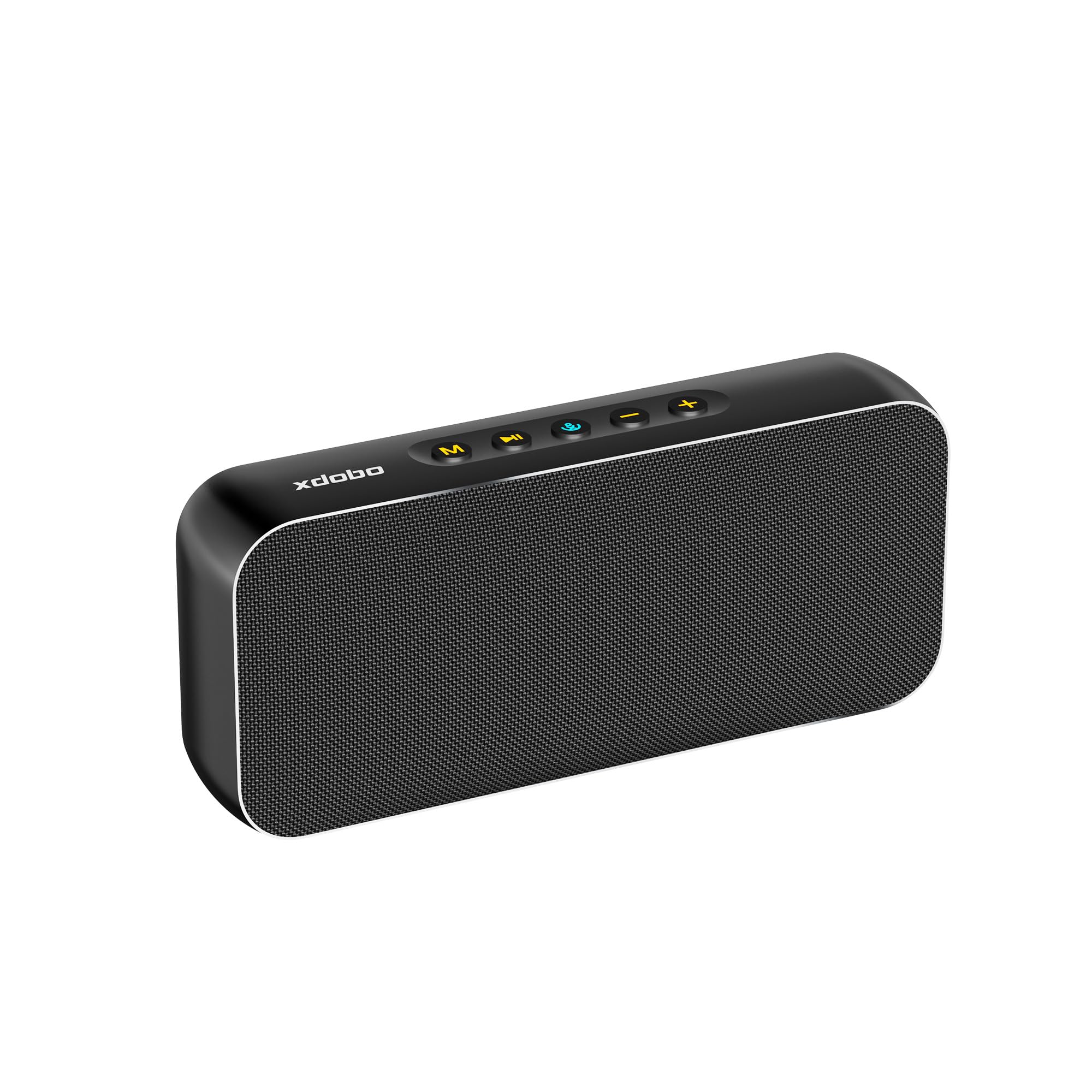
Image: The xdobo Luxe Portable Bluetooth Speaker in black, showcasing การออกแบบที่เพรียวบาง
มีอะไรอยู่ในกล่อง
- xdobo Luxe Portable Bluetooth Speaker
- สายชาร์จแบบ USB Type-C
- คู่มือการใช้งาน
สินค้าเกินview
ลักษณะทางกายภาพ
The xdobo Luxe speaker features a premium design with a metal body and durable waterproof fabric. Its compact size and lightweight construction make it highly portable.
- ขนาด : 200 x 35 x 87 มม. (7.87 นิ้ว (ลึก) x 1.38 นิ้ว (กว้าง) x 3.43 นิ้ว (สูง))
- น้ำหนัก: 674 กรัม
- วัสดุ: โลหะ, ผ้า
การควบคุมและพอร์ต
The top panel of the speaker houses intuitive control buttons, while the side features a protected port panel.

ภาพ: รายละเอียด view of the speaker's top control buttons and the rubber-sealed side panel revealing TF card slot, Type-C charging port, and AUX input.
- ปุ่มโหมด (M): Switches between input modes (Bluetooth, TF Card, AUX).
- ปุ่มเล่น/หยุดชั่วคราว (►▮▮): เล่นหรือหยุดเสียงชั่วคราว
- Power/Bluetooth Button (🔊): Powers the speaker on/off and initiates Bluetooth pairing.
- ลดเสียงลง (-): Decreases volume. Long press for previous track.
- เพิ่มระดับเสียง (+): Increases volume. Long press for next track.
- ช่องเสียบการ์ด TF: สำหรับเล่นเพลงโดยตรงจากการ์ด TF (MicroSD)
- พอร์ต Type-C: สำหรับชาร์จลำโพง
- พอร์ต AUX: สำหรับการเชื่อมต่อเสียงแบบมีสาย
การตั้งค่า
1. ชาร์จลำโพง
Before first use, fully charge the speaker. Connect the provided Type-C cable to the speaker's Type-C port and a compatible USB power adapter (not included).
- เวลาในการชาร์จ: ประมาณ 3-4 ชั่วโมง
- กำลังไฟฟ้าเข้า: Type-C 5V/2A.
- ไฟ LED จะแสดงสถานะการชาร์จ

Image: The xdobo Luxe speaker highlighting its long battery life and Type-C fast charging capability.
2. การเปิด/ปิดเครื่อง
Press and hold the Power/Bluetooth button (🔊) for 2-3 seconds to power the speaker on or off. A sound prompt will indicate the status.
3. การจับคู่บลูทู ธ
- Ensure the speaker is powered on and in Bluetooth mode (the LED indicator will flash).
- บนอุปกรณ์ของคุณ (สมาร์ทโฟน แท็บเล็ต ฯลฯ) เปิดใช้งานบลูทูธและค้นหาอุปกรณ์ที่มีอยู่
- Select "XDOBO LUXE" from the list.
- Once paired, the LED indicator will stop flashing and remain solid, and a sound prompt will confirm the connection.
4. การจับคู่ True Wireless Stereo (TWS)
To achieve true wireless stereo sound, you can pair two xdobo Luxe speakers together.

Image: Two xdobo Luxe speakers demonstrating True Wireless Stereo (TWS) pairing for enhanced sound.
- ตรวจสอบให้แน่ใจว่าลำโพงทั้งสองเปิดอยู่และไม่ได้เชื่อมต่อกับอุปกรณ์ Bluetooth อื่นใด
- On one speaker (this will be the primary speaker), double-press the Power/Bluetooth button (🔊). It will enter TWS pairing mode.
- The primary speaker will automatically search for the secondary speaker. Once connected, both speakers will emit a sound prompt.
- ทีนี้ ให้เชื่อมต่ออุปกรณ์ของคุณกับลำโพงหลักผ่านบลูทูธ ตามที่อธิบายไว้ในขั้นตอนที่ 3
5. Connecting via AUX or TF Card
- ช่องเสริม: Connect a 3.5mm audio cable (not included) from your audio source to the speaker's AUX port. The speaker will automatically switch to AUX mode.
- บัตร TF: ใส่การ์ด TF (MicroSD) ที่มีเพลงลงไป files into the TF card slot. The speaker will automatically switch to TF card mode.
คำแนะนำการใช้งาน
การควบคุมพื้นฐาน
- เล่น/หยุดชั่วคราว: Press the Play/Pause button (►▮▮).
- เพิ่ม/ลดระดับเสียง: กดปุ่ม '+' หรือ '-' สั้นๆ
- เพลงถัดไป: กดปุ่ม '+' ค้างไว้
- แทร็กก่อนหน้า: กดปุ่ม '-' ค้างไว้
- เปลี่ยนโหมด: Press the 'M' button to cycle through Bluetooth, TF Card, and AUX modes.
การซ่อมบำรุง
การทำความสะอาด
เช็ดลำโพงด้วย d . นุ่มๆamp cloth. Do not use harsh chemicals or abrasive cleaners. Ensure all port covers are securely closed before cleaning with moisture.
การดูแลรักษาแบบกันน้ำ
The speaker is designed to be waterproof. However, ensure the rubber cover for the charging and AUX ports is firmly sealed before exposing the speaker to water or moisture to maintain its waterproof integrity.

Image: The xdobo Luxe speaker positioned outdoors near water, illustrating its waterproof and durable design.
การดูแลแบตเตอรี่
เพื่อยืดอายุการใช้งานแบตเตอรี่ ควรหลีกเลี่ยงการปล่อยประจุแบตเตอรี่จนหมดบ่อยๆ ควรชาร์จลำโพงเป็นประจำ แม้จะไม่ได้ใช้งานเป็นเวลานานก็ตาม
การแก้ไขปัญหา
- ไม่มีไฟฟ้า: ตรวจสอบให้แน่ใจว่าลำโพงชาร์จเต็มแล้ว เสียบปลั๊กเข้ากับแหล่งจ่ายไฟแล้วลองอีกครั้ง
- ไม่สามารถจับคู่บลูทูธได้: Make sure the speaker is in Bluetooth pairing mode (flashing LED). Ensure your device's Bluetooth is on and within range. Try unpairing and re-pairing.
- ไม่มีเสียง: ตรวจสอบระดับเสียงทั้งบนลำโพงและอุปกรณ์ที่เชื่อมต่อ ตรวจสอบให้แน่ใจว่าได้เลือกโหมดอินพุตที่ถูกต้องแล้ว
- คุณภาพเสียงไม่ดี: Move the speaker closer to your Bluetooth device. Ensure there are no obstructions. For wired connections, check the audio cable.
ข้อมูลจำเพาะ
| คุณสมบัติ | ข้อมูลจำเพาะ |
|---|---|
| ยี่ห้อ | เอ็กซ์โดโบ |
| หมายเลขรุ่น | XDOBO LUXE |
| กำลังขับสูงสุดของลำโพง | 60 วัตต์ |
| การตอบสนองความถี่ | 20 เฮิรตซ์ - 16 กิโลเฮิรตซ์ |
| เทคโนโลยีการเชื่อมต่อ | บลูทูธ 5.3 |
| โหมดเอาต์พุตเสียง | สเตอริโอ |
| ประเภทการติดตั้ง | อิสระ |
| วัสดุของตู้หุ้ม | โลหะ, ผ้า |
| คุณสมบัติเพิ่มเติม | กันน้ำ |
| สี | สีดำ |
| อายุการใช้งานแบตเตอรี่โดยเฉลี่ย | 8 Hours (varies by volume and content) |
| ขนาดลำโพง | 2.05 นิ้ว |
| เส้นผ่านศูนย์กลางวูฟเฟอร์ | 3 นิ้ว |
| ระดับความต้านทานต่อน้ำ | กันน้ำ |
| อัตราส่วนสัญญาณต่อเสียงรบกวน | 110 เดซิเบล |
| Total USB 2.0 Ports | 1 (ประเภท C) |
| อิมพีแดนซ์ | 4 โอห์ม |
| จำนวนแบตเตอรี่ | แบตเตอรี่ที่ไม่ได้มาตรฐาน 1 ก้อน (รวมอยู่ด้วย) |
| ประเภทไดร์เวอร์เสียง | ไดร์เวอร์แบบไดนามิก |
| ขนาดไดร์เวอร์เสียง | 52 มิลลิเมตร |
| อินพุต Voltage | 5 โวลต์ |
| น้ำหนักสินค้า | 674 กรัม |
| อุปกรณ์ที่รองรับ | สมาร์ทโฟน |
| เวลาในการชาร์จแบตเตอรี่ | 4 ชั่วโมง |
การรับประกันและการสนับสนุน
The xdobo Luxe Portable Bluetooth Speaker comes with a การรับประกันจากผู้ผลิต 1 ปี. For warranty claims or technical support, please refer to the contact information provided on the product packaging or visit the official xdobo webเว็บไซต์.
หากต้องการความช่วยเหลือเพิ่มเติม โปรดไปที่ xdobo Store on Amazon.