
1. ข้อมูลด้านความปลอดภัยที่สำคัญ
โปรดอ่านคำแนะนำด้านความปลอดภัยทั้งหมดก่อนใช้งานโปรเจคเตอร์ เก็บคู่มือนี้ไว้เพื่อใช้อ้างอิงในอนาคต
- อย่าปิดกั้นช่องระบายอากาศ ตรวจสอบให้แน่ใจว่ามีพื้นที่ว่างรอบโปรเจ็กเตอร์เพียงพอเพื่อให้มีการไหลเวียนของอากาศที่ดี
- หลีกเลี่ยงการสัมผัสกับแสงจากเลนส์โปรเจ็กเตอร์โดยตรง
- Do not place the projector near heat sources or in direct sunlight.
- ใช้เฉพาะอะแดปเตอร์จ่ายไฟที่มาพร้อมกับอุปกรณ์เท่านั้น
- ห้ามเปิดหรือซ่อมโปรเจคเตอร์ด้วยตนเอง โปรดส่งซ่อมโดยช่างผู้ชำนาญการเท่านั้น
- เก็บโปรเจ็กเตอร์ให้ห่างจากน้ำหรือของเหลวอื่นๆ
2. เนื้อหาบรรจุภัณฑ์
ตรวจสอบว่ามีรายการทั้งหมดอยู่ในแพ็คเกจ:
- Aurzen Roku TV Smart Projector (D1R Cube)
- สายไฟ
- Remote Control (2 AAA Batteries Required, not included)
- คู่มือการใช้งาน (เอกสารนี้)
3. สินค้าหมดview
The Aurzen D1R Cube is a compact smart projector featuring built-in Roku TV for integrated streaming. It offers 1080P Full HD resolution, Dolby Audio, and a sealed optical engine for enhanced durability and clarity.
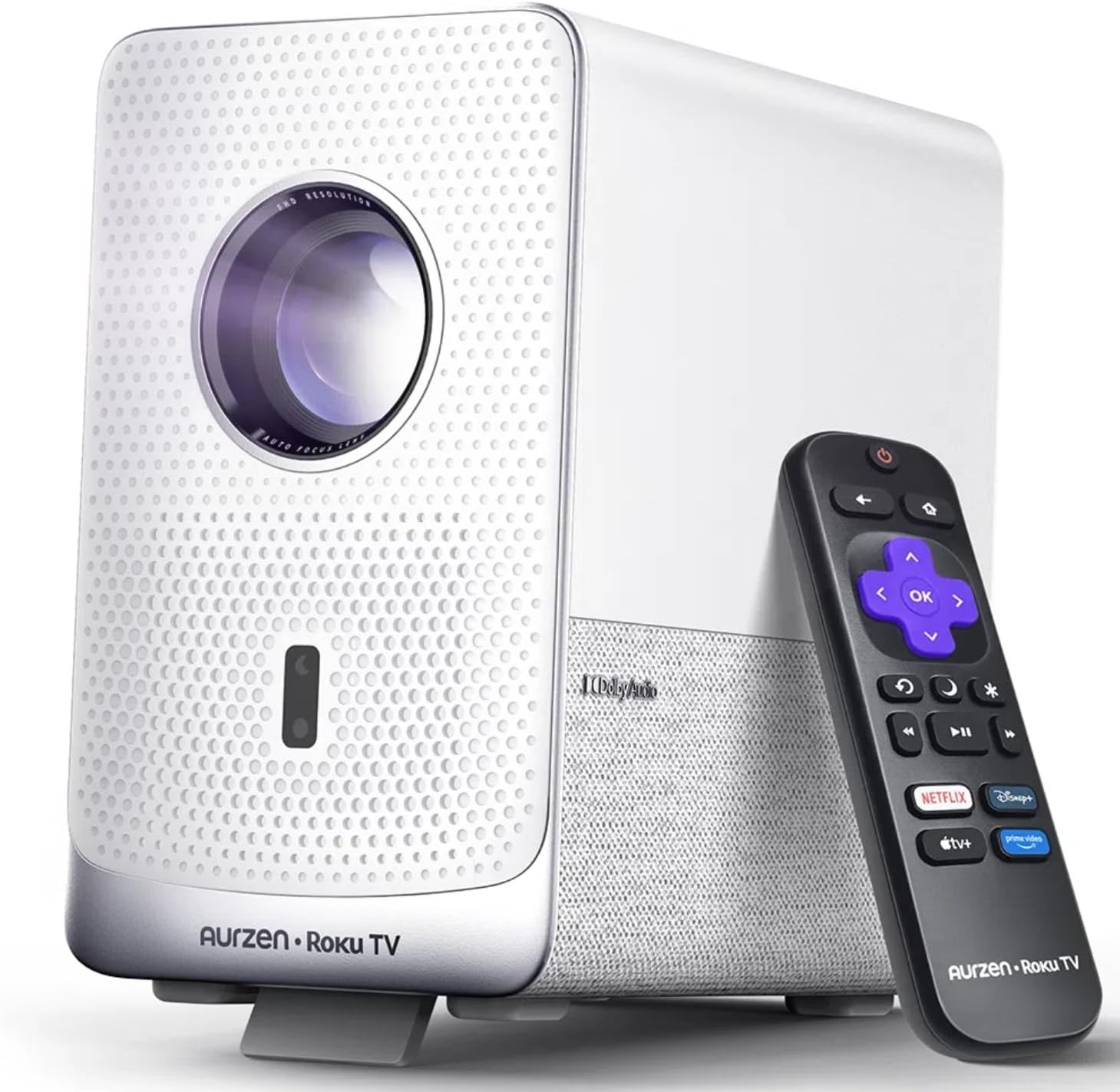
Image: The Aurzen D1R Cube Smart Projector shown with its remote control. The projector is white with a textured front panel and a visible lens.
คุณสมบัติหลัก:
- Roku TV Built-in: Access popular streaming services directly.
- เครื่องอ่านเลนส์แบบปิดผนึก: Protects against dust, maintaining image quality and extending lifespan.
- 1080P FHD Resolution: Delivers crisp and clear visuals.
- ระบบเสียง Dolby: Provides enhanced sound experience.
- Auto Focus & Keystone Correction: Automatic image adjustment for quick setup.
- Dual-band WiFi & Bluetooth 5.2: For seamless connectivity.
- แอปเปิล AirPlay: Effortless content sharing from Apple devices.
- ความเข้ากันได้ของสมาร์ทโฮม: Works with Apple HomeKit, Siri, Alexa, and Google Assistant.

Image: An internal diagram illustrating the sealed optical engine of the Aurzen D1R Cube projector, highlighting its dust-proof design.
4. การตั้งค่า
4.1 การจัดวางเริ่มต้น
วางโปรเจ็กเตอร์บนพื้นผิวที่มั่นคงและเรียบ เพื่อประสิทธิภาพสูงสุด viewing, position it directly in front of your projection surface (wall or screen). The projector features automatic focus and keystone correction to adjust the image, but a relatively straight angle is recommended.

Image: A visual representation of the projector's auto-focus and auto-keystone correction features, showing how the image automatically adjusts to create a perfect rectangular display.
4.2 การเชื่อมต่อสายไฟ
- เชื่อมต่อสายไฟเข้ากับพอร์ตอินพุตไฟของโปรเจ็กเตอร์
- เสียบปลายสายไฟอีกด้านหนึ่งเข้ากับเต้ารับไฟฟ้าที่เหมาะสม
- The projector will power on automatically or can be turned on using the power button on the device or remote.
4.3 ตั้งค่าการควบคุมระยะไกล
Insert two AAA batteries (not included) into the remote control. Ensure correct polarity. The remote is pre-paired with the projector.
4.4 Initial Roku TV Setup
Upon first power-on, follow the on-screen instructions to set up your Roku TV. This includes:
- การเลือกภาษาของคุณ
- Connecting to a Wi-Fi network (a stable internet connection is required).
- Activating your Roku account. If you do not have one, you will be prompted to create a free account.
- Installing desired streaming channels.
5. คู่มือการใช้งาน
5.1 การเปิด/ปิดเครื่อง
กดปุ่มเปิด/ปิดบนโปรเจ็กเตอร์หรือรีโมทคอนโทรลเพื่อเปิดหรือปิดเครื่อง
5.2 Roku Home Screen Navigation
Use the directional pad and OK button on the remote to navigate the Roku home screen. Access streaming channels, search for content, and adjust settings.

Image: A screenshot of the Roku TV home screen, displaying various streaming app icons and navigation options.
5.3 แอปพลิเคชันสตรีมมิ่ง
The Roku TV platform provides access to a wide range of streaming applications such as Netflix, Prime Video, Disney+, Hulu, YouTube, and more. Select an app from the home screen to begin streaming.

ภาพ: การแสดงกราฟิกasing various popular streaming service logos available on the Roku TV platform, including Netflix, Disney+, and Hulu.
5.4 การเชื่อมต่ออุปกรณ์ภายนอก
The projector includes HDMI and USB ports for connecting external devices.
- ช่องต่อ HDMI: Connect gaming consoles, Blu-ray players, or other HDMI-enabled devices. Select the corresponding HDMI input from the Roku TV menu.
- ยูเอสบี: เล่นสื่อ fileบันทึกไฟล์ (รูปภาพ วิดีโอ เพลง) จากอุปกรณ์จัดเก็บข้อมูล USB
5.5 การเชื่อมต่อบลูทูธ
Connect Bluetooth headphones or speakers for an enhanced audio experience.
- Go to the Roku TV settings menu.
- Select 'Remotes & devices' then 'Bluetooth devices'.
- ตั้งค่าอุปกรณ์ Bluetooth ของคุณเข้าสู่โหมดจับคู่
- Select your device from the list on the projector screen to pair.

Image: A diagram illustrating the Bluetooth connectivity of the Aurzen D1R Cube projector, showing it connecting to various external audio devices.
5.6 แอปเปิล แอร์เพลย์
Effortlessly share content from your Apple devices (iPhone, iPad, Mac) to the projector using Apple AirPlay.
- Ensure your Apple device and the projector are connected to the same Wi-Fi network.
- On your Apple device, open the content you wish to share (e.g., photos, videos).
- แตะไอคอน AirPlay (โดยปกติจะเป็นรูปสี่เหลี่ยมผืนผ้าที่มีลูกศรชี้ขึ้น).
- Select your Aurzen D1R Cube projector from the list of available devices.

Image: A family watching content projected from an Apple device onto a large screen via Apple AirPlay using the Aurzen D1R Cube projector.
5.7 การควบคุมด้วยเสียงและการบูรณาการบ้านอัจฉริยะ
The projector supports voice control via the Roku mobile app and is compatible with Apple HomeKit, Siri, Alexa, and Google Assistant for broader smart home integration.
- แอป Roku Mobile: Download the Roku mobile app to use voice commands, type easily, and control your projector from your smartphone.
- Smart Home Assistants: Link your Roku account to your preferred smart home ecosystem (Apple Home, Amazon Alexa, Google Home) to control the projector with voice commands.
6. การบำรุงรักษา
6.1 Sealed Optical Engine
The Aurzen D1R Cube features a sealed optical engine designed to prevent dust accumulation on internal components. This reduces the need for routine internal cleaning and helps maintain consistent image quality over time.

Image: A side-by-side comparison showing the difference in dust accumulation between a sealed optical engine (left) and an open optical engine (right) after a period of use.
6.2 การทำความสะอาดทั่วไป
- ภายนอก: Wipe the exterior of the projector with a soft, dry cloth. Do not use abrasive cleaners or solvents.
- เลนส์: Gently clean the projector lens with a lens cleaning cloth or specialized lens cleaning solution. Avoid touching the lens with your fingers.
- การระบายอากาศ : Ensure ventilation openings are clear of dust and debris. Use a soft brush or compressed air to gently clean them if necessary.
6.3 พื้นที่จัดเก็บ
When not in use for extended periods, store the projector in a cool, dry place, away from direct sunlight and extreme temperatures. Consider using a protective cover or case to prevent dust accumulation.
7 การแก้ไขปัญหา
If you encounter issues with your Aurzen D1R Cube projector, refer to the following common solutions:
| ปัญหา | วิธีแก้ปัญหาที่เป็นไปได้ |
|---|---|
| ไม่มีไฟฟ้า | ตรวจสอบให้แน่ใจว่าสายไฟเชื่อมต่อกับโปรเจ็กเตอร์และเต้ารับไฟฟ้าอย่างแน่นหนาแล้ว ทดสอบเต้ารับด้วยอุปกรณ์อื่น |
| ไม่มีรูปภาพ | Check if the projector is powered on. Verify the input source (HDMI, USB) is correctly selected. Ensure the lens cap is removed. |
| ภาพเบลอ | The projector has auto-focus. If the image remains blurry, try repositioning the projector or restarting it to trigger auto-focus again. Ensure the lens is clean. |
| ไม่มีเสียง | Check the volume level on the projector and any connected external audio devices. Ensure Bluetooth audio is correctly paired or external speakers are properly connected. |
| ปัญหาการเชื่อมต่อ Wi-Fi | Ensure your Wi-Fi router is working. Restart the projector and your router. Verify the Wi-Fi password is correct in the Roku TV settings. |
| รีโมตไม่ตอบสนอง | Replace the AAA batteries in the remote control. Ensure there are no obstructions between the remote and the projector. |
For further assistance, please refer to the online support resources or contact Aurzen customer service.
8. ข้อมูลจำเพาะ
Detailed technical specifications for the Aurzen D1R Cube Smart Projector:
| คุณสมบัติ | ข้อมูลจำเพาะ |
|---|---|
| ยี่ห้อ | ออร์เซน |
| แบบอย่าง | D1R Cube |
| ความละเอียดการแสดงผลสูงสุด | 1920 x 1080 (1080P FHD) |
| เทคโนโลยีการเชื่อมต่อ | WiFi (Dual-band 2.4G/5G), Bluetooth 5.2, HDMI, USB, Audio |
| คุณสมบัติพิเศษ | Roku TV Smart Projector, Sealed Optical Engine, Dolby Audio, Apple AirPlay, Smart Home Compatibility |
| น้ำหนักสินค้า | 5.68 ปอนด์ |
| ขนาดสินค้า | 7.42 x 7 x 7.83 นิ้ว |
| สี | สีขาว |
9. การรับประกันและการสนับสนุน
9.1 การรับประกันสินค้า
Aurzen products are covered by a manufacturer's warranty. Please refer to the warranty card included with your product or visit the official Aurzen webเว็บไซต์สำหรับข้อกำหนดและเงื่อนไขการรับประกันโดยเฉพาะ
9.2 การสนับสนุนลูกค้า
For technical support, troubleshooting assistance, or warranty claims, please contact Aurzen customer service through their official channels. You can find more information and contact options on the Aurzen Brand Store on Amazon.