
เทอร์โมโปร TP110
ThermoPro TP110 Refrigerator Thermometer User Manual
รุ่น: TP110 | ยี่ห้อ: ThermoPro
การแนะนำ
ขอบคุณสำหรับการซื้อasing the ThermoPro TP110 Refrigerator Thermometer. This device is designed to accurately monitor temperatures in refrigerators, freezers, and other environments, ensuring optimal conditions for food storage and other applications. Please read this manual thoroughly before use to ensure proper operation and longevity of your device.
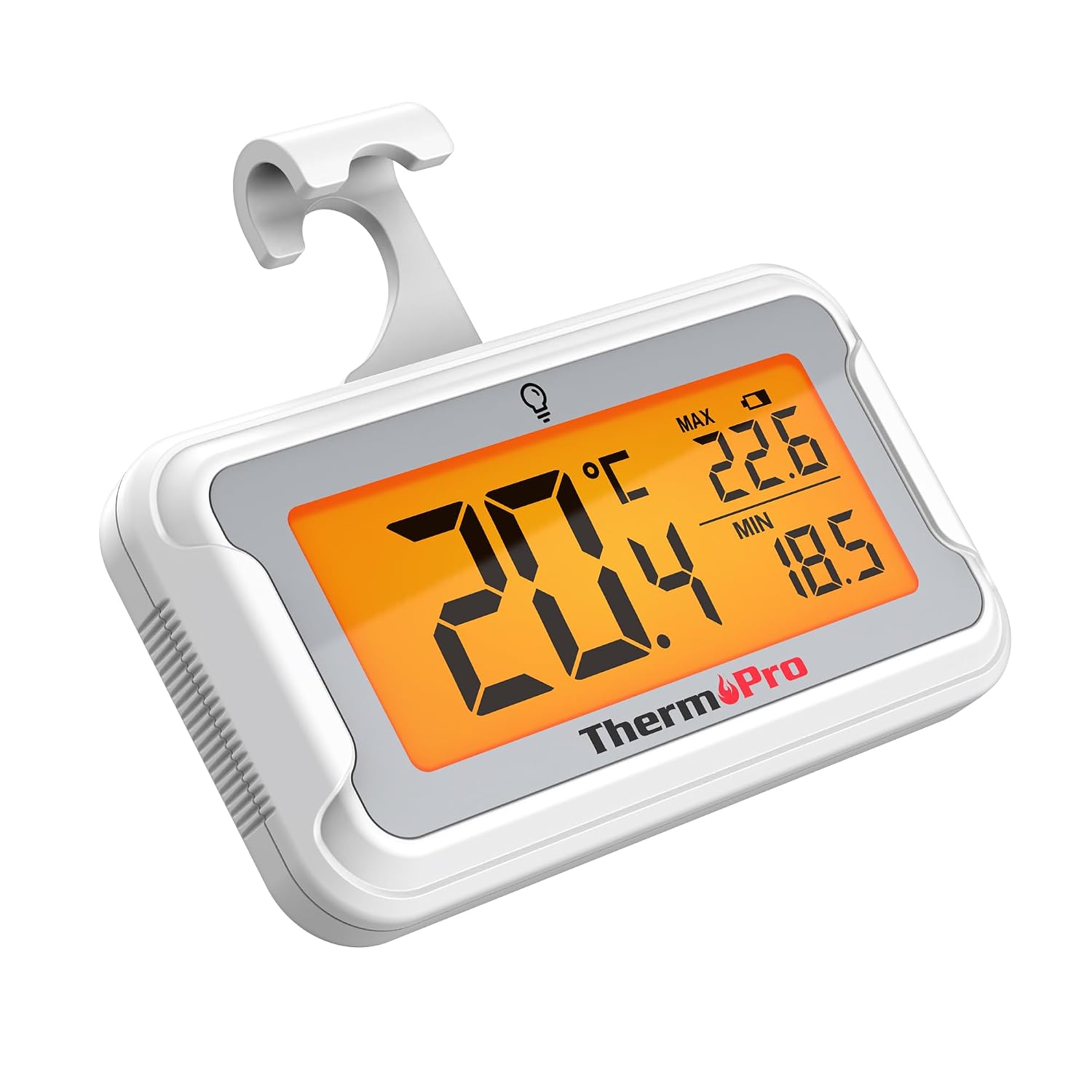
Image: The ThermoPro TP110 Refrigerator Thermometer, a compact white device with a large digital display showing temperature readings.
คุณสมบัติหลัก
- Wide Temperature Range & High Accuracy: Measures from -30°C to 50°C (-22°F to 122°F) with an accuracy of ±0.5°C (±1°F).
- ความสามารถในการอ่านที่เหมาะสมที่สุด: Features an oversized LCD screen with a bright backlight for easy reading, even in low-light conditions.
- คุณสมบัติกันน้ำที่เหนือกว่า: IPX6 rated design ensures reliable operation in humid and cold environments.
- การบันทึกอุณหภูมิสูงสุด/ต่ำสุด: Tracks and displays the maximum and minimum temperatures over the last 24 hours, allowing you to monitor temperature fluctuations.
- ตัวเลือกตำแหน่งหลายตำแหน่ง: Equipped with a magnet, a hanging hook, and a kickstand for versatile placement.
- เปลี่ยนแบตเตอรี่ได้ง่าย: Designed with a rotating battery compartment for quick and tool-free battery changes.

Image: A comparison chart highlighting the ThermoPro TP110's features such as backlight, easy battery change, ±0.5°C precision, full screen, waterproof design, and MAX/MIN temperature tracking, contrasting it with other thermometers.
เนื้อหาแพ็คเกจ
- 1 x ThermoPro TP110 Refrigerator Thermometer
- แบตเตอรี่ CR2032 จำนวน 1 ก้อน (ติดตั้งไว้แล้ว)
- 1 x คู่มือผู้ใช้
การตั้งค่า
1. การติดตั้งแบตเตอรี่
The ThermoPro TP110 comes with a CR2032 battery pre-installed. If the display is not active or shows a low battery indicator, please replace the battery:
- ค้นหาช่องใส่แบตเตอรี่ที่ด้านหลังของเทอร์โมมิเตอร์
- Rotate the battery cover counter-clockwise to the "OPEN" position.
- ถอดแบตเตอรี่ CR2032 เก่าออก
- ใส่แบตเตอรี่ CR2032 ใหม่โดยให้ด้านบวก (+) หันขึ้น
- Rotate the battery cover clockwise to the "LOCK" position to secure it.

Image: A three-step visual guide demonstrating how to easily replace the battery by rotating the cover to open, inserting a new battery, and rotating to lock.
2. ตัวเลือกการจัดวาง
The thermometer offers three convenient placement options:
- แม่เหล็กกลับ: Attach the thermometer to any metallic surface, such as a refrigerator door.
- ขอแขวน: ใช้ตะขอที่ติดมากับตัวเครื่องเพื่อแขวนเทอร์โมมิเตอร์ไว้กับชั้นวางหรือราวแขวน
- Fold-out Stand: Utilize the stand on the back to place the thermometer upright on a flat surface.

Image: Illustrations showing the thermometer used in different environments: a domestic refrigerator, a portable cooler, a car refrigerator, a refrigerated truck, and a wine cellar, demonstrating its versatility.
คำแนะนำการใช้งาน
1. เปิด/ปิดเครื่อง
The thermometer automatically powers on when the battery is installed. To turn it off, press and hold the power button (if available, otherwise it's always on). It features an automatic shutdown after 10 seconds of inactivity to conserve battery life, but will reactivate upon temperature change or button press.
2. การเลือกหน่วยอุณหภูมิ
Press the "°C/°F" button to switch between Celsius and Fahrenheit temperature displays.
3. การเปิดใช้งานไฟแบ็คไลท์
Touch the light bulb icon on the screen to activate the backlight for 10 seconds, improving visibility in dark conditions.
4. Max/Min Temperature Records
The thermometer automatically records the maximum and minimum temperatures over a 24-hour period. These values are displayed on the screen alongside the current temperature. The records reset every 24 hours or when the battery is replaced.

Image: The thermometer placed near raw meat in a refrigerator, showing current, maximum, and minimum temperatures. An accompanying graph illustrates the 24-hour temperature history, highlighting the highest and lowest points.
การซ่อมบำรุง
- การทำความสะอาด: เช็ดเทอร์โมมิเตอร์ด้วยโฆษณาamp ผ้า. อย่าจุ่มลงในน้ำหรือใช้น้ำยาทำความสะอาดที่มีฤทธิ์กัดกร่อน
- การเปลี่ยนแบตเตอรี่: Replace the CR2032 battery when the low battery indicator appears on the display. Refer to the "Battery Installation" section for instructions.
- พื้นที่จัดเก็บ: If storing for an extended period, remove the battery to prevent leakage. Store in a dry place away from extreme temperatures.

Image: The ThermoPro TP110 thermometer partially submerged in water, with water droplets splashing around it, illustrating its IPX6 waterproof rating.
การแก้ไขปัญหา
| ปัญหา | สาเหตุที่เป็นไปได้ | สารละลาย |
|---|---|---|
| ไม่มีการแสดงผลหรือแสดงผลจางมาก | Low or dead battery; battery inserted incorrectly. | เปลี่ยนแบตเตอรี่ CR2032 โดยตรวจสอบให้แน่ใจว่าใส่ขั้วถูกต้อง |
| การอ่านอุณหภูมิไม่ถูกต้อง | Thermometer placed too close to a heat source or vent; sensor obstruction. | Relocate the thermometer to a central area of the refrigerator/freezer, away from direct airflow or heat sources. |
| แสงไฟไม่ทำงาน | Battery low; temporary malfunction. | เปลี่ยนแบตเตอรี่ หากปัญหายังคงอยู่ โปรดติดต่อฝ่ายบริการลูกค้า |
ข้อมูลจำเพาะ
| คุณสมบัติ | รายละเอียด |
|---|---|
| ช่วงอุณหภูมิ | -30°C ถึง 50°C (-22°F ถึง 122°F) |
| ความแม่นยำ | ±0.5 องศาเซลเซียส (±1 องศาฟาเรนไฮต์) |
| ประเภทจอภาพ | จอ LCD ดิจิทัลพร้อมไฟแบ็คไลท์ |
| ระดับการกันน้ำ | IPX6 |
| แหล่งพลังงาน | 1 x CR2032 แบตเตอรี่ (รวมอยู่ด้วย) |
| วัสดุ | พลาสติก |
| ขนาด (โดยประมาณ) | 8 ซม. (ความยาว) |
| คุณสมบัติพิเศษ | Large screen, High precision, Low battery indicator, Backlit, Waterproof, Max/Min record |

Image: A visual representation of the ThermoPro TP110's large LCD screen, showing its approximate dimensions of 8cm by 6cm, and highlighting the backlight feature.
การรับประกันและการสนับสนุน
ThermoPro ให้การรับประกันสินค้าชิ้นนี้ในกรณีที่สินค้ามีข้อบกพร่องด้านวัสดุและฝีมือการผลิต สำหรับข้อมูลการรับประกันโดยละเอียด การลงทะเบียนผลิตภัณฑ์ หรือการสนับสนุนทางเทคนิค โปรดเยี่ยมชมเว็บไซต์อย่างเป็นทางการของ ThermoPro webหรือติดต่อฝ่ายบริการลูกค้า เก็บใบเสร็จรับเงินไว้เป็นหลักฐานการซื้อ
ผู้ผลิต: ThermoPro
ประเทศต้นกำเนิด: จีน
For further assistance, please refer to the contact information provided on the ThermoPro official webเว็บไซต์.
เอกสารที่เกี่ยวข้อง - TP110
 |
คู่มือการใช้งานเทอร์โมมิเตอร์ดิจิทัลสำหรับตู้เย็น/ช่องแช่แข็ง ThermoPro TP110 คู่มือการใช้งานอย่างเป็นทางการสำหรับเทอร์โมมิเตอร์ดิจิทัลสำหรับตู้เย็น/ช่องแช่แข็ง ThermoPro TP110 เรียนรู้เกี่ยวกับคุณสมบัติ ข้อมูลจำเพาะ การใช้งาน ความปลอดภัย การรับประกัน และการสนับสนุนลูกค้า |
 |
คู่มือผู้ใช้เครื่องวัดอุณหภูมิเนื้อไร้สายบลูทูธ TempSpike คู่มือผู้ใช้ฉบับสมบูรณ์สำหรับเครื่องวัดอุณหภูมิเนื้อไร้สายบลูทูธ TempSpike ครอบคลุมการตั้งค่า คุณสมบัติ การใช้งาน ข้อควรระวังด้านความปลอดภัย และข้อมูลการรับประกัน มีคำแนะนำในภาษาเยอรมัน ฝรั่งเศส และอิตาลี |
 |
ThermoPro TP-15H เครื่องวัดอุณหภูมิแบบดิจิทัลอ่านค่าทันที: คู่มือผู้ใช้และคุณสมบัติ คู่มือการใช้งานฉบับสมบูรณ์สำหรับเทอร์โมมิเตอร์วัดอุณหภูมิอาหารแบบดิจิทัลอ่านค่าได้ทันที ThermoPro TP-15H เรียนรู้เกี่ยวกับคุณสมบัติ ข้อมูลจำเพาะ วิธีการใช้งานสำหรับการปรุงอาหาร การสอบเทียบ การดูแลรักษา และการรับประกัน |
 |
เทอร์โมมิเตอร์วัดอุณหภูมิขนมและการทอดแบบดิจิทัล ThermoPro TP510 - คู่มือการใช้งาน คู่มือผู้ใช้เทอร์โมมิเตอร์ดิจิทัลสำหรับทำขนมและทอด ThermoPro TP510 เรียนรู้เกี่ยวกับคุณสมบัติ ข้อมูลจำเพาะ วิธีการวัดอุณหภูมิ คำแนะนำในการดูแล การรับประกัน และข้อมูลการปฏิบัติตามข้อกำหนด |
 |
คู่มือผู้ใช้เครื่องวัดอุณหภูมิอาหารระยะไกล ThermoPro TP-07S คู่มือผู้ใช้เทอร์โมมิเตอร์วัดอุณหภูมิอาหารระยะไกล ThermoPro TP-07S เรียนรู้วิธีใช้เทอร์โมมิเตอร์ความถี่วิทยุแบบตั้งโปรแกรมได้นี้เพื่อตรวจสอบอุณหภูมิในการปรุงอาหารบนเตาย่าง เตารมควัน และเตาอบ ฟีเจอร์ต่างๆ ประกอบด้วยอุณหภูมิที่ตั้งไว้ล่วงหน้า ตัวจับเวลาถอยหลัง และระยะการทำงานแบบไร้สาย |
 |
คู่มือผู้ใช้เครื่องวัดอุณหภูมิอาหารระยะไกล ThermoPro TP-09 คู่มือผู้ใช้ที่ครอบคลุมสำหรับเทอร์โมมิเตอร์อาหารระยะไกล ThermoPro TP-09 ซึ่งมีรายละเอียดการตั้งค่า การใช้งาน คุณสมบัติ การแก้ไขปัญหา และข้อมูลการรับประกันสำหรับเทอร์โมมิเตอร์อาหารความถี่วิทยุที่ตั้งโปรแกรมได้นี้ |
Ask a question about this manual
Ask about setup, troubleshooting, compatibility, parts, safety, or missing instructions. Manuals+ will review the question and use this page’s manual context to help answer it.