
1. สูงกว่าview
The Roku Select Series HD TV provides a streamlined entertainment experience. This 32-inch 720p HD television integrates the Roku operating system for easy access to streaming content, live TV, and various applications. It features a voice remote for convenient control and includes technologies like Bluetooth Headphone Mode and Dolby Audio for enhanced sound.
คุณสมบัติหลัก
- Seamless Streaming: Fast Wi-Fi and quick app launches for immediate entertainment access.
- Extensive Content: Access to thousands of streaming apps, free movies, shows, and live TV channels.
- หน้าจอหลักที่ปรับแต่งได้: Organize apps and content for personalized viewการไอเอ็นจี
- การอัปเดตซอฟต์แวร์อัตโนมัติ: Ensures access to the latest features and applications.
- การรวมระบบบ้านอัจฉริยะ: Compatible with Roku Voice, Siri, Alexa, and Google Assistant for voice control. Supports Apple AirPlay for content sharing.
- Clear HD Picture: 720p HD resolution with Roku Smart Picture technology for optimized visuals.
- เสียงระยะไกล: Search, play, and control streaming with voice commands.
- เสียงที่ได้รับการปรับปรุง: Designed for clear speech and louder sound with Dolby Audio technology.
- Bluetooth Headphone Mode: Private listening with wireless headphones.

Image: Roku 32-inch Select Series HD Smart TV with included remote control.
2. อะไรอยู่ในกล่อง
ตรวจสอบว่าส่วนประกอบทั้งหมดมีอยู่ก่อนดำเนินการติดตั้ง
- Roku Select Series 32" HD TV
- Stands and screws
- Roku Voice Remote with batteries (2 AAA)
- สายไฟ
- คู่มือการใช้งาน (เอกสารนี้)

Image: Contents of the Roku Select Series TV packaging.
3. การตั้งค่า
3.1 การแกะกล่อง
นำทีวีและอุปกรณ์เสริมทั้งหมดออกจากบรรจุภัณฑ์อย่างระมัดระวัง เก็บบรรจุภัณฑ์ไว้สำหรับการขนส่งหรือซ่อมบำรุงในอนาคต
3.2 การติดตั้งขาตั้ง
- วางทีวีคว่ำหน้าลงบนพื้นผิวที่นุ่มและสะอาดเพื่อป้องกันรอยขีดข่วน
- จัดวางขาตั้งทีวีให้ตรงกับรูสกรูที่ด้านล่างของทีวี
- ยึดขาตั้งด้วยสกรูที่ให้มา ตรวจสอบให้แน่ใจว่าขันแน่นสนิท
3.3 การเชื่อมต่ออุปกรณ์ต่อพ่วง
เชื่อมต่ออุปกรณ์ของคุณเข้ากับพอร์ตที่เหมาะสมด้านหลังทีวี
- ช่องต่อ HDMI: Connect up to three HDMI devices (e.g., cable box, gaming console, Blu-ray player) to the HDMI ports.
- ยูเอสบี: Use the USB port for media playback or connecting compatible accessories.
- ออปติคอล (S/PDIF): สำหรับเชื่อมต่อกับระบบเสียงภายนอก
- สายไฟ: เชื่อมต่อสายไฟเข้ากับทีวีแล้วจึงเสียบเข้ากับเต้ารับที่ผนัง
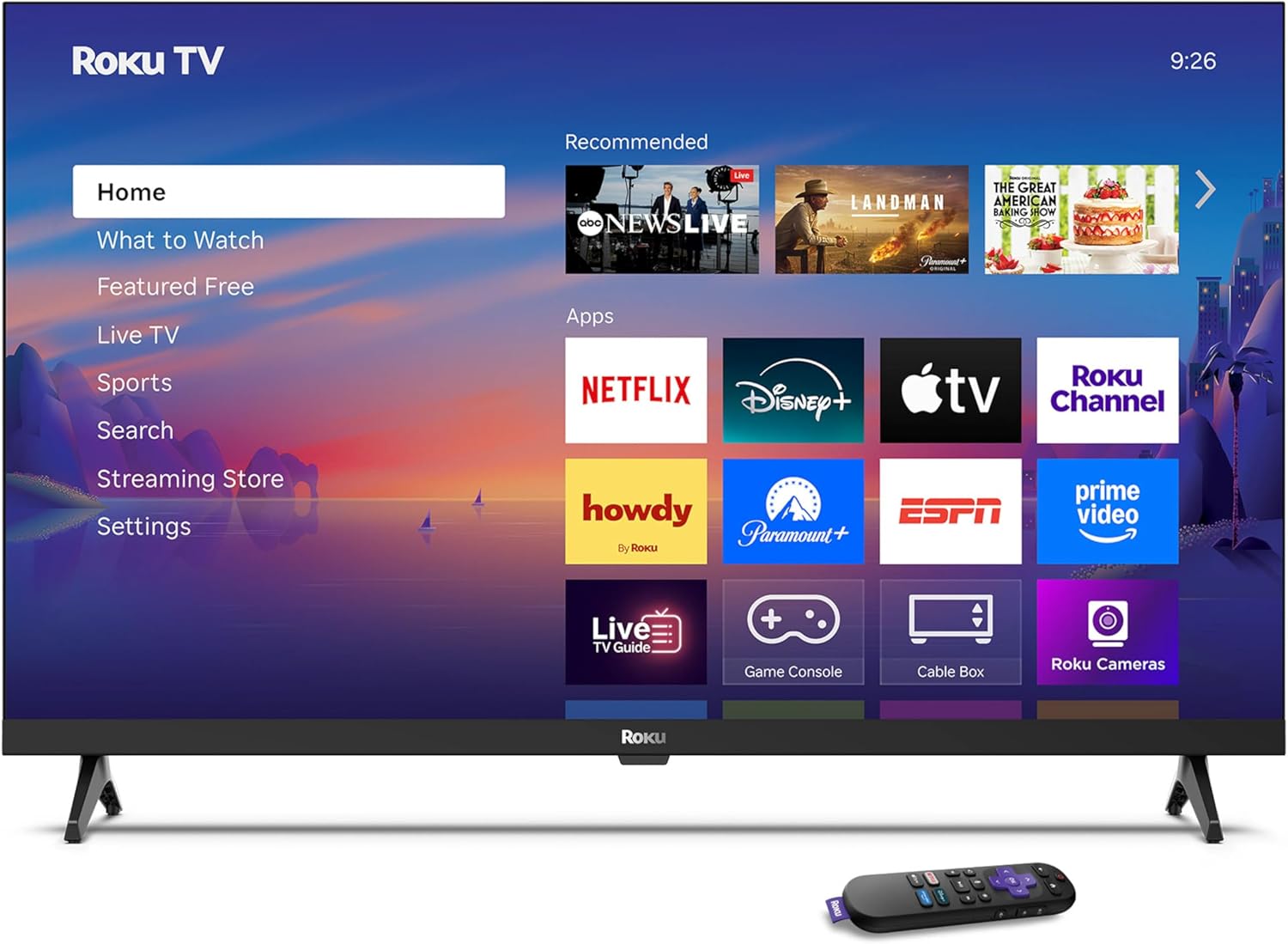
Image: Rear panel connections including HDMI, USB, and optical ports.
3.4 การเปิดเครื่องครั้งแรกและการเชื่อมต่อเครือข่าย
- Plug in the TV and press the power button on the remote or TV.
- ทำตามคำแนะนำบนหน้าจอเพื่อเลือกภาษาและเชื่อมต่อกับเครือข่าย Wi-Fi ของคุณ
- Activate your Roku account or create a new one.
วิดีโอ: จบแล้วview of the Roku TV operating system, demonstrating its user interface and features. This video is provided by Roku, Inc.
4. คู่มือการใช้งาน
4.1 การใช้งานรีโมทควบคุมด้วยเสียง
The Roku Voice Remote allows for intuitive control of your TV and streaming content.
- การค้นหาด้วยเสียง: Press and hold the voice button and speak your command to search for content, launch apps, or control playback.
- การนำทาง: ใช้แผ่นทิศทางเพื่อเลื่อนผ่านเมนูและเลือกรายการ
- ทางลัดของแอป: ปุ่มเฉพาะช่วยให้เข้าถึงบริการสตรีมมิ่งยอดนิยมได้อย่างรวดเร็ว

Image: Features of the Roku Voice Remote, highlighting voice control and shortcut buttons.
4.2 Navigating the Home Screen
The Roku Home Screen provides access to all your installed apps, inputs, and settings.
- บ้าน: Returns you to the main home screen.
- ดูอะไรดี: Discover recommended content.
- ทีวีสด: Access free live television channels.
- ร้านค้าสตรีมมิ่ง: Browse and add new streaming channels.
- การตั้งค่า: Adjust TV and system preferences.

Image: The Roku TV home screen interface.
4.3 การปรับการตั้งค่าภาพและเสียง
ปรับแต่งของคุณ viewing and listening experience through the settings menu.
- โหมดภาพ: Select from predefined modes like Standard, Vivid, Sports, or Movie. Roku Smart Picture automatically optimizes settings.
- โหมดเสียง: เลือกเสียงโปรfiles or enable features like Night Mode for reduced volume fluctuations.
- Bluetooth Headphone Mode: Pair your wireless headphones for private audio.

Image: Picture mode settings on the Roku TV.

Image: Bluetooth Headphone Mode in use.

Image: Dolby Audio technology for clear sound.
5. การบำรุงรักษา
5.1 การทำความสะอาดหน้าจอ
ในการทำความสะอาดหน้าจอทีวี ให้เช็ดเบาๆ ด้วยผ้าแห้งเนื้อนุ่มที่ไม่เป็นขุย สำหรับคราบฝังแน่น ให้เช็ดเบาๆ อีกครั้งampชุบผ้าด้วยน้ำหรือน้ำยาทำความสะอาดหน้าจอ หลีกเลี่ยงการใช้สารเคมีรุนแรงหรือวัสดุที่มีฤทธิ์กัดกร่อน
5.2 การอัปเดตซอฟต์แวร์
Your Roku TV automatically receives software updates when connected to the internet. These updates provide new features, performance improvements, and bug fixes. Ensure your TV remains connected to the internet for optimal performance.
6 การแก้ไขปัญหา
If you encounter issues with your Roku TV, refer to the following common solutions:
- ไม่มีไฟฟ้า: ตรวจสอบให้แน่ใจว่าสายไฟเสียบเข้ากับทีวีและเต้ารับไฟฟ้าที่ใช้งานได้สนิทแล้ว ลองเสียบกับเต้ารับอื่นดู
- ไม่มีภาพ/เสียง: Verify that the correct input source is selected. Check all cable connections (HDMI, audio). Restart the TV by unplugging it for 30 seconds and plugging it back in.
- ระยะไกลไม่ทำงาน: Replace the AAA batteries in the remote. Ensure there are no obstructions between the remote and the TV. For voice remote issues, re-pair the remote if necessary (refer to Roku support for specific steps).
- ปัญหาการเชื่อมต่อเครือข่าย: Restart your Wi-Fi router and modem. Go to the TV's settings menu, then Network, and try reconnecting to your Wi-Fi network.
- App Not Loading/Crashing: Try restarting the app. If the issue persists, remove the app from the home screen, restart the TV, and then re-add the app from the Streaming Store.
7. ข้อมูลจำเพาะ
| คุณสมบัติ | รายละเอียด |
|---|---|
| ขนาดหน้าจอ | 32 นิ้ว |
| เทคโนโลยีการแสดงผล | นำ |
| ปณิธาน | 720p |
| อัตราการรีเฟรช | 60 เฮิรตซ์ |
| คุณสมบัติพิเศษ | Bluetooth Headphone Mode, Dolby Audio, Voice Remote |
| เทคโนโลยีการเชื่อมต่อ | บลูทู ธ Wi-Fi |
| พอร์ต HDMI ทั้งหมด | 3 |
| พอร์ต USB รวม | 1 |
| อินพุตเสียง | HDMI |
| ระบบปฏิบัติการ | ระบบปฏิบัติการ Roku |
| ประเภทการติดตั้ง | ติดตั้งบนโต๊ะ ติดตั้งบนผนัง |
| มาตรฐาน VESA Mount | 200 x 200 มม. |
| ขนาดสินค้า (ลึก x กว้าง x สูง) | ลึก 7 นิ้ว x กว้าง 28.3 นิ้ว x สูง 18.3 นิ้ว |
| น้ำหนักสินค้า | 7.5 ปอนด์ |
| หมายเลขรุ่น | 32R2D5 |
| ยูพีซี | 829610008974 |
8. ข้อมูลการรับประกัน
8.1 การรับประกันแบบจำกัด
Roku warrants the hardware against defects in materials and workmanship under normal use for a period of one (1) year from the date of purchase ("Warranty Period"). If Roku determines that the device’s hardware is defective during the Warranty Period, Roku’s sole obligation, and your exclusive remedy, will be to either repair or replace the unit with either a new or rebuilt device, at its option. This warranty applies if the product is used in accordance with the provided documentation.
8.2 นโยบายการคืนสินค้า
You may return a device for any reason:
- Within thirty (30) days from the date of purchase from Roku.
- Within the applicable return period if purchased from an authorized reseller or distributor.
Additional details regarding product returns can be found on the Roku support site.
9. การสนับสนุน
For further assistance, troubleshooting guides, and frequently asked questions, please visit the official Roku support webเว็บไซต์: