
1. บทนำ
Welcome to the user manual for your new Nubia Flip 5G smartphone. This guide provides essential information to help you set up, operate, and maintain your device. The Nubia Flip 5G combines a compact, foldable design with advanced features, including a dual AMOLED display, a versatile external screen, and AI-powered functionalities.
Key features of your Nubia Flip 5G include:
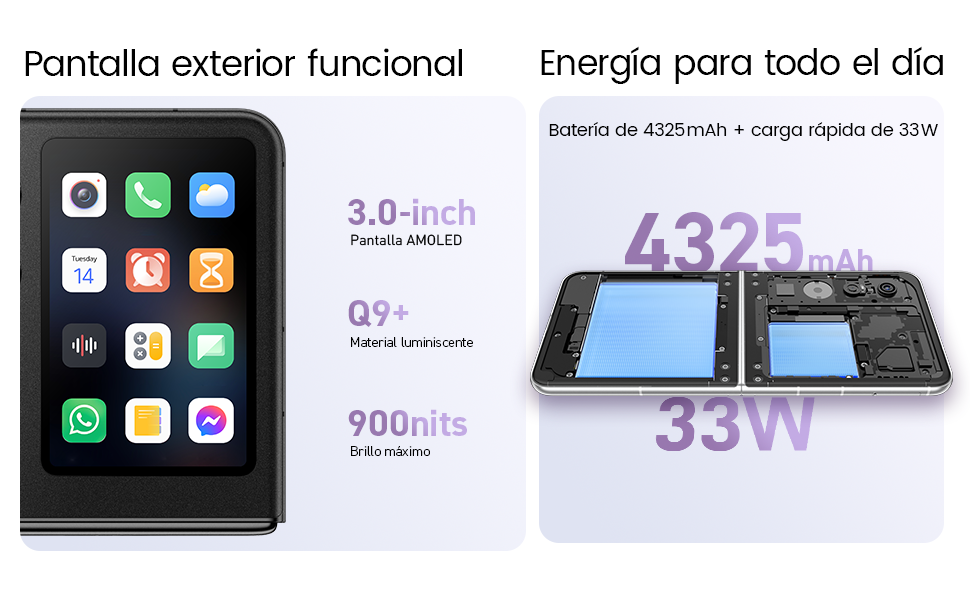
- Dual AMOLED Displays: Enjoy a fluid 120 Hz refresh rate on both the 6.9-inch internal display and the 3-inch external display.
- Fully Functional External Display: Access 100% of your applications directly from the external screen without unfolding the phone.
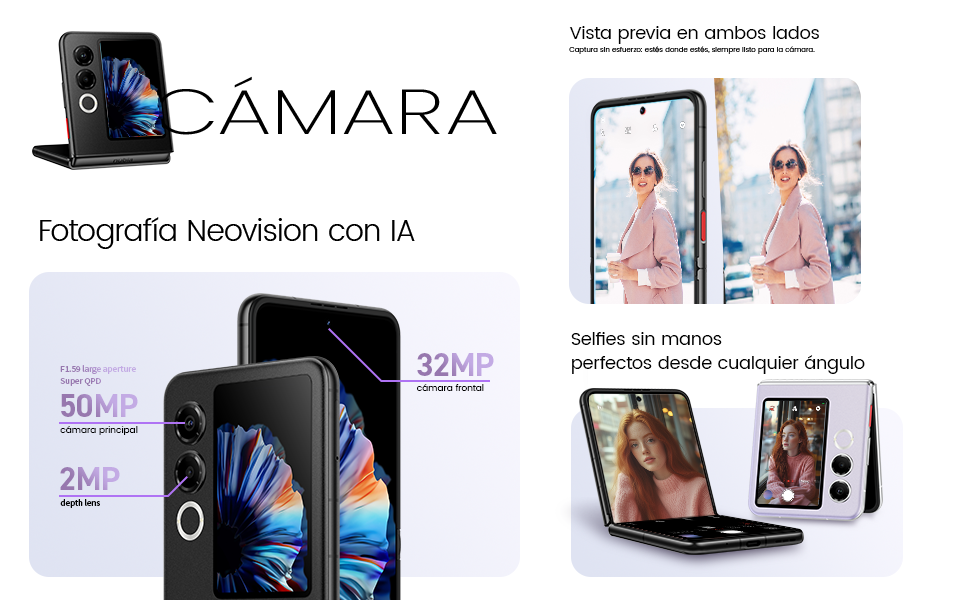
- ระบบกล้องขั้นสูง: Capture high-quality photos with the 50 MP main camera, supported by AI features and 4K stabilized video recording. Utilize the external screen for high-resolution selfies.
- AI-Powered Enhancements: Benefit from features like AI Magic Photos for editing and live translation for voice calls.
- แบตเตอรี่ใช้งานได้ยาวนาน: Equipped with a 4325 mAh battery and 33W fast charging, allowing 50% charge in under 20 minutes.
2. การตั้งค่า
2.1. การแกะกล่องและการตรวจสอบเบื้องต้น
นำสินค้าทั้งหมดออกจากบรรจุภัณฑ์อย่างระมัดระวัง ตรวจสอบให้แน่ใจว่ามีส่วนประกอบต่อไปนี้:
- Nubia Flip 5G Smartphone
- สาย USB
- เคสโทรศัพท์
- ฟิล์มกันรอย
Inspect the device for any visible damage. If any components are missing or damaged, contact customer support.
2.2. การใส่ซิมการ์ด
- ปิดเครื่องอุปกรณ์
- ค้นหาถาดใส่การ์ด SIM ที่ด้านข้างของโทรศัพท์
- Use the SIM ejector tool (not included, typically found with your SIM card) to open the tray.
- ใส่ซิมการ์ดนาโนของคุณลงในถาดโดยให้ด้านที่เป็นขั้วสีทองหันลง อุปกรณ์นี้รองรับการใช้งานสองซิม
- ใส่ถาดกลับเข้าไปในโทรศัพท์อย่างระมัดระวัง
2.3. การเปิดเครื่องและการกำหนดค่าเริ่มต้น
- กดปุ่มเปิด/ปิดค้างไว้จนกว่าโลโก้ Nubia จะปรากฏขึ้น
- ปฏิบัติตามคำแนะนำบนหน้าจอเพื่อเลือกภาษา เชื่อมต่อกับเครือข่าย Wi-Fi และตั้งค่าบัญชี Google ของคุณ
- คุณจะได้รับคำแนะนำในการตั้งค่าคุณสมบัติด้านความปลอดภัย เช่น การปลดล็อกด้วยลายนิ้วมือและการจดจำใบหน้า
3. การใช้งานอุปกรณ์
3.1. Understanding the Dual Display

Your Nubia Flip 5G features two displays: a large 6.9-inch internal foldable AMOLED screen and a compact 3-inch external AMOLED screen. Both screens offer a smooth 120 Hz refresh rate for an enhanced visual experience.
- จอแสดงผลภายใน: Ideal for immersive content consumption, gaming, and detailed tasks.
- จอแสดงผลภายนอก: Provides quick access to notifications, widgets, music controls, and even full applications without needing to unfold the phone. Swipe left or right to navigate through different functions.
3.2. ฟังก์ชันการทำงานของกล้อง

The Nubia Flip 5G is equipped with a powerful 50 MP main camera and a secondary portrait camera, enhanced with AI for superior image quality. The 32 MP front camera ensures clear video calls and selfies.
- High-Resolution Selfies: Use the external screen as a viewfinder to take selfies with the high-quality rear cameras.
- Hands-Free Photography: Partially fold the phone and place it on a flat surface to capture photos and videos without needing a tripod.
- 4K Stabilized Video: Record smooth, high-definition videos with advanced stabilization.
3.3. คุณสมบัติ AI
The device integrates several AI functions to enhance user experience:
- AI Magic Photos: Utilize AI for intelligent photo editing and enhancement.
- Live Call Translation: Experience real-time translation during voice calls, breaking down language barriers.
3.4. วิดีโอโอเวอร์view
วิดีโอแสดงผลิตภัณฑ์อย่างเป็นทางการasing the Nubia Flip 5G's design, versatile external display, hands-free selfie capabilities, and long-lasting battery.
4. แบตเตอรี่และการชาร์จ

The Nubia Flip 5G is equipped with a 4325 mAh battery, designed to provide extended usage. It supports 33W fast charging, allowing you to quickly replenish the battery. A 50% charge can be achieved in less than 20 minutes.
- Use the provided USB cable and a compatible 33W charger for optimal fast charging.
- Avoid using non-certified chargers or cables to prevent damage to the device.
5. การบำรุงรักษา
Proper care ensures the longevity and optimal performance of your Nubia Flip 5G.
- การดูแลหน้าจอ: The foldable screen is delicate. Avoid pressing hard on the screen, especially near the crease. Keep sharp objects away from the display.
- การทำความสะอาด: ใช้ผ้านุ่มไม่เป็นขุยทำความสะอาดหน้าจอและตัวเครื่อง หลีกเลี่ยงสารเคมีรุนแรงหรือวัสดุที่มีฤทธิ์กัดกร่อน
- ความต้านทานน้ำ: While the device may have some level of splash resistance, it is not fully waterproof. Avoid submerging the phone in water or exposing it to excessive moisture.
- อุณหภูมิ: ควรใช้งานอุปกรณ์ภายในช่วงอุณหภูมิที่แนะนำ ความร้อนหรือความเย็นจัดอาจส่งผลต่ออายุการใช้งานและประสิทธิภาพของแบตเตอรี่
- การอัปเดตซอฟต์แวร์: Regularly update your device's software to ensure you have the latest features, security patches, and performance improvements.
6 การแก้ไขปัญหา
If you encounter issues with your Nubia Flip 5G, try the following common troubleshooting steps:
- อุปกรณ์ไม่เปิด: ตรวจสอบให้แน่ใจว่าแบตเตอรี่ชาร์จเต็มแล้ว เสียบที่ชาร์จและรอสักครู่ก่อนลองเปิดเครื่องอีกครั้ง
- หน้าจอไม่ตอบสนอง: Restart the device by pressing and holding the Power button. If unresponsive, perform a forced restart (refer to device-specific instructions if standard restart fails).
- แอปขัดข้อง: ล้างแคชของแอปที่มีปัญหาหรือติดตั้งใหม่ ตรวจสอบให้แน่ใจว่าซอฟต์แวร์อุปกรณ์ของคุณเป็นเวอร์ชันล่าสุด
- อายุการใช้งานแบตเตอรี่ไม่ดี: Adjust screen brightness, disable unnecessary background apps, and turn off features like GPS or Bluetooth when not in use.
- ปัญหาการเชื่อมต่อ (Wi-Fi/Bluetooth): Toggle Wi-Fi or Bluetooth off and on. Restart your router or the connected device.
- ความร้อนสูงเกินไป: Close demanding applications, reduce screen brightness, and avoid direct sunlight. If overheating persists, contact support.
For more complex issues, refer to the official Nubia support webเว็บไซต์หรือติดต่อฝ่ายบริการลูกค้าของพวกเขา
7. ข้อมูลจำเพาะ
Below are the detailed technical specifications for the Nubia Flip 5G (Model: 123447101014):
| คุณสมบัติ | ข้อมูลจำเพาะ |
|---|---|
| ระบบปฏิบัติการ | แอนดรอยด์ 14 |
| น้ำหนักสินค้า | 193 กรัม |
| ขนาดแพ็คเกจ | ขนาด 21.1 x 9 x 3.2 ซม. ; 193 กรัม |
| แบตเตอรี่ | ต้องใช้แบตเตอรี่ขนาด 1 C (รวมอยู่ด้วย) |
| หมายเลขรุ่น | 123447101014 |
| เทคโนโลยีการเชื่อมต่อ | บลูทูธ, NFC, USB, Wi-Fi |
| จีพีเอส | จริง |
| คุณสมบัติพิเศษ | Stereo speakers, Mobile Hotspot capability, Dual SIM, Built-in GPS |
| คุณสมบัติการแสดงผลอื่น ๆ | ไร้สาย |
| อินพุตอินเทอร์เฟซมนุษย์ | หน้าจอสัมผัส |
| ความละเอียดของสแกนเนอร์ | 2790 x 1188 |
| คุณสมบัติอื่นๆ ของกล้อง | ด้านหน้าด้านหลัง |
| แจ็คเสียง | ไม่ทราบ |
| ฟอร์มแฟกเตอร์ | หน้าจอพับได้ |
| สี | สีดำ |
| ระดับพลังงานแบตเตอรี่ | 4325 มิลลิแอมป์ |
| เวลาสนทนาทางโทรศัพท์ | 24 ชั่วโมง |
| ขนาดแรม | 8GB |
| รุ่นซีพียู | มีเดียเทก ไดเมนซิตี้ 9000 |
| ความเร็วซีพียู | 2 กิกะเฮิรตซ์ |
| ความจุหน่วยความจำ | 8GB |
| ขนาดหน้าจอ | 6.9 นิ้ว |
| อัตราการรีเฟรช | 120 เฮิรตซ์ |
| ชื่อรุ่น | ZTE Nubia Flip |
8. การรับประกันและการสนับสนุน
Your Nubia Flip 5G smartphone comes with a standard manufacturer's warranty. Please refer to the warranty card included in your product packaging for specific terms and conditions, including coverage duration and claim procedures.
For technical support, service, or additional information, please visit the official Nubia website or contact their authorized customer service channels. Keep your purchase receipt and device serial number handy when seeking support.