
1. บทนำ
ขอบคุณสำหรับการซื้อasing the XDOBO Dolby Atmos 7.1.4 Surround Sound System. This manual provides essential information for setting up, operating, and maintaining your new audio system. Please read it thoroughly before use to ensure optimal performance and safety.
2. คุณสมบัติของผลิตภัณฑ์
- Dolby Atmos 7.1.4 Channel System: Delivers a revolutionary, immersive sound experience with overhead audio effects.
- ระบบเสียงรอบทิศทาง 360°: Creates a wide soundstage for enhanced immersion, reproducing environmental sounds with precision through left/right sky channels (up-firing speakers), a center speaker, and left/right surround channels.
- 8-inch Wireless Subwoofer: Provides powerful, deep bass, covering frequencies down to 40Hz for impactful audio.
- Bluetooth 5.3 EDR: Ensures stable, high-speed wireless connectivity for seamless audio streaming.
- เอาต์พุตสูงสุด 500 วัตต์: Delivers overwhelming power for a truly moving audio experience.
- DSP Digital Tuning Technology: Optimizes sound sources and adjusts the sound field for enhanced spatial presence.
- Wireless Speaker Connectivity: All speakers connect wirelessly, allowing for flexible placement with only power connections required.
- ตัวเลือกการเชื่อมต่อที่หลากหลาย: Supports HDMI ARC, HDMI IN, Bluetooth, USB, Optical, and Coaxial inputs for versatile connectivity.
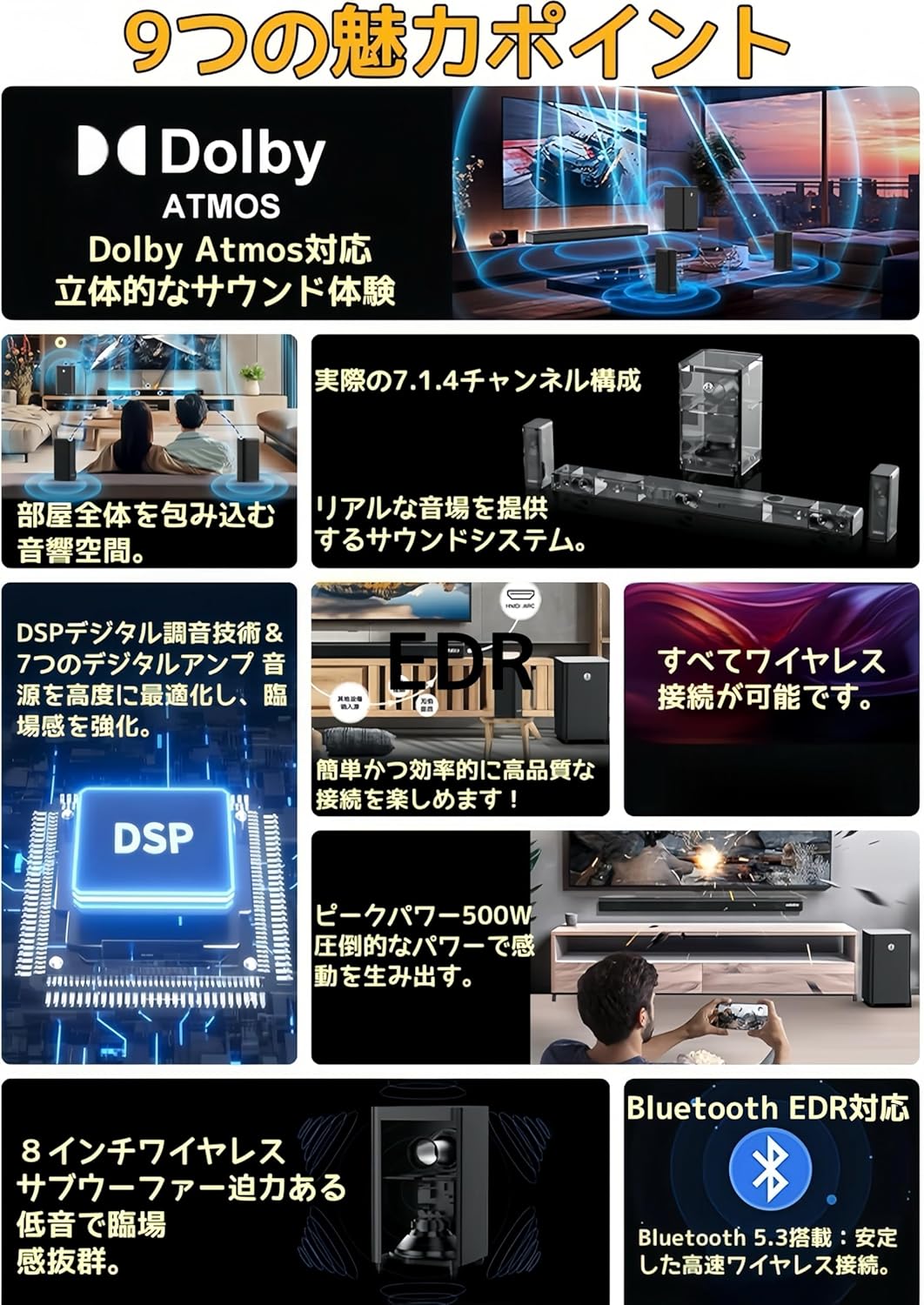
ภาพ: เหนือview of the system's key features, including Dolby Atmos, 7.1.4 channel configuration, wireless connectivity, DSP technology, 500W peak power, 8-inch wireless subwoofer, and Bluetooth 5.3 EDR.

Image: Illustration of the DSP (Digital Signal Processor) technology, highlighting its role in optimizing Dolby Atmos content and enhancing the sound field.

ภาพ: ระยะใกล้ view of an up-firing speaker, demonstrating how it reflects sound off the ceiling at a 20-degree angle to create a three-dimensional audio space.
3. เนื้อหาบรรจุภัณฑ์
กรุณาตรวจสอบว่าสินค้าทั้งหมดมีอยู่ในแพ็คเกจ:
- Soundbar x 1 (with Power Cable x 1)
- Surround Speakers x 2 (with Power Adapters x 2, Wall Mount Brackets x 2)
- Subwoofer x 1 (with Power Cable x 1)
- รีโมทคอนโทรล x 1
- ชุดสกรูยึด x 1
- คู่มือการใช้งาน x 1
4. การตั้งค่า
4.1 การจัดวางลำโพง
The XDOBO 7.1.4 system consists of a soundbar, two surround speakers, and a subwoofer. All speakers are wireless, offering flexibility in placement.
- ซาวด์บาร์: Place the soundbar centrally below your TV. Ensure there are no obstructions in front of the up-firing speakers on top of the soundbar.
- ลำโพงเซอร์ราวด์: Position the two surround speakers behind or to the sides of your listening position. They should be equidistant from the main listening area for optimal surround sound. Wall mounting is also an option using the included brackets.
- ซับวูฟเฟอร์: The wireless subwoofer can be placed anywhere in the room where it provides the best bass response. Experiment with different locations to find the ideal spot.

Image: Diagram showing the layout of the soundbar, subwoofer, and left/right surround speakers, illustrating the 7.1.4 channel configuration with left/right, center, left/right surround, and left/right sky channels.

ภาพ: อดีตample setup showing a soundbar and two wireless surround speakers positioned around a TV and sofa, demonstrating the flexibility of wireless placement for an immersive experience.
4.2 การเชื่อมต่อสายไฟ
Connect the provided power cables to the soundbar, subwoofer, and surround speakers, then plug them into appropriate power outlets. The speakers will automatically pair upon powering on.
5. คู่มือการใช้งาน
5.1 เปิด/ปิดเครื่อง
กดปุ่มเปิด/ปิดบนซาวด์บาร์หรือรีโมทคอนโทรลเพื่อเปิดหรือปิดระบบ
5.2 การเลือกอินพุต
Use the 'Input' button on the remote control or the soundbar to cycle through available input sources: HDMI ARC, HDMI IN, Bluetooth, USB, Optical, Coaxial, and AUX.
5.3 การควบคุมระดับเสียง
Adjust the volume using the Volume Up (+) and Volume Down (-) buttons on the remote control or the soundbar.
5.4 การจับคู่บลูทูธ
- Select 'Bluetooth' as the input source on the soundbar. The soundbar will enter pairing mode.
- บนอุปกรณ์มือถือของคุณ เปิดใช้งาน Bluetooth และค้นหาอุปกรณ์ที่มีอยู่
- Select "XDOBO Draco Mini" (or similar) from the list to connect.
- Once connected, you can stream audio from your device to the sound system.
6. การเชื่อมต่อ
The soundbar offers various connection options for different audio sources.
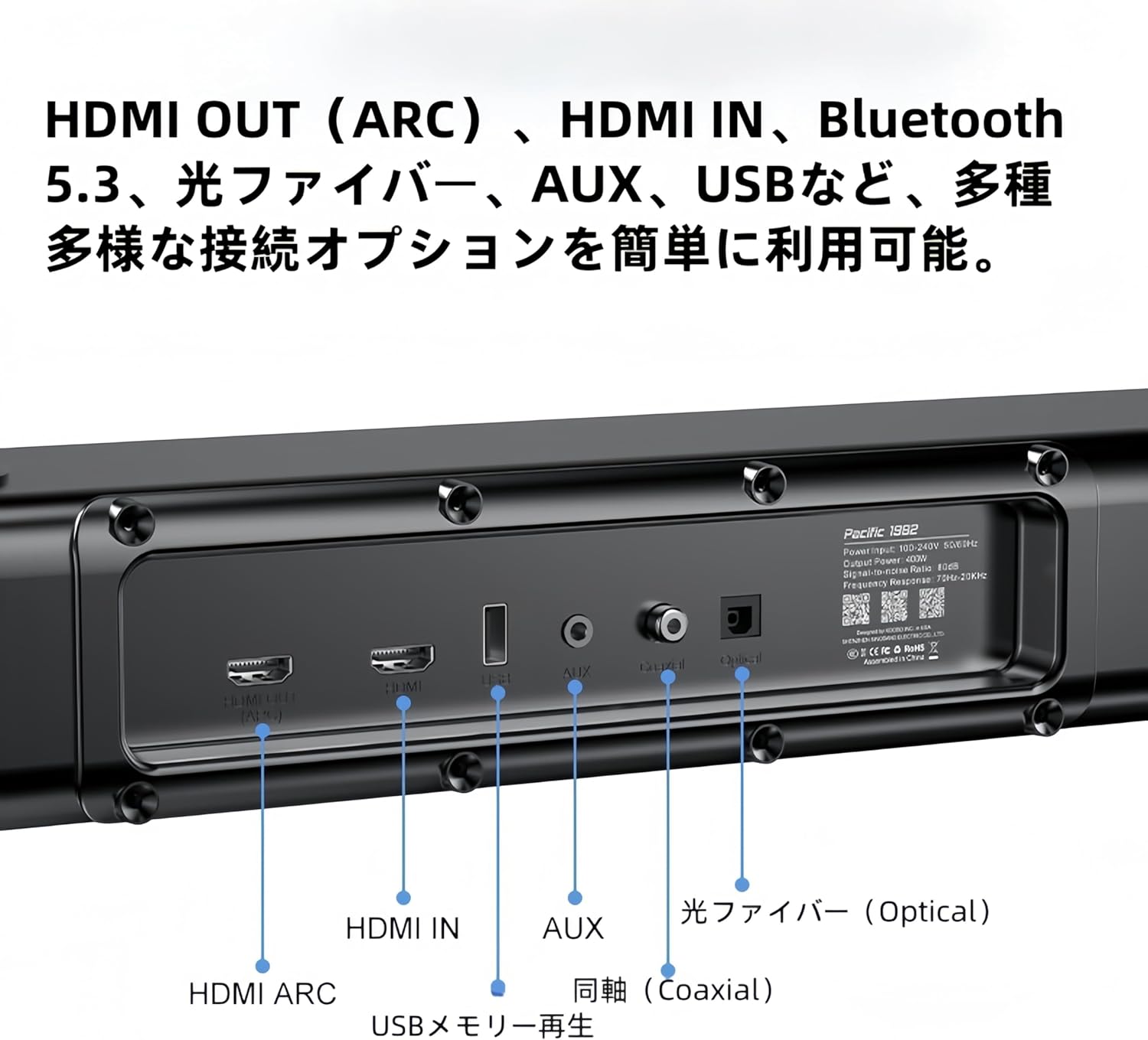
ภาพ: รายละเอียด view of the soundbar's rear panel, showing various input ports including HDMI ARC, HDMI IN, USB, AUX, Optical, and Coaxial connections.
- อาร์ค HDMI: Connect to your TV's HDMI ARC port for high-quality audio transmission and control.
- HDMI ใน: Connect external devices like Blu-ray players or game consoles.
- บลูทูธ: For wireless audio streaming from compatible devices (refer to 5.4 Bluetooth Pairing).
- ยูเอสบี: Insert a USB memory stick for direct audio playback.
- ออปติคอล: Connect to your TV or other audio sources using an optical cable.
- โคแอกเซียล: Connect to compatible audio sources using a coaxial cable.
- ช่องเสริม: Use a 3.5mm audio cable to connect to devices with an analog audio output.
7. การบำรุงรักษา
เพื่อให้ระบบเสียงของคุณมีอายุการใช้งานยาวนานและทำงานได้อย่างมีประสิทธิภาพสูงสุด โปรดปฏิบัติตามคำแนะนำในการบำรุงรักษาดังต่อไปนี้:
- การทำความสะอาด: Use a soft, dry cloth to wipe the surfaces of the speakers. Do not use liquid cleaners, aerosols, or abrasive materials, as they may damage the finish.
- การระบายอากาศ : Ensure proper ventilation around all speaker units. Do not block any ventilation openings.
- พื้นที่จัดเก็บ: หากจะเก็บรักษาระบบไว้เป็นเวลานาน ควรตัดการเชื่อมต่อจากแหล่งจ่ายไฟและเก็บไว้ในที่แห้งและเย็น หลีกเลี่ยงแสงแดดโดยตรงและอุณหภูมิที่สูงหรือต่ำเกินไป
8 การแก้ไขปัญหา
If you encounter any issues with your XDOBO sound system, please refer to the following common problems and solutions:
| ปัญหา | สาเหตุที่เป็นไปได้ | สารละลาย |
|---|---|---|
| ไม่มีไฟฟ้า | สายไฟไม่ได้เชื่อมต่อ เต้ารับไฟฟ้าชำรุด | ตรวจสอบให้แน่ใจว่าสายไฟทั้งหมดเชื่อมต่อแน่นหนาดีแล้ว และปลั๊กไฟใช้งานได้ปกติ |
| ไม่มีเสียง | เลือกอินพุตไม่ถูกต้อง; ระดับเสียงต่ำเกินไป; สายเคเบิลไม่ได้เชื่อมต่ออย่างถูกต้อง | Select the correct input source. Increase the volume. Check all audio cables for secure connections. |
| การจับคู่บลูทูธล้มเหลว | อุปกรณ์อยู่ไกลเกินไป; ซาวด์บาร์ไม่ได้อยู่ในโหมดจับคู่; มีสัญญาณรบกวน | Ensure the soundbar is in Bluetooth pairing mode. Move your device closer to the soundbar. Avoid strong electromagnetic interference. |
| Surround speakers or subwoofer not connecting wirelessly | Power issue; Out of range; Interference | Ensure all wireless speakers are powered on. Place them within range of the soundbar. Restart the soundbar and speakers. |
9. ข้อมูลจำเพาะ
| คุณสมบัติ | รายละเอียด |
|---|---|
| ชื่อรุ่น | Draco Mini |
| ประเภทลำโพง | ซาวด์บาร์ |
| การกำหนดค่าช่องเสียงรอบทิศทาง | 7.1.4 |
| ขนาดสินค้า (ซาวด์บาร์) | 5D x 110W x 6H ซม. |
| ขนาดสินค้า (ซับวูฟเฟอร์) | 240 x 240 x 420 มม. |
| Product Dimensions (Surround Speakers) | 228 x 114 x 72 มม. |
| เทคโนโลยีการสื่อสารไร้สาย | บลูทูธ 5.3 + EDR |
| ช่วงตอบสนองความถี่ | 50Hz ~ 18KHz |
| เอาต์พุตระดับความดันเสียง | มากกว่า 80 เดซิเบล |
| อัตราการบิดเบือน | <10% |
| เอาต์พุตสูงสุดของลำโพง | 500 วัตต์ |
| เทคโนโลยีการเชื่อมต่อ | HDMI ARC, Bluetooth, USB, Optical Fiber, Coaxial |
| โหมดเอาต์พุตเสียง | ล้อมรอบ |
| ประเภทการติดตั้ง | ผนัง, โต๊ะ |

Image: A table summarizing the product specifications for the XDOBO Draco Mini, including model number, dimensions, Bluetooth version, frequency range, and interface types.
10. ข้อมูลด้านความปลอดภัย
Please observe the following safety precautions to prevent damage to the product and ensure your safety:
- อย่าให้เครื่องโดนฝน ความชื้น หรืออุณหภูมิที่สูงหรือต่ำเกินไป
- ห้ามวางเครื่องไว้ใกล้แหล่งความร้อน เช่น หม้อน้ำ เครื่องทำความร้อน เตา หรืออุปกรณ์อื่นๆ (รวมถึง ampเครื่องให้ความร้อน) ที่ผลิตความร้อน
- อย่าวางวัตถุที่บรรจุของเหลว เช่น แจกัน บนตัวเครื่อง
- อย่าปิดกั้นช่องระบายอากาศใดๆ ติดตั้งตามคำแนะนำของผู้ผลิต
- ปกป้องสายไฟไม่ให้ถูกเหยียบหรือถูกหนีบ โดยเฉพาะที่ปลั๊ก เต้ารับไฟฟ้า และจุดที่สายไฟออกจากเครื่อง
- ใช้เฉพาะอุปกรณ์เสริม/สิ่งที่แนบตามที่ผู้ผลิตกำหนดเท่านั้น
- ถอดปลั๊กอุปกรณ์นี้ในระหว่างพายุฝนฟ้าคะนองหรือเมื่อไม่ได้ใช้งานเป็นเวลานาน
11. การรับประกันและการสนับสนุน
XDOBO products are designed and manufactured to the highest quality standards. For information regarding warranty coverage, technical support, or service inquiries, please refer to the warranty card included in your package or contact XDOBO customer support through the retailer where you purchased the product.