
1. บทนำ
This manual provides essential information for the safe and efficient operation of your ZDSSY ZD-L018AQ Smart Projector. This device offers 1080P native resolution with 4K support, 600 ANSI lumens brightness, electric focus, and auto keystone correction. It features integrated WiFi 6 and Bluetooth 5.2 for seamless connectivity and a built-in Smart TV OS with access to various applications.

Image 1.1: ZDSSY ZD-L018AQ Smart Projector, a compact device with a lens on the front and a stand for adjustable positioning.
2. อะไรอยู่ในกล่อง
ตรวจสอบว่ามีสินค้าครบทั้งหมดเมื่อแกะกล่อง:
- โปรเจ็คเตอร์ขนาดเล็ก
- รีโมทคอนโทรล
- สายไฟ
- คู่มือการใช้งาน (เอกสารนี้)
3. สินค้าหมดview
ทำความคุ้นเคยกับส่วนประกอบและพอร์ตต่างๆ ของโปรเจ็กเตอร์
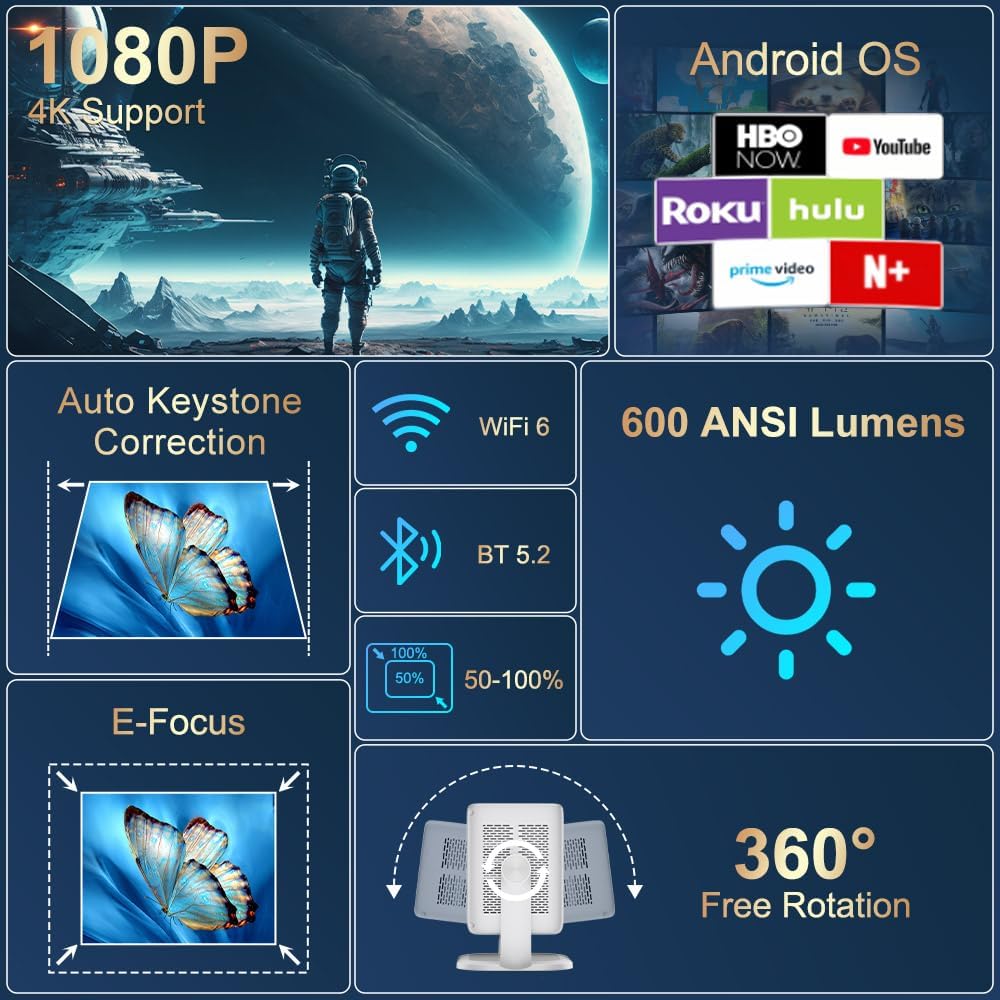
ภาพที่ 3.1: จบแล้วview of the projector's key features including 1080P 4K support, Auto Keystone, WiFi 6, Bluetooth 5.2, E-Focus, 600 ANSI Lumens, and 360° Free Rotation.
3.1 แผงด้านหน้า
- เลนส์ฉายภาพ: ฉายภาพลงบนหน้าจอหรือพื้นผิว
- วงแหวนโฟกัส: Manual adjustment for image sharpness (though electric focus is primary).
3.2 แผงด้านหลัง
- พอร์ตไฟ: เชื่อมต่อเข้ากับสายไฟที่ให้มาในชุด
- พอร์ต HDMI: Connects to external devices like laptops, gaming consoles, or DVD players.
- พอร์ต USB: สำหรับเชื่อมต่ออุปกรณ์จัดเก็บข้อมูล USB หรืออุปกรณ์ต่อพ่วงอื่นๆ
- ช่องต่อสัญญาณเสียงออก (แจ็ค 3.5 มม.): สำหรับเชื่อมต่อหูฟังหรือลำโพงภายนอก
- ปุ่มเปิด/ปิด: เปิด/ปิดโปรเจ็กเตอร์
4. การตั้งค่า
4.1 การเชื่อมต่อสายไฟ
- Connect the included power cord to the projector's power port.
- เสียบปลายอีกด้านของสายไฟเข้ากับเต้ารับไฟฟ้าทั่วไป
4.2 การจัดวางและการปรับแต่ง
Position the projector on a stable, flat surface. The integrated 360° rotatable and adjustable stand allows for flexible projection angles, including ceilings and walls.
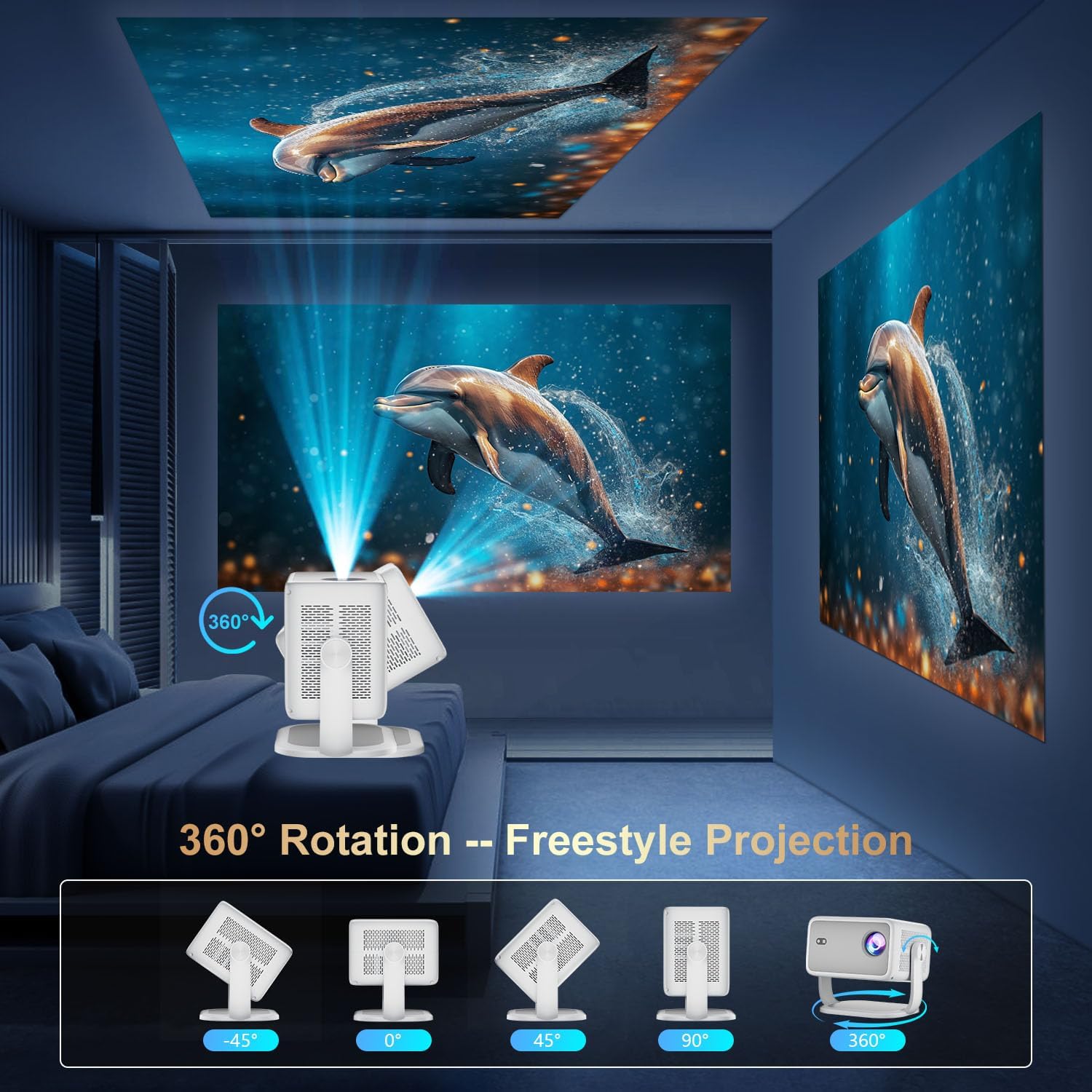
Image 4.1: The projector demonstrating its 360-degree rotation capability for versatile projection angles.
4.3 การแก้ไขโฟกัสและคีย์สโตน
The projector features automatic keystone correction and electric focus for quick image alignment and sharpness. Digital zoom (50%-100%) allows for image resizing without moving the unit.

Image 4.2: The projector automatically adjusting focus and keystone correction for a perfectly aligned and sharp image.
4.4 Initial Network Setup
- Power on the projector using the power button on the rear panel or the remote control.
- Navigate to 'Networking Setting' on the home screen using the remote.
- เลือกเครือข่าย WiFi ของคุณและป้อนรหัสผ่านเพื่อเชื่อมต่อ
5. ปฏิบัติการ
5.1 การใช้งานรีโมทคอนโทรล
The included remote control is the primary interface for navigating the projector's Smart TV OS. It requires two AAA batteries (not included).
- ปุ่มเปิด/ปิด: เปิด/ปิดโปรเจ็กเตอร์
- ปุ่มนำทาง: Use the directional arrows to move between menu options.
- ปุ่มตกลง: ยืนยันการเลือก
- ปุ่มย้อนกลับ: กลับไปยังหน้าจอที่แล้ว
- ปุ่มปรับระดับเสียง: ปรับระดับเสียงออก
5.2 Smart TV OS and Applications
The projector runs on a Smart TV OS, providing access to various streaming applications.

Image 5.1: The projector's home screen displaying various built-in applications such as Netflix, YouTube, Prime Video, and Hulu.
- From the home screen, select the desired application (e.g., Netflix, YouTube, Hulu, Prime Video).
- หากจำเป็น โปรดเข้าสู่ระบบด้วยข้อมูลประจำตัวบัญชีของคุณ
- Browse and enjoy content.
- Additional apps can be downloaded from the App Store.
5.3 การเชื่อมต่ออุปกรณ์ภายนอก
Connect external devices via HDMI or USB:
- ช่องต่อ HDMI: Connect an HDMI cable from your external device to the projector's HDMI port. Select 'HDMI' input from the projector's home screen.
- ยูเอสบี: Insert a USB drive into the USB port. Navigate to 'Files' on the home screen to access content.
5.4 Wireless Screen Mirroring (Miracast/AirPlay)
The projector supports Miracast and AirPlay for wireless screen mirroring from compatible devices (Windows, iOS, Android).

Image 5.2: A smartphone wirelessly mirroring its screen content to the ZDSSY ZD-L018AQ Smart Projector via WiFi.
- Ensure your device and the projector are connected to the same WiFi network.
- On the projector, select the 'AirPin' or 'ScreenCast' option (may vary by firmware version).
- On your mobile device, activate screen mirroring/casting and select the projector from the list of available devices.
5.5 บลูทู ธ เสียง
เชื่อมต่อลำโพงบลูทูธภายนอกหรือหูฟังเพื่อคุณภาพเสียงที่ดีขึ้น

Image 5.3: The projector wirelessly connected to a soundbar via Bluetooth 5.2, enhancing the audio experience.
- Navigate to 'Bluetooth Setting' on the projector's home screen.
- เปิดใช้งาน Bluetooth และค้นหาอุปกรณ์ที่มีอยู่
- Select your Bluetooth audio device to pair.
6. การบำรุงรักษา
การบำรุงรักษาอย่างสม่ำเสมอจะช่วยให้โปรเจคเตอร์ของคุณทำงานได้อย่างมีประสิทธิภาพสูงสุดและมีอายุการใช้งานยาวนานขึ้น
- การทำความสะอาดเลนส์: ใช้ผ้าเนื้อนุ่ม ปราศจากขน ที่ออกแบบมาสำหรับเลนส์โดยเฉพาะ เช็ดเลนส์โปรเจคเตอร์เบาๆ หลีกเลี่ยงวัสดุที่มีฤทธิ์กัดกร่อนหรือสารเคมีรุนแรง
- การระบายอากาศ : Ensure the projector's ventilation openings are clear of dust and obstructions to prevent overheating. Do not block the vents during operation.
- พื้นที่จัดเก็บ: เมื่อไม่ใช้งาน ควรเก็บโปรเจคเตอร์ไว้ในที่แห้งและเย็น หลีกเลี่ยงแสงแดดโดยตรงและอุณหภูมิที่สูงหรือต่ำเกินไป ควรใช้บรรจุภัณฑ์เดิมหรือกล่องป้องกันหากมี
- หมดแรง: Always power off the projector properly before unplugging it.
7 การแก้ไขปัญหา
โปรดดูส่วนนี้เพื่อดูวิธีแก้ไขปัญหาทั่วไป
| ปัญหา | สาเหตุที่เป็นไปได้ | สารละลาย |
|---|---|---|
| ไม่มีไฟฟ้า | สายไฟไม่ได้เชื่อมต่อ มีปัญหากับเต้ารับไฟฟ้า | ตรวจสอบการเชื่อมต่อสายไฟ ลองใช้เต้ารับอื่น |
| ไม่มีรูปภาพ | Input source not selected; external device not connected. | Select correct input source (HDMI, USB); ensure external device is on and connected. |
| ภาพเบลอ | ไม่ได้ปรับโฟกัส; โปรเจคเตอร์อยู่ใกล้/ไกลเกินไป | Use electric focus or manual focus ring; adjust projector distance. |
| ไม่มีเสียง | ระดับเสียงเบาเกินไป อุปกรณ์เสียงภายนอกไม่ได้เชื่อมต่อ/จับคู่ | เพิ่มระดับเสียง ตรวจสอบการจับคู่บลูทูธหรือการเชื่อมต่อสายสัญญาณเสียง 3.5 มม. |
| ปัญหาการเชื่อมต่อ WiFi/บลูทูธ | Incorrect password; device out of range; interference. | Re-enter password; move closer to router/device; reduce interference. |
8. ข้อมูลจำเพาะ
| คุณสมบัติ | รายละเอียด |
|---|---|
| ยี่ห้อ | ZDSSY |
| หมายเลขรุ่น | ZD-L018AQ |
| ความละเอียดการแสดงผล | 1920 x 1080 (ดั้งเดิม) |
| รองรับ 4K | ใช่ |
| ความสว่าง | 600 ANSI Lumens |
| เทคโนโลยีการเชื่อมต่อ | บลูทูธ 5.2, HDMI, USB, Wi-Fi 6 |
| คุณสมบัติพิเศษ | Auto Screen Alignment, Built-In Speaker, Built-In Wi-Fi, Portable, Electric Focus |
| การใช้ที่แนะนำ | ในร่ม/กลางแจ้ง |
| ขนาดสินค้า | 6.69 x 5.9 x 9.05 นิ้ว |
| น้ำหนักสินค้า | 2.97 ปอนด์ |
9. การรับประกันและการสนับสนุน
ZDSSY is committed to providing high-quality products and customer satisfaction.
- บริการลูกค้า: 24/7 Professional Service is available for any inquiries or assistance.
- การคืนสินค้า/การแลกเปลี่ยน: A 30-day return or exchange policy is offered.
- การสนับสนุนด้านเทคนิค: เรามีบริการสนับสนุนทางเทคนิคตลอดอายุการใช้งานสำหรับผลิตภัณฑ์ของคุณ
For further assistance, please refer to the contact information provided with your purchase or visit the official ZDSSY webเว็บไซต์.