
การแนะนำ
Welcome to the user manual for your AMACOOL Handheld Ice Cooler Fan. This innovative device is engineered to deliver powerful and instant cooling relief, featuring advanced semiconductor technology for an ice-cooling effect. Its portable design and long-lasting battery make it an ideal companion for staying comfortable in various environments, from travel to outdoor activities. Please read this manual thoroughly to ensure safe and optimal use of your fan.
ข้อมูลด้านความปลอดภัยที่สำคัญ
เพื่อป้องกันการบาดเจ็บหรือความเสียหายต่ออุปกรณ์ของคุณ โปรดปฏิบัติตามข้อควรระวังด้านความปลอดภัยดังต่อไปนี้:
- ห้ามจุ่มพัดลมลงในน้ำหรือของเหลวอื่นๆ
- เก็บให้พ้นจากมือเด็กและสัตว์เลี้ยง
- Do not insert fingers or foreign objects into the fan blades or cooling plate.
- Use only the provided charging cable or a certified 5V charger.
- หลีกเลี่ยงอุณหภูมิที่สูงเกินไปและแสงแดดโดยตรง
- อย่าพยายามถอดประกอบหรือซ่อมพัดลมด้วยตนเอง โปรดติดต่อฝ่ายบริการลูกค้าเพื่อขอความช่วยเหลือ
- ตรวจสอบให้แน่ใจว่าพอร์ตชาร์จแห้งก่อนที่จะเสียบสายชาร์จ
เนื้อหาแพ็คเกจ
โปรดตรวจสอบในช่องเพื่อยืนยันว่ามีสิ่งของครบถ้วน:
- 1 x AMACOOL Handheld Ice Cooler Fan
- สายชาร์จ 1 x USB-C
- 1 x สายคล้องคอ
- 1 x คู่มือผู้ใช้ (เอกสารนี้)

Image: The AMACOOL Handheld Ice Cooler Fan shown with its accompanying lanyard and charging cable, illustrating the complete package contents.
สินค้าเกินview
Familiarize yourself with the key components of your AMACOOL Handheld Ice Cooler Fan:
- ใบพัดลม: Located at the top, responsible for airflow.
- Ceramic Cooling Plate: Positioned at the center of the fan head, provides instant ice cooling.
- จอแสดงผลดิจิตอล LED: Shows battery level, fan speed, and cooling mode.
- Scroll Switch: Used to adjust fan speed and activate cooling mode.
- พอร์ตชาร์จ Type-C: Located at the bottom for recharging the internal battery.
- Anti-Lost Lanyard Slot: สำหรับติดสายคล้องคอที่ให้มาด้วย
- Base Anti-Slip Pad: ช่วยให้วางได้อย่างมั่นคงบนพื้นผิว

ภาพ: ระเบิด view diagram of the fan, highlighting its internal components such as aerodynamic blades, ceramic cooling plate, LED digital display, and scroll switch.
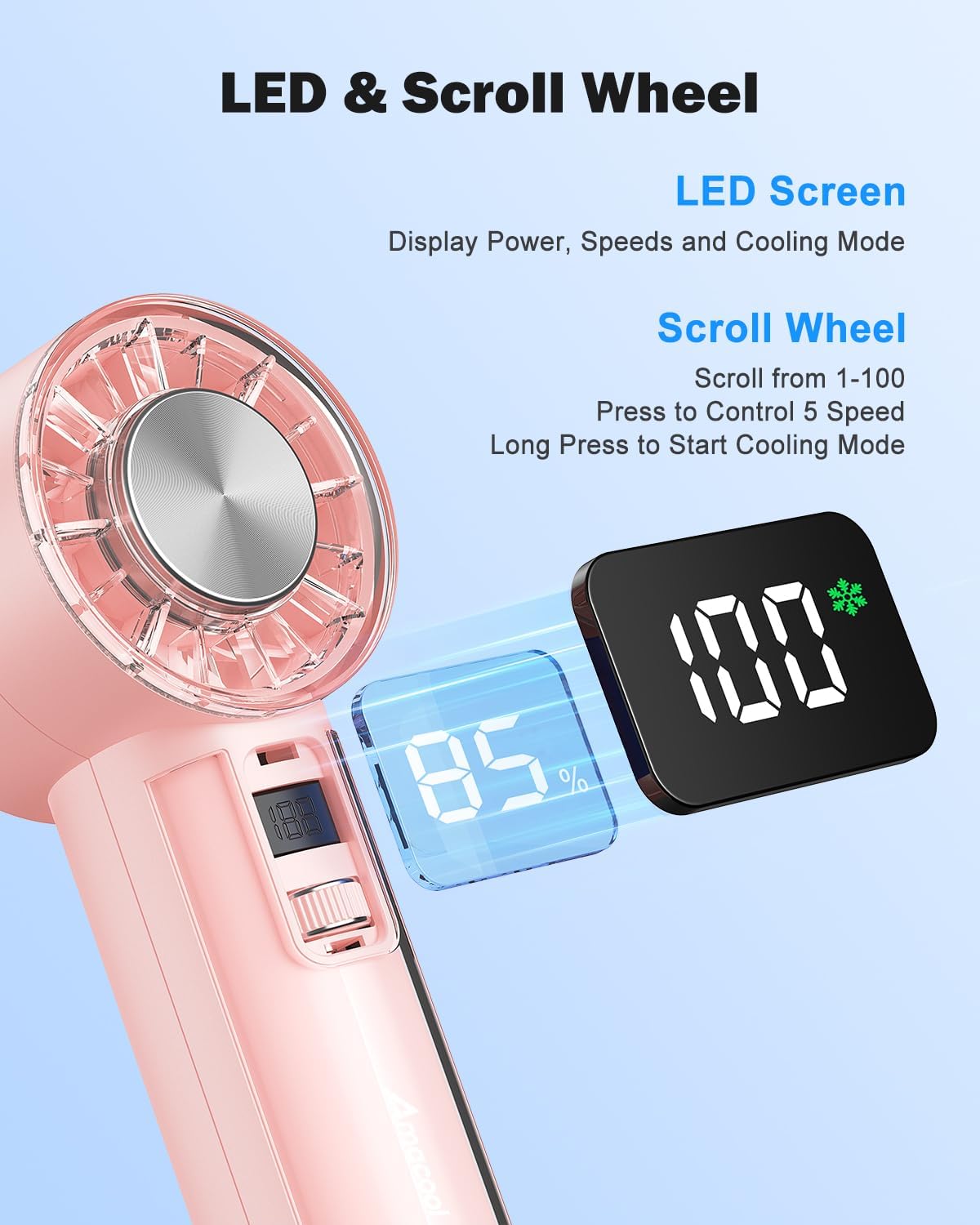
ภาพ: รายละเอียด view of the fan's LED screen, showing battery percentage and speed settings, along with the scroll wheel for control.

Image: Close-ups of various design details, including the Type-C charging port, sleek body, anti-lost lanyard attachment, and the base anti-slip pad.
การตั้งค่า
กำลังชาร์จพัดลม
Before first use, fully charge your AMACOOL Handheld Ice Cooler Fan.
- Connect the provided USB-C charging cable to the charging port at the bottom of the fan.
- Plug the other end of the USB-C cable into a 5V USB power adapter (not included) or a computer's USB port.
- The LED digital display will show the charging progress. A full charge typically takes a few hours.
- Once fully charged, the display will indicate 100%. Disconnect the charging cable.
การติดเชือกเส้นเล็ก
For convenient portability, attach the included lanyard:
- Thread the thin loop of the lanyard through the lanyard slot located near the top of the fan handle.
- Pass the main strap of the lanyard through the loop you just created and pull to secure.
คำแนะนำการใช้งาน
เปิด/ปิดเครื่อง
- การเปิดเครื่อง: Briefly press the scroll switch. The fan will start in Normal mode at a low speed.
- วิธีปิดเครื่อง: Briefly press the scroll switch repeatedly until the fan speed reaches 0, or long press the scroll switch for 2 seconds.
การปรับความเร็วพัดลม
The fan offers 100 stepless speed settings for precise airflow control.
- เพื่อเพิ่มความเร็ว: Scroll the switch upwards.
- To Decrease Speed: Scroll the switch downwards.
- The LED display will show the current speed setting (0-100).

Image: A woman experiencing the strong airflow from the fan, illustrating its powerful cooling capability with 9500 RPM.
Activating Ice Cooling Mode
For an extra layer of heat protection and instant cool relief:
- ในการเปิดใช้งาน: Long press the scroll switch for 2 seconds while the fan is on. The LED display will show a snowflake icon, indicating Ice Cooling mode is active.
- วิธีปิดใช้งาน: Long press the scroll switch for 2 seconds again. The snowflake icon will disappear.
Note: Ice Cooling mode consumes more power. The fan can operate for up to 2 hours in Ice Cooling mode on a full charge, compared to up to 18 hours in Normal fan mode.

Image: The fan's instant cooling chip is highlighted, with illustrations showing the fan being used to cool the face, neck, and wrist, demonstrating its versatility for personal ice therapy.
Monitoring Battery and Settings
The visual LED screen provides real-time information:
- ระดับแบตเตอรี่: Displays as a percentagอี (เช่น 85%)
- ความเร็วพัดลม: Displays as a number from 0 to 100.
- โหมดทำความเย็น: A snowflake icon indicates Ice Cooling mode is active.
การซ่อมบำรุง
Proper care will extend the life of your fan:
- การทำความสะอาด: Use a soft, dry cloth to wipe the exterior of the fan. For the fan blades, use a cotton swab or a soft brush to gently remove dust. Do not use abrasive cleaners or immerse the fan in water.
- พื้นที่จัดเก็บ: When not in use for extended periods, store the fan in a cool, dry place, away from direct sunlight and extreme temperatures. Ensure the battery is partially charged (around 50%) before storage to maintain battery health.
การแก้ไขปัญหา
If you encounter any issues with your fan, please refer to the following table:
| ปัญหา | สาเหตุที่เป็นไปได้ | สารละลาย |
|---|---|---|
| พัดลมไม่เปิด | แบตเตอรี่หมด | Charge the fan using the provided USB-C cable. |
| แรงลมจากพัดลมอ่อนเกินไป | Fan speed is too low. / Obstruction in fan blades. | Increase fan speed using the scroll switch. / Check for and remove any obstructions from the fan blades. |
| Ice Cooling mode not working. | Not activated. / Battery too low. | Long press the scroll switch for 2 seconds to activate. / Ensure the fan has sufficient battery charge. |
| พัดลมมีเสียงผิดปกติ | มีสิ่งแปลกปลอมอยู่ในพัดลม | Turn off the fan immediately and check for any foreign objects. If the noise persists, discontinue use and contact support. |
| จอแสดงผลไม่ทำงาน | Fan is off. / Malfunction. | Turn on the fan. If the issue persists after charging and restarting, contact customer support. |
ข้อมูลจำเพาะ
| ยี่ห้อ | อะมาคูล |
| แบบอย่าง | Handheld Ice Cooler Fan |
| สี | สีชมพู |
| ขนาดสินค้า | 5.89 x 5.21 x 15.49 ซม. |
| น้ำหนักสินค้า | 281 กรัม |
| แหล่งพลังงาน | ใช้พลังงานจากแบตเตอรี่ (แบตเตอรี่แบบชาร์จไฟได้ 4,000mAh) |
| เล่มที่tage | 5 โวลต์ |
| ความเร็วการไหลของอากาศสูงสุด | สูงสุด 9,500 รอบต่อนาที |
| การตั้งค่าความเร็วพัดลม | 100 stepless adjustable speeds |
| เทคโนโลยีการทำความเย็น | Instant-cool semiconductor technology |
| อายุการใช้งานแบตเตอรี่ (โดยประมาณ) | Up to 18 hours (Normal mode), Up to 2 hours (Ice Cooling mode) |
| คุณสมบัติพิเศษ | Portable, Lightweight, LED Digital Display, Ice Cooling Mode |
การรับประกันและการสนับสนุน
Your AMACOOL Handheld Ice Cooler Fan is covered by a manufacturer's warranty. Please refer to the warranty card included in your package for specific terms and conditions. For technical support, troubleshooting assistance, or warranty claims, please contact AMACOOL customer service through the retailer's platform or the contact information provided on the product packaging.
เรามุ่งมั่นที่จะมอบผลิตภัณฑ์คุณภาพสูงและการบริการลูกค้าที่เป็นเลิศให้กับคุณ