
สินค้าเกินview
The GOBOULT Y1 Pro Wireless Earbuds are designed to provide a high-quality audio experience with features like extended playtime, clear calling, and low-latency gaming. This manual provides detailed instructions for setting up, operating, and maintaining your earbuds.

ภาพ: ภาพตัดปะแสดงasing key features of the GOBOULT Y1 Pro Earbuds, including 60 hours playtime, Zen Quad Mic ENC, 45ms low latency gaming, 13mm bass drivers, Type-C fast charging, and Bluetooth 5.3.
เนื้อหาแพ็คเกจ
- GOBOULT Y1 Pro Wireless Earbuds
- เคสชาร์จไฟ
- สายชาร์จแบบ USB Type-C
- แผ่นรองหูฟัง (หลายขนาด)
- จุกหูฟัง (ขนาดต่างๆ)
- บัตรรับประกัน
การตั้งค่า
1. การชาร์จหูฟังและเคส
Before initial use, ensure both the earbuds and the charging case are fully charged. This optimizes battery life and performance.
- Connect the provided USB Type-C charging cable to the charging port on the case and to a compatible USB power adapter (not included).
- ไฟ LED บนเคสชาร์จจะสว่างขึ้นเพื่อแสดงสถานะการชาร์จ
- A full charge typically takes a few hours. A quick 10-minute charge can provide approximately 120 minutes of playtime.

Image: The GOBOULT Y1 Pro earbuds and charging case, illustrating the Type-C fast charging capability, where 10 minutes of charge provides 120 minutes of playtime.
2. การจับคู่เบื้องต้น
Follow these steps to pair your earbuds with your device for the first time:
- Remove any protective film from the charging contacts on the earbuds.
- Place both earbuds into the charging case and close the lid for a few seconds.
- Open the charging case lid. The earbuds will automatically power on and enter pairing mode, indicated by flashing LED lights.
- บนสมาร์ทโฟนหรืออุปกรณ์ที่รองรับบลูทูธ ให้ไปที่การตั้งค่าบลูทูธ
- ค้นหา อุปกรณ์ที่มีอยู่และเลือก "GOBOULT Y1 Pro" จากรายการ
- เมื่อเชื่อมต่อแล้ว จะมีเสียงแจ้งเตือนยืนยันการจับคู่สำเร็จ

Image: A diagram illustrating the initial setup steps, including removing protective film and opening the case, along with a detailed guide to the touch controls for both left and right earbuds.
3. การเชื่อมต่อใหม่อัตโนมัติ
After initial pairing, the earbuds will automatically connect to the last paired device when removed from the charging case and Bluetooth is enabled on the device.

Image: GOBOULT Y1 Pro earbuds and charging case, demonstrating Bluetooth 5.3 for stable, efficient, and fast pairing with a connected smartphone.
คำแนะนำการใช้งาน
เปิด/ปิดเครื่อง
- เปิดเครื่อง: Open the charging case lid. The earbuds will power on automatically. Alternatively, if outside the case, long press the touch area on both earbuds for 3 seconds.
- หมดแรง: Place both earbuds back into the charging case and close the lid. They will power off automatically. Alternatively, long press the touch area on both earbuds for 5 seconds.
การควบคุมแบบสัมผัส
The GOBOULT Y1 Pro earbuds feature intuitive touch controls for managing music, calls, and other functions. Refer to the diagram below and the following list for specific actions:
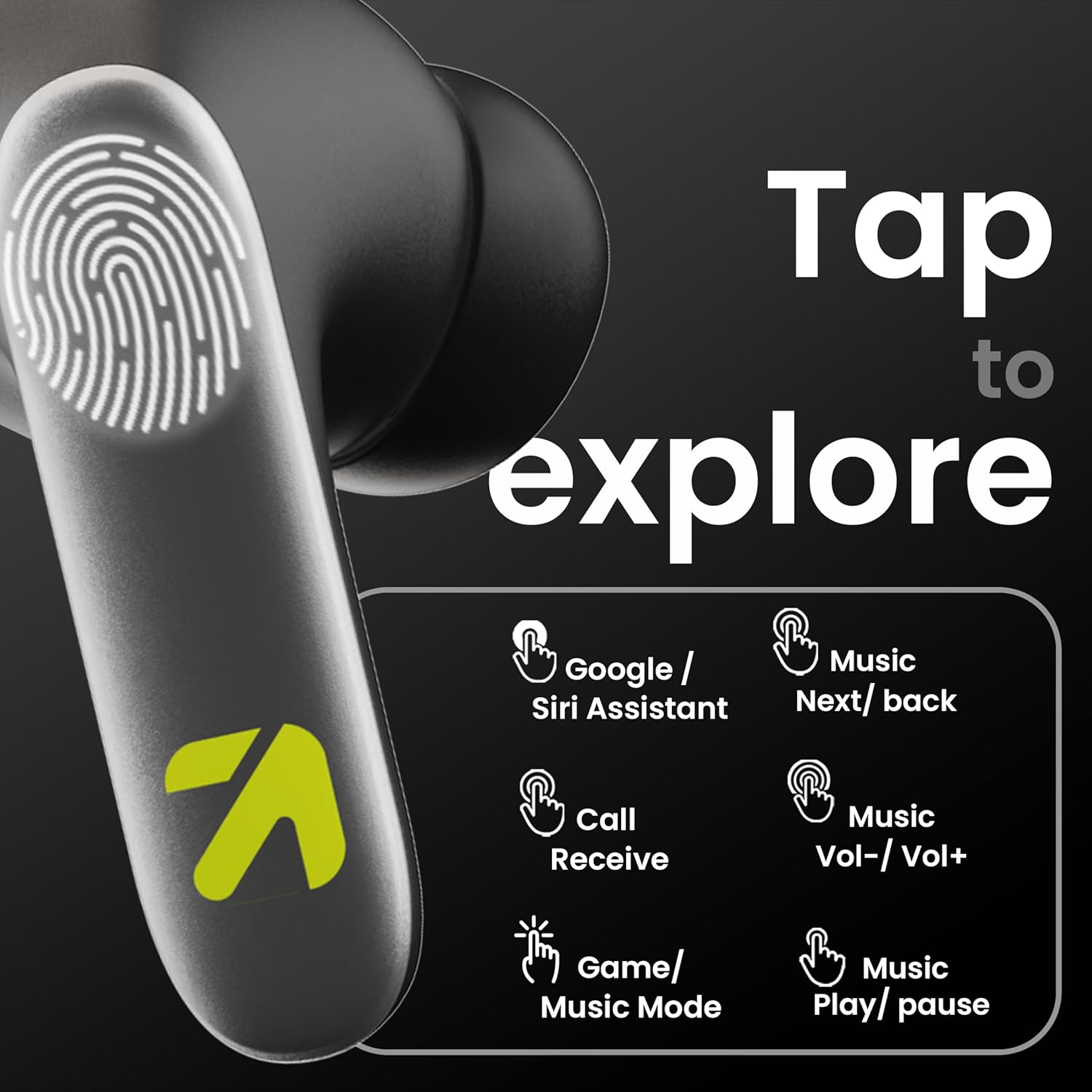
Image: A visual guide to the touch controls on the GOBOULT Y1 Pro earbuds, detailing actions for Google/Siri Assistant, music navigation, call management, volume control, and game/music mode switching.
- แตะครั้งเดียว (ซ้าย/ขวา): เล่น/หยุดเพลง, รับสาย/วางสาย
- แตะสองครั้ง (เอียร์บัดซ้าย): เพลงก่อนหน้า
- แตะสองครั้ง (เอียร์บัดขวา): เพลงถัดไป
- แตะสามครั้ง (หูฟังข้างซ้าย): ลดระดับเสียง.
- แตะสามครั้ง (หูฟังข้างขวา): เพิ่มระดับเสียง.
- Long Press (2 seconds, Left/Right): Reject incoming call, Activate Voice Assistant (Google/Siri).
- Four Taps (Left/Right): Activate/Deactivate Gaming Mode.
โหมดการเล่นเกม
For an enhanced gaming experience, activate the ultra-low latency Gaming Mode:
- การเปิดใช้งาน: Tap the touch area four times on either earbud.
- การปิดใช้งาน: Tap the touch area four times again.

Image: GOBOULT Y1 Pro earbuds and charging case, highlighting the 45ms low latency gaming mode for real-time audio synchronization, activated by four taps.
ผู้ช่วยเสียง
Quickly access your device's voice assistant (Siri or Google Assistant) for hands-free control:
- การเปิดใช้งาน: Perform a long tap on the touch area of either earbud.

Image: Illustration showing how to access Siri or Google Assistant with a long tap on the earbud's touch sensor.
การลดเสียงรบกวนสิ่งแวดล้อม (ENC)
The GOBOULT Y1 Pro features Zen Quad Mic ENC technology, ensuring crystal-clear calls by effectively filtering out ambient noise from your surroundings.

Image: A diagram explaining how Environmental Noise Cancellation (ENC) works by isolating your voice from environmental noise, ensuring clear communication during calls.
การซ่อมบำรุง
การทำความสะอาด
- ทำความสะอาดหูฟังและกล่องชาร์จเป็นประจำด้วยผ้าแห้งนุ่มที่ไม่เป็นขุย
- Ensure the charging contacts on both the earbuds and inside the case are free from dust and debris to maintain proper charging.
- ห้ามใช้สารทำความสะอาดที่มีฤทธิ์กัดกร่อน ตัวทำละลาย หรือสารเคมีรุนแรง เนื่องจากอาจทำให้ผลิตภัณฑ์เสียหายได้
ความต้านทานต่อน้ำ
The GOBOULT Y1 Pro earbuds are rated IPX5 water-resistant. This means they are protected against low-pressure water jets from any direction, making them suitable for workouts and light splashes.
- ห้ามจุ่มหูฟังลงในน้ำ
- Avoid exposing them to heavy rain or extreme moisture.
- ตรวจสอบให้แน่ใจว่าหูฟังแห้งก่อนใส่กลับเข้าไปในกล่องชาร์จเพื่อป้องกันความเสียหาย

Image: GOBOULT Y1 Pro earbuds with water droplets, illustrating their IPX5 water resistance, providing protection against sweat and splashes.
การแก้ไขปัญหา
If you encounter any issues with your GOBOULT Y1 Pro earbuds, refer to the following common troubleshooting steps:
หูฟังไม่จับคู่หรือเชื่อมต่อ
- ตรวจสอบให้แน่ใจว่าทั้งหูฟังและเคสชาร์จมีแบตเตอรี่เพียงพอ
- Turn off Bluetooth on your device, wait 5 seconds, then turn it back on.
- On your device, "Forget" or "Unpair" "GOBOULT Y1 Pro" from the Bluetooth list, then attempt the pairing process again.
- Place both earbuds back into the charging case, close the lid, wait 10 seconds, then open the lid to re-enter pairing mode.
เอียร์บัดตัวเดียวเท่านั้นที่ใช้งานได้
- ตรวจสอบให้แน่ใจว่าได้ชาร์จหูฟังเอียร์บัดทั้งสองข้างแล้ว
- ใส่หูฟังทั้งสองข้างกลับเข้าไปในกล่องชาร์จ ปิดฝา แล้วเปิดอีกครั้ง ซึ่งมักจะทำให้หูฟังทั้งสองข้างเชื่อมต่อกันอีกครั้ง
- หากปัญหายังคงอยู่ ให้ลองรีเซ็ตหูฟัง (ดูคำแนะนำของผู้ผลิต) webไซต์สำหรับคำแนะนำการรีเซ็ตโดยเฉพาะหากไม่มีรายละเอียดที่นี่)
คุณภาพเสียงไม่ดีหรือระดับเสียงเบา
- Ensure the earbuds are properly seated in your ears to create a good seal. Try different sized eartips.
- ทำความสะอาดเศษสิ่งสกปรกออกจากตะแกรงของหูฟัง
- ตรวจสอบระดับเสียงและการตั้งค่าเสียงของอุปกรณ์ต้นทางเสียง
- ขยับเข้าใกล้อุปกรณ์ที่เชื่อมต่อมากขึ้นเพื่อหลีกเลี่ยงสัญญาณรบกวน
ปัญหาการชาร์จ
- ตรวจสอบให้แน่ใจว่าสายชาร์จเชื่อมต่อกับเคสและแหล่งจ่ายไฟอย่างแน่นหนา
- Try a different USB Type-C charging cable or power adapter.
- ทำความสะอาดหน้าสัมผัสการชาร์จบนหูฟังทั้งสองข้างและภายในเคสด้วยสำลีแห้ง
ข้อมูลจำเพาะ
| คุณสมบัติ | รายละเอียด |
|---|---|
| ยี่ห้อ | โกบูลท์ |
| ชื่อรุ่น | แอร์เบส |
| เวอร์ชันบลูทูธ | 5.3 |
| การวางตำแหน่งหู | ในหู |
| การควบคุมเสียงรบกวน | การลดเสียงรบกวนสิ่งแวดล้อม (ENC) |
| ขนาดไดร์เวอร์เสียง | 13 มิล |
| เวลาเล่นทั้งหมด | สูงสุด 60 ชั่วโมง (พร้อมเคสชาร์จ) |
| ความหน่วงต่ำ | 45ms (โหมดเกม) |
| ประเภทการชาร์จ | ชาร์จเร็วแบบ Type-C |
| ความต้านทานต่อน้ำ | IPX5 |
| วิธีการควบคุม | สัมผัส |
| อุปกรณ์ที่รองรับ | สมาร์ทโฟน แท็บเล็ต แล็ปท็อป เดสก์ท็อป ลำโพงอัจฉริยะ |
| น้ำหนักสินค้า | 50 กรัม |
| ประเทศต้นกำเนิด | จีน |
ข้อมูลการรับประกัน
The GOBOULT Y1 Pro Wireless Earbuds are covered by a รับประกันจากผู้ผลิต 1 ปี ตั้งแต่วันที่ซื้อสินค้า
This warranty covers manufacturing defects. Please retain your proof of purchase for any warranty claims. The warranty does not cover damage caused by misuse, accidents, unauthorized modifications, or normal wear and tear.
สนับสนุน
For further assistance, technical support, or warranty inquiries, please contact:
- ผู้ผลิต: Exotic Mile Private Limited, B-67 Wazirpur Industrial Area, New Delhi 110052
- ผู้นำเข้า: Exotic Mile Pvt. Ltd. , B67 Wazirpur Industrial Area , New Delhi 110052
- For customer service contact details, please refer to the GOBOULT official webเว็บไซต์หรือแพลตฟอร์มที่คุณซื้อสินค้า