
1. บทนำ
Thank you for choosing the Sunffice Wireless Bluetooth 5.3 Earbuds. This manual provides essential information for setting up, operating, and maintaining your new earbuds and charging case. Please read it carefully to ensure optimal performance and longevity of your device.
2. เนื้อหาบรรจุภัณฑ์
โปรดตรวจสอบว่าสินค้าทั้งหมดที่ระบุไว้ด้านล่างนี้มีอยู่ในแพ็คเกจของคุณ:
- Sunffice Wireless Bluetooth Earbuds (Left and Right)
- LED Touch Screen Charging Case
- สายชาร์จ USB (Type-C)
- คู่มือการใช้งาน

Image: Contents of the Sunffice Earbuds package, including the earbuds, charging case, USB cable, and user manual.
3. สินค้าหมดview
Familiarize yourself with the components of your Sunffice Wireless Earbuds and Charging Case.

Image: The Sunffice Wireless Earbuds placed in their charging case, showcasing the LED touch screen.
Image: Detailed diagram illustrating the various components of the earbuds and charging case, including the flashlight, USB interface, Type-C port, earplug, charging port, left/right charging compartments, magnetic edge, charging compartment cover, screen off button, multi-functional screen, time display, and battery levels for both earbuds and the charging case.
- หูฟัง: In-ear design with touch control.
- เคสชาร์จ: Features a full-color LED touch screen, USB-A output for phone charging, and a Type-C input for charging the case.
- หน้าจอสัมผัส LED: Displays date, time, battery levels, Bluetooth connection status, and provides access to various functions like music control, equalizer, illumination, camera trigger, alarm, volume adjustment, and games.
4. การตั้งค่า
4.1 Charging the Charging Case and Earbuds
ก่อนใช้งานครั้งแรก โปรดชาร์จเคสชาร์จและหูฟังให้เต็มก่อน
- Connect the provided Type-C USB cable to the charging port on the case and a power source.
- The LED screen will indicate the charging status.
- Place the earbuds into their respective slots in the charging case. They will automatically begin charging.
The 5000mAh charging case can charge the earbuds approximately 4-5 times, providing extended listening time. The case can also be used as a power bank to charge your phone.

Image: The Sunffice charging case connected to a laptop, illustrating the charging process for the case itself.
4.2 การจับคู่บลูทูธ
หูฟังไร้สายรุ่นนี้ใช้เทคโนโลยี Bluetooth 5.3 เพื่อการเชื่อมต่อที่รวดเร็วและเสถียร
- เปิดกล่องชาร์จ หูฟังจะเข้าสู่โหมดจับคู่โดยอัตโนมัติ
- บนอุปกรณ์ของคุณ (สมาร์ทโฟน แท็บเล็ต แล็ปท็อป) เปิดใช้งาน Bluetooth และค้นหาอุปกรณ์ที่มีอยู่
- Select "Bluetooth Earbuds" (or similar name) from the list to connect.
- เมื่อจับคู่แล้ว หูฟังจะเชื่อมต่อกับอุปกรณ์ของคุณโดยอัตโนมัติเมื่อนำออกจากเคสในครั้งต่อไป

Image: A smartphone displaying its Bluetooth settings, showing a successful connection to the earbuds, labeled as 'A98 TWS'.
5. คู่มือการใช้งาน
5.1 LED Touch Screen Functions
The charging case features an intelligent LED touch screen for various controls and information.

Image: The LED touch screen of the charging case displaying various functions, including music control, system settings, calculator, stopwatch, equalizer, and lock screen wallpaper options.
- เวลาและวันที่: Check current date and time.
- ระดับแบตเตอรี่: View battery status of both earbuds and the charging case.
- การควบคุมเพลง: Play, pause, skip tracks, and adjust volume directly from the screen.
- Equalizer: Select different audio profiles (e.g., Pop, Rock, Class, Jazz, Rural, Normal).
- การให้แสงสว่าง: Control lighting features (if applicable).
- ทริกเกอร์กล้อง: ใช้เป็นชัตเตอร์ระยะไกลสำหรับกล้องโทรศัพท์ของคุณ
- เตือน: ตั้งค่าสัญญาณเตือน
- เกม: Access built-in games.
- ไฟฉาย: เปิดใช้งานไฟฉายในตัว
ระบบควบคุมแบบสัมผัสสำหรับหูฟัง 5.2
The earbuds feature touch-sensitive areas for controlling playback and calls. Specific functions can often be customized via a mobile application (if available).
- แตะครั้งเดียว: เล่น/หยุดเพลง, รับสาย/วางสาย
- แตะสองครั้ง: เพลงถัดไป (หูฟังข้างขวา), เพลงก่อนหน้า (หูฟังข้างซ้าย)
- แตะสามครั้ง: เปิดใช้งานผู้ช่วยเสียง
- กดแบบยาว: Reject call, Switch between Noise Cancellation/Transparency modes (if applicable).
5.3 Charging Your Phone with the Case
The charging case can act as a portable power bank for your mobile phone.
- Connect your phone's charging cable to the USB-A output port on the charging case.
- The charging case will begin to charge your phone.
Video: This video demonstrates the various features of the Sunffice Wireless Earbuds and Charging Case, including unboxing, navigating the touch screen for games and calculators, and using the charging case to charge a smartphone. It also shows the flashlight function.
6. การบำรุงรักษา
เพื่อให้หูฟังของคุณใช้งานได้ยาวนานและมีประสิทธิภาพสูงสุด โปรดปฏิบัติตามคำแนะนำในการบำรุงรักษาเหล่านี้:
- การทำความสะอาด: ทำความสะอาดหูฟังและกล่องชาร์จเป็นประจำด้วยผ้านุ่ม แห้ง และไม่เป็นขุย หลีกเลี่ยงการใช้สารเคมีรุนแรงหรือวัสดุที่มีฤทธิ์กัดกร่อน
- ความต้านทานน้ำ: The earbuds feature IPX waterproof coating technology, protecting them from sweat and rain. However, they are not designed for submersion in water. Do not use them while swimming or showering.
- พื้นที่จัดเก็บ: เมื่อไม่ใช้งาน ให้เก็บหูฟังไว้ในกล่องชาร์จเพื่อปกป้องหูฟังและรักษาระดับพลังงาน เก็บในที่แห้งและเย็น หลีกเลี่ยงอุณหภูมิที่สูงหรือต่ำเกินไป
- การชาร์จ: ใช้เฉพาะสายชาร์จที่ให้มาหรือเทียบเท่าที่ได้รับการรับรองเท่านั้น หลีกเลี่ยงการชาร์จเกิน

Image: Sunffice earbuds with water droplets, illustrating their water-resistant design suitable for sports activities.
7 การแก้ไขปัญหา
หากคุณพบปัญหาเกี่ยวกับหูฟัง โปรดดูวิธีแก้ไขปัญหาทั่วไปต่อไปนี้:
- ไม่มีเสียง: ตรวจสอบให้แน่ใจว่าหูฟังชาร์จไฟเต็มแล้ว จับคู่กับอุปกรณ์อย่างถูกต้อง และเปิดเสียงไว้ทั้งในหูฟังและอุปกรณ์ที่เชื่อมต่ออยู่
- ไม่สามารถจับคู่ได้: Make sure Bluetooth is enabled on your device and the earbuds are in pairing mode. Try turning Bluetooth off and on again on your device, or resetting the earbuds (refer to manufacturer's webไซต์สำหรับคำแนะนำการรีเซ็ตเฉพาะหากจำเป็น)
- การเชื่อมต่อไม่ต่อเนื่อง: Ensure you are within the Bluetooth range (up to 10 meters) and there are no significant obstructions between the earbuds and your device.
- ปัญหาการชาร์จ: Check that the charging cable is securely connected and the power source is active. Clean the charging contacts on both the earbuds and the case.
- หน้าจอสัมผัสไม่ตอบสนอง: Ensure the screen is clean and dry. Try restarting the charging case by holding the screen off button (if available) or allowing the battery to drain and recharge.
8. ข้อมูลจำเพาะ
| คุณสมบัติ | ข้อมูลจำเพาะ |
|---|---|
| ชื่อรุ่น | Wireless Bluetooth Earbuds with charging case |
| เวอร์ชันบลูทูธ | 5.3 |
| ช่วงบลูทูธ | 10 เมตร |
| อายุการใช้งานแบตเตอรี่ของหูฟังเอียร์บัด | ประมาณ 5 ชั่วโมง |
| ความจุของเคสชาร์จ | 5000mAh (approx. 4-5 earbud charges) |
| ระดับความต้านทานต่อน้ำ | Water Resistant (IPX) |
| ประเภทการควบคุม | การควบคุมแบบสัมผัส |
| อุปกรณ์ที่รองรับ | Cellphones, Laptops, Music Production Equipment, Smart Speaker, Tablets |
| น้ำหนักสินค้า | 100 กรัม (3.53 ออนซ์) |
| วัสดุ | พลาสติก |
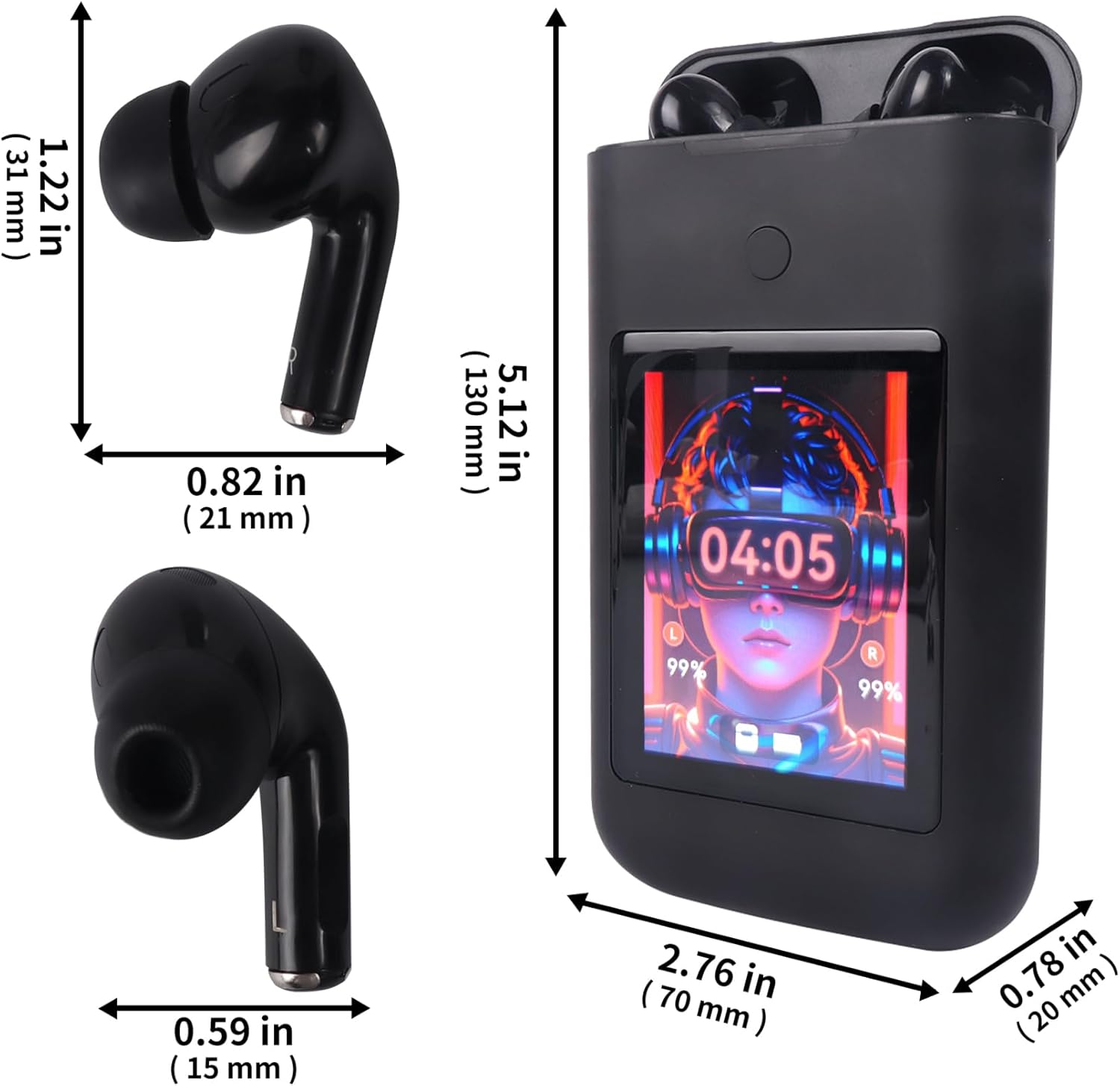
Image: Diagram showing the dimensions of the Sunffice Wireless Earbuds and their charging case in inches and millimeters.
9. ข้อมูลด้านความปลอดภัย
- ห้ามถอดประกอบ ซ่อมแซม หรือดัดแปลงผลิตภัณฑ์
- ควรเก็บผลิตภัณฑ์ให้ห่างจากอุณหภูมิที่สูงจัด แสงแดดโดยตรง และเปลวไฟ
- Avoid exposing the product to excessive moisture or liquids beyond its water resistance rating.
- ห้ามใช้หูฟังที่ระดับเสียงสูงเป็นเวลานานเพื่อป้องกันความเสียหายต่อการได้ยิน
- เก็บให้พ้นจากมือเด็กและสัตว์เลี้ยง
10. การรับประกันและการสนับสนุน
สำหรับข้อมูลการรับประกันและการสนับสนุนลูกค้า โปรดดูเอกสารประกอบที่ให้มาพร้อมกับสินค้าที่คุณซื้อ หรือติดต่อผู้ขายโดยตรง โปรดเก็บหลักฐานการซื้อไว้สำหรับการเรียกร้องการรับประกันใดๆ