
1. สินค้าหมดview
The FOXBOX DM3-A GPS Smartwatch is designed for active individuals, offering robust features for sports, health monitoring, and daily connectivity. It combines a durable build with advanced technology to support your lifestyle.

Image: FOXBOX DM3-A GPS Smartwatch with both black and orange strap options.
คุณสมบัติหลัก:
- 1.43-inch AMOLED Display with Always-On Function
- Integrated GPS and 6 Satellite Positioning Systems
- Bluetooth Calling and Smart Notifications
- 24/7 Health Monitoring (Heart Rate, SpO2, Sleep, Stress)
- โหมดกีฬามากกว่า 100 โหมด
- 5ATM Waterproof and IP68 Dust Resistance
- 500mAh Long-lasting Battery
- Built-in Barometer, Altimeter, and Compass
2. คู่มือการติดตั้ง
2.1 อะไรอยู่ในกล่อง
- 1 x FOXBOX DM3-A Smartwatch
- 1 x Black Silicone Strap
- 1 x Red Silicone Strap
- 1 x สายชาร์จ
- 1 x คู่มือผู้ใช้
2.2 การชาร์จสมาร์ทวอทช์
Before first use, fully charge your smartwatch. Connect the magnetic charging cable to the charging points on the back of the watch and plug the USB end into a power adapter (not included) or a computer USB port. A full charge typically takes approximately 7 hours.
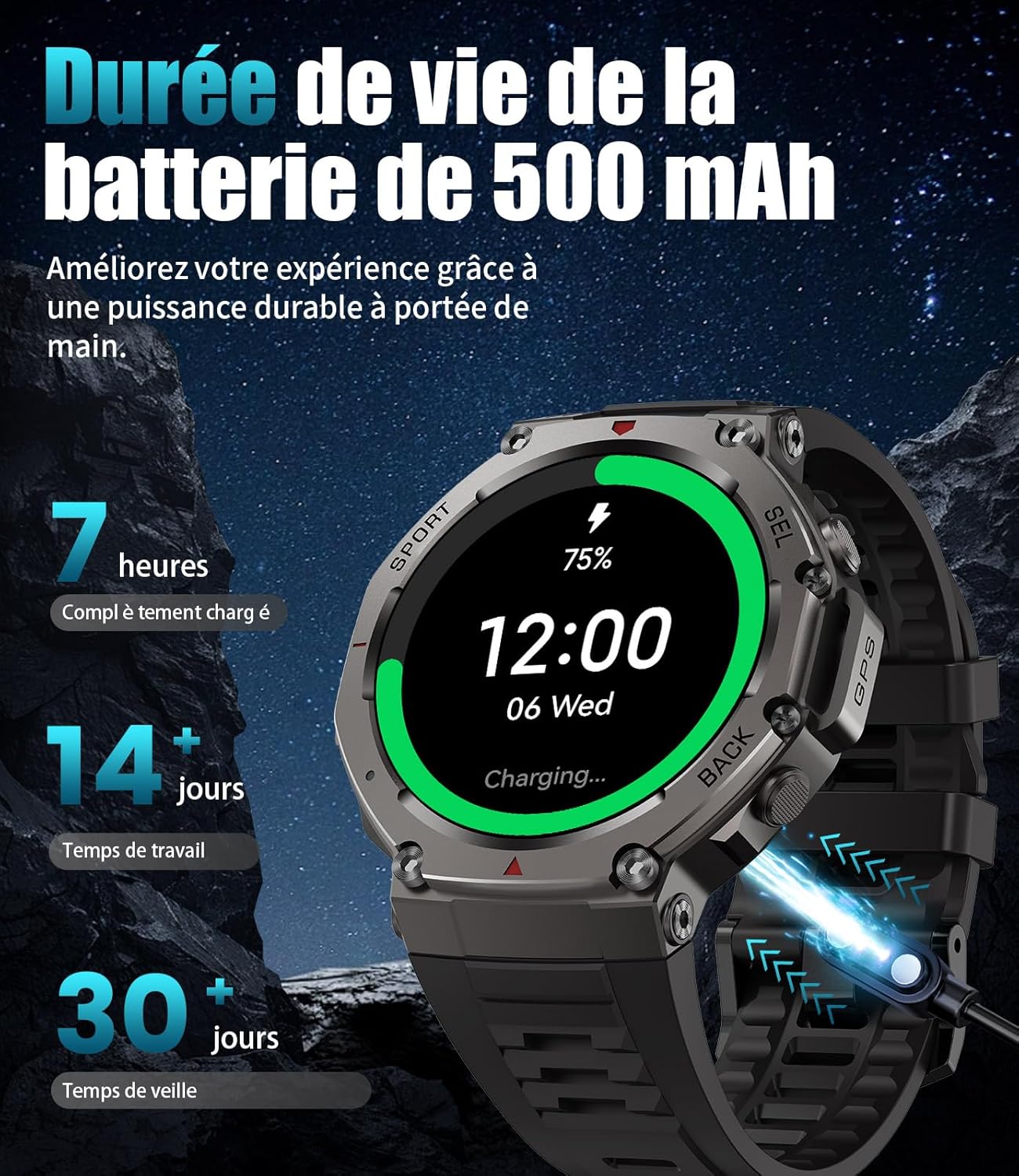
Image: The smartwatch connected to its magnetic charging cable, illustrating the charging process and battery life indicators.
2.3 การติดตั้งและการจับคู่แอป
To unlock the full potential of your FOXBOX DM3-A, download and install the กลอรีฟิตโปร app on your smartphone. The app is compatible with Android 5.0+ and iOS 12.0+.
- ดาวน์โหลดแอป: Scan the QR code displayed on your smartwatch screen or visit the official download link: GloryFitPro App Download.
- เปิดใช้งานบลูทูธ: ตรวจสอบให้แน่ใจว่าได้เปิดใช้งาน Bluetooth บนสมาร์ทโฟนของคุณแล้ว
- เปิด GloryFitPro: Launch the app and create an account or log in.
- เพิ่มอุปกรณ์: In the app, navigate to the 'Device' section and select 'Add a device'. The app will search for nearby smartwatches.
- Select DM3-A: From the list of found devices, select 'DM3-A' to initiate the pairing process.
- ยืนยันการจับคู่: Follow the on-screen prompts on both your phone and smartwatch to confirm the pairing. Grant necessary permissions for notifications and calls.

Image: Visual guide on connecting the smartwatch to your phone using the GloryFitPro app, including QR code scanning and Bluetooth pairing steps.
3. คู่มือการใช้งาน
3.1 การนำทางพื้นฐาน
- หน้าจอสัมผัส: Swipe left/right to navigate between main functions, swipe up/down for quick settings or notifications. Tap to select.
- ปุ่มด้านข้าง: The smartwatch features multiple physical buttons for quick access to specific functions (e.g., Sport mode, Back, Select). Refer to the on-screen prompts for specific button actions.
3.2 คุณสมบัติการแสดงผล
The DM3-A features a vibrant 1.43-inch AMOLED HD display, providing clear visuals and rich colors. The Always-On Display function allows you to see the time and essential information at a glance without needing to raise your wrist or tap the screen.

Image: Close-up of the smartwatch's 1.43-inch AMOLED HD display, highlighting its vibrant colors and detailed interface.
3.3 การปรับแต่งหน้าปัดนาฬิกา
Personalize your smartwatch with over 200 watch faces available through the GloryFitPro app. You can also create custom watch faces using your own photos.

Image: Various customizable watch faces displayed on the smartwatch, demonstrating the range of styles and information layouts available.
3.4 การโทรและการแจ้งเตือนบลูทูธ
Make and receive calls directly from your wrist using the built-in speaker and microphone. The smartwatch also displays real-time notifications from your paired smartphone, including messages from WhatsApp, Facebook, Twitter, and SMS.

Image: A user interacting with the smartwatch to answer a call, alongside illustrations of the dial pad, contact list, and incoming call screen.
3.5 การตรวจติดตามสุขภาพ
The DM3-A provides comprehensive 24/7 health monitoring, including:
- การติดตามอัตราการเต้นของหัวใจ: มีการตรวจสอบอัตราการเต้นของหัวใจอย่างต่อเนื่อง
- การวัดออกซิเจนในเลือด (SpO2): Real-time blood oxygen level readings.
- การวิเคราะห์การนอนหลับ: ติดตามการนอนหลับtages (การนอนหลับแบบตื้น การนอนหลับแบบลึก REM) และให้ข้อมูลเชิงลึกเกี่ยวกับคุณภาพการนอนหลับ
- การติดตามความเครียด: ช่วยให้คุณเข้าใจและจัดการระดับความเครียดของคุณ
- การติดตามกิจกรรม: บันทึกจำนวนก้าว ระยะทาง และปริมาณแคลอรีที่เผาผลาญ
- คำเตือน: Hydration and movement reminders to promote healthy habits.

Image: The smartwatch displaying heart rate and blood oxygen levels, with an accompanying phone screen showing detailed health data and sleep analysis.

Image: The smartwatch displaying sleep data, with a graph illustrating sleep stages and total sleep time, emphasizing real-time sleep monitoring capabilities.
3.6 โหมดกีฬาและ GPS
With over 100 specialized sport modes, the DM3-A is your ultimate fitness companion. It accurately tracks your performance for various activities, from running and cycling to swimming and climbing. The integrated GPS and support for 6 satellite positioning systems (GPS, Glonass, BeiDou, Galileo, NavIC, QZSS) ensure precise location tracking for your outdoor adventures.

Image: The smartwatch displaying various sport modes and metrics like heart rate, speed, and duration, with examples of activities like surfing, horse riding, climbing, and running.

Image: Diagram illustrating the smartwatch's integrated GPS and its ability to connect to 6 satellite positioning systems for accurate outdoor tracking, including compass, barometric pressure, and altitude readings.

Image: The smartwatch displaying compass, altitude, and barometric pressure readings, emphasizing its utility for outdoor navigation and environmental monitoring.
3.7 ความต้านทานต่อน้ำ
The FOXBOX DM3-A is 5ATM waterproof and IP68 rated, meaning it can withstand splashes, rain, and brief immersion in water. It is suitable for swimming and other water-based activities, but not for deep diving or high-pressure water activities.

Image: The smartwatch shown in various challenging environments, highlighting its 5ATM water resistance, anti-shock capabilities, and resistance to extreme temperatures.

Image: A swimmer underwater with the smartwatch, demonstrating its 5ATM water resistance and how the touchscreen automatically locks to prevent accidental touches during water activities.
4. การบำรุงรักษา
4.1 การทำความสะอาดสมาร์ทวอทช์ของคุณ
ทำความสะอาดสมาร์ทวอทช์ของคุณเป็นประจำเพื่อให้มั่นใจถึงประสิทธิภาพและสุขอนามัยที่ดีที่สุด ใช้ผ้าเนื้อนุ่มที่ไม่เป็นขุยเช็ดหน้าจอและตัวเครื่อง สำหรับคราบสกปรกที่ติดแน่น ให้ใช้ผ้าชุบน้ำหมาดๆ เช็ดเบาๆampชุบผ้าด้วยน้ำ หลีกเลี่ยงการใช้สารเคมีรุนแรงหรือวัสดุที่มีฤทธิ์กัดกร่อน
4.2 การดูแลแบตเตอรี่
เพื่อยืดอายุการใช้งานแบตเตอรี่ให้ยาวนานที่สุด:
- Avoid extreme temperatures (hot or cold) when charging or storing the watch.
- อย่าปล่อยให้นาฬิกาแบตหมดเกลี้ยงเป็นเวลานาน
- Charge the watch using the provided original charging cable.
- The 500mAh battery provides approximately 10-15 days of typical use and over 60 days in standby mode. Continuous GPS usage will reduce battery life to about 22 hours.

Image: Illustration of the smartwatch's 500mAh battery capacity, showing estimated usage times for continuous GPS, always-on display, normal use, and standby mode.
5 การแก้ไขปัญหา
If you encounter issues with your FOXBOX DM3-A smartwatch, please refer to the following common solutions:
- ปัญหาการเชื่อมต่อ (บลูทูธ):
- Ensure Bluetooth is enabled on both your phone and smartwatch.
- Make sure the smartwatch is within the Bluetooth range of your phone.
- รีสตาร์ททั้งโทรศัพท์และสมาร์ทวอทช์ของคุณ
- Forget the device in your phone's Bluetooth settings and re-pair through the GloryFitPro app.
- ความไม่แม่นยำของ GPS:
- ให้แน่ใจว่าคุณอยู่ในพื้นที่กลางแจ้งที่เปิดโล่งและมีน้ำใส view ของท้องฟ้า
- ควรปล่อยให้นาฬิกามีเวลาเพียงพอในการรับสัญญาณ GPS ก่อนเริ่มทำกิจกรรม
- Ensure the GloryFitPro app is updated to the latest version.
- Sensor Malfunction (Heart Rate, SpO2, Sleep):
- ตรวจสอบให้แน่ใจว่าสวมนาฬิกาให้พอดีกับข้อมือ ไม่หลวมหรือแน่นเกินไป
- ทำความสะอาดบริเวณเซ็นเซอร์ที่ด้านหลังของนาฬิกา
- รีสตาร์ทสมาร์ตวอทช์
- Watch Not Turning On/Charging:
- Check the charging cable for damage and ensure it's properly connected to the watch and power source.
- ลองใช้พอร์ต USB หรืออะแดปเตอร์จ่ายไฟอื่น
- Ensure the charging contacts on the watch are clean.
หากปัญหายังคงมีอยู่ โปรดติดต่อฝ่ายสนับสนุนลูกค้าเพื่อขอความช่วยเหลือเพิ่มเติม
6. ข้อมูลจำเพาะ
| คุณสมบัติ | ข้อมูลจำเพาะ |
|---|---|
| ยี่ห้อ | ฟ็อกซ์บ็อกซ์ |
| หมายเลขรุ่น | DM3-อ |
| แสดง | 1.43-inch AMOLED HD |
| ความจุของแบตเตอรี่ | ลิเธียมโพลิเมอร์ 500 mAh |
| อายุการใช้งานแบตเตอรี่ (ใช้งานปกติ) | 10-15 วัน |
| อายุการใช้งานแบตเตอรี่ (สแตนด์บาย) | กว่า 60 วัน |
| อายุการใช้งานแบตเตอรี่ (GPS ต่อเนื่อง) | ประมาณ 22 ชั่วโมง |
| ความต้านทานต่อน้ำ | 5ATM, IP68 |
| การเชื่อมต่อ | บลูทูธ |
| จีพีเอส | Integrated GPS, supports 6 satellite systems |
| การเก็บข้อมูลความทรงจำ | 256MB |
| อุปกรณ์ที่รองรับ | แอนดรอยด์ 5.0+ / iOS 12.0+ |
| คุณสมบัติพิเศษ | GPS, Phone Call, Calendar, Notification, Multisport Tracker, Barometer, Altimeter, Compass |
7. การรับประกันและการสนับสนุน
The FOXBOX DM3-A Smartwatch comes with a การรับประกันจากผู้ผลิต 2 ปี, covering replacement, return, or full refund in case of technical issues or defects. This warranty ensures a secure purchase and reflects our commitment to quality.
For any technical problems (e.g., Bluetooth connection errors, sensor malfunctions), strap adjustments, or general inquiries, please contact our customer service team. Our expert support is available 24/7 to provide prompt resolution.
Please refer to your purchase documentation for specific contact details or visit the official FOXBOX support page.