
สินค้าเกินview
The JUOVI CLIP J1 is a compact and durable wireless portable Bluetooth speaker designed for versatile use. Featuring an integrated carabiner, IP68 waterproof and dustproof rating, and up to 24 hours of playtime, it delivers premium HD sound for both indoor and outdoor environments. This speaker also includes a unique Beat Mode and supports wireless stereo pairing for an immersive audio experience.
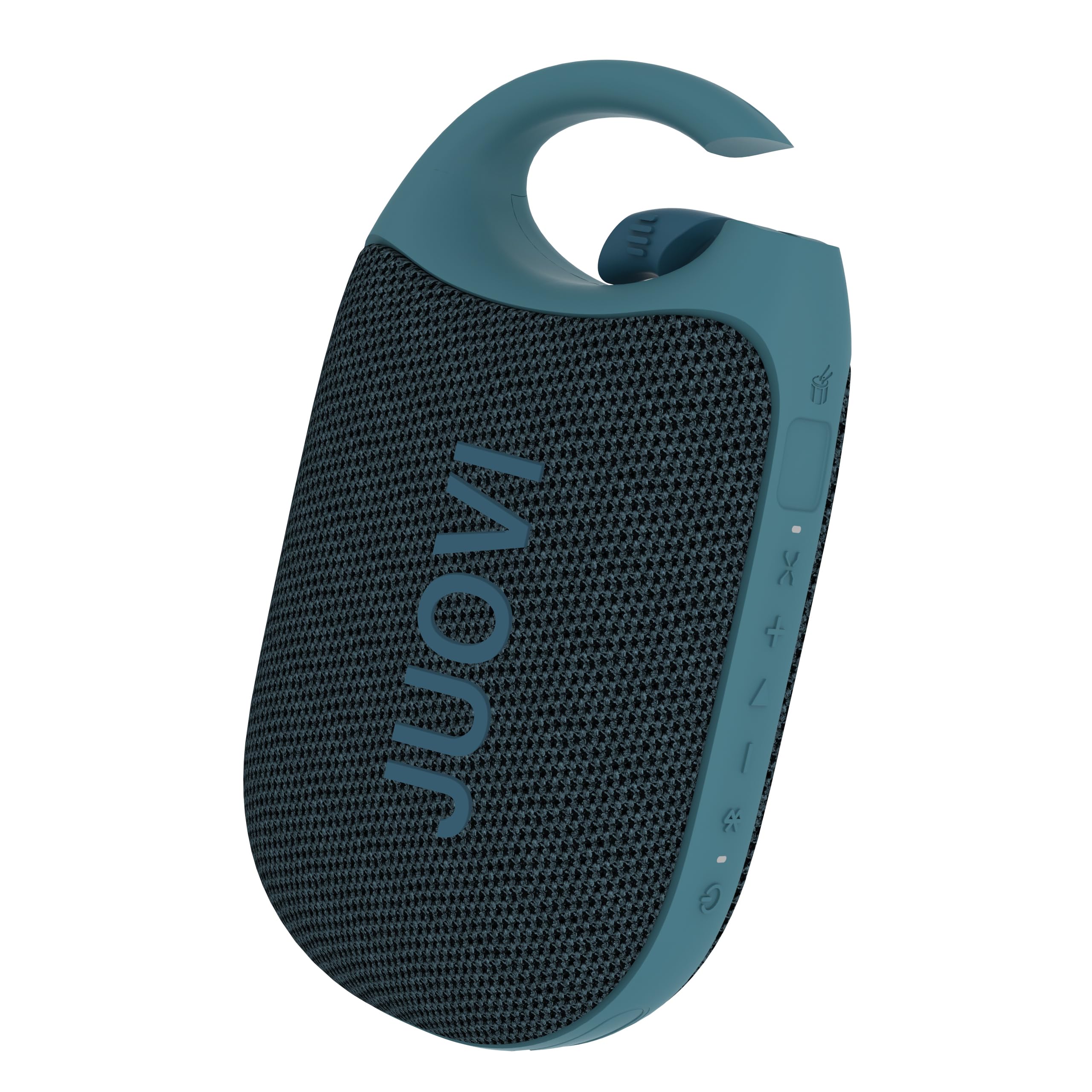
Figure 1: JUOVI CLIP J1 Bluetooth Speaker (Blue)
มีอะไรอยู่ในกล่อง
- ลำโพงบลูทูธ x 1
- 3A Type-A to Type-C charging cable (30cm) x 1
- คู่มือการใช้งาน x 1
การตั้งค่า
1. ชาร์จลำโพง
Before first use, fully charge the speaker using the provided USB-C charging cable. Connect the USB-A end to a compatible power adapter (not included) and the USB-C end to the speaker's charging port. The Power/Bluetooth indicator light will show charging status.

Figure 2: Speaker highlighting 24-hour playtime.
2. เปิด/ปิดเครื่อง
- การเปิดเครื่อง: Press and hold the Power button (1) for 2 seconds. The Power/Bluetooth indicator (8) will light up.
- วิธีปิดเครื่อง: Press and hold the Power button (1) for 2 seconds. The indicator light will turn off.
3. การจับคู่บลูทู ธ
- Ensure the speaker is powered on and the Power/Bluetooth indicator (8) is blinking, indicating it's in pairing mode.
- บนอุปกรณ์ของคุณ (สมาร์ทโฟน แท็บเล็ต ฯลฯ) เปิดใช้งานบลูทูธและค้นหาอุปกรณ์ที่มีอยู่
- Select "JUOVI CLIP J1" from the list. The indicator light will turn solid blue once connected.
- ลำโพงนี้มีระยะการใช้งานแบบไร้สายได้ไกลถึง 10 เมตร (33 ฟุต)
4. การจับคู่สเตอริโอไร้สาย (TWS)
To achieve powerful, multidimensional sound, you can connect two JUOVI CLIP J1 speakers together:
- ตรวจสอบให้แน่ใจว่าลำโพงทั้งสองเปิดอยู่และไม่ได้เชื่อมต่อกับอุปกรณ์ Bluetooth อื่นใด
- On one speaker, press and hold the Bluetooth button (2) for 2 seconds to activate TWS pairing mode. The speaker will emit a tone.
- The two speakers will automatically search for and connect to each other. Once connected, one speaker will act as the primary (left channel) and the other as the secondary (right channel).
- เชื่อมต่ออุปกรณ์ของคุณกับลำโพงหลักผ่านบลูทูธตามที่อธิบายไว้ในขั้นตอนที่ 3

Figure 3: Two speakers connected for Wireless Stereo Pairing.
การดำเนินงาน
1. ปุ่มฟังก์ชัน
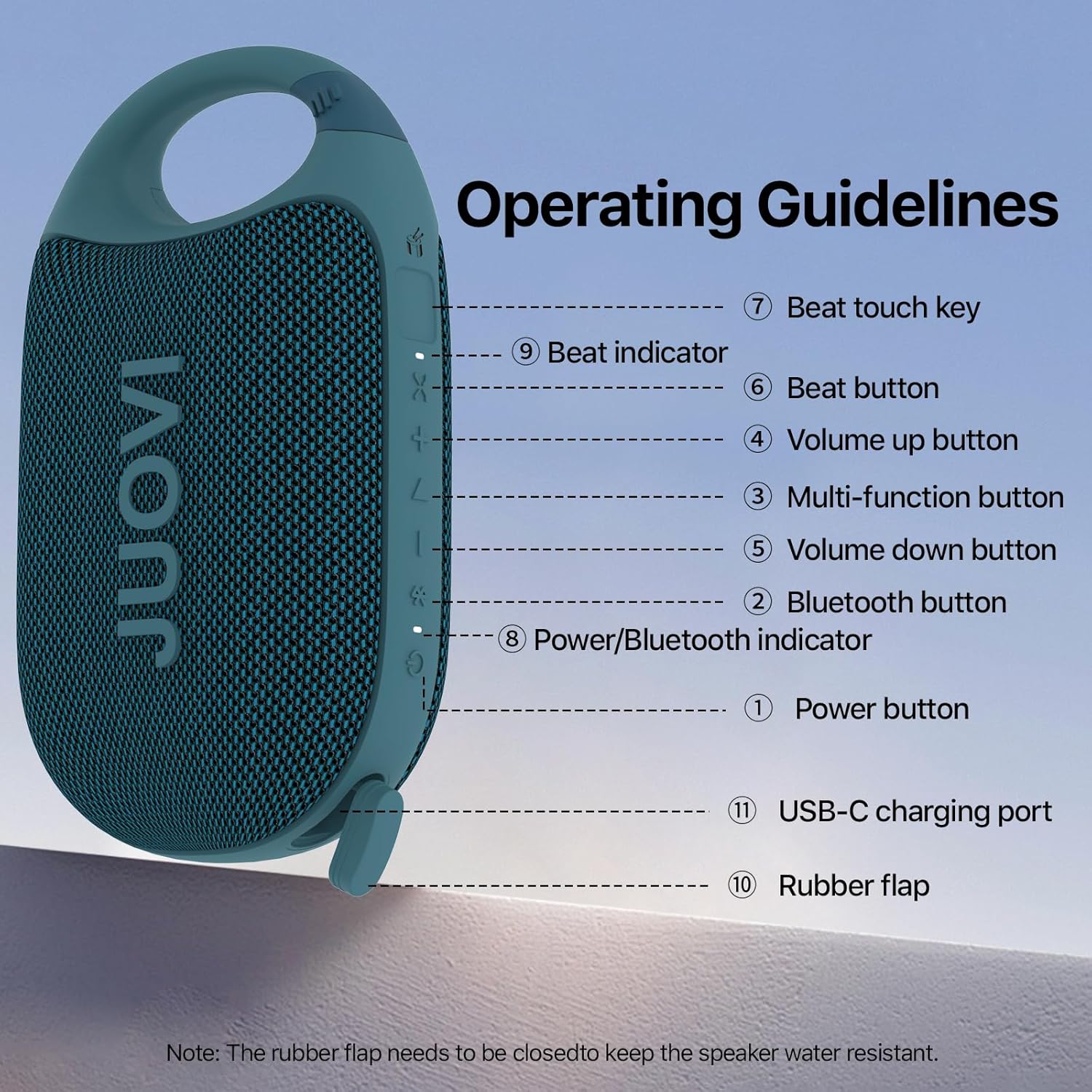
Figure 4: Operating Guidelines and Button Layout.
| ปุ่ม/การดำเนินการ | การทำงาน |
|---|---|
| Power Button (1) - Long Press (2s) | เปิด/ปิดเครื่อง |
| Bluetooth Button (2) - Short Press | Pairing Connected/Disconnected |
| Bluetooth Button (2) - Long Press (2s) | Stereo Link Function On/Off |
| Multi-function Button (3) - Short Press | เล่น/หยุดเพลง |
| Multi-function Button (3) - Twice Press | เพลงต่อไป |
| Multi-function Button (3) - Third Press | เพลงก่อนหน้า |
| Volume Up Button (4) - Short Press | เพิ่มปริมาณ |
| Volume Down Button (5) - Short Press | ลดปริมาณ |
| Beat Button (6) - Short Press | Beat On/Off |
| Beat Button (6) - Long Press (1s) | Beat Mode Switching |
| Beat Touch Key (7) | Activates Beat Sound |
2. Beat Mode and App Control
The JUOVI CLIP J1 features a unique Beat Mode that generates dynamic sound variations. You can sync beats to your music or create standalone rhythms. For enhanced customization, download the JUOVI GO app. The app allows you to:
- Access 20 high-fidelity instrument sounds.
- Freely layer sounds with beat modes.
- Customize your listening experience through the app's smart EQ, adjusting for crisp, mellow, rich, or personalized sound.

Figure 5: Customize sound and beats via the JUOVI GO app.
การซ่อมบำรุง
1. การดูแลรักษากันน้ำและกันฝุ่น
The speaker is IP68-rated, meaning it withstands splashes, submersion, and heavy rain. To maintain its waterproof integrity, ensure the rubber flap covering the USB-C charging port is securely closed at all times when not charging.

Figure 6: Speaker demonstrating IP68 waterproof capability.
2. การทำความสะอาด
เช็ดลำโพงด้วย d . นุ่มๆamp ผ้า. อย่าใช้สารเคมีที่รุนแรงหรือน้ำยาทำความสะอาดที่มีฤทธิ์กัดกร่อน
3. การจัดเก็บ
Store the speaker in a cool, dry place away from direct sunlight and extreme temperatures. If storing for an extended period, charge the battery periodically to prolong its lifespan.
การแก้ไขปัญหา
- ลำโพงไม่เปิดใช้งาน: ตรวจสอบให้แน่ใจว่าแบตเตอรี่ชาร์จเต็มแล้ว เชื่อมต่อกับแหล่งจ่ายไฟโดยใช้สาย USB-C
- ไม่สามารถเชื่อมต่อผ่านบลูทูธได้: Make sure the speaker is in pairing mode (blinking indicator). Check that Bluetooth is enabled on your device and it's within 10 meters of the speaker. Try restarting both the speaker and your device.
- ไม่มีเสียง: ตรวจสอบระดับเสียงทั้งบนลำโพงและอุปกรณ์ที่เชื่อมต่อ ตรวจสอบให้แน่ใจว่าลำโพงจับคู่สำเร็จแล้ว
- คุณภาพเสียงไม่ดี: เลื่อนลำโพงให้ใกล้กับอุปกรณ์ของคุณมากขึ้นเพื่อลดการรบกวน ตรวจสอบให้แน่ใจว่าไม่มีสิ่งกีดขวางระหว่างลำโพงและอุปกรณ์ของคุณ
- Stereo pairing not working: Ensure both speakers are not connected to any other device before attempting TWS pairing. Follow the TWS pairing instructions carefully.
ข้อมูลจำเพาะ
| คุณสมบัติ | รายละเอียด |
|---|---|
| ชื่อรุ่น | เจ 6301 |
| ยี่ห้อ | จูโอวี |
| เทคโนโลยีการเชื่อมต่อ | บลูทูธ |
| เทคโนโลยีการสื่อสารไร้สาย | บลูทูธ |
| ช่วงบลูทูธ | 10 เมตร |
| ประเภทลำโพง | กลางแจ้งและในร่ม |
| คุณสมบัติพิเศษ | Dustproof, Portable, Shockproof, Stereo Pairing, Waterproof |
| ระดับความต้านทานต่อน้ำ | กันน้ำ (IP68) |
| แหล่งพลังงาน | ใช้พลังงานจากแบตเตอรี่ |
| ความจุของแบตเตอรี่ | 1800 มิลลิวินาทีamp ชั่วโมง |
| เวลาในการชาร์จ | 3.5 ชั่วโมง |
| เวลาเล่น | นานถึง 24 ชั่วโมง |
| กำลังขับสูงสุดของลำโพง | 8 วัตต์ |
| โหมดเอาต์พุตเสียง | โมโน (สเตอริโอพร้อม TWS) |
| อัตราส่วนสัญญาณต่อเสียงรบกวน | 90 เดซิเบล |
| การตอบสนองความถี่ | ความถี่ 20 กิโลเฮิรตซ์ |
| น้ำหนักสินค้า | 250.7 กรัม (8.8 ออนซ์) |
| ขนาดสินค้า | ลึก 5.43 นิ้ว x กว้าง 3.17 นิ้ว x สูง 2.07 นิ้ว |
| วัสดุ | พลาสติก |
| วิธีการควบคุม | แอปสัมผัส |
การรับประกันและการสนับสนุน
This product comes with a Limited Warranty. For detailed warranty information or technical support, please refer to the contact information provided in the packaging or visit the official JUOVI webเว็บไซต์.
วิดีโอผลิตภัณฑ์อย่างเป็นทางการ
วิดีโอ 1: ผลิตภัณฑ์อย่างเป็นทางการเสร็จสิ้นview of the JUOVI Clip Wireless Portable Bluetooth Speaker, showcasing คุณสมบัติและการออกแบบของมัน