
การแนะนำ
Thank you for choosing the Casio MWA-300H Series watch. This manual provides essential information regarding the setup, operation, and maintenance of your new timepiece. Please read this manual carefully to ensure proper use and to fully understand the features of your watch.
The Casio MWA-300H is an analog watch featuring a chronograph, 100-meter water resistance, and luminous hands for enhanced readability. It is designed for versatile wear, suitable for both daily use and recreational water activities.
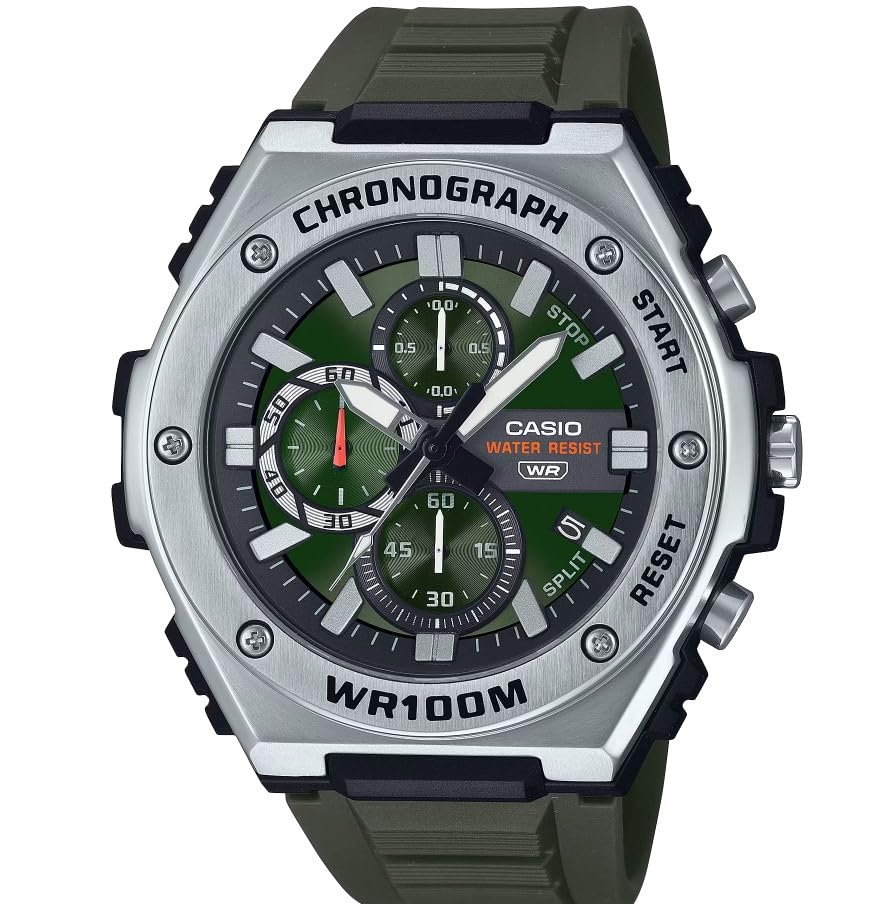
ภาพ: ด้านหน้า view of the Casio MWA-300H Series watch, highlighting its green dial, chronograph sub-dials, and black resin band.
Setup: Initial Settings
การตั้งเวลา
- Pull the crown out to the second click (time setting position). The second hand will stop.
- Rotate the crown to set the hour and minute hands. Ensure the AM/PM setting is correct if your watch has a 24-hour indicator or date changes at midnight.
- ดันเม็ดมะยมกลับเข้าที่เดิม เข็มวินาทีจะเดินต่อ
การตั้งวันที่
- Pull the crown out to the first click (date setting position).
- หมุนเม็ดมะยมเพื่อตั้งวันที่ หลีกเลี่ยงการตั้งวันที่ระหว่างเวลา 9:00 น. ถึง 1:00 น. เนื่องจากอาจรบกวนกลไกการเปลี่ยนวันที่อัตโนมัติได้
- ดันเม็ดมะยมกลับเข้าที่ตามปกติ
ข้อมูลแบตเตอรี่
Your Casio MWA-300H watch is powered by 1 LR44 battery, which is included. The battery life is approximately 3 years. When the battery runs low, the watch may exhibit irregular movement or stop. It is recommended to have the battery replaced by a qualified watch technician to maintain water resistance.
Operating: Watch Functions
การใช้โครโนกราฟ (นาฬิกาจับเวลา)
The chronograph function allows for precise timing of events. Your watch features a 1/10-second stopwatch that captures elapsed, split, and 1st/2nd place times across three dedicated sub-dials.
- Starting the Stopwatch: Press button A (typically the upper right button) to start the stopwatch.
- Stopping the Stopwatch: Press button A again to stop the stopwatch.
- Resetting the Stopwatch: After stopping, press button B (typically the lower right button) to reset the stopwatch hands to zero.
- การวัดเวลาแบบแยกส่วน: While the stopwatch is running, press button B to measure split times. The stopwatch hands will momentarily stop to indicate the split time, then resume timing. Press button B again to release the split time and display the current elapsed time.
Note: Refer to the specific button layout on your watch for exact button assignments.
Water Resistance (100 Meters)
Your Casio MWA-300H watch is water resistant up to 100 meters (330 feet). This rating means the watch is suitable for swimming, showering, and recreational water activities. It is not suitable for diving or snorkeling where significant water pressure changes occur.
- Do not operate the crown or buttons while the watch is wet or submerged.
- หลังจากนาฬิกาโดนน้ำเค็มแล้ว ให้ล้างด้วยน้ำจืดและเช็ดให้แห้ง
เข็มและเครื่องหมายเรืองแสง
The watch features luminous hands and markers that absorb light and glow in the dark, providing readability in low-light conditions. The intensity and duration of the glow depend on the amount and type of light exposure.
การซ่อมบำรุง
การดูแลทั่วไป
- ควรเช็ดนาฬิกาเป็นประจำด้วยผ้าแห้งเนื้อนุ่มเพื่อขจัดสิ่งสกปรกและความชื้น
- ควรหลีกเลี่ยงการนำนาฬิกาไปวางไว้ในที่ที่มีอุณหภูมิสูงหรือต่ำเกินไป แสงแดดโดยตรงเป็นเวลานาน หรือสนามแม่เหล็กแรงสูง
- Keep the watch away from solvents, detergents, perfumes, and cosmetics, as these can damage the resin materials.
การเปลี่ยนแบตเตอรี่
When the battery needs replacement, it is highly recommended to take your watch to an authorized Casio service center or a reputable watch repair shop. This ensures that the watch is properly sealed and its water resistance is maintained after battery replacement.
Water Resistance Checks
To maintain the water resistance of your watch, it is advisable to have it inspected periodically (e.g., every 2-3 years) by an authorized service center, especially if it is frequently exposed to water.
การแก้ไขปัญหา
| ปัญหา | สาเหตุที่เป็นไปได้ | สารละลาย |
|---|---|---|
| Watch hands do not move or move irregularly. | แบตเตอรี่อ่อน | เปลี่ยนแบตเตอรี่ ปรึกษาช่างซ่อมนาฬิกาผู้เชี่ยวชาญ |
| เวลาไม่ถูกต้อง | Time not set correctly; watch has stopped and restarted. | ตั้งเวลาใหม่ตามคำแนะนำในหัวข้อ "การตั้งเวลา" |
| วันที่เปลี่ยนเป็นเวลาเที่ยงวันแทนที่จะเป็นเที่ยงคืน | การตั้งค่า AM/PM ไม่ถูกต้อง | เลื่อนเวลาไปอีก 12 ชั่วโมง |
| เข็มนาฬิกาโครโนกราฟจะไม่รีเซ็ตกลับไปที่ศูนย์ | Chronograph hands misalignment. | Consult the full Casio module manual for chronograph hand adjustment procedures, or contact customer support. |
| มีความชื้นอยู่ภายในนาฬิกา | Crown or buttons operated underwater; seals compromised. | นำนาฬิกาไปที่ศูนย์บริการที่ได้รับอนุญาตเพื่อตรวจสอบและซ่อมแซมโดยทันที เพื่อป้องกันความเสียหายเพิ่มเติม |
ข้อมูลจำเพาะ
| ชื่อรุ่น | MWA-300H |
| ประเภทจอภาพ | อนาล็อก |
| ประเภทการเคลื่อนไหว | ควอตซ์ |
| ความลึกของการต้านทานน้ำ | 100 เมตร (330 ฟุต) |
| คุณสมบัติเพิ่มเติม | Chronograph, Date Display, Luminous Hands |
| แหล่งพลังงาน | ใช้พลังงานจากแบตเตอรี่ (มีแบตเตอรี่ LR44 จำนวน 1 ก้อนให้มาด้วย) |
| วัสดุตัวเรือน | เรซิน |
| วัสดุของวงดนตรี | เรซิน |
| วัสดุคริสตัล | เรซิน |
| เส้นผ่านศูนย์กลางตัวเรือน | 50.9 มิลลิเมตร |
| ความหนาของเคส | 14.3 มิลลิเมตร |
| ความกว้างของแถบ | 22 มิลลิเมตร |
| ประเภทตัวล็อค | หัวเข็มขัด |
การรับประกันและการสนับสนุน
การรับประกันแบบจำกัด
Your Casio MWA-300H watch comes with a limited warranty. Please refer to the warranty card included with your purchase for specific terms, conditions, and duration of coverage. The warranty typically covers manufacturing defects under normal use.
การสนับสนุนลูกค้า
For further assistance, technical support, or warranty claims, please contact Casio customer service. You can find contact information on the official Casio webตรวจสอบได้จากเว็บไซต์หรือเอกสารประกอบที่มาพร้อมกับนาฬิกาของคุณ
For more detailed information, including specific module operations or advanced settings, please visit the official Casio support website or refer to the full module manual for your watch.