
1. บทนำและเรื่องอื่นๆview
The AIYIMA S700 Active Bluetooth Bookshelf Speakers are designed to deliver a rich and immersive audio experience for your home entertainment system. These 2.0 channel powered speakers feature a sophisticated acoustic design, including a 3.5-inch silk dome tweeter and a 5.25-inch fiberglass mid-bass driver, ensuring clear highs and powerful, resonant bass. With multiple connectivity options such as Bluetooth 5.0, Optical, ARC, RCA, and USB, the S700 speakers offer versatile integration with various devices, including TVs, PCs, smartphones, and home theater setups. An additional SUB output allows for easy connection to an external subwoofer for enhanced bass performance. Intuitive controls, including an infrared remote and on-speaker adjustments, along with three preset EQ modes, provide a customizable listening experience tailored to your preferences.
2. ข้อมูลด้านความปลอดภัย
โปรดอ่านคำแนะนำด้านความปลอดภัยทั้งหมดอย่างละเอียดก่อนใช้ผลิตภัณฑ์นี้ เก็บคู่มือนี้ไว้เพื่อใช้อ้างอิงในอนาคต
- Do not expose the speakers to rain, moisture, or extreme temperatures.
- ตรวจสอบให้แน่ใจว่ามีการระบายอากาศที่เหมาะสมรอบลำโพงเพื่อป้องกันความร้อนสูงเกินไป
- ห้ามปิดกั้นช่องระบายอากาศใดๆ
- ใช้เฉพาะอะแดปเตอร์ไฟฟ้าที่มาพร้อมกับเครื่องเท่านั้น
- ห้ามเปิดฝาครอบลำโพง ไม่มีชิ้นส่วนใดภายในที่ผู้ใช้สามารถซ่อมแซมได้เอง โปรดส่งซ่อมโดยช่างผู้ชำนาญการเท่านั้น
- Keep the speakers away from strong magnetic fields.
- Avoid placing the speakers on unstable surfaces where they might fall.
- ถอดปลั๊กไฟออกในระหว่างที่มีพายุฝนฟ้าคะนองหรือเมื่อไม่ได้ใช้งานเป็นเวลานาน
3. เนื้อหาบรรจุภัณฑ์
Carefully unpack the box and ensure all items listed below are present and in good condition:
- AIYIMA S700 Bookshelf Speakers (1 pair)
- รีโมทคอนโทรล
- สายดิจิตอลออฟติคอล
- อะแดปเตอร์แปลงไฟ
- สาย RCA เป็น RCA
- คู่มือการใช้งาน
4. คุณสมบัติของผลิตภัณฑ์
- 2-Way Powered Speaker System: Features a 3.5-inch silk dome tweeter for clear high frequencies and a 5.25-inch fiberglass mid-bass driver for deep, resonant bass, ideal for both music and movies.
- ตัวเลือกการป้อนข้อมูลหลายรายการ: Equipped with Bluetooth 5.0 for stable wireless connections, and supports Optical, ARC (Audio Return Channel), RCA, and USB inputs for versatile connectivity with various home theater and audio devices.
- เอาต์พุต SUB: Allows for easy connection to an external subwoofer, further enhancing the bass experience and enabling a 2.1 channel audio system.
- การควบคุมที่เป็นมิตรกับผู้ใช้: Includes RGB/three-color LED status indicators for clear visual feedback, an infrared remote control, and intuitive buttons and a rotary knob on the speaker for effortless operation.
- Optimized Bass Design: Features a rear dual bass reflex port design with a downward-facing guide tube, ensuring consistent bass performance regardless of speaker placement.
- โหมด EQ 3 โหมด: Integrated BP1048B2 DSP chip provides professional-grade audio tuning. Choose from three preset sound modes—Music, Cinema, and Dialogue—to customize your listening experience for any content.
- การตั้งค่าแบบง่ายๆ: Designed for easy installation with clear instructions and complete accessories included.
5. สินค้าหมดview

รูปที่ 5.1 : ด้านหน้า view of the AIYIMA S700 Bookshelf Speakers with the included remote control.
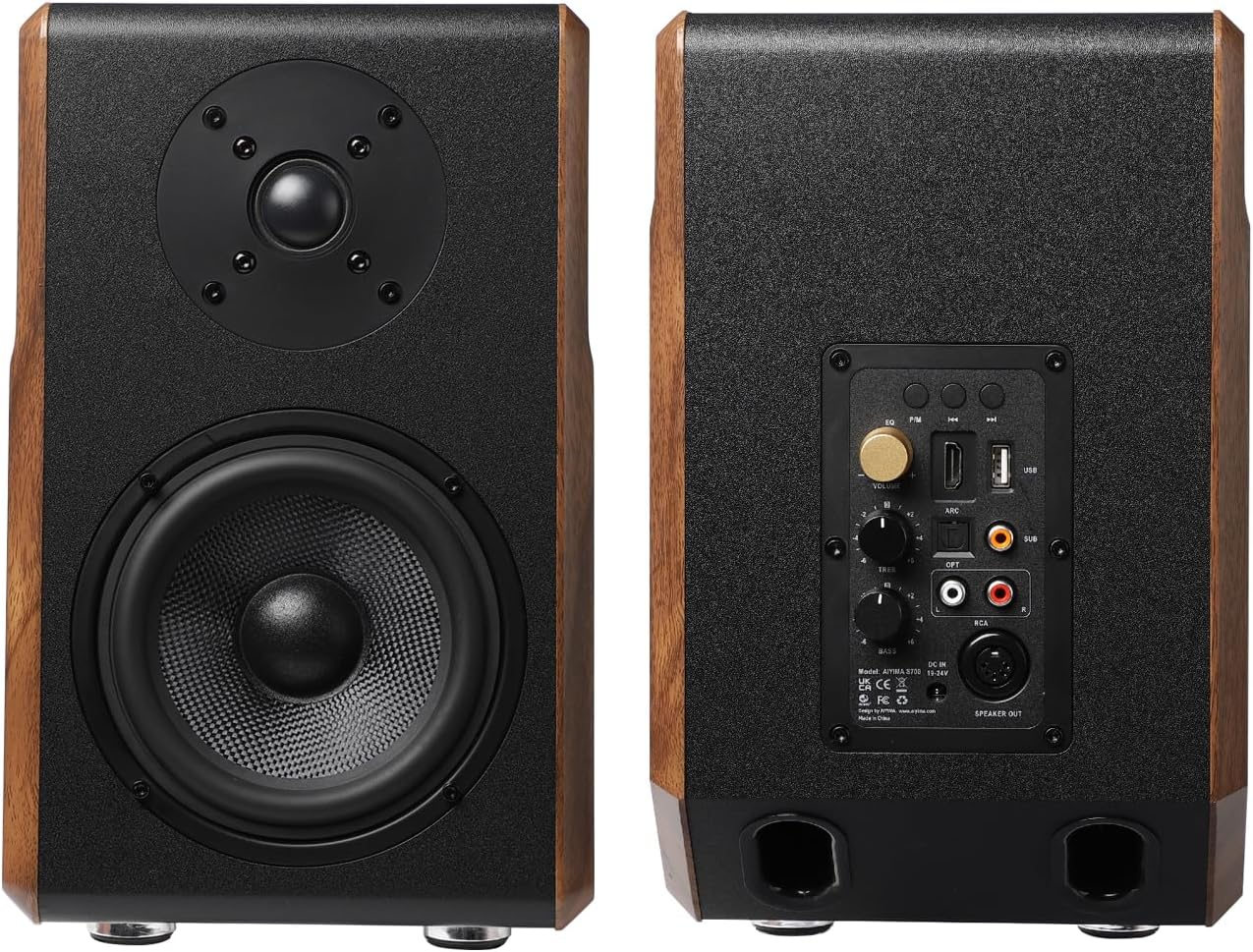
รูปที่ 5.2: ด้านหน้าและด้านหลัง views of the AIYIMA S700 Bookshelf Speakers, showing the control panel and ports on the back of the right speaker.

Figure 5.3: Detailed diagram illustrating the various controls and input/output ports on the AIYIMA S700 speakers, including ARC, USB, SUB output, Optical, RCA, power input, bass control, and treble control.

Figure 5.4: Illustration of the Dual Inverted-phase Hole Design, showing the downward-facing guide tubes for enhanced bass performance.

รูปที่ 5.5: ระยะใกล้ view of the internal BP1048B2 DSP processing chip and the Bluetooth 5.0 chip, highlighting the advanced audio technology.

รูปที่ 5.6: อดีตample setup of the AIYIMA S700 speakers providing 2.0 channel stereo sound with a laptop.

รูปที่ 5.7: รายละเอียด view of the 3.5-inch silk film treble speaker, designed for high-frequency range up to 30KHz.

รูปที่ 5.8: รายละเอียด view of the 5.25-inch fiberglass bass/midrange speaker, capable of strong bass dive capability down to 38Hz.

รูปที่ 5.9: อดีตample setup of the AIYIMA S700 speakers integrated into a 2.1 channel audio system with an external subwoofer and TV.
6. การตั้งค่า
6.1 การจัดวางลำโพง
For optimal stereo imaging, place the speakers at an equal distance from your listening position, forming an equilateral triangle. Ensure the right speaker (the one with the control panel and power input) is on the right side of your setup.
6.2 การเชื่อมต่อลำโพง
- Connect the included 5-pin DIN cable from the 'SPEAKER OUT' port on the back of the right (active) speaker to the corresponding input on the left (passive) speaker.
- บันทึก: The provided inter-speaker cable is approximately 1.5 meters (5 feet) long. If you require greater separation between the speakers, a longer compatible 5-pin DIN cable can be purchased separately.
6.3 การเชื่อมต่อกับแหล่งจ่ายไฟ
- Connect the power adapter to the 'Power input (DC19V-24V)' port on the back of the right speaker.
- เสียบอะแดปเตอร์ไฟฟ้าเข้ากับเต้ารับไฟฟ้าที่เหมาะสม
6.4 การเชื่อมต่อแหล่งเสียง
The AIYIMA S700 offers multiple input options:
- บลูทูธ: Power on the speakers. The LED indicator will show the current input mode. Select Bluetooth mode using the remote or the input selection button on the speaker. On your device (smartphone, tablet, PC), search for 'AIYIMA S700' in the Bluetooth settings and pair.
- ออปติคอล: Connect an optical cable (included) from your audio source (e.g., TV, game console) to the 'OPT input' on the speaker. Select Optical mode.
- ARC (ช่องสัญญาณเสียงกลับ): Connect an HDMI cable from your TV's HDMI ARC port to the 'ARC input' on the speaker. Ensure your TV's ARC function is enabled. Select ARC mode.
- อาร์ซีเอ: Use the included RCA to RCA cable to connect your audio source (e.g., DVD player, turntable) to the 'RCA input' on the speaker. Select RCA mode.
- ยูเอสบี: เชื่อมต่อไดรฟ์ USB ที่มีไฟล์เสียง files to the 'USB input' on the speaker. The speaker will automatically detect and play compatible audio files. Select USB mode.
- เอาต์พุต SUB: To connect an external active subwoofer, use an RCA cable from the 'SUB output' on the speaker to the input on your subwoofer.
7. คู่มือการใช้งาน
7.1 เปิด/ปิดเครื่อง
Press the power switch/input selection button on the rear panel of the right speaker or the 'POWER' button on the remote control to turn the speakers on or off.
7.2 การเลือกอินพุต
Press the 'Input selection' button on the rear panel or the corresponding input buttons (BT, OPT, ARC, RCA, USB) on the remote control to switch between audio sources. The RGB/three-color LED indicator will change to reflect the active input.
7.3 การควบคุมระดับเสียง
Adjust the master volume using the 'Volume control' rotary knob on the rear panel of the right speaker or the 'VOL+' and 'VOL-' buttons on the remote control.
7.4 การควบคุมเสียงเบสและเสียงแหลม
Fine-tune the audio output using the dedicated 'Bass control' and 'Treble control' rotary knobs located on the rear panel of the right speaker. Turn clockwise to increase and counter-clockwise to decrease.
โหมดอีควอไลเซอร์ 7.5 โหมด
The S700 features three preset EQ modes to optimize sound for different content types. Press the 'Music', 'Cinema', or 'Dialogue' buttons on the remote control to switch between modes:
- โหมดเพลง: โปรเสียงสมดุลfile suitable for general music listening.
- โหมด Cinema: Enhanced bass and surround effects for movies and cinematic content.
- โหมดการสนทนา: Optimizes vocal clarity, ideal for news, podcasts, or TV shows with heavy dialogue.
7.6 ฟังก์ชั่นการควบคุมระยะไกล
The remote control provides convenient access to all speaker functions:
- พลัง: เปิด/ปิดลำโพง
- ใบ้: ปิด/เปิดเสียง
- ฉบับ+/ฉบับ-: Adjusts volume up/down.
- ก่อนหน้า/ถัดไป: Skips to previous/next track (USB/Bluetooth mode).
- เล่น/หยุดชั่วคราว: Plays/pauses audio (USB/Bluetooth mode).
- BT/OPT/ARC/RCA/USB: ปุ่มเลือกอินพุตโดยตรง
- MUSIC/CINEMA/DIALOGUE: EQ mode selection.
8. การบำรุงรักษา
Proper maintenance ensures the longevity and optimal performance of your AIYIMA S700 speakers.
- การทำความสะอาด: Use a soft, dry cloth to wipe the speaker surfaces. Do not use liquid cleaners, aerosols, or abrasive chemicals, as they may damage the finish.
- ฝุ่น: ควรปัดฝุ่นตะแกรงลำโพงและตัวขับเสียงเป็นประจำ โดยใช้แปรงขนนุ่มหรือเครื่องดูดฝุ่นที่มีหัวแปรง ปรับระดับความแรงต่ำ
- การจัดวาง: ควรหลีกเลี่ยงการวางลำโพงในที่ที่มีแสงแดดส่องโดยตรง ใกล้แหล่งความร้อน หรือในบริเวณที่มีความชื้นสูง
- พื้นที่จัดเก็บ: หากจะจัดเก็บลำโพงเป็นเวลานาน ควรถอดปลั๊กออกและเก็บไว้ในที่แห้งและเย็น โดยควรอยู่ในบรรจุภัณฑ์เดิม
9 การแก้ไขปัญหา
If you encounter any issues with your AIYIMA S700 speakers, please refer to the following troubleshooting guide:
| ปัญหา | สาเหตุที่เป็นไปได้ | สารละลาย |
|---|---|---|
| ไม่มีเสียง | No power; Incorrect input selected; Volume too low; Cables not connected properly. | Ensure power adapter is connected and outlet is active. Select correct input source. Increase volume. Check all audio cables (inter-speaker, input source). |
| เสียงเพี้ยน | Volume too high; Source audio quality is poor; Cables are faulty or loose. | Reduce volume. Test with a different audio source. Check and re-seat all cables. |
| ปัญหาการจับคู่บลูทูธ | ลำโพงไม่ได้อยู่ในโหมดจับคู่; อุปกรณ์อยู่ไกลเกินไป; มีสัญญาณรบกวน | Ensure speakers are in Bluetooth mode and discoverable. Move device closer to speakers. Turn off other Bluetooth devices nearby. Try unpairing and re-pairing. |
| รีโมตคอนโทรลไม่ทำงาน | Batteries are dead; Obstruction between remote and speaker; Remote sensor blocked. | Replace batteries. Remove any obstructions. Ensure remote is pointed at the speaker's sensor. |
| Bass is too strong/overwhelming | Bass control set too high; Room acoustics. | Adjust the 'Bass control' knob on the rear panel counter-clockwise to reduce bass. Experiment with speaker placement to minimize bass resonance in the room. |
10. ข้อมูลจำเพาะ
| คุณสมบัติ | ข้อมูลจำเพาะ |
|---|---|
| ชื่อรุ่น | S700 |
| ประเภทลำโพง | ลำโพงวางบนชั้นวางหนังสือ |
| กำลังขับสูงสุดของลำโพง | 120 วัตต์ |
| การตอบสนองความถี่ | ความถี่ 20 กิโลเฮิรตซ์ |
| เทคโนโลยีการสื่อสารไร้สาย | บลูทูธ 5.0 |
| เทคโนโลยีการเชื่อมต่อ | ARC, Bluetooth, Optical, RCA, USB |
| โหมดเอาต์พุตเสียง | สเตอริโอ |
| อินพุต Voltage | 240 โวลต์ |
| ขนาดลำโพง | วูฟเฟอร์ขนาด 5.25 นิ้ว |
| ขนาดสินค้า | ลึก 23 นิ้ว x กว้าง 10.4 นิ้ว x สูง 15 นิ้ว |
| น้ำหนักสินค้า | 19.06 ปอนด์ |
| สี | สีน้ำตาล |
| วิธีการควบคุม | ระยะไกล |
| อุปกรณ์ที่รองรับ | Desktop, Home Theater, Smartphone, Tablet, Television |
| คุณสมบัติพิเศษ | ARC, Bass Boost, Optical, Stereo Pairing, USB Port |
| ส่วนประกอบที่รวมอยู่ | Bookshelf speakers, Digital Optical Cable, Power Adapter, User Manual, RCA to RCA cable, Remote |
| ผู้ผลิต | ยี่หม่า เทค |
| วันที่พร้อมใช้งานครั้งแรก | วันที่ 24 ธันวาคม 2024 |
11. การรับประกันและการสนับสนุน
The AIYIMA S700 Active Bluetooth Bookshelf Speakers come with a full manufacturer's warranty. For specific details regarding the warranty period and coverage, please refer to the warranty card included in your package or contact AIYIMA customer support.
การสนับสนุนลูกค้า
If you have any questions, require technical assistance, or need to claim warranty service, please contact AIYIMA customer support through their official website or the contact information provided in your product documentation. When contacting support, please have your product model (S700) and purchase details ready.
For more information and updates, you may visit the official AIYIMA store: AIYIMA Store on Amazon