
การแนะนำ
This manual provides essential information for the setup, operation, and maintenance of your new VW 80 cm (32 inches) Pro Series HD Ready Smart QLED Google TV, model VW32GQ1. Please read these instructions carefully before using the television to ensure proper functionality and safety. Keep this manual for future reference.
มีอะไรอยู่ในกล่อง
ตรวจสอบว่าบรรจุภัณฑ์มีส่วนประกอบทั้งหมด:
- 1 x VW 80 cm (32 inches) Pro Series HD Ready Smart QLED Google TV
- ฐานตั้งโต๊ะ 2 ชิ้น
- 1 x วงเล็บยึดผนัง
- 1 x รีโมทคอนโทรล
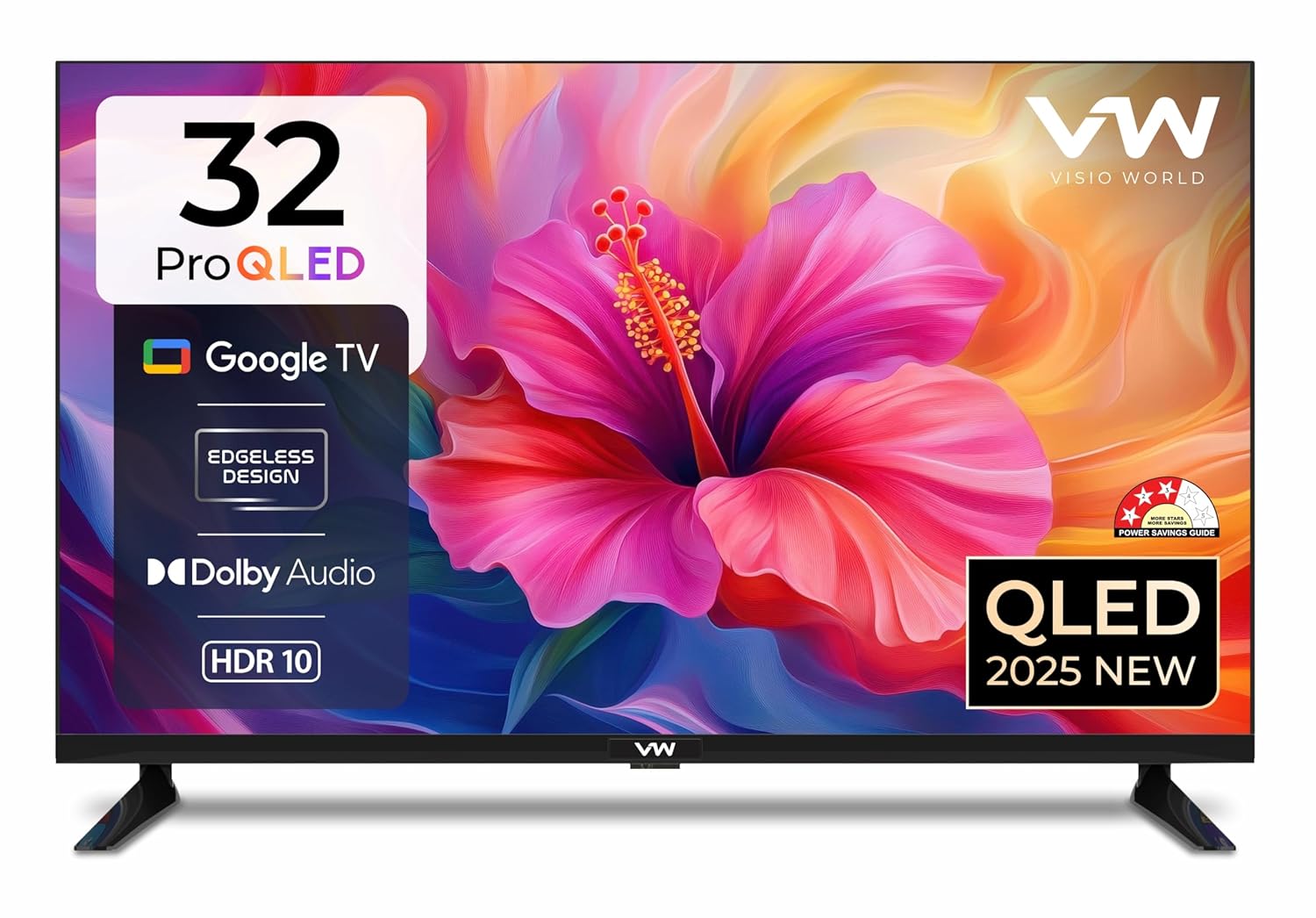
ภาพ: ด้านหน้า view of the VW 32-inch Pro Series QLED Google TV. This image displays the television with its bezel-less design and the 'VW Visio World' logo at the bottom center.
การตั้งค่า
ตัวเลือกการติดตั้ง
Your television offers two primary mounting options: table-top placement using the included stand bases or wall mounting using the provided bracket.
วิธีการติดตั้งขาตั้งโต๊ะ:
- วางหน้าจอทีวีลงบนพื้นผิวที่นุ่มและเรียบอย่างระมัดระวังเพื่อป้องกันความเสียหาย
- ติดฐานขาตั้งโต๊ะทั้งสองชิ้นเข้ากับช่องที่กำหนดไว้ที่ด้านล่างของทีวี ตรวจสอบให้แน่ใจว่าได้ยึดแน่นด้วยสกรูที่ให้มา
- ค่อยๆ ยกทีวีขึ้นแล้ววางลงบนพื้นผิวที่มั่นคงและเรียบเสมอกัน
การติดตั้งแบบติดผนัง:
For wall mounting, it is recommended to seek professional assistance. Ensure the wall can support the TV's weight (approximately 6 kg) and that the wall mount is installed according to its specific instructions.
การเปิดเครื่องครั้งแรกและการกำหนดค่า
- เชื่อมต่อสายไฟเข้ากับทีวีแล้วจึงเสียบเข้ากับเต้ารับไฟฟ้า
- กดปุ่มเปิดปิดบนรีโมทคอนโทรลหรือบนทีวีโดยตรง
- Follow the on-screen instructions to complete the initial setup, which includes language selection, network connection (Wi-Fi or Ethernet), and Google account sign-in for Google TV features.

ภาพ: Diagram illustrating the dimensions of the VW 32-inch TV. The diagram shows the height (44.1cm/17.36in), length (73.9cm/29.09in), and base width (16.8cm/6.61in) of the television.
คำแนะนำการใช้งาน
เปิด/ปิดเครื่อง
กดปุ่ม พลัง button on the remote control to turn the TV on or off. A short press will put the TV into standby mode, while a long press may offer power-off options.
การนำทาง
ใช้ปุ่มควบคุมทิศทาง (ขึ้นลงซ้ายขวา) และ OK button on the remote to navigate through menus and select options on the Google TV interface.
Accessing Google TV
The TV boots directly into the Google TV interface, providing personalized content recommendations, access to installed apps, and a watchlist. Use the บ้าน button on the remote to return to the main Google TV screen at any time.

ภาพ: Screenshot of the Google TV interface displayed on the VW Smart TV. The screen shows various streaming applications like Netflix, YouTube, Prime Video, and Disney+Hotstar, along with content recommendations.
การเชื่อมต่อ
The VW32GQ1 TV offers a range of connectivity options for various devices:
- พอร์ต HDMI (x2): Connect devices such as set-top boxes, gaming consoles, laptops, or Blu-ray players.
- พอร์ต USB (x1): เชื่อมต่ออุปกรณ์จัดเก็บข้อมูล USB สำหรับการเล่นสื่อ
- พอร์ตอีเธอร์เน็ต: เพื่อการเชื่อมต่ออินเตอร์เน็ตแบบมีสายที่เสถียร
- อินพุต AV: เชื่อมต่ออุปกรณ์รุ่นเก่าโดยใช้สายวิดีโอคอมโพสิตและสายเสียงสเตอริโอ
- อินพุต RF: สำหรับเชื่อมต่อเสาอากาศหรือเคเบิลทีวี
- เอาท์พุตหูฟัง: สำหรับการฟังส่วนตัว
- Wi-Fi ดูอัลแบนด์: Supports 2.4 GHz and 5 GHz networks for wireless internet access.
- Bluetooth 5.0: เชื่อมต่อหูฟังไร้สาย ลำโพงซาวด์บาร์ หรืออุปกรณ์เสริมอื่นๆ ที่รองรับบลูทูธ
- Googlecast/Fastcast: Wirelessly cast content from compatible smartphones or tablets to the TV.

ภาพ: Diagram illustrating the multiple connectivity ports and wireless features of the VW Smart TV. It highlights USB, HDMI, RF IN, AV IN, Network, Digital Audio Output (Optical), Ethernet, Google Cast, Bluetooth 5.0, and Dual Band WiFi.
คุณสมบัติของสมาร์ททีวี
Your VW32GQ1 TV is powered by Google TV, offering a range of intelligent features:
- อินเทอร์เฟซ Google TV: Provides a personalized home screen with content recommendations based on your viewนิสัย.
- คำแนะนำเนื้อหา: Discover new movies and shows across your streaming services.
- รายการเฝ้าดู: Add content to your watchlist from various apps for later viewการไอเอ็นจี
- Personal & Kids Profiles: สร้างมืออาชีพรายบุคคลfiles for tailored experiences and parental controls.
- ผู้ช่วย Google: ใช้คำสั่งเสียงผ่านรีโมทคอนโทรลเพื่อค้นหาเนื้อหา ควบคุมอุปกรณ์สมาร์ทโฮม และรับข้อมูล
- แอพที่ติดตั้งล่วงหน้า: Quick access hotkeys for Netflix, Prime Video, YouTube, and Disney+Hotstar on the remote.
- โปรเซสเซอร์ควอดคอร์: ช่วยให้การทำงานราบรื่นและโหลดแอปได้อย่างรวดเร็ว
- หน่วยความจำและการจัดเก็บ: Equipped with 1 GB RAM and 8 GB internal storage for apps and system data.
คุณสมบัติการแสดงผล
Experience clear and vibrant visuals with the VW32GQ1's display technology:
- HD Ready Resolution (1366x768): Provides clear picture quality.
- 60 Hertz Refresh Rate: Ensures smooth motion for standard content.
- กว้าง 178 องศา Viewอิงมุม: Consistent picture quality from various positions.
- QLED with 10-bit Panel: Delivers enhanced color volume and accuracy.
- ดีไซน์ไร้ขอบ: เพิ่มพื้นที่หน้าจอให้มากที่สุดเพื่อประสบการณ์การรับชมที่สมจริง viewการสร้างประสบการณ์
- รองรับ HDR10: Provides improved contrast and color detail in compatible content.
- 1 Billion Colours: Capable of displaying a wide spectrum of colors.
- ALLM (โหมดเวลาแฝงต่ำอัตโนมัติ): ลดความหน่วงในการป้อนข้อมูลเพื่อประสบการณ์การเล่นเกมที่ราบรื่นยิ่งขึ้น
- MEMC (การประมาณการเคลื่อนไหว, การชดเชยการเคลื่อนไหว): Enhances motion clarity in fast-paced scenes.

ภาพ: Visual representation of the VW Smart TV's QLED display capabilities, highlighting DCI-P3 94% color gamut, Google Cast, ALLM, Dolby Audio, Google Assistant, Google Photos, Realtek processor, and HDR10 support.
คุณสมบัติด้านเสียง
The VW32GQ1 TV is equipped with audio features designed for clear sound:
- เอาต์พุต 30 วัตต์: จัดเตรียมให้ ample sound volume for typical room environments.
- High Fidelity Speakers: Designed for clear audio reproduction.
- การรองรับระบบเสียง Dolby: Enhances sound quality for a more immersive experience.
- 5 Sound Modes: Choose from Standard, Speech, Music, Stadium, and User modes to optimize audio for different content types.
รีโมทคอนโทรล
The included remote control is designed for intuitive navigation and smart TV functions:
- ผู้ช่วยเสียง: Activate Google Assistant with a dedicated button for voice commands.
- ปุ่มลัด: Dedicated buttons for quick access to popular streaming services like Netflix, Prime Video, YouTube, and Disney+Hotstar.
- ปุ่มป้อนแหล่งที่มา: Easily switch between connected devices.
- ปุ่มทีวีสด: Access traditional broadcast television.
- เทคโนโลยี: Utilizes both IR and Bluetooth for reliable control.
- ความต้องการแบตเตอรี่: ต้องใช้แบตเตอรี่ 2 AA (ไม่รวม)

ภาพ: Diagram of the Google TV remote control, highlighting its smart functions. Features shown include 'Ok Google' for Google Voice Assistant, Live TV button, Input Source button, and hotkeys for Netflix, Prime Video, and YouTube.
การซ่อมบำรุง
การบำรุงรักษาอย่างถูกวิธีจะช่วยให้ทีวีของคุณมีอายุการใช้งานยาวนานและทำงานได้อย่างมีประสิทธิภาพ:
- การทำความสะอาดหน้าจอ: ใช้ผ้านุ่มไม่เป็นขุยที่ออกแบบมาสำหรับอุปกรณ์อิเล็กทรอนิกส์โดยเฉพาะ ห้ามใช้สารเคมีรุนแรงหรือน้ำยาทำความสะอาดที่มีฤทธิ์กัดกร่อน เช็ดเบาๆampหากจำเป็น ให้ชุบผ้าด้วยน้ำ แล้วเช็ดเบาๆ
- ทำความสะอาดร่างกาย: เช็ดกรอบและขาตั้งทีวีด้วยผ้าแห้งนุ่ม
- การระบายอากาศ : ตรวจสอบให้แน่ใจว่าอากาศไหลเวียนรอบทีวีได้เพียงพอ อย่าปิดกั้นช่องระบายอากาศ
- สายไฟ: ตรวจสอบสายไฟเป็นประจำเพื่อดูว่ามีการชำรุดเสียหายหรือไม่
การแก้ไขปัญหา
หากคุณประสบปัญหาเกี่ยวกับทีวี โปรดดูวิธีแก้ไขทั่วไปต่อไปนี้:
ไม่มีไฟฟ้า
- Ensure the power cord is securely plugged into both the TV and the power outlet.
- ตรวจสอบว่าเต้ารับไฟฟ้าใช้งานได้หรือไม่โดยเสียบอุปกรณ์อื่นเข้าไป
- ลองกดปุ่มเปิดปิดบนทีวีโดยตรง ไม่ใช่แค่ที่รีโมท
ไม่มีภาพ/เสียงจากอุปกรณ์ภายนอก
- ตรวจสอบว่าได้เลือกแหล่งสัญญาณเข้าที่ถูกต้องบนทีวี
- Check the HDMI or AV cables for secure connections.
- ตรวจสอบให้แน่ใจว่าอุปกรณ์ภายนอกเปิดใช้งานอยู่และทำงานได้อย่างถูกต้อง
รีโมตคอนโทรลไม่ทำงาน
- Replace the batteries in the remote control (requires 2 AA batteries).
- ตรวจสอบให้แน่ใจว่าไม่มีสิ่งกีดขวางระหว่างรีโมทและเซ็นเซอร์ IR ของทีวี
- For Bluetooth functions, ensure the remote is paired with the TV.
ปัญหาการเชื่อมต่อเครือข่าย
- รีสตาร์ทเราเตอร์ Wi-Fi ของคุณ
- Check the Wi-Fi settings on the TV to ensure the correct network is selected and the password is entered accurately.
- หากใช้สายอีเทอร์เน็ต โปรดตรวจสอบให้แน่ใจว่าเชื่อมต่อกับทีวีและเราเตอร์อย่างแน่นหนา
ข้อมูลจำเพาะ
| คุณสมบัติ | ข้อมูลจำเพาะ |
|---|---|
| ยี่ห้อ | VW |
| แบบอย่าง | VW32GQ1 |
| ขนาดหน้าจอ | 32 นิ้ว (80 ซม.) |
| เทคโนโลยีการแสดงผล | คิวแอลอีดี |
| ปณิธาน | ความละเอียดระดับ HD Ready (1366 x 768 พิกเซล) |
| อัตราการรีเฟรช | 60 เฮิรตซ์ |
| Viewอิงแองเกิล | 178 องศา |
| ระบบปฏิบัติการ | แอนดรอยด์ (กูเกิลทีวี) |
| ความจุของหน่วยความจำ | 8GB |
| แรม | 1GB |
| กำลังขับเสียง | 30 วัตต์ |
| เทคโนโลยีเสียง | ระบบเสียงดอลบี้ |
| การเชื่อมต่อ | Dual-band Wi-Fi, Bluetooth 5.0, 2x HDMI, 1x USB, Ethernet, AV, RF, Headphone |
| คุณสมบัติพิเศษ | Google TV, HDR-10, Wide Color Gamut, Voice Assistant Remote, ALLM, MEMC |
| ขนาดสินค้า (กxยxส) | 15 x 72 x 47 ซม. |
| น้ำหนักสินค้า | 6 กก. |
| แหล่งพลังงาน | AC |
| แบตเตอรี่รีโมทคอนโทรล | แบตเตอรี่ AA 2 ก้อน (ไม่รวม) |
การรับประกันและการสนับสนุน
Your VW television comes with a brand warranty. To avail warranty services, please retain your purchase invoice. For any technical assistance or service requests, refer to the contact information provided with your purchase documentation or visit the official VW support webเว็บไซต์.