
1. บทนำ
This manual provides essential information for the safe and efficient operation of your ZDSSY HY320MAX Mini Projector. Please read it thoroughly before using the device and retain it for future reference. The ZDSSY HY320MAX is a 1080P native mini projector featuring Android 13, built-in licensed applications, WiFi 6, Bluetooth 5.4, and automatic keystone correction, designed for versatile indoor and outdoor entertainment.
2. ข้อมูลด้านความปลอดภัย
- แหล่งจ่ายไฟ: ใช้เฉพาะอะแดปเตอร์ไฟฟ้าที่ให้มาเท่านั้น ตรวจสอบให้แน่ใจว่าระดับเสียงtage ตรงกับแหล่งจ่ายไฟในพื้นที่ของคุณ
- การระบายอากาศ : อย่าปิดกั้นช่องระบายอากาศ ตรวจสอบให้แน่ใจว่ามีอากาศถ่ายเทเพียงพอรอบ ๆ โปรเจ็กเตอร์เพื่อป้องกันความร้อนสูงเกินไป
- การสัมผัสของเหลว: ควรวางโปรเจคเตอร์ให้ห่างจากน้ำหรือของเหลวอื่นๆ ห้ามใช้งานในที่ชื้นแฉะamp สภาพแวดล้อม
- แหล่งความร้อน: ควรหลีกเลี่ยงการวางโปรเจ็กเตอร์ไว้ใกล้แหล่งความร้อน เช่น เครื่องทำความร้อน ช่องระบายความร้อน เตา หรือเครื่องใช้ไฟฟ้าอื่นๆ ที่สร้างความร้อน
- การปกป้องดวงตา: อย่ามองตรงเข้าไปในเลนส์โปรเจ็กเตอร์เมื่อลamp เปิดอยู่ เนื่องจากแสงที่สว่างเกินไปอาจทำให้ตาเมื่อยล้าหรือเกิดความเสียหายได้
- การทำความสะอาด: ถอดปลั๊กไฟก่อนทำความสะอาด ใช้ผ้าแห้งนุ่มๆ เช็ดทำความสะอาดภายนอก ส่วนเลนส์ ให้ใช้ผ้าเช็ดเลนส์โดยเฉพาะ
- การบริการ: อย่าพยายามให้บริการผลิตภัณฑ์นี้ด้วยตนเอง ส่งต่อการบริการทั้งหมดไปยังช่างบริการที่ผ่านการรับรอง
3. เนื้อหาบรรจุภัณฑ์
กรุณาตรวจสอบว่าสินค้าทั้งหมดมีอยู่และอยู่ในสภาพดีเมื่อแกะกล่อง:
- ZDSSY HY320MAX Mini Projector
- อะแดปเตอร์แปลงไฟ
- การควบคุมด้วยเสียงผ่าน Bluetooth
- คู่มือการใช้งาน
- สาย HDMI (อนุมานได้)
4. สินค้าหมดview
4.1 ส่วนประกอบของโปรเจ็กเตอร์
The ZDSSY HY320MAX Mini Projector features a compact design with essential components for ease of use.
- เลนส์ฉายภาพ: ฉายภาพลงบนหน้าจอหรือพื้นผิว
- ตะแกรงระบายอากาศ: Located on the sides or rear to dissipate heat.
- กำลังไฟเข้า: สำหรับการเชื่อมต่ออะแดปเตอร์ไฟฟ้า
- พอร์ต HDMI: For connecting external devices like gaming consoles or laptops.
- พอร์ต USB: สำหรับเชื่อมต่ออุปกรณ์จัดเก็บข้อมูล USB
- ตัวรับสัญญาณ IR: สำหรับรับสัญญาณจากรีโมทคอนโทรล
- ขาตั้งปรับได้: Allows for 180° flexible rotation for various projection angles.
4.2 การควบคุมระยะไกล
The included Bluetooth voice remote control allows for easy navigation and voice commands.
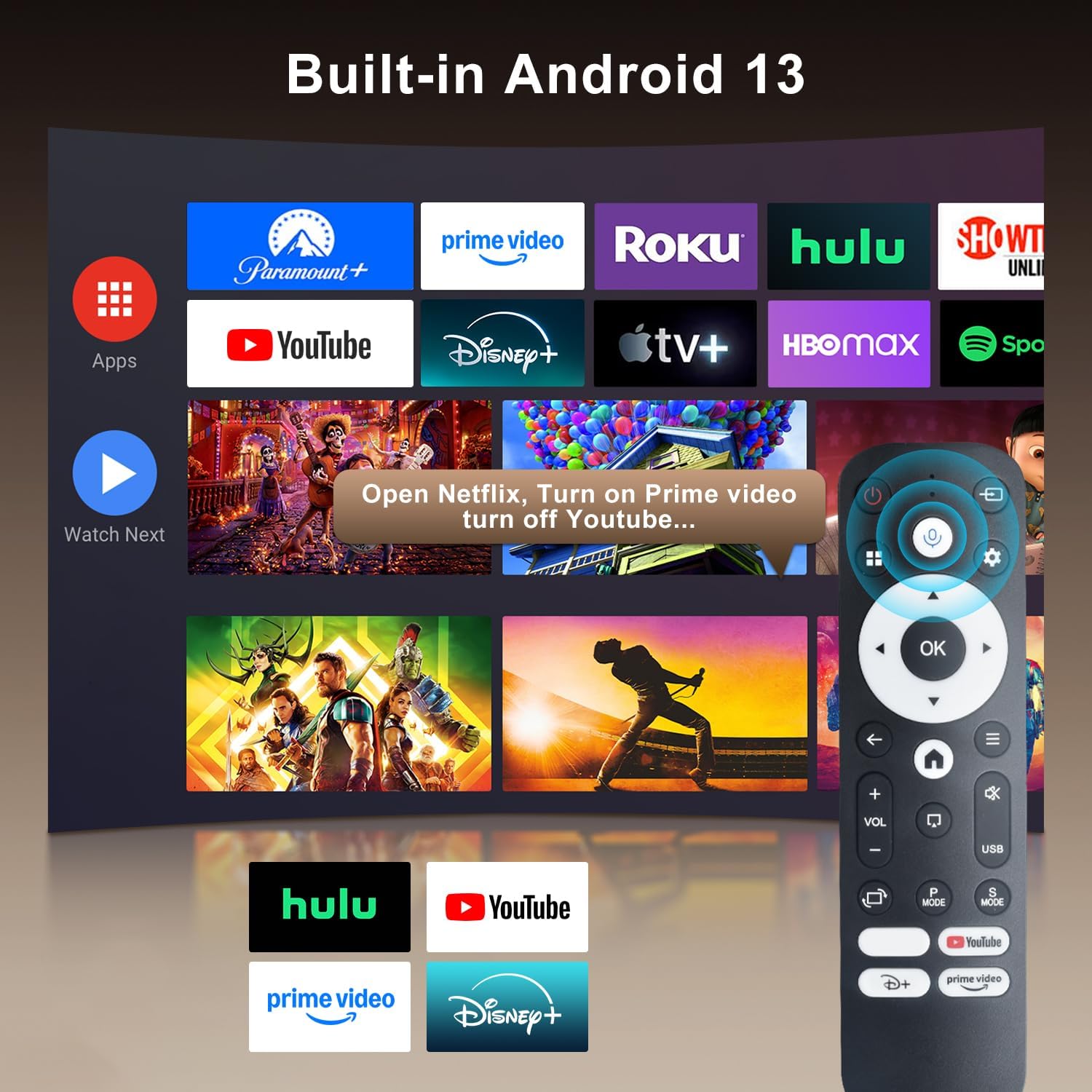
Image: The projector's interface showing built-in Android 13 apps and the Bluetooth voice remote control.
5. การตั้งค่า
5.1 การจัดวาง
Position the projector on a stable, flat surface. The 180° flexible rotation allows projection onto walls, ceilings, or floors. Ensure the projector is within the recommended throw distance of 1 to 6 meters for an optimal image size between 30 and 300 inches.

Image: The ZDSSY HY320MAX Mini Projector set up for an outdoor movie night, demonstrating its portability and flexible placement.
5.2 การเชื่อมต่อสายไฟ
ต่ออะแดปเตอร์แปลงไฟเข้ากับพอร์ตอินพุตไฟของโปรเจ็กเตอร์ จากนั้นเสียบอะแดปเตอร์เข้ากับเต้ารับไฟฟ้า
5.3 การเปิดเครื่องครั้งแรก
กดปุ่มเปิด/ปิดบนโปรเจ็กเตอร์หรือรีโมทคอนโทรลเพื่อเปิดเครื่อง โปรเจ็กเตอร์จะเริ่มทำงานและแสดงหน้าจอ Android 13
5.4 การแก้ไขโฟกัสและคีย์สโตน
The projector features AI Auto Keystone correction, which automatically adjusts the image to be rectangular even if the projector is placed at an angle. You can also use the 50%-100% zoom function to resize the screen without moving the projector.

Image: A visual representation of the projector's automatic keystone correction feature, ensuring a perfectly aligned picture.
5.5 การเชื่อมต่อเครือข่าย
Navigate to the settings menu to connect to a Wi-Fi network. The projector supports ultra-fast WiFi 6 for smooth streaming and lag-free gaming.

Image: The projector displaying content wirelessly, highlighting its WiFi 6 and Bluetooth 5.4 capabilities for smoother performance.
5.6 การจับคู่บลูทูธ
For enhanced audio, pair Bluetooth 5.4 compatible speakers or headphones with the projector through the settings menu.
6. คู่มือการใช้งาน
6.1 การนำทางอินเทอร์เฟซ
Use the directional buttons and 'OK' button on the remote control to navigate through the Android 13 interface. The 'Back' button returns to the previous screen, and the 'Home' button returns to the main menu.

Image: The ZDSSY HY320MAX projector's home screen, displaying various pre-installed streaming applications.
6.2 Using Built-in Apps
The projector comes with officially licensed apps such as Netflix, Prime Video, and YouTube pre-installed. Access these directly from the home screen. The built-in APP STORE allows you to download additional applications.
6.3 External Input Sources
Connect external devices via the HDMI or USB ports. Select the appropriate input source from the projector's menu to display content from these devices.
6.4 การมิเรอร์หน้าจอ
The projector supports screen mirroring from compatible smartphones (Android and iOS) over Wi-Fi. Refer to the on-screen instructions for connecting your device.

Image: A user mirroring their smartphone screen to the projector, demonstrating the wireless connectivity feature.
6.5 การควบคุมด้วยเสียง
Utilize the Bluetooth voice remote for hands-free control. Press and hold the microphone button on the remote, then speak your command (e.g., "Open Netflix," "ค้นหา ภาพยนตร์").

Image: The projector displaying a streaming service interface, with the remote control highlighting the voice assistant button and a voice command exampเล.
7. การบำรุงรักษา
- การทำความสะอาดเลนส์: Gently wipe the projector lens with a soft, lint-free cloth specifically designed for optical lenses. Avoid using abrasive materials or harsh chemicals.
- การทำความสะอาดภายนอก: Use a soft, dry cloth to clean the projector's exterior. Do not use liquid or aerosol cleaners.
- การระบายอากาศ : Regularly check that the ventilation grilles are free from dust and obstructions to ensure proper heat dissipation.
- พื้นที่จัดเก็บ: เมื่อไม่ได้ใช้งานเป็นเวลานาน ควรเก็บโปรเจ็กเตอร์ไว้ในที่แห้งและเย็น ป้องกันฝุ่นละอองและแสงแดดโดยตรง
8 การแก้ไขปัญหา
หากคุณพบปัญหาเกี่ยวกับโปรเจ็กเตอร์ของคุณ โปรดดูปัญหาทั่วไปและวิธีแก้ไขต่อไปนี้:
| ปัญหา | สาเหตุที่เป็นไปได้ | สารละลาย |
|---|---|---|
| ไม่มีไฟฟ้า | Power cable disconnected; Power outlet fault | ตรวจสอบให้แน่ใจว่าสายไฟเชื่อมต่ออย่างแน่นหนา ลองใช้เต้ารับไฟฟ้าอื่น |
| ไม่มีรูปภาพ | ไม่ได้เลือกแหล่งสัญญาณเข้า; ไม่ได้เชื่อมต่ออุปกรณ์ | Select correct input source (HDMI/USB); Ensure external device is connected and powered on. |
| ภาพเบลอ | ภาพไม่ชัด; มุมกล้องไม่ถูกต้อง | Allow Auto Keystone to adjust; Manually adjust focus if available. |
| ไม่มีเสียง | ระดับเสียงเบาเกินไป; ไม่ได้เชื่อมต่ออุปกรณ์เสียงภายนอก | Increase volume; Check Bluetooth connection for external speakers. |
| รีโมตไม่ตอบสนอง | Low battery; Not paired | Replace batteries; Re-pair the Bluetooth remote control. |
| ปัญหาการเชื่อมต่อ Wi-Fi | รหัสผ่านไม่ถูกต้อง; ปัญหาเกี่ยวกับเราเตอร์ | Verify Wi-Fi password; Restart your router and the projector. |
9. ข้อมูลจำเพาะ
Detailed technical specifications for the ZDSSY HY320MAX Mini Projector:
- ยี่ห้อ: ZDSSY
- ชื่อรุ่น : HY320MAX
- หมายเลขรุ่น: HY320MAX-US
- ความละเอียดการแสดงผล: Native 1920 x 1080 Pixels
- ความละเอียดการแสดงผลสูงสุด: 3840 x 2160 Pixels (4K Support)
- ประเภทจอภาพ: จอแอลซีดี
- ความสว่าง: 20000 Lumen (400 ANSI Lumens)
- อัตราส่วนคอนทราสต์: 10000:1 น.
- แหล่งกำเนิดแสง อายุการใช้งาน: 60000 ชั่วโมง
- เทคโนโลยีการเชื่อมต่อ: USB, HDMI, Built-In Wi-Fi (WiFi 6), Bluetooth 5.4
- วิธีการควบคุม: Remote Control, Voice
- การใช้ที่แนะนำ: ในร่ม/กลางแจ้ง
- ประเภทการติดตั้ง: Ceiling Mount/Table Mount/Wall Mount
- ระยะโยนขั้นต่ำ: 1 เมตร
- ระยะโยนสูงสุด: 6 เมตร
- Minimum Image Size: 30 นิ้ว
- ขนาดภาพสูงสุด: 300 นิ้ว
- เล่มที่tage: 110 โวลต์
- วัดtage: 70 วัตต์
- ขนาดรายการ (ยาว x กว้าง x สูง): ยาว 4.09 นิ้ว x กว้าง 3.98 นิ้ว x สูง 8.66 นิ้ว

Image: A comparison illustrating the native 1080P resolution and 4K support capabilities of the ZDSSY HY320MAX projector.
10. การรับประกันและการสนับสนุน
The ZDSSY HY320MAX Mini Projector comes with a รับประกัน 3 ปี. This warranty includes free parts replacement and lifelong technical support. For any warranty claims, technical assistance, or support inquiries, please contact ZDSSY customer service through the retailer where the product was purchased or refer to the contact information provided on the official ZDSSY webเว็บไซต์.