
การแนะนำ
This manual provides detailed instructions for the KZZI Z98 Wireless Mechanical Keyboard. It covers setup, operation, maintenance, and troubleshooting to ensure optimal performance and user experience. Please read this manual thoroughly before using your keyboard.
มีอะไรอยู่ในกล่อง
- Z98 Wireless Mechanical Keyboard
- ตัวดึงกุญแจ
- Replacement Switch (4 pieces)
- สาย USB
- ผ้าคลุมป้องกันฝุ่น
สินค้าเกินview
The KZZI Z98 keyboard features a 90% layout, smart display, multi-mode connectivity, and hot-swappable switches for a customizable and efficient typing experience.
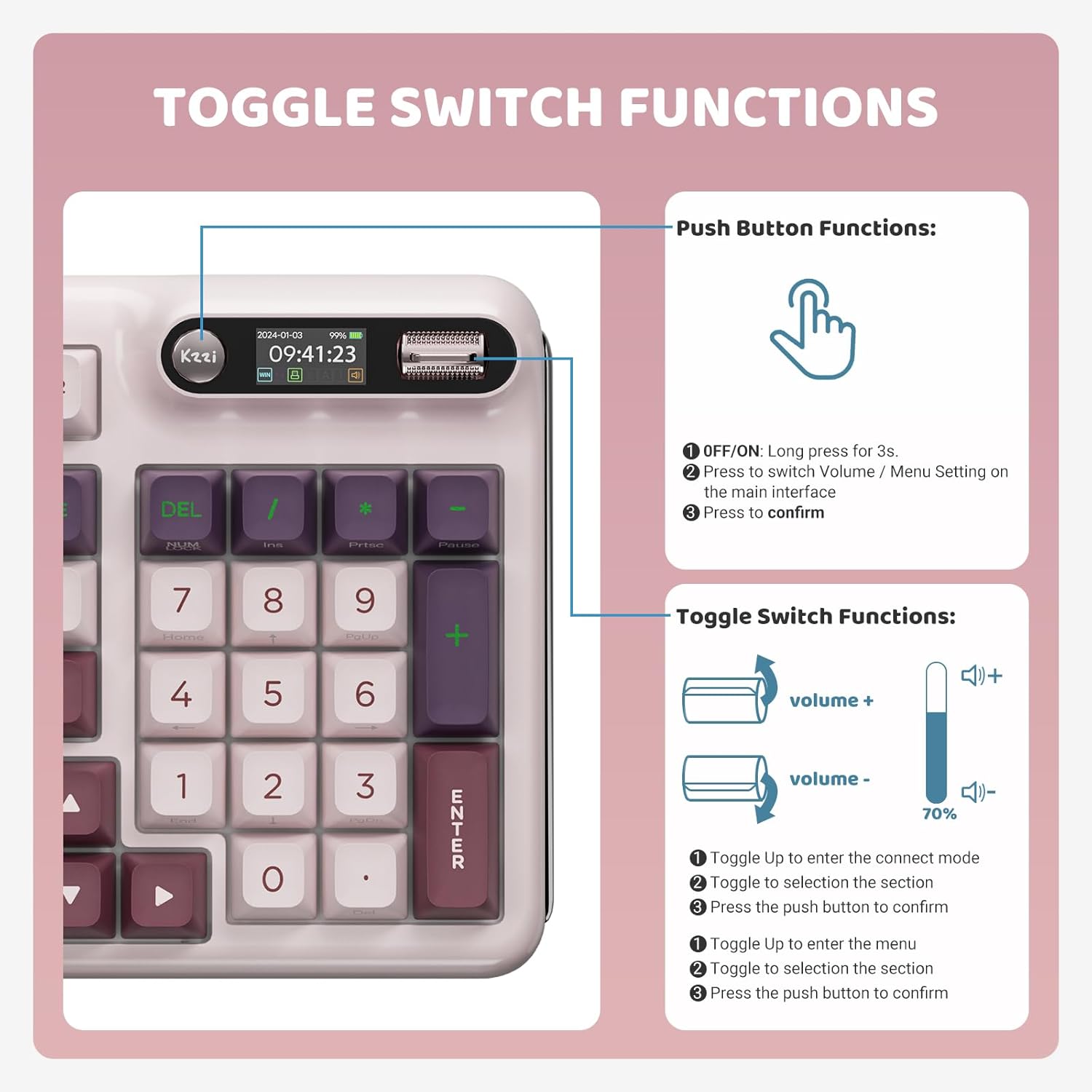
Image: KZZI Z98 Wireless Mechanical Keyboard showcasing เค้าโครงเต็มรูปแบบและแสงไฟ RGB
คำแนะนำการตั้งค่า
1. การเชื่อมต่อแบบมีสาย (USB-C)
- ค้นหาพอร์ต USB-C บนแป้นพิมพ์
- เชื่อมต่อสาย USB-C ที่ให้มาเข้ากับคีย์บอร์ดและปลายอีกด้านหนึ่งเข้ากับพอร์ต USB ของคอมพิวเตอร์ของคุณ
- ระบบของคุณจะตรวจจับแป้นพิมพ์โดยอัตโนมัติ
2. การเชื่อมต่อไร้สาย 2.4GHz
- Remove the 2.4GHz USB receiver from its storage slot on the keyboard.
- เสียบตัวรับสัญญาณ USB เข้ากับพอร์ต USB ที่พร้อมใช้งานบนคอมพิวเตอร์ของคุณ
- On the keyboard's smart display, use the knob to navigate to the connection settings and select the 2.4GHz mode. The display will show "2.4G Linking" and then "2.4G Success!" upon successful connection.

Image: The KZZI Z98 keyboard highlighting its three connection modes: Bluetooth 5.0, 2.4GHz wireless, and USB-C wired.
3. การเชื่อมต่อบลูทูธ 5.0
- On the keyboard's smart display, use the knob to navigate to the connection settings and select one of the Bluetooth channels (BT1, BT2, or BT3). The display will show "BT Linking".
- บนอุปกรณ์ของคุณ (พีซี แล็ปท็อป แท็บเล็ต สมาร์ทโฟน) เปิดใช้งาน Bluetooth และค้นหาอุปกรณ์ใหม่
- Select "Kzzi-Z98" from the list of available devices to pair. The keyboard display will show "BT Success!" once paired.
- The keyboard can store up to three different Bluetooth devices, allowing for seamless switching.
Video: Demonstrates the triple-mode connection process for the KZZI Z98 keyboard, including wired, 2.4GHz, and Bluetooth setup.
คำแนะนำการใช้งาน
1. Smart Display & Knob Functions
The integrated smart display and three-way knob provide quick access to keyboard settings and system information.
- ฟังก์ชั่นปุ่มกด:
- Press for 3 seconds to turn the keyboard ON/OFF.
- กดเพื่อสลับระหว่างการควบคุมระดับเสียงและการตั้งค่าเมนูบนหน้าจอหลัก
- กดเพื่อยืนยันการเลือกในเมนู
- ฟังก์ชั่นสวิตช์สลับ:
- Toggle up/down to adjust volume or navigate through menu options.
- Toggle up to enter the connect mode, then toggle to select a section, and press the push button to confirm.
- Toggle up to enter the menu, then toggle to select a section, and press the push button to confirm.

Image: Detailed diagram illustrating the functions of the toggle switch and push button on the KZZI Z98 keyboard's smart display.

Image: The smart digital screen of the KZZI Z98 keyboard showing different display options including Home, GIF image display, System Connection, RGB Mode & Color, RGB Brightness/Speed, and Volume.
2. การปรับแต่งแสง RGB
The keyboard features 16.8 million RGB backlit keys with various effects.
- Use the smart display and knob to navigate to the RGB settings.
- Adjust brightness, speed, and select from 18 default lighting effects.
- Utilize the software for advanced customization, including 'Music Syncing' mode.

Image: The KZZI Z98 keyboard illuminated with 16.8 million RGB backlighting, demonstrating various color possibilities.
3. การปรับแต่งซอฟต์แวร์
Advanced customization options are available through the dedicated software.
- Download the KZZI Z98 software from the official KZZI webเว็บไซต์.
- ใช้ซอฟต์แวร์เพื่อ:
- ปรับแต่ง GIF สำหรับจอแสดงผลอัจฉริยะ
- ตั้งโปรแกรมมาโครแป้นพิมพ์ที่ซับซ้อน
- Fine-tune RGB lighting effects.
- Enable 'Music Syncing' mode for dynamic lighting.

Image: A computer screen displaying the KZZI keyboard software, illustrating options for 18 RGB lighting effects, music audio visualizer effects, and macro recording and editing.
4. สวิตช์แบบ Hot-Swappable
The KZZI Z98 supports hot-swappable 3-pin/5-pin switches, allowing for easy customization without soldering.
- ใช้ตัวดึงคีย์แคปที่ให้มาเพื่อถอดคีย์แคปที่ต้องการออกอย่างระมัดระวัง
- Use the switch puller (not included, but commonly available) to gently remove the switch from the PCB.
- จัดตำแหน่งขาของสวิตช์ใหม่ให้ตรงกับรูบนแผงวงจรพิมพ์ (PCB) แล้วกดให้แน่นจนกระทั่งล็อกเข้าที่ ตรวจสอบให้แน่ใจว่าขาไม่งอ
- เปลี่ยนปุ่มคีย์แคป

ภาพ: ภาพระยะใกล้ view of the KZZI Z98 keyboard's hot-swappable slotted PCB, demonstrating how switches can be easily removed and replaced.
วิดีโอ: จบแล้วview of the KZZI Z98 Wireless Mechanical Keyboard, demonstrating features such as the smart display, connection modes, hot-swappable switches, and RGB lighting effects.
การซ่อมบำรุง
การบำรุงรักษาอย่างถูกวิธีจะช่วยให้คีย์บอร์ด KZZI Z98 ของคุณมีอายุการใช้งานยาวนานและรักษาประสิทธิภาพการทำงานได้ดี
- การทำความสะอาด: Use a soft, dry cloth to wipe the keyboard surface. For deeper cleaning, remove keycaps with the provided puller and use compressed air to clear debris from between switches.
- การดูแลแบตเตอรี่ To maximize battery life, avoid fully discharging the keyboard frequently. Charge the 3750mAh battery when the low battery indicator appears on the smart display.
- พื้นที่จัดเก็บ: When not in use, store the keyboard in a cool, dry place, ideally covered with the provided dust cover to prevent dust accumulation.

ภาพ: ภายใน view of the KZZI Z98 keyboard, highlighting its massive 3750mAh battery for ultra-long lasting life.
การแก้ไขปัญหา
หากคุณพบปัญหาเกี่ยวกับคีย์บอร์ด KZZI Z98 โปรดดูวิธีแก้ไขปัญหาทั่วไปต่อไปนี้:
- แป้นพิมพ์ไม่ตอบสนอง:
- ตรวจสอบให้แน่ใจว่าได้เปิดแป้นพิมพ์แล้ว
- Check the battery level on the smart display and charge if necessary.
- Verify the connection mode (wired, 2.4GHz, or Bluetooth) is correctly selected and established.
- สำหรับ 2.4GHz โปรดตรวจสอบให้แน่ใจว่าเสียบตัวรับสัญญาณ USB ไว้อย่างแน่นหนา
- For Bluetooth, ensure your device's Bluetooth is enabled and the keyboard is paired.
- ไฟ RGB ไม่ทำงาน/ไม่ถูกต้อง:
- Check RGB settings via the smart display or software.
- Ensure the keyboard is not in a low-power mode that disables RGB.
- กุญแจไม่ลงทะเบียน:
- Remove the keycap and switch to check for any obstructions or bent pins. Re-seat or replace the switch if needed.
- ตรวจสอบให้แน่ใจว่าเฟิร์มแวร์ของคีย์บอร์ดเป็นเวอร์ชันล่าสุด
- Smart Display Not Functioning:
- รีสตาร์ทแป้นพิมพ์
- ตรวจสอบให้แน่ใจว่าแป้นพิมพ์มีพลังงานเพียงพอ
ข้อมูลจำเพาะ
| คุณสมบัติ | รายละเอียด |
|---|---|
| หมายเลขรุ่น | Z98 |
| เทคโนโลยีการเชื่อมต่อ | บลูทูธ 5.0, วิทยุ RF 2.4GHz, สาย USB-C |
| เค้าโครง | 90% (94 คีย์) |
| สวิตซ์ | Hot-Swappable Linear Switches (3-pin/5-pin support) |
| ปุ่มกด | โฟม PBT ฉีดขึ้นรูปสองชั้น ความสูงระดับ DSA |
| การแบ็คไลท์ | 16.8 Million RGB, Customizable |
| ความจุของแบตเตอรี่ | 3750mAh |
| อายุการใช้งานแบตเตอรี่ (โดยประมาณ) | 20 days (non-RGB), 5 days (with RGB, 6 hours daily use) |
| คุณสมบัติพิเศษ | Smart Display & Knob, Gasket Mount, Sound-absorbing layers, Software Customization (GIFs, Macros, Music Syncing) |
| อุปกรณ์ที่รองรับ | คอมพิวเตอร์ส่วนบุคคล, แล็ปท็อป, เครื่องเล่นเกม, สมาร์ททีวี, แท็บเล็ต |
| น้ำหนักสินค้า | 3 ปอนด์ |
| ขนาดแพ็คเกจ | 17.13 x 8.03 x 2.05 นิ้ว |
การรับประกันและการสนับสนุน
The KZZI Z98 Wireless Mechanical Keyboard comes with a standard manufacturer's warranty. Please refer to the warranty card included with your product for specific terms and conditions. For technical support, troubleshooting assistance, or warranty claims, please contact KZZI customer service through their official webไซต์หรือข้อมูลการติดต่อที่ให้ไว้ในบรรจุภัณฑ์ผลิตภัณฑ์ของคุณ