
ZHNN B0DN1FN21M
ZHNN Android 13 Car Radio Stereo User Manual
Model: B0DN1FN21M
การแนะนำ
This manual provides detailed instructions for the installation, operation, and maintenance of your ZHNN Android 13 Car Radio Stereo. Designed for seamless integration, this unit enhances your driving experience with advanced features such as Wireless CarPlay, Android Auto, GPS Navigation, and a high-resolution touchscreen display.
ความเข้ากันได้: This car stereo is specifically compatible with Dodge Charger and Dodge Magnum models from 2005, 2006, and 2007. Before installation, please verify your vehicle's console and dimensions to ensure proper fitment.
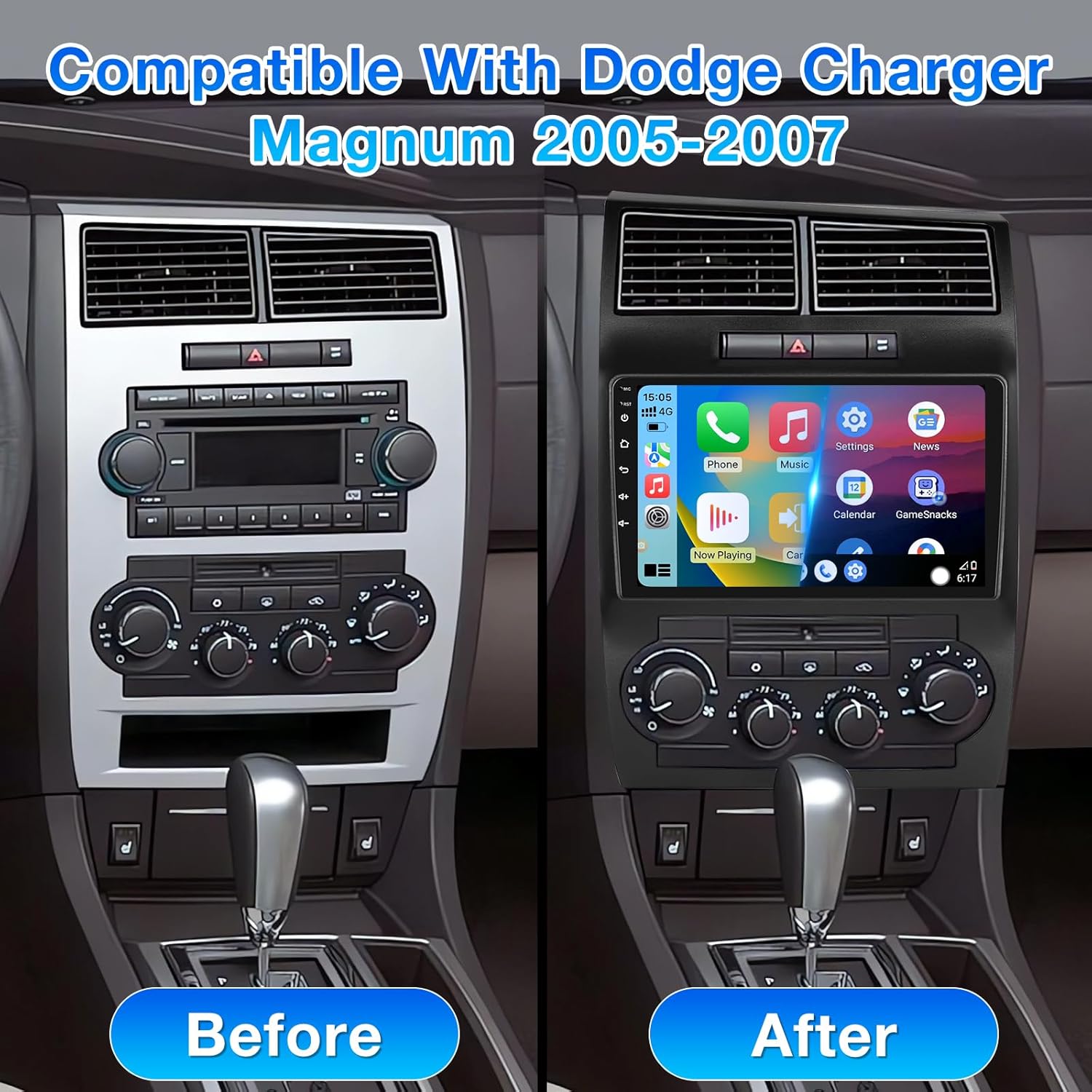
Image: Comparison of a Dodge Charger/Magnum dashboard before and after the installation of the ZHNN Android 13 Car Radio Stereo, highlighting the integrated 9-inch display.
การติดตั้งและการตั้งค่า
Proper installation is crucial for optimal performance. It is recommended to have the unit installed by a professional if you are unfamiliar with car audio systems.
รายการตรวจสอบก่อนการติดตั้ง:
- Confirm vehicle compatibility (Dodge Charger/Magnum 2005-2007).
- โปรดตรวจสอบให้แน่ใจว่ามีส่วนประกอบทั้งหมดตามที่ระบุไว้ในส่วน 'สิ่งที่มีอยู่ในกล่อง'
- โปรดถอดแบตเตอรี่รถยนต์ออกก่อนเริ่มการติดตั้ง เพื่อป้องกันความเสียหายทางไฟฟ้า
ขั้นตอนการติดตั้ง (ทั่วไป)view):
- Carefully remove the factory radio and dashboard trim.
- Connect the provided power cable harness to the vehicle's wiring.
- Connect the GPS antenna and external microphone.
- If installing the backup camera, route the camera cable to the rear of the vehicle and connect it to the unit.
- Secure the new head unit into the dashboard opening.
- เชื่อมต่อแบตเตอรี่รถยนต์กลับเข้าไป และทดสอบการทำงานของอุปกรณ์
- ติดตั้งแผงหน้าปัดใหม่
Refer to the detailed wiring diagram and specific installation instructions included in the product packaging for precise steps.
คำแนะนำการใช้งาน
การใช้งานพื้นฐาน:
- เปิด/ปิดเครื่อง: กดปุ่มเปิด/ปิดบนตัวเครื่องค้างไว้หรือใช้สวิตช์กุญแจของรถ
- การควบคุมระดับเสียง: Adjust using the physical buttons or the on-screen controls.
- อินเทอร์เฟซหน้าจอสัมผัส: Navigate through menus and applications by tapping and swiping on the 9-inch capacitive touchscreen.
CarPlay แบบไร้สายและ Android Auto:
Connect your smartphone wirelessly via Bluetooth and Wi-Fi to access CarPlay (for iPhone) or Android Auto (for Android phones). This allows for hands-free calls, messaging, navigation, and music playback directly from your phone's interface displayed on the stereo.

Image: The car stereo screen displaying both Wireless CarPlay and Android Auto interfaces, demonstrating seamless smartphone integration.
การนำทาง GPS:
The built-in GPS module provides precise positioning. You can use pre-installed maps or download online maps and navigation applications from the APP store when connected to a network.

Image: The car stereo displaying a detailed GPS navigation map, indicating real-time route guidance.
การเชื่อมต่อบลูทูธ:
Pair your mobile phone via Bluetooth for hands-free calling and wireless audio streaming. Access your phonebook, call history, and play music directly from your device.
วิทยุ FM/RDS:
Tune into your favorite FM radio stations. The RDS (Radio Data System) feature provides additional information such as station name and song title where available.

Image: The car stereo displaying the FM Radio interface, showing the current frequency and RDS data.
MirrorLink:
สะท้อนหน้าจอสมาร์ทโฟนของคุณไปยังจอแสดงผลเครื่องเสียงรถยนต์โดยตรง วิธีนี้ช่วยให้คุณสามารถ view content from your phone, such as videos or photos, on the larger screen.

Image: The MirrorLink function in action, displaying the content of a smartphone screen directly on the car stereo's large display.
อินพุตกล้องสำรอง:
The unit supports AHD backup cameras, providing a clear reversing image automatically when the vehicle is put into reverse gear. This aids in safer parking and maneuvering.

Image: The car stereo displaying the clear reversing image from the AHD backup camera, complete with parking guidelines.
ฟังก์ชั่นแยกหน้าจอ:
Utilize the split-screen feature to run two applications simultaneously, such as navigation on one side and music playback on the other, enhancing multitasking convenience.

Image: The car stereo screen demonstrating the split-screen feature, with a navigation map on one side and a music player on the other.
ระบบควบคุมพวงมาลัย (SWC):
อุปกรณ์นี้รองรับการควบคุมจากพวงมาลัยรถยนต์เดิมของคุณ ช่วยให้คุณจัดการเสียง การโทร และฟังก์ชันอื่นๆ ได้โดยไม่ต้องละมือจากพวงมาลัย
การซ่อมบำรุง
- การทำความสะอาด: ใช้ผ้านุ่มและแห้งเช็ดหน้าจอและตัวเครื่อง หลีกเลี่ยงน้ำยาทำความสะอาดหรือตัวทำละลายที่มีฤทธิ์กัดกร่อน
- การอัปเดตซอฟต์แวร์: ตรวจสอบผู้ผลิตเป็นระยะ webไซต์หรือการตั้งค่าของหน่วยสำหรับการอัปเดตซอฟต์แวร์ที่มีอยู่เพื่อให้มั่นใจถึงประสิทธิภาพที่เหมาะสมที่สุดและการเข้าถึงฟีเจอร์ใหม่
- อุณหภูมิ: Avoid exposing the unit to extreme temperatures, which can affect its lifespan.
การแก้ไขปัญหา
| ปัญหา | สาเหตุที่เป็นไปได้ | สารละลาย |
|---|---|---|
| ไม่มีไฟฟ้า | สายไฟหลวม; ฟิวส์ขาด; แบตเตอรี่รถยนต์อ่อน. | Check power cables; Inspect and replace fuse; Charge/check vehicle battery. |
| ไม่มีเสียง | สายลำโพงหลุดออก ระดับเสียงเบาเกินไป ฟังก์ชันปิดเสียงทำงานอยู่ | ตรวจสอบการเชื่อมต่อลำโพง; เพิ่มระดับเสียง; ปิดโหมดปิดเสียง |
| สัญญาณ GPS สูญหาย | เสาอากาศ GPS ถูกกีดขวางหรือหลุดการเชื่อมต่อ; สัญญาณดาวเทียมอ่อน | มั่นใจชัดเจน view for antenna; Check antenna connection; Move to open area. |
| การตัดการเชื่อมต่อ Bluetooth/CarPlay/Android Auto | Interference; Incorrect pairing; Software glitch. | Restart unit and phone; Re-pair device; Check for software updates. |
| หน้าจอสัมผัสไม่ตอบสนอง | ระบบค้าง; มีสิ่งสกปรกบนหน้าจอ | Restart unit; Clean screen. |
If problems persist, please contact ZHNN customer support for assistance.
ข้อมูลจำเพาะ
- ระบบปฏิบัติการ: แอนดรอยด์ 13
- ซีพียู: ควอดคอร์
- หน่วยความจำ: แรม 2GB + รอม 64GB
- ขนาดหน้าจอ: 9 นิ้ว
- ความละเอียดการแสดงผล: ขนาด 1280x720
- การเชื่อมต่อ: บลูทูธ, ยูเอสบี, ไวไฟ
- คุณสมบัติพิเศษ: Android Auto, Built-In Bluetooth, Touchscreen, Wireless CarPlay, GPS Navigation, MirrorLink, Backup Camera Support, Steering Wheel Control
- โหมดเอาต์พุตเสียง: สเตอริโอ
- การกำหนดค่าช่องสัญญาณเสียงรอบทิศทาง: 5.1, 7.1
- การเข้ารหัสวิดีโอ: H.264, H.265/HEVC, MPEG-4
- น้ำหนักสินค้า: 3.94 ปอนด์
- ขนาดแพ็คเกจ: 17.83 x 11.18 x 4.61 นิ้ว
มีอะไรอยู่ในกล่อง
- ชุดวิทยุติดรถยนต์
- สายไฟ
- อาร์ซีเอเคเบิ้ล
- ไมโครโฟน
- กล้องสำรอง
- เสาอากาศ GPS
- USB Cable (for original car)
- FM Antenna Adapter Cable
- กล่องแคนบัส
- เครื่องมือ (สำหรับการติดตั้ง)
- คู่มือการใช้งาน (เอกสารนี้)

Image: A visual representation of all components included in the ZHNN Android 13 Car Radio Stereo package.
การรับประกันและการสนับสนุน
Your ZHNN Android 13 Car Radio Stereo comes with a standard manufacturer's warranty. Please refer to the warranty card included in your package for specific terms and conditions, including warranty period and coverage details.
For technical support, troubleshooting assistance, or warranty claims, please contact ZHNN customer service through the contact information provided in your product documentation or on the official ZHNN website. Please have your model number (B0DN1FN21M) and purchase details ready when contacting support.