
การแนะนำ
The URANT USB3.2 to Type C Converter is a compact and versatile adapter designed to facilitate fast charging and high-speed data transfer. It converts a USB-C female port to a USB-A female port, allowing for broader compatibility with various devices. An integrated LED digital display provides real-time monitoring of voltage กระแสไฟและกำลังไฟระหว่างการทำงาน
คุณสมบัติผลิตภัณฑ์
- Integrated LED Digital Display: แสดงปริมาณแบบเรียลไทม์tage (V), current (A), and power (W) to monitor charging status and device performance.
- การชาร์จและถ่ายโอนข้อมูลอย่างรวดเร็ว: Supports fast charging up to 36W (12V/3A in QC mode) and high-speed data transfer up to 10Gbps, compliant with the USB 3.2 standard.
- การออกแบบกะทัดรัดและพกพาสะดวก: มีลักษณะโปร่งใส casing and an ultra-compact design for easy portability.
- ฟังก์ชั่น Plug-and-Play: Requires no additional drivers or software for operation.
- ความเข้ากันได้กว้าง: Compatible with devices such as PCs, laptops, tablets, smartphones, chargers, flash drives, and power banks.

Image: The URANT USB3.2 to Type C Converter, showcasing its transparent design and intelligent digital display with 36W fast charge and 10Gbps transmission capabilities.

ภาพ: รายละเอียด view emphasizing the 36W fast charging support of the converter.

Image: The converter in use, illustrating its 10Gbps data transfer capability between a smartphone and a laptop.
เนื้อหาแพ็คเกจ
- Two (2) URANT USB3.2 to Type C Converters
การตั้งค่า
The URANT USB3.2 to Type C Converter is designed for simple plug-and-play operation, requiring no complex installation or software.
- เชื่อมต่อ USB-C: Insert the USB-C female end of the converter into your USB-C cable or device (e.g., a USB-C charger or a device with a USB-C port).
- เชื่อมต่อ USB-A: Connect the USB-A female end of the converter to your USB-A device or port (e.g., a laptop's USB-A port, a USB-A flash drive, or a USB-A cable).
- ตรวจสอบการเชื่อมต่อ: Ensure both connections are secure. The converter's LED display should illuminate, indicating power flow.
คำแนะนำการใช้งาน
Once the converter is properly connected, it will automatically begin to function and display real-time information.
- การแสดงผลแบบเรียลไทม์: The integrated LED display will automatically cycle through and show the current voltage (V), current (A), and power (W) of the connected device. This allows you to monitor the charging or power consumption status.
- การถ่ายโอนข้อมูล: When connected between compatible devices, the converter facilitates data transfer at speeds up to 10Gbps. Ensure your devices and cables support USB 3.2 for optimal performance.
- การชาร์จ: The converter supports fast charging up to 36W. For fast charging to occur, both the power source and the receiving device must support compatible fast charging protocols (e.g., QC mode).
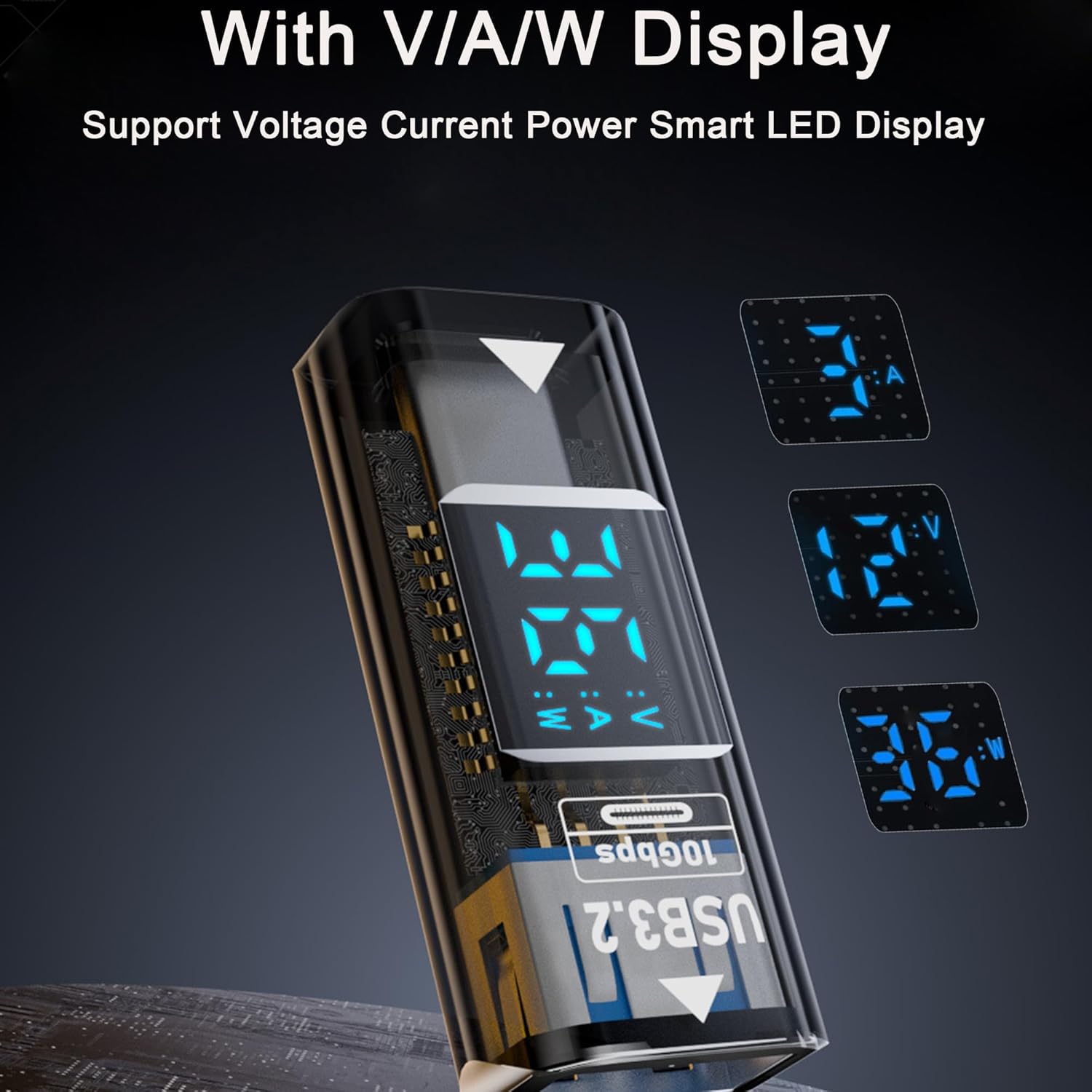
ภาพ: รายละเอียด view of the converter's LED display, illustrating its ability to show voltagการอ่านค่ากระแสไฟฟ้าและกำลังไฟฟ้า
การซ่อมบำรุง
To ensure the longevity and optimal performance of your URANT USB3.2 to Type C Converter, follow these maintenance guidelines:
- การทำความสะอาด: Keep the adapter clean and free from dust and moisture. Use a soft, dry cloth for cleaning. Avoid liquid cleaners.
- พื้นที่จัดเก็บ: เก็บอะแดปเตอร์ไว้ในที่แห้งและเย็นเมื่อไม่ใช้งาน หลีกเลี่ยงการสัมผัสกับอุณหภูมิที่สูงหรือต่ำเกินไป แสงแดดโดยตรง หรือความชื้นสูง
- การจัดการ: Handle the adapter with care. Avoid dropping it or subjecting it to strong impacts. Do not pull on the cables when disconnecting; always grasp the adapter itself.
- ถอดชิ้นส่วน: Do not attempt to disassemble or repair the adapter. Unauthorized modifications can damage the device and will void any warranty.
การแก้ไขปัญหา
If you encounter issues with your URANT USB3.2 to Type C Converter, please refer to the following common troubleshooting steps:
No Display or Incorrect Readings
- การเชื่อมต่อที่ปลอดภัย: Ensure the adapter is securely connected to both the power source/data source and the receiving device.
- วาดพลัง: Verify that the connected devices are drawing sufficient power. Some very low-power devices may not activate the full LED display.
- Test Different Ports/Devices: Try connecting the adapter to a different USB port or with another compatible device to determine if the issue is with the adapter or the connected equipment.
Slow Charging or Data Transfer
- การตรวจสอบความเข้ากันได้: Confirm that all components (source device, receiving device, cables, and the adapter itself) support USB 3.2 and the desired fast charging protocols (e.g., QC mode) for optimal speeds.
- คุณภาพสายเคเบิล: Ensure that the USB cables used are of high quality and rated for fast charging and high-speed data transfer.
- Port Limitations: Some USB ports on older devices may have lower power output or data transfer capabilities.
Adapter Not Recognized by Device
- การสอดใส่จนสุด: Ensure the adapter is fully inserted into the port without any gaps.
- รีสตาร์ทอุปกรณ์: Restart the connected device (PC, laptop, smartphone) and try reconnecting the adapter.
- การตรวจสอบไดรเวอร์: While the adapter is plug-and-play, ensure your operating system's USB drivers are up to date.
ข้อมูลจำเพาะ
| หมายเลขรุ่น | URANT-USBC-36W |
| ยี่ห้อ | อูรันต์ |
| ประเภทขั้วต่อ (อินพุต) | USB Type C Female |
| ประเภทขั้วต่อ (เอาต์พุต) | USB Type A ตัวเมีย |
| จำนวนพอร์ต | 1 (USB-C Female to USB-A Female) |
| กำลังขับสูงสุด | 36W (12V/3A in QC mode) |
| ความเร็วในการถ่ายโอนข้อมูล | Up to 10Gbps (USB 3.2 Standard) |
| ประเภทจอภาพ | LED (Voltage, กระแสไฟฟ้า, กำลังไฟฟ้า) |
| อุปกรณ์ที่รองรับ | PC, laptop, tablet, smartphone, charger, flash drive, mobile power |
| น้ำหนักสินค้า | 1.92 ออนซ์ |
| ขนาดแพ็คเกจ | 3.66 x 2.17 x 0.35 นิ้ว |

Image: Dimensions and port identification for the URANT USB3.2 to Type C Converter.
การรับประกันและการสนับสนุน
For warranty information, technical assistance, or customer support regarding your URANT USB3.2 to Type C Converter, please refer to the manufacturer's official website or contact URANT customer service through your purchase platform. Please retain your proof of purchase for warranty claims.