
1. บทนำ
The SNAKOL SK-505A is a versatile 2-in-1 electrical measurement tool, combining the functionalities of an insulation resistance tester and a digital multimeter. Designed for professional and DIY use, it offers a wide range of measurement capabilities including insulation resistance up to 20GΩ, voltage up to 1000V, resistance, capacitance, frequency, and diode testing. Its auto-ranging feature and backlit screen enhance usability in various environments.
This manual provides essential information for the safe and effective operation of your SK-505A meter. Please read it thoroughly before use and retain it for future reference.
2. ข้อมูลด้านความปลอดภัย
คำเตือน: To avoid possible electric shock, fire, or personal injury, please read all safety information before using the product. Adhere to all local and national safety codes.
- Always ensure the meter is in the correct function and range for the measurement being performed.
- ห้ามใช้มิเตอร์หากพบว่าชำรุด หรือสายวัดชำรุด
- ห้ามใช้เกินปริมาณที่กำหนดtage, which is CAT III 600V for general multimeter functions and up to 1000V for insulation resistance testing.
- ใช้ความระมัดระวังเมื่อทำงานกับ voltages สูงกว่า 30V AC RMS, 42V peak หรือ 60V DC ปริมาตรเหล่านี้tagอาจทำให้เกิดอันตรายจากการช็อตได้
- ควรตัดกระแสไฟออกจากวงจรที่กำลังทดสอบทุกครั้งก่อนทำการวัดค่าความต้านทานหรือความจุ
- ตรวจสอบให้แน่ใจว่าช่องใส่แบตเตอรี่ปิดสนิทก่อนใช้งาน
- ห้ามใช้งานมิเตอร์ในบริเวณที่มีก๊าซ ไอระเหย หรือฝุ่นละอองที่อาจก่อให้เกิดการระเบิดได้
3. สินค้าหมดview

Figure 3.1: SNAKOL SK-505A Multimeter and included accessories. This image displays the main unit, test leads, alligator clips, carrying bag, and battery charger with rechargeable batteries.
3.1 คุณสมบัติหลัก
- ฟังก์ชั่น 2-in-1: Combines Insulation Resistance Tester and Digital Multimeter.
- ช่วงการวัดกว้าง: Measures insulation resistance up to 20GΩ and rated voltage up to 1000V. Also measures AC/DC voltage (up to 1500V), resistance, frequency, capacitance (up to 100mF), and performs diode tests.
- อัตโนมัติ: ช่วยให้การใช้งานง่ายขึ้นด้วยการเลือกช่วงการวัดที่เหมาะสมโดยอัตโนมัติ
- RMS ที่แท้จริง: ให้ค่าการอ่านที่แม่นยำสำหรับรูปคลื่นที่ไม่ใช่รูปคลื่นไซน์
- หน้าจอ LCD เรืองแสง: ช่วยให้มองเห็นได้ชัดเจนแม้ในสภาพแสงน้อย
- ฟังก์ชั่นการเก็บข้อมูล: หยุดภาพหน้าจอขณะอ่านค่า เพื่อให้บันทึกได้ง่าย
- แบตเตอรี่แบบชาร์จไฟได้: Includes two 3.7V lithium batteries and a dedicated charger for extended use.
- การออกแบบที่ทนทาน: Features a soft silicone protective case for enhanced durability and grip.
- มาตรฐานความปลอดภัย : CAT III 600V rating for safe operation.
3.2 เนื้อหาบรรจุภัณฑ์
- 1x SNAKOL SK-505A Multimeter
- 1x กระเป๋าถือ
- 3x Test Leads with Caps
- 1x คู่มือผู้ใช้ (เอกสารนี้)
- 2x 3.7V Rechargeable Lithium Batteries
- เครื่องชาร์จแบตเตอรี่ 1x
- 3x Alligator Clips
4. การตั้งค่า
4.1 การติดตั้งและการชาร์จแบตเตอรี่
- หาช่องใส่แบตเตอรี่ที่ด้านหลังของมิเตอร์
- คลายเกลียวฝาปิดช่องใส่แบตเตอรี่แล้วถอดออก
- Insert the two 3.7V rechargeable lithium batteries, observing the correct polarity (+/-).
- ใส่ฝาปิดช่องใส่แบตเตอรี่และขันให้แน่นด้วยสกรู
- To charge the batteries, remove them from the meter and place them into the provided battery charger. Connect the charger to a suitable power source.

Figure 4.1: The SK-505A uses rechargeable lithium batteries, which can be charged using the included external charger.
4.2 การเชื่อมต่อสายทดสอบ
The SK-505A uses standard test leads. Ensure they are securely plugged into the correct input jacks for the desired measurement function.
- COM Jack (Black): Always connect the black test lead to the COM (Common) jack.
- VΩHz Jack (Red): เชื่อมต่อสายทดสอบสีแดงเข้ากับแจ็คนี้เพื่อปรับระดับเสียงtagเช่น การวัดค่าความต้านทาน ความถี่ ความจุ และไดโอด
- LINE Jack (Red): For insulation resistance testing, connect the red test lead to the LINE jack.
- EARTH GUARD Jack (Black): For insulation resistance testing, connect the black test lead to the EARTH GUARD jack.
5. คู่มือการใช้งาน
5.1. การดำเนินการทั่วไป
- หมุนแป้นหมุนไปที่ฟังก์ชันการวัดที่ต้องการ
- เชื่อมต่อสายวัดทดสอบเข้ากับวงจรหรือชิ้นส่วนที่ต้องการทดสอบ
- อ่านค่าการวัดจากหน้าจอ LCD
5.2 การวัดความต้านทานของฉนวน
The SK-505A can measure insulation resistance with rated voltages of 50V, 100V, 250V, 500V, and 1000V.
- Ensure the circuit is de-energized and safely discharged before connecting the meter.
- Connect the red test lead to the LINE jack and the black test lead to the EARTH GUARD jack.
- Turn the rotary dial to the "Insulation Test V.Sel" section. Select the desired test voltagอี (เช่น 1000V)
- กดปุ่ม ทดสอบ button to initiate the insulation test. The voltage will be applied, and the resistance value will be displayed.
- To perform PI/DAR (Polarization Index/Dielectric Absorption Ratio) tests, press the พีไอ/ดีอาร์ button. The meter will automatically perform the test over a set time and display the ratio.

Figure 5.1: The meter set to measure insulation resistance, showing the rotary dial for voltagอี การเลือก
5.3 Digital Multimeter Functions
For general multimeter functions, connect the black test lead to the COM jack and the red test lead to the VΩHz jack.
- เล่มที่tagการวัด (AC/DC): หมุนแป้นหมุนไปที่ ~V สำหรับ AC voltagอีหรือ =V สำหรับ DC voltage. The meter supports up to 1500V.
- การวัดความต้านทาน: หมุนแป้นหมุนไปที่ Ω. The meter will auto-range.
- การวัดความจุ: หมุนแป้นหมุนไปที่ mF. The meter supports up to 100mF.
- การทดสอบไดโอด: Turn the dial to the diode symbol.
- การทดสอบความต่อเนื่อง: Turn the dial to the continuity symbol. An audible beep indicates continuity.
- การวัดความถี่: หมุนแป้นหมุนไปที่ ~VHz.
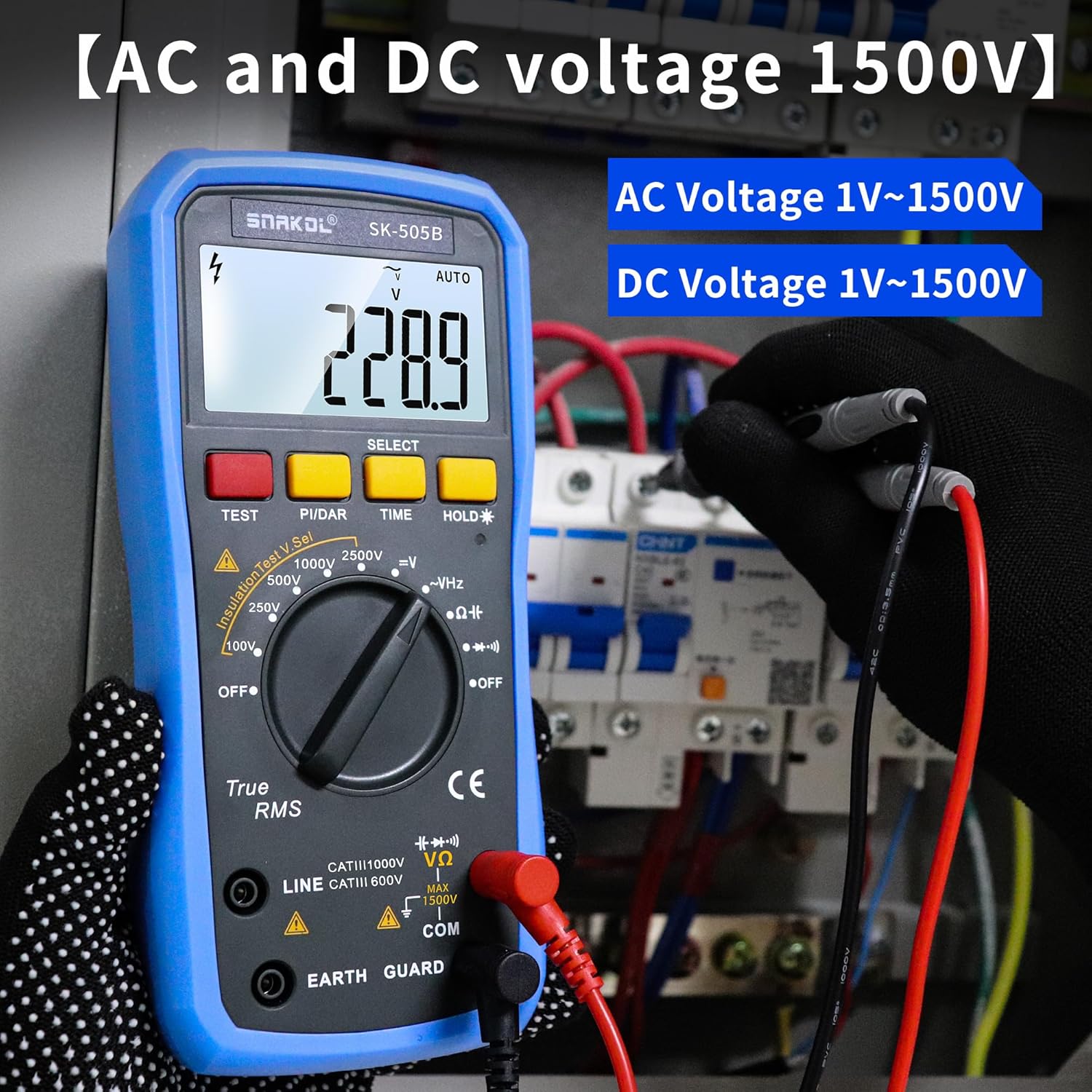
Figure 5.2: Measuring AC or DC voltage with the SK-505A.

Figure 5.3: Measuring capacitance with the SK-505A.
5.4 ฟังก์ชั่นพิเศษ
- แสงไฟด้านหลัง: กดค้างไว้ ถือ button for 2 seconds to toggle the backlight on/off.
- การเก็บข้อมูล: กดสั้น ๆ ถือ กดปุ่มเพื่อหยุดค่าที่แสดงบนหน้าจอ กดอีกครั้งเพื่อปล่อย
- ปิดเครื่องอัตโนมัติ: The meter will automatically shut down after a period of inactivity to conserve battery life.

Figure 5.4: The large backlit screen of the SK-505A for improved readability.
6. การบำรุงรักษา
6.1 การทำความสะอาด
เช็ดมิเตอร์asinจีกับโฆษณาamp cloth and mild detergent. Do not use abrasives or solvents. Ensure the meter is completely dry before storage or use.
6.2 การเปลี่ยนแบตเตอรี่
When the low battery indicator appears on the display, recharge the batteries promptly using the provided charger. If the meter will not be used for an extended period, remove the batteries to prevent leakage.
6.3 พื้นที่จัดเก็บ
Store the meter and its accessories in the provided carrying bag in a cool, dry place, away from direct sunlight and extreme temperatures.
7 การแก้ไขปัญหา
| ปัญหา | สาเหตุที่เป็นไปได้ | สารละลาย |
|---|---|---|
| มิเตอร์ไม่เปิดใช้งาน | แบตเตอรี่เหลือน้อยหรือหมด ติดตั้งแบตเตอรี่ไม่ถูกต้อง | Recharge or replace batteries; check battery polarity. |
| ไม่มีการแสดงข้อความ "OL" หรือ "ไม่อ่านข้อความ" | Incorrect function/range selected; open circuit; measurement exceeds range. | Select correct function/range; check circuit connections; ensure measurement is within meter's limits. |
| การอ่านที่ไม่ถูกต้อง | Damaged test leads; environmental interference; meter malfunction. | Inspect and replace test leads if damaged; move away from strong electromagnetic fields; contact support if issue persists. |
| ไฟแบ็คไลท์ไม่ทำงาน | ฟังก์ชันไฟแบ็คไลท์ถูกปิดอยู่ | Long press the HOLD button for 2 seconds to activate backlight. |
8. ข้อมูลจำเพาะ
| คุณสมบัติ | ข้อมูลจำเพาะ |
|---|---|
| หมายเลขรุ่น | SK-505A |
| การทดสอบความต้านทานฉนวนฉบับtage | 50V, 100V, 250V, 500V, 1000V |
| Max. Insulation Resistance | 20GΩ |
| แม็กซ์ ฉบับtagการวัด (AC/DC) | 1500โวลต์ |
| Max. Capacitance Measurement | 100 ม |
| ระดับความปลอดภัย | กสท.600 XNUMXV |
| แหล่งพลังงาน | 2 x 3.7V Rechargeable Lithium Batteries (included) |
| ขนาดสินค้า (กว้าง x ยาว x สูง) | 7.5 x 3.5 x 2.2 นิ้ว |
| น้ำหนัก | 1.7 ปอนด์ |
| สี | สีฟ้าและสีดำ |
9. การรับประกันและการสนับสนุน
The SNAKOL SK-505A comes with a one-year warranty from the date of purchase. This warranty covers defects in materials and workmanship under normal use. It does not cover damage resulting from misuse, accident, alteration, neglect, or unauthorized repair.
For technical support, warranty claims, or any inquiries regarding your SNAKOL SK-505A, please contact SNAKOL customer service through the retailer where the product was purchased or visit the official SNAKOL webเว็บไซต์สำหรับข้อมูลการติดต่อ
Enjoy quality Amazon after-sales service. You can refund if you are not satisfied.