
1. บทนำ
This manual provides detailed instructions for the FREEWOLF M68 60% Wireless Gaming Keyboard. Please read this manual carefully before using the product to ensure proper operation and longevity.

Figure 1: FREEWOLF M68 Wireless Gaming Keyboard (Shimmer color variant)
2. สินค้าหมดview
คุณสมบัติหลัก:
- การเชื่อมต่อสามโหมด: Supports wired (USB-C), 2.4GHz wireless, and Bluetooth 5.0 connections.
- ความเข้ากันได้หลายอุปกรณ์: Connects to Windows, Mac, Linux, PC, Laptop, iPad, iOS, and Android devices.
- รูปแบบกะทัดรัด 60%: Features 67 keys, optimizing desktop space.
- คีย์แคป PBT: Durable Polybutylene Terephthalate keycaps with clear legends.
- ไฟแบ็คไลท์ LED สีรุ้ง: Offers constant and breathing modes with adjustable brightness and speed.
- แบตเตอรี่ใช้งานได้ยาวนาน: Built-in 2000mAH battery provides extended usage.
- การออกแบบตามหลักสรีรศาสตร์: Double leg braces allow for three adjustable typing angles.
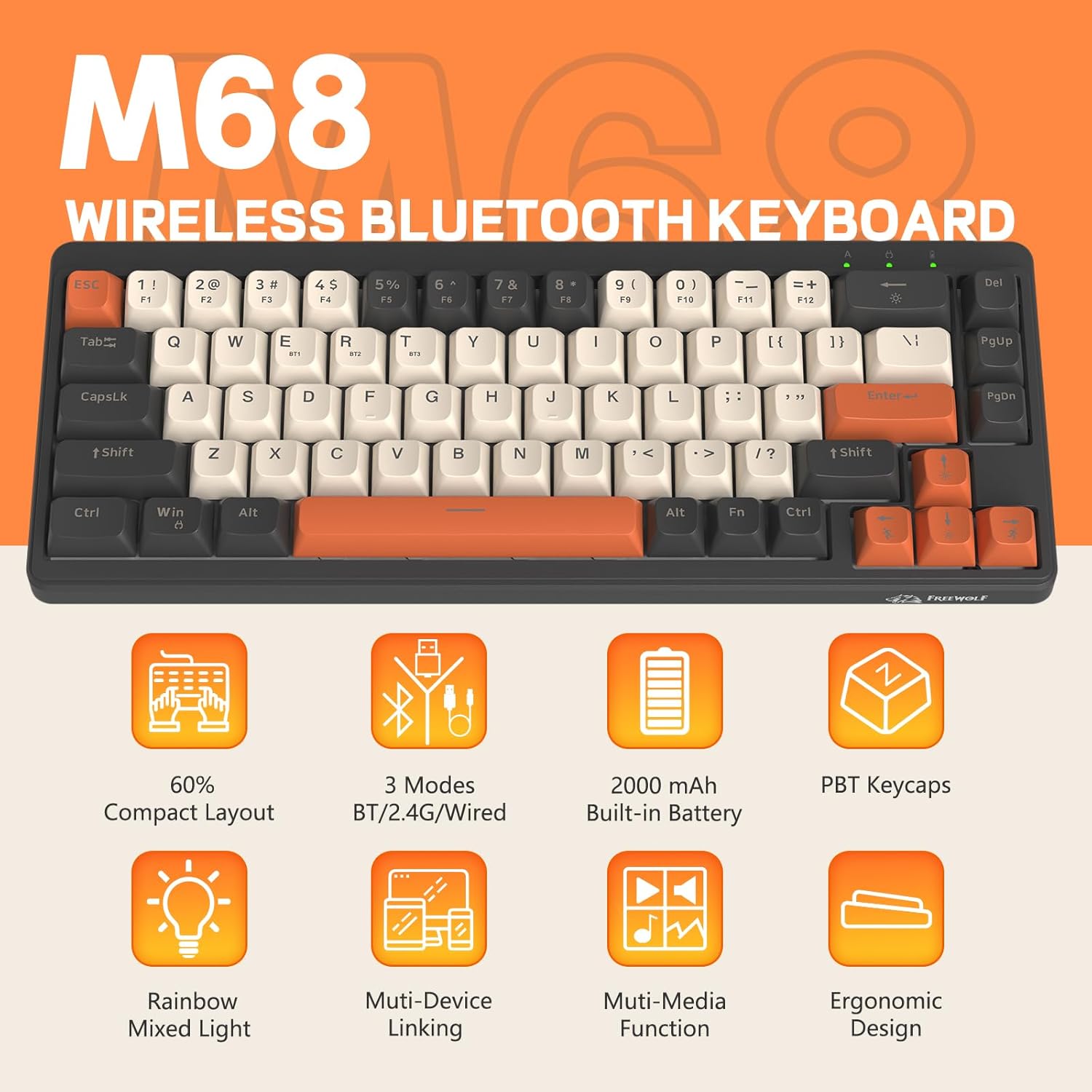
รูปที่ 2: เกินview of FREEWOLF M68 key features.
3. การตั้งค่าและการเชื่อมต่อ
3.1. การเชื่อมต่อแบบไตรโหมดผ่านview
The M68 keyboard supports three connection methods: wired via USB-C, 2.4GHz wireless via a USB receiver, and Bluetooth 5.0. You can switch between these modes using the dedicated switch on the keyboard.

รูปที่ 3: รายละเอียด view of the 3-mode connection options.
3.2. การเชื่อมต่อแบบมีสาย
- ค้นหาพอร์ต USB-C บนแป้นพิมพ์
- เชื่อมต่อสาย USB-C ที่ให้มาเข้ากับคีย์บอร์ดและปลายอีกด้านหนึ่งเข้ากับพอร์ต USB ของคอมพิวเตอร์ของคุณ
- ตรวจสอบให้แน่ใจว่าสวิตช์โหมดบนแป้นพิมพ์ตั้งอยู่ในตำแหน่งแบบมีสาย (USB)
- ระบบของคุณจะจดจำแป้นพิมพ์โดยอัตโนมัติ
3.3. การเชื่อมต่อไร้สาย 2.4GHz
- Locate the 2.4GHz USB receiver (often stored in a compartment on the keyboard).
- เสียบตัวรับสัญญาณ USB เข้ากับพอร์ต USB ที่พร้อมใช้งานบนคอมพิวเตอร์ของคุณ
- Set the mode switch on the keyboard to the 2.4GHz wireless position.
- แป้นพิมพ์ควรเชื่อมต่อโดยอัตโนมัติ หากไม่เป็นเช่นนั้น ให้กด FN + อาร์ เพื่อเริ่มการจับคู่
3.4. การเชื่อมต่อบลูทู ธ
The M68 can connect to up to three Bluetooth devices simultaneously.
- ตั้งสวิตช์โหมดบนแป้นพิมพ์ไปที่ตำแหน่งบลูทูธ
- To enter pairing mode for a specific channel (BT1, BT2, or BT3), press and hold เอฟเอ็น + คิว (สำหรับ BT1) FN + ว (สำหรับ BT2) หรือ FN + อี (for BT3) until the corresponding indicator light flashes rapidly.
- On your device (PC, laptop, tablet, phone), open Bluetooth settings and search for "FREEWOLF M68".
- เลือกคีย์บอร์ดที่จะจับคู่ ไฟแสดงสถานะจะติดสว่างเมื่อเชื่อมต่อแล้ว
- หากต้องการสลับระหว่างอุปกรณ์บลูทูธที่จับคู่แล้ว ให้กด FN + Q/W/E สั้นๆ
4. การดำเนินการ
4.1. การควบคุมแบ็คไลท์
The M68 features customizable rainbow LED backlighting.
- FN + แบ็คสเปซ: Toggle backlight on/off or switch between constant and breathing modes.
- FN + ลูกศรซ้าย: ลดความเร็วไฟแบ็คไลท์
- FN + ลูกศรขวา: เพิ่มความเร็วไฟแบ็คไลท์
- FN + ลูกศรขึ้น: เพิ่มความสว่างของไฟแบ็คไลท์
- FN + ลูกศรลง: ลดความสว่างของแสงไฟด้านหลัง

รูปที่ 4: การรวมปุ่มปรับระดับแสงพื้นหลัง
4.2 การปรับตามหลักสรีรศาสตร์
The keyboard includes double leg braces on the back to adjust the typing angle for comfort.
- Flip the keyboard over to access the leg braces.
- ปรับสองวินาทีtage leg braces to achieve your preferred typing angle (flat, one stage, or two stagจ)

Figure 5: Ergonomic angle adjustments.
4.3. การจัดการแบตเตอรี่
The keyboard has a built-in 2000mAH rechargeable battery.
- การชาร์จ: Connect the keyboard via the USB-C cable to a power source (computer USB port or wall adapter). The charging indicator will show status.
- อายุการใช้งานแบตเตอรี่: Up to 60 hours with backlight on, and up to 200 hours with backlight off.
- ประหยัดพลังงาน: The keyboard will enter sleep mode after a period of inactivity to conserve battery. Press any key to wake it up.

Figure 6: Battery capacity information.
5. การบำรุงรักษา
- การทำความสะอาด: Use a soft, dry cloth to clean the keyboard surface. For keycaps, you may use a slightly damp ผ้า หลีกเลี่ยงความชื้นที่มากเกินไป
- การถอดคีย์แคป: If necessary, use a keycap puller to carefully remove PBT keycaps for deeper cleaning or replacement.
- พื้นที่จัดเก็บ: เก็บแป้นพิมพ์ไว้ในที่แห้งและเย็น หลีกเลี่ยงแสงแดดโดยตรงและอุณหภูมิที่สูงหรือต่ำเกินไป
- หลีกเลี่ยงของเหลว: Do not expose the keyboard to liquids to prevent damage to internal components.
6 การแก้ไขปัญหา
| ปัญหา | สาเหตุที่เป็นไปได้ | สารละลาย |
|---|---|---|
| แป้นพิมพ์ไม่ตอบสนอง (มีสาย) | การเชื่อมต่อสายเคเบิลหลวม โหมดไม่ถูกต้อง | Ensure USB-C cable is securely connected. Check if the mode switch is set to wired. Try a different USB port. |
| แป้นพิมพ์ไม่ตอบสนอง (2.4GHz) | USB receiver not connected, incorrect mode, pairing issue. | Ensure USB receiver is plugged in. Set mode switch to 2.4GHz. Re-pair by pressing FN + อาร์. Try a different USB port for the receiver. |
| แป้นพิมพ์ไม่ตอบสนอง (บลูทูธ) | Not paired, incorrect mode, device Bluetooth off. | Ensure device Bluetooth is on. Set mode switch to Bluetooth. Enter pairing mode (FN + Q/W/E) and re-pair. Forget the device on your system and re-pair. |
| ไฟแบ็คไลท์ไม่ทำงานหรือค้าง | Backlight off, low battery, software glitch. | กด FN + แบ็คสเปซ to toggle. Charge the keyboard. Try resetting the keyboard (refer to advanced functions if available, or disconnect/reconnect). |
| กุญแจไม่ลงทะเบียนหรือพิมพ์ซ้ำ | Dust/debris under keycap, switch issue. | Carefully remove keycap and clean. If issue persists, contact support. |
7. ข้อมูลจำเพาะ
| แบบอย่าง | M68 |
| ยี่ห้อ | ฟรีวูล์ฟ |
| การเชื่อมต่อ | แบบมีสาย (USB-C), ไร้สาย 2.4GHz, บลูทูธ 5.0 |
| เค้าโครงคีย์ | 60% (67 คีย์) |
| วัสดุปุ่มกด | PBT (โพลีบิวทิลีนเทเรฟทาเลต) |
| การแบ็คไลท์ | Rainbow LED (RGB) |
| ความจุของแบตเตอรี่ | 2000มิลลิแอมป์ |
| อุปกรณ์ที่รองรับ | Laptop, PC, Tablet (Windows, Mac, Linux, iOS, Android) |
| ขนาดสินค้า | 32.51 x 12.5 x 3.99 ซม. |
| น้ำหนัก | 600 กรัม |
| คุณสมบัติพิเศษ | Ergonomic (adjustable angles), Backlit |
8. การรับประกันและการสนับสนุน
For warranty information, technical support, or customer service inquiries, please refer to the contact information provided with your purchase or visit the official FREEWOLF webเว็บไซต์.
โปรดเก็บหลักฐานการซื้อไว้เพื่อใช้ในกรณีเรียกร้องการรับประกัน