
1. บทนำ
The MiBOXER TRI-PW 500W AC Triac Dimmer is designed for precise control of lighting systems in residential and commercial environments. This device integrates WiFi and 2.4GHz technology, allowing for remote operation via compatible applications and MiBOXER remote controls. It supports triac dimming, ensuring compatibility with a wide range of lighting fixtures, including LED, halogen, and incandescent lights, for smooth and consistent dimming from full brightness to a soft glow.
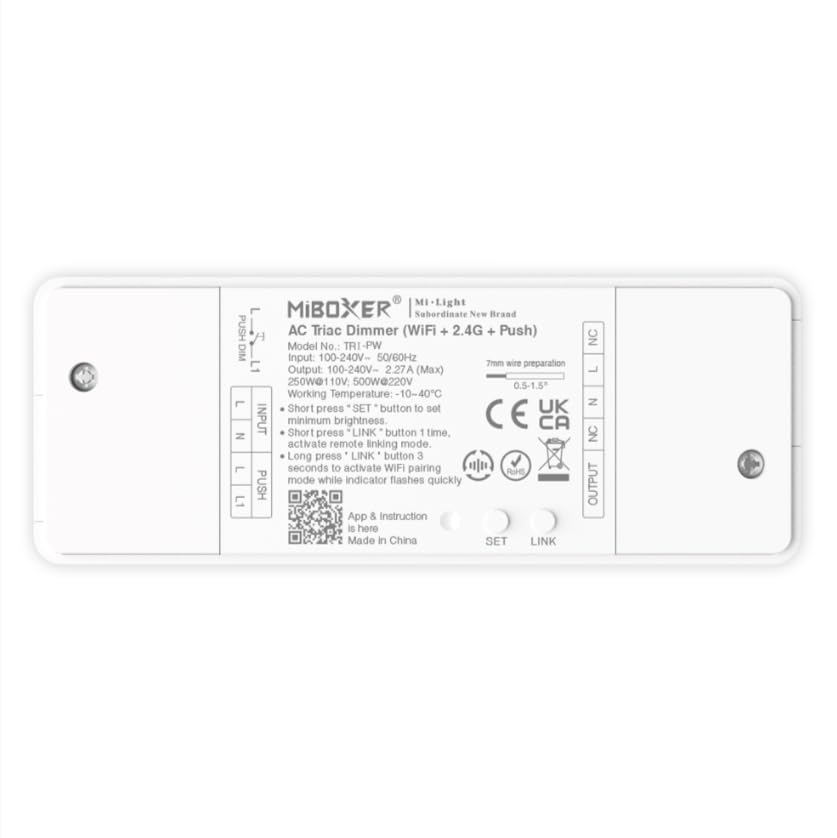
ภาพที่ 1.1: จบแล้วview of the MiBOXER TRI-PW 500W AC Triac Dimmer unit.
2. ข้อมูลด้านความปลอดภัย
- การติดตั้งระบบไฟฟ้า: ควรให้ช่างไฟฟ้าที่มีคุณสมบัติเหมาะสมเป็นผู้ติดตั้ง โดยต้องปฏิบัติตามข้อกำหนดและระเบียบข้อบังคับด้านไฟฟ้าในท้องถิ่น
- การตัดการเชื่อมต่อไฟฟ้า: Always disconnect power at the circuit breaker before installing or servicing the dimmer.
- เล่มที่tagความเข้ากันได้: ตรวจสอบให้แน่ใจปริมาณอินพุตtage matches the dimmer's specifications (100-240V AC).
- ความจุในการรับน้ำหนัก: Do not exceed the maximum load capacity of 500W. Overloading can cause damage or fire.
- สำหรับใช้ภายในอาคารเท่านั้น: This device is intended for indoor use in dry locations. Avoid exposure to moisture or extreme temperatures.
- ความเข้ากันได้: Use only with compatible dimmable lighting fixtures (LED, halogen, incandescent).
3. เนื้อหาบรรจุภัณฑ์
ตรวจสอบว่ามีส่วนประกอบทั้งหมดอยู่ในแพ็คเกจ:
- MiBOXER TRI-PW 500W AC Triac Dimmer Unit
- User Manual (may be included as a separate document)

Image 3.1: MiBOXER TRI-PW Dimmer unit shown with its packaging and a user manual.
4. คุณสมบัติของผลิตภัณฑ์
- Powerful 500W Capacity: Supports high-power loads, suitable for various lighting fixtures.
- Triac Dimming Technology: Provides flicker-free dimming for LED, halogen, and incandescent lights.
- WiFi & 2.4GHz Control: Integrates with WiFi and MiBOXER 2.4GHz systems for smartphone or remote control.
- Push Control Compatibility: Allows for quick, on-site dimming adjustments via a push button.
- การควบคุมผ่านแอปและเสียง: Compatible with major smart home platforms for app-based and voice command control.
- ฟังก์ชั่นหน่วยความจำ: Retains previous lighting settings after power cycles.
5. ข้อมูลจำเพาะ
| คุณสมบัติ | รายละเอียด |
|---|---|
| ยี่ห้อ | ไมบ็อกเซอร์ |
| ชื่อรุ่น | TRI-PW |
| คุณสมบัติพิเศษ | เครื่องหรี่ไทรแอก AC 500W |
| ระดับย่านความถี่ | แบนด์เดียว |
| มาตรฐานการสื่อสารไร้สาย | 802.11ข |
| อุปกรณ์ที่รองรับ | รองรับการหรี่แสงแบบกด |
| การใช้ที่แนะนำ | Home lighting systems |
| เทคโนโลยีการเชื่อมต่อ | ไวไฟ |
| ความเข้ากันได้ของสมาร์ทโฮม | Smart Home Compatible (e.g., Amazon Alexa, Google Assistant) |
| ความครอบคลุม | LED, halogen, incandescent, high-power loads |
| ความถี่ | 2.4 กิกะเฮิรตซ์ |
| ขนาด (โดยประมาณ) | 117มม. (ยาว) x 45มม. (กว้าง) x 24มม. (สูง) |
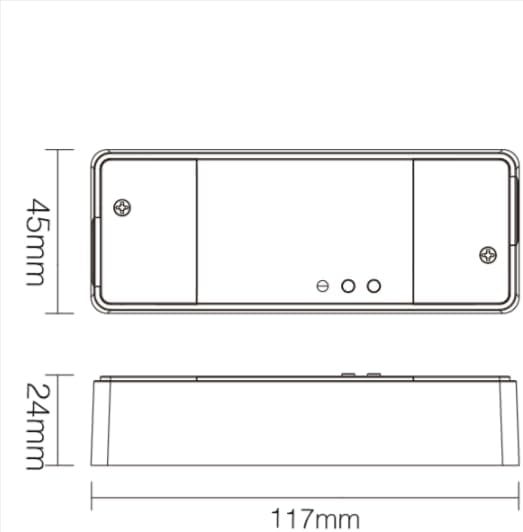
Image 5.1: Technical drawing showing the approximate dimensions of the TRI-PW dimmer.

Image 5.2: Packaging dimensions for the MiBOXER TRI-PW dimmer.
6. การตั้งค่าและการติดตั้ง
สำคัญ: โปรดตรวจสอบให้แน่ใจว่าได้ตัดกระแสไฟที่เบรกเกอร์แล้วก่อนเริ่มการติดตั้ง
แผนผังการเดินสายไฟ
The MiBOXER TRI-PW dimmer supports two primary wiring methods for integration with a push switch. Both methods are suitable for triac dimming LED lights, traditional filament lamps และฮาโลเจน lamps.

Image 6.1: Wiring diagrams for connecting the MiBOXER TRI-PW dimmer with a push switch.
Method 1: Single-Wire Push Switch Connection
- Connect the Live (L) and Neutral (N) input wires from your power supply (100-240V~) to the corresponding 'INPUT' terminals on the dimmer.
- Connect the Live (L) and Neutral (N) output wires to your lighting fixture (100-240V~) from the 'OUTPUT' terminals.
- Connect one wire from the push switch to the 'PUSH' terminal on the dimmer.
- Connect the other wire from the push switch to the Live (L) input terminal.
Method 2: Two-Wire Push Switch Connection
- Connect the Live (L) and Neutral (N) input wires from your power supply (100-240V~) to the corresponding 'INPUT' terminals on the dimmer.
- Connect the Live (L) and Neutral (N) output wires to your lighting fixture (100-240V~) from the 'OUTPUT' terminals.
- Connect the two wires from the push switch directly to the 'PUSH' terminals on the dimmer.
After wiring, secure the dimmer in a suitable electrical box or enclosure. Restore power at the circuit breaker.
7. คู่มือการใช้งาน
7.1. Push Switch Control
- ข่าวสารแบบสั้น: Turn the lights ON or OFF.
- กดแบบยาว: Adjust the brightness level. Release the button to set the desired brightness.
7.2. WiFi App Control
The TRI-PW dimmer supports control via a smart app (e.g., Tuya Smart app). No additional 2.4G gateway is required for app control.
- Download the compatible smart home app from your device's app store.
- ลงทะเบียนหรือเข้าสู่ระบบบัญชีของคุณ
- Put the dimmer into pairing mode (refer to the app's instructions or the dimmer's specific pairing procedure, usually involving a long press of the 'SET' button or power cycling).
- Follow the in-app instructions to add the device to your network.
- Once connected, you can control the dimmer's ON/OFF state and brightness from your smartphone.
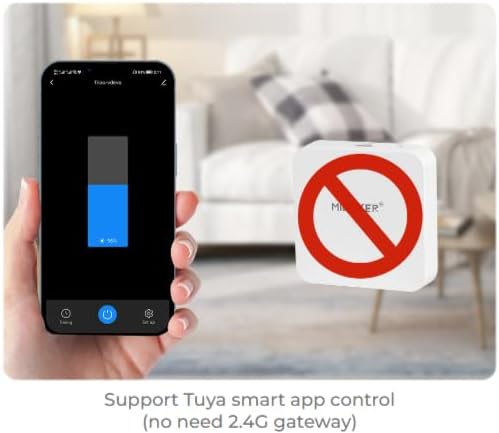
ภาพที่ 7.1: อดีตample of controlling the dimmer using a smartphone application.
7.3. 2.4GHz Remote Control
The dimmer can be paired with MiBOXER 2.4GHz remote controls for direct wireless control.
- ตรวจสอบให้แน่ใจว่าได้เปิดใช้งานตัวหรี่ไฟแล้ว
- Refer to your MiBOXER 2.4GHz remote control's manual for specific pairing instructions. Typically, this involves pressing a "Link" or "Pair" button on the remote within a few seconds of powering on the dimmer or pressing the dimmer's 'SET' button.
- A successful pairing is usually indicated by the connected light flashing.
7.4. การควบคุมด้วยเสียง (Alexa/Google Assistant)
The TRI-PW dimmer is compatible with smart home voice assistants like Amazon Alexa and Google Assistant when integrated through a compatible smart home app.
- Ensure your dimmer is successfully connected to the smart home app (e.g., Tuya Smart).
- เปิดแอป Amazon Alexa หรือ Google Home ของคุณ
- Enable the skill or service for the smart home app you are using (e.g., "Tuya Smart" skill).
- Discover devices. Your dimmer should appear in the list.
- Assign a name to your dimmer (e.g., "Living Room Light").
- You can now control your light using voice commands, such as "Alexa, turn on Living Room Light" or "Hey Google, dim Living Room Light to 50%."

Image 7.2: The dimmer is compatible with voice control platforms like Amazon Alexa and Google Assistant.
8. การบำรุงรักษา
- การทำความสะอาด: Disconnect power before cleaning. Wipe the dimmer with a soft, dry cloth. Do not use liquid cleaners or aerosols.
- การตรวจสอบ: ตรวจสอบความแน่นของการเชื่อมต่อสายไฟและร่องรอยการสึกหรอหรือความเสียหายเป็นระยะ
- อัพเดตเฟิร์มแวร์: If available, check the smart home app for firmware updates to ensure optimal performance and security.
9 การแก้ไขปัญหา
| ปัญหา | สาเหตุที่เป็นไปได้ | สารละลาย |
|---|---|---|
| ไฟไม่เปิด | No power, incorrect wiring, faulty bulb, dimmer not paired. | Check circuit breaker. Verify wiring according to diagrams. Test bulb. Re-pair dimmer with app/remote. |
| ไฟกระพริบหรือเสียงฮัม | Incompatible bulb, overloaded circuit, loose wiring. | Ensure bulbs are dimmable and compatible with triac dimmers. Reduce load. Check wiring connections. |
| Dimmer not responding to app/remote. | Dimmer out of range, WiFi issue, not paired. | Ensure dimmer is within WiFi/2.4GHz range. Check WiFi router. Re-pair dimmer with app/remote. |
| ไม่สามารถเชื่อมต่อ WiFi ได้ | Incorrect WiFi password, 5GHz network, dimmer not in pairing mode. | Verify WiFi password. Ensure you are connecting to a 2.4GHz network. Put dimmer into WiFi pairing mode. |
10. การรับประกันและการสนับสนุน
This MiBOXER TRI-PW dimmer comes with a รับประกัน 2 ปี ตั้งแต่วันที่ซื้อ การรับประกันนี้ครอบคลุมถึงข้อบกพร่องในวัสดุและฝีมือการผลิตภายใต้การใช้งานปกติ
The warranty does not cover damage caused by improper installation, misuse, unauthorized modifications, or acts of nature.
For technical support or warranty claims, please contact your retailer or the manufacturer directly. Please have your purchase receipt and product model number (TRI-PW) available when contacting support.
หากต้องการข้อมูลเพิ่มเติมสามารถเยี่ยมชมได้ที่ MiBOXER Store on Amazon.


