
KEENSTAR ST-265TC
KEENSTAR ST-265TC Touch Screen 2-Slice Toaster
Model: ST-265TC
1. มาตรการป้องกันที่สำคัญ
เมื่อใช้เครื่องใช้ไฟฟ้า ควรปฏิบัติตามข้อควรระวังด้านความปลอดภัยพื้นฐานเสมอ ซึ่งรวมถึงสิ่งต่อไปนี้:
- โปรดอ่านคำแนะนำทั้งหมดก่อนใช้งานเครื่องปิ้งขนมปัง
- อย่าสัมผัสพื้นผิวที่ร้อน ใช้ที่จับหรือลูกบิด
- เพื่อป้องกันไฟฟ้าช็อต ห้ามจุ่มสายไฟ ปลั๊ก หรือเครื่องปิ้งขนมปังลงในน้ำหรือของเหลวอื่นๆ
- จำเป็นต้องมีการดูแลอย่างใกล้ชิดเมื่อมีเด็กหรือใช้งานเครื่องใช้ไฟฟ้าใดๆ ใกล้เด็ก
- ถอดปลั๊กออกเมื่อไม่ได้ใช้งานและก่อนทำความสะอาด ปล่อยให้เย็นลงก่อนใส่หรือถอดชิ้นส่วน
- ห้ามใช้งานเครื่องใช้ไฟฟ้าที่มีสายไฟหรือปลั๊กชำรุด หรือหลังจากที่เครื่องใช้ไฟฟ้าทำงานผิดปกติหรือได้รับความเสียหายในลักษณะใดๆ
- อย่าให้สายไฟห้อยออกจากขอบโต๊ะหรือเคาน์เตอร์ หรือสัมผัสพื้นผิวที่ร้อน
- ห้ามวางบนหรือใกล้เตาแก๊สหรือเตาไฟฟ้าที่ร้อน หรือในเตาอบที่อุ่น
- ห้ามใช้เครื่องปิ้งขนมปังนอกเหนือจากวัตถุประสงค์การใช้งาน
- Oversize foods, metal foil packages, or utensils must not be inserted into a toaster as they may involve a risk of fire or electric shock.
- เพลิงไหม้อาจเกิดขึ้นได้หากเครื่องปิ้งขนมปังถูกคลุมหรือสัมผัสวัสดุติดไฟ เช่น ผ้าม่าน ม่านบังตา ผนัง และอื่นๆ ในระหว่างการใช้งาน
- อย่าพยายามถอดอาหารออกในขณะที่เครื่องปิ้งขนมปังเสียบปลั๊กอยู่
- เครื่องใช้ไฟฟ้าชิ้นนี้มีไว้สำหรับใช้ในครัวเรือนเท่านั้น
2. สินค้าหมดview
The KEENSTAR ST-265TC is a modern 2-slice toaster featuring a touch screen interface for precise control over your toasting preferences. It includes wide slots to accommodate various bread types and a removable crumb tray for easy cleaning.
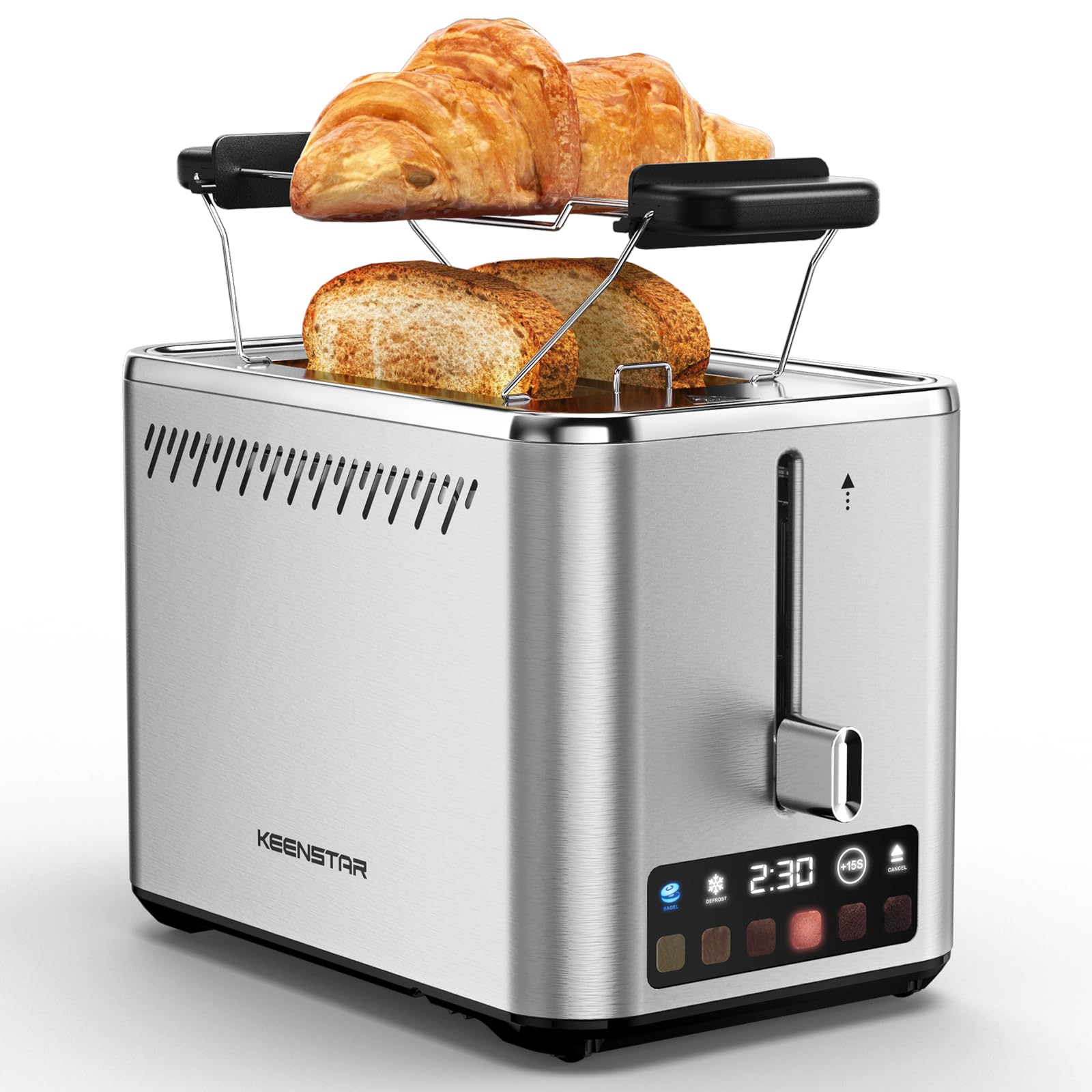
Image: KEENSTAR ST-265TC 2-Slice Toaster in silver stainless steel.
3. การตั้งค่า
การแกะกล่อง
Carefully remove the toaster and all packaging materials from the box. Ensure all accessories, including the warming rack, are present.
การจัดวาง
วางเครื่องปิ้งขนมปังบนพื้นผิวที่มั่นคง เรียบ และทนความร้อน ห่างจากวัสดุที่ติดไฟได้ง่าย เช่น ม่านหรือผนัง ตรวจสอบให้แน่ใจว่ามีการระบายอากาศที่เพียงพอรอบๆ เครื่องใช้ไฟฟ้า
การใช้ครั้งแรก
Before toasting food for the first time, operate the toaster without bread on the highest browning setting (level 6) to burn off any manufacturing residues. A slight odor or smoke may be present; this is normal and will dissipate.
4. คู่มือการใช้งาน
แผงควบคุมโอเวอร์view

Image: The toaster's smart touch control display showing 6 browning levels and extra functions like Bagel, Defrost, +15S, and Cancel.
การปิ้งแบบพื้นฐาน
- Insert up to two slices of bread into the wide 1.5-inch slots.
- Select your desired browning level (1-6) by touching the corresponding icon on the display. Level 1 is the lightest, and Level 6 is the darkest.
- Press the lever down until it locks into place. The digital display will show a countdown timer.
- The toast will automatically pop up when the cycle is complete.

Image: Visual guide showing the steps for easy toaster operation: 1. Put bread in slots, 2. Select browning level and function, 3. Press the lever down, 4. Enjoy delicious bread.
ฟังก์ชั่นเบเกิล
This function is designed to toast the cut side of bagels while gently warming the outer side.
- Insert bagel halves into the slots with the cut side facing outwards.
- เลือกระดับความเกรียมที่คุณต้องการ
- สัมผัส เบเกิล button on the display. It will illuminate.
- Press the lever down until it locks.

Image: The toaster's display showing the illuminated BAGEL mode. BAGEL mode toasts one side only; place the cut side facing outward.
ฟังก์ชั่นละลายน้ำแข็ง
Use this function to toast frozen bread without pre-thawing.
- ใส่ขนมปังแช่แข็งลงในช่องที่เตรียมไว้
- เลือกระดับความเกรียมที่คุณต้องการ
- สัมผัส ละลายน้ำแข็ง button on the display. It will illuminate.
- Press the lever down until it locks.

Image: The toaster's display showing the illuminated DEFROST mode. This mode allows you to cook frozen breads easily without guesswork.
+15S Function
If your toast is not quite browned enough after a cycle, you can add an additional 15 seconds of toasting time.
- After a toasting cycle, if more browning is desired, touch the +15วินาที ปุ่ม.
- The toaster will initiate a 15-second toasting cycle.
ยกเลิกฟังก์ชัน
To stop the toasting cycle at any time, simply touch the ยกเลิก button. The lever will automatically raise, and the heating elements will turn off.

Image: The toaster's display highlighting the +15S button to increase baking time by 15 seconds, and the Cancel button to stop heating.
ชั้นอุ่น Warm
The included warming rack can be used to warm pastries, croissants, or other items that cannot be placed directly into the toaster slots.
- Place the warming rack securely on top of the toaster, aligning it over the slots.
- Place the item to be warmed on the rack.
- Start a toasting cycle (without bread in the slots) to generate heat. The heat rising from the toaster will warm the item on the rack.
- Monitor the item closely to prevent over-warming or burning.

Image: The removable warming rack attached to the toaster, with a croissant placed on it for warming.
วิดีโอสินค้า
Video: Demonstrates the touchscreen and warming tray features of the KEENSTAR toaster.
วิดีโอ: รายละเอียดview of the KEENSTAR Smart 2-Slice Toaster, highlighting its touch screen and various functions.
Video: Explores the key features and functionalities of the KEENSTAR toaster.
5. การบำรุงรักษาและการทำความสะอาด
การทำความสะอาดทั่วไป
Always unplug the toaster from the power outlet and allow it to cool completely before cleaning. Wipe the exterior with a soft, damp ใช้ผ้าเช็ดทำความสะอาดเท่านั้น ห้ามใช้สารทำความสะอาดที่มีฤทธิ์กัดกร่อนหรือแผ่นขัดโลหะ เพราะอาจทำให้พื้นผิวสแตนเลสเป็นรอยได้
ถาดรองเศษขนมปัง
The removable crumb tray collects crumbs during toasting and should be emptied regularly to prevent fire hazards.
- ตรวจสอบให้แน่ใจว่าได้ถอดปลั๊กเครื่องปิ้งขนมปังแล้ว และเครื่องเย็นสนิทแล้ว
- ดึงถาดรองเศษขนมปังที่อยู่ด้านล่างด้านหลังของเครื่องปิ้งขนมปังออกมา
- ทิ้งเศษขนมและเช็ดถาดให้สะอาดด้วยน้ำยาทำความสะอาดamp ผ้า.
- เลื่อนถาดรองเศษอาหารกลับเข้าที่จนกระทั่งได้ยินเสียงคลิกและแน่นสนิท

Image: The toaster's convenient design showing the removable crumb tray being pulled out and the cord storage area on the bottom.
การจัดเก็บสายไฟ
For neat storage, the power cord can be wrapped around the designated area on the underside of the toaster.
6 การแก้ไขปัญหา
- เครื่องปิ้งขนมปังเปิดไม่ติด: Ensure the power cord is securely plugged into a working electrical outlet. Make sure the toast lever is fully pressed down.
- การปิ้งที่ไม่สม่ำเสมอ: Ensure bread slices are centered in the slots. Try adjusting the browning level. Different types of bread may require different settings.
- Bread stuck in slots: Unplug the toaster immediately and allow it to cool. Gently remove the bread using non-metallic tongs. Never use metal utensils.
- ควันออกมาจากเครื่องปิ้งขนมปัง: Unplug the toaster immediately. Remove any food particles or crumbs that may be lodged inside the slots or on the heating elements. Ensure the crumb tray is clean.
7. ข้อมูลจำเพาะ
| ยี่ห้อ | คีนสตาร์ |
| แบบอย่าง | ST-265TC |
| พลัง | 900 วัตต์ |
| เล่มที่tage | 120 โวลต์ (AC) |
| จำนวนชิ้น | 2 |
| วัสดุ | สแตนเลส |
| ขนาดสินค้า (ลึก x กว้าง x สูง) | 10.39" x 7.1" x 6.1" |
| ความกว้างของช่อง | 1.5 นิ้ว |
| คุณสมบัติพิเศษ | Cancel Function, LED Indicator, Removable Crumb Tray, Touchscreen, Warming Rack |

Image: Diagram showing the dimensions of the KEENSTAR ST-265TC toaster: 9.4 inches (24cm) length, 6.1 inches (15.6cm) width, 7 inches (18cm) height, and 1.5 inch (3.8cm) wide slots.
8. การรับประกันและการสนับสนุน
การรับประกัน
This KEENSTAR toaster comes with a 2-year warranty. Please refer to the warranty card included in the product packaging for detailed terms and conditions.
การสนับสนุนลูกค้า
For any questions, technical assistance, or warranty claims, please contact KEENSTAR customer support. Contact information can typically be found on the warranty card or the official KEENSTAR webเว็บไซต์.
Ask a question about this manual
Ask about setup, troubleshooting, compatibility, parts, safety, or missing instructions. Manuals+ will review the question and use this page’s manual context to help answer it.