
Nine West NW/3176RGRG
Nine West Women's Mesh Bracelet Watch NW/3176RGRG User Manual
Model: NW/3176RGRG
การแนะนำ
This manual provides instructions for the Nine West Women's Mesh Bracelet Watch, model NW/3176RGRG. Please read these instructions carefully before using your watch to ensure proper operation and care.
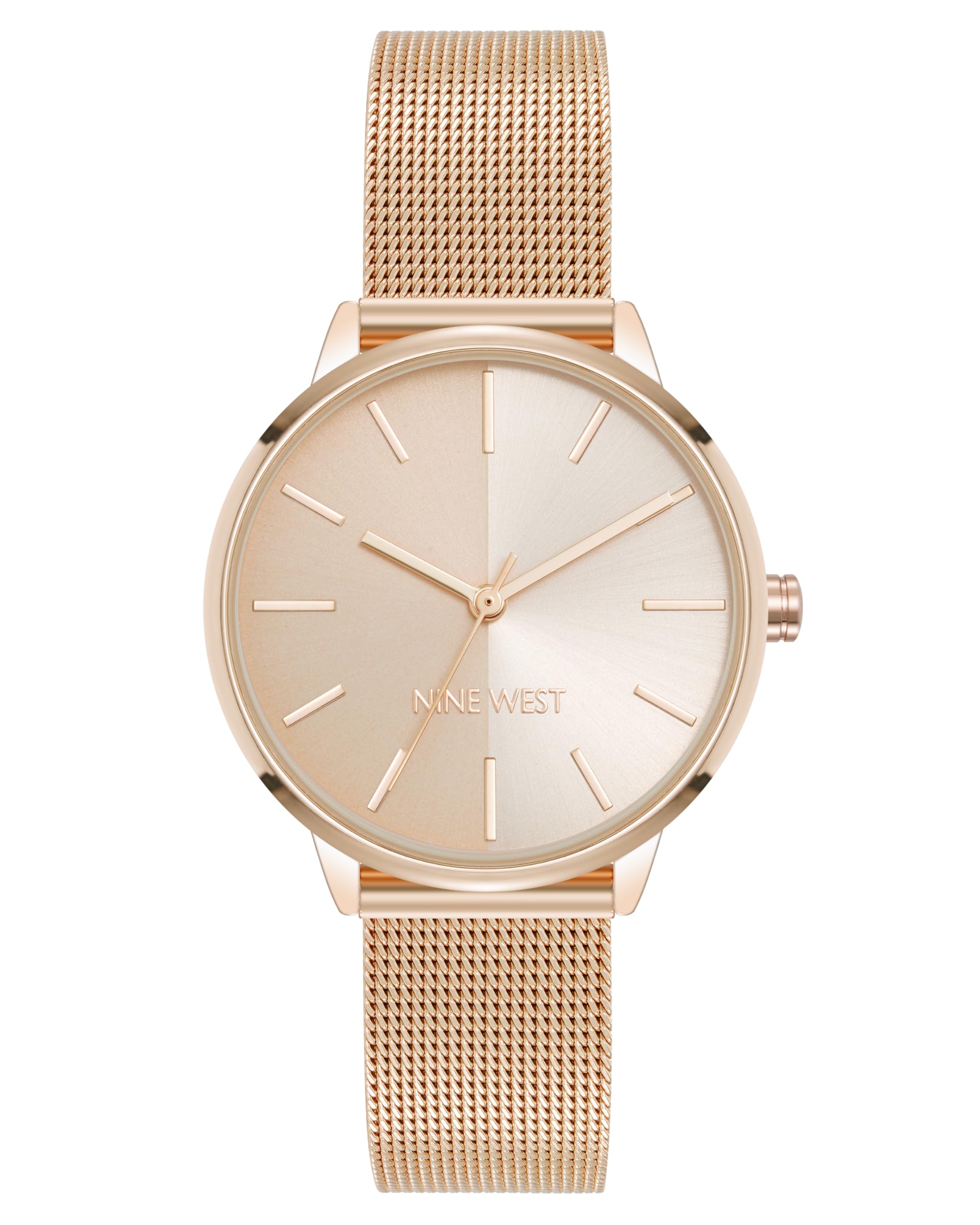
ภาพ: ด้านหน้า view of the Nine West Women's Mesh Bracelet Watch in Rose Gold, showcasing its elegant design and mesh band.
เนื้อหาแพ็คเกจ
ตรวจสอบว่ามีรายการทั้งหมดอยู่ในแพ็คเกจ:
- Nine West Women's Mesh Bracelet Watch (Model NW/3176RGRG)
- คู่มือการใช้งาน (เอกสารนี้)
- กล่องใส่นาฬิกา

Image: The Nine West Women's Mesh Bracelet Watch presented inside its white box, ready for unboxing.
การตั้งค่าและการปรับแต่งเบื้องต้น
Adjusting the Mesh Bracelet
The mesh bracelet features an adjustable sliding buckle closure. Proper adjustment ensures comfort and prevents the watch from slipping.
- Locate the Clasp: Identify the sliding buckle clasp on the mesh bracelet.
- Open the Locking Mechanism: Use a small, flat tool (like a small screwdriver or a sturdy paperclip) to gently lift the locking plate on the clasp. This plate secures the buckle in place.
- Slide to Adjust: Once the locking plate is open, slide the buckle along the mesh band to achieve the desired fit on your wrist.
- ยึดตัวล็อคให้แน่น: Press the locking plate back down firmly until it clicks into place. Ensure it is fully closed to prevent accidental opening.

ภาพ: ด้านหลัง view of the watch, highlighting the adjustable mesh bracelet and its sliding buckle clasp mechanism.
คำแนะนำการใช้งาน
การตั้งเวลา
To set the correct time on your Nine West watch:
- ดึงมงกุฎออกมา: ค่อยๆ ดึงเม็ดมะยม (ปุ่มเล็กๆ ด้านข้างตัวเรือนนาฬิกา) ออกไปทางตำแหน่งตั้งเวลา
- ปรับเวลา: หมุนเม็ดมะยมตามเข็มนาฬิกาหรือทวนเข็มนาฬิกาเพื่อเลื่อนเข็มชั่วโมงและเข็มนาทีไปยังเวลาที่ต้องการ
- กดที่มงกุฎ: เมื่อตั้งเวลาเสร็จแล้ว ให้ดันเม็ดมะยมกลับไปที่ตำแหน่งเดิม การทำเช่นนี้จะทำให้กลไกของนาฬิกาเริ่มทำงาน

ภาพ: ด้านข้าง view of the watch, illustrating the position of the crown used for setting the time.
การซ่อมบำรุง
การทำความสะอาดนาฬิกาของคุณ
เพื่อรักษารูปลักษณ์ของนาฬิกาของคุณ:
- เช็ดตัวเรือนนาฬิกาและกระจกด้วยผ้าแห้งเนื้อนุ่ม
- For the mesh bracelet, a slightly damp สามารถใช้ผ้าแล้วเช็ดให้แห้งทันที
- หลีกเลี่ยงการใช้สารเคมีรุนแรงหรือวัสดุขัดถู เพราะอาจทำให้พื้นผิวเสียหายได้
การเปลี่ยนแบตเตอรี่
When the watch stops running, the battery may need replacement. This should be performed by a qualified watch technician to prevent damage to the watch movement and maintain its integrity.
ความต้านทานต่อน้ำ
สำคัญ: นาฬิกาเรือนนี้เป็น ไม่กันน้ำ. Avoid all contact with water, including showering, swimming, or exposure to rain. Water damage is not covered under warranty.
การแก้ไขปัญหา
| ปัญหา | สาเหตุที่เป็นไปได้ | สารละลาย |
|---|---|---|
| นาฬิกาไม่ทำงาน | แบตเตอรี่หมด; ไม่ได้กดเม็ดมะยมเข้าไป | เปลี่ยนแบตเตอรี่ (แนะนำให้ทำโดยช่างผู้เชี่ยวชาญ); ดันเม็ดมะยมเข้าไปจนสุด |
| เวลาไม่ถูกต้อง | Crown accidentally pulled out; Watch exposed to strong magnetic fields | Ensure crown is fully pushed in; Keep watch away from strong magnets. |
| Bracelet feels loose/tight | Improper band adjustment | Refer to "Adjusting the Mesh Bracelet" section for proper adjustment. |
ข้อมูลจำเพาะ
- หมายเลขรุ่น: NW/3176RGRG
- ความเคลื่อนไหว: ควอตซ์
- วัสดุเลนส์: คริสตัลแร่
- Dial Finish: Rose gold split dial (half matte, half sunray)
- วัสดุสร้อยข้อมือ: Rose gold-tone mesh
- ประเภทตัวล็อค: Adjustable sliding buckle closure
- ความต้านทานน้ำ: ไม่ทนน้ำ
- ขนาดแพ็คเกจ: 4.41 x 3.15 x 2.83 นิ้ว
- น้ำหนักสินค้า: 6.56 ออนซ์
- ผู้ผลิต: ไนน์เวสต์
การรับประกันและการสนับสนุน
Nine West watches are manufactured to high-quality standards. For warranty information or technical support, please refer to the official Nine West webหรือติดต่อฝ่ายบริการลูกค้า เก็บใบเสร็จรับเงินไว้เป็นหลักฐานการซื้อ
หากต้องการความช่วยเหลือเพิ่มเติม คุณสามารถไปที่ Nine West Store on Amazon.
Ask a question about this manual
Ask about setup, troubleshooting, compatibility, parts, safety, or missing instructions. Manuals+ will review the question and use this page’s manual context to help answer it.