
อเว่ย T78
AWEI T78 Mini Wireless Earbuds User Manual
รุ่น : T78
การแนะนำ
Thank you for choosing the AWEI T78 Mini Wireless Earbuds. These earbuds are designed to provide an immersive audio experience with advanced Bluetooth 5.4 technology, clear call performance, and a lightweight, ergonomic design. This manual will guide you through the setup, operation, and maintenance of your new earbuds to ensure optimal performance and longevity.

Image: AWEI T78 earbuds and charging case, highlighting immersive stereo sound.
มีอะไรอยู่ในกล่อง
- หูฟังไร้สาย AWEI T78
- เคสชาร์จไฟ
- สายชาร์จ USB (Type-C)
- คู่มือการใช้งาน
- จุกปิดหู
สินค้าเกินview
The AWEI T78 earbuds consist of two lightweight earbuds and a portable charging case. The earbuds feature touch-sensitive controls for easy operation, while the charging case provides extended battery life on the go.
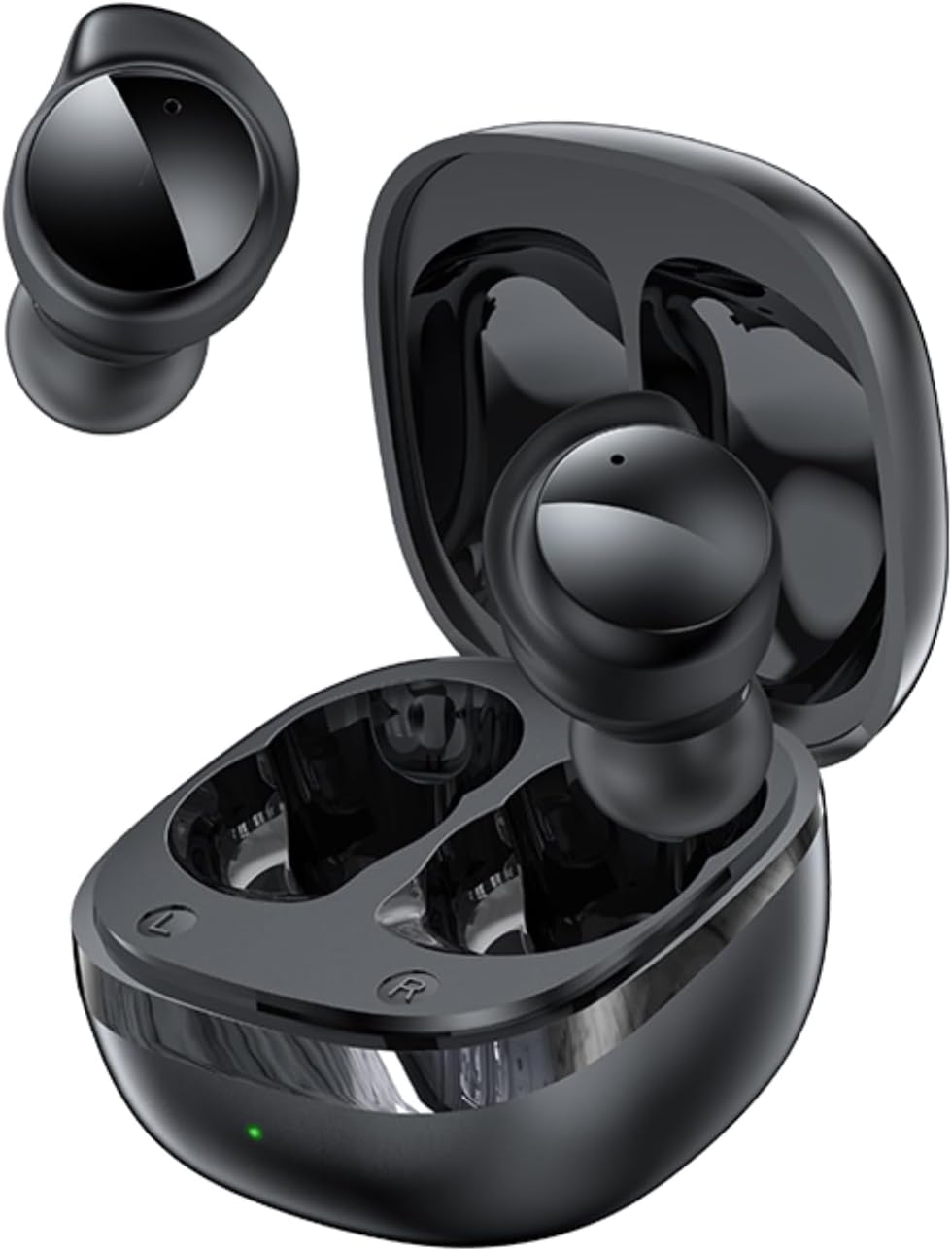
Image: AWEI T78 Mini Wireless Earbuds and Charging Case.

Image: Internal components of an AWEI T78 earbud, showcasing the 13mm speaker.
การตั้งค่า
1. การชาร์จหูฟังและเคส
Before first use, fully charge the charging case and earbuds. Connect the provided Type-C USB cable to the charging port on the case and a power source. The charging indicator light will show the charging status.
- แบตเตอรี่เคสชาร์จ: 200mAh
- เวลาในการชาร์จ (เคส): ประมาณ 1 ชั่วโมง
- Earbud Play Time: Up to 4 hours per charge
- Earbud Talk Time: Up to 3 hours per charge
- Total Playback with Charging Case: Up to 30 hours (dual-ear mode), up to 52 hours (single-ear alternating mode)

Image: Battery life details for AWEI T78 earbuds.
2. การจับคู่กับอุปกรณ์ของคุณ
- ตรวจสอบให้แน่ใจว่าได้ชาร์จเอียร์บัดแล้ว
- เปิดกล่องชาร์จ หูฟังจะเปิดอัตโนมัติและเข้าสู่โหมดจับคู่
- บนอุปกรณ์ของคุณ (สมาร์ทโฟน แท็บเล็ต แล็ปท็อป) ให้เปิดใช้งาน Bluetooth
- ค้นหา เลือกอุปกรณ์ Bluetooth ที่ใช้งานได้ และเลือก "AWEI T78" จากรายการ
- เมื่อเชื่อมต่อเสร็จแล้ว คุณจะได้ยินเสียงยืนยัน และหูฟังจะพร้อมใช้งาน
The earbuds feature Bluetooth 5.4 for a fast, stable, and low-latency connection up to 10 meters (33 feet). They will automatically reconnect to the last paired device when taken out of the case.

Image: AWEI T78 earbuds demonstrating Bluetooth 5.4 connectivity.
การดำเนินงาน
เปิด/ปิดเครื่อง
- เปิดเครื่อง: เปิดกล่องชาร์จ หูฟังจะเปิดโดยอัตโนมัติ
- หมดแรง: ใส่หูฟังกลับเข้าไปในกล่องชาร์จและปิดฝา หูฟังจะปิดโดยอัตโนมัติและเริ่มชาร์จ
การควบคุมแบบสัมผัส
The AWEI T78 earbuds feature intuitive touch controls on each earbud. The functions are as follows:
- เล่น/หยุดชั่วคราว: Tap once on either L/R earbud.
- เพลงถัดไป: Tap twice on either L/R earbud.
- เพลงก่อนหน้า: Tap thrice on either L/R earbud.
- รับสาย/วางสาย: Tap once on either L/R earbud.
- ปฏิเสธสาย: Touch for 1 second on either L/R earbud.
- เปิดใช้งาน Voice Assistant: Long touch for 2 seconds on either L/R earbud.

Image: Detailed diagram of AWEI T78 earbud touch controls.
โหมดเอียร์บัดเดี่ยว
You can use either the left or right earbud independently. Simply take one earbud out of the case, and it will automatically connect to your device. The other earbud can remain in the case or be used later.

Image: AWEI T78 earbud worn, emphasizing its lightweight design.
การซ่อมบำรุง
การทำความสะอาด
ควรทำความสะอาดหูฟังและเคสชาร์จเป็นประจำ เพื่อรักษาประสิทธิภาพและสุขอนามัยที่ดีที่สุด
- ใช้ผ้าแห้งนุ่มและไม่ขุยเช็ดหูฟังและกล่องชาร์จ
- ค่อยๆ ขจัดขี้หูหรือสิ่งสกปรกออกจากส่วนที่เป็นตาข่ายของหูฟังและจุดสัมผัสการชาร์จโดยใช้สำลีแห้งสะอาดหรือแปรงขนนุ่มขนาดเล็ก
- ห้ามใช้สารทำความสะอาดที่มีฤทธิ์กัดกร่อน แอลกอฮอล์ หรือตัวทำละลายเคมี
ความต้านทานต่อน้ำ (IPX5)
The AWEI T78 earbuds are IPX5 waterproof, meaning they are protected against low-pressure water jets from any direction. This makes them suitable for workouts and light rain. However, they are not designed for submersion in water or for use during swimming or showering.
พื้นที่จัดเก็บ
เมื่อไม่ได้ใช้งาน ควรเก็บหูฟังไว้ในกล่องชาร์จเพื่อป้องกันฝุ่นละอองและความเสียหาย รวมถึงเพื่อรักษาระดับประจุไฟ
การแก้ไขปัญหา
- หูฟังไม่จับคู่กับอุปกรณ์:
- โปรดตรวจสอบให้แน่ใจว่าได้เปิดใช้งานบลูทูธบนอุปกรณ์ของคุณแล้ว
- Make sure the earbuds are charged and out of the charging case.
- Try forgetting "AWEI T78" from your device's Bluetooth list and re-pairing.
- Restart your device and try again. - มีหูฟังเพียงข้างเดียวที่ใช้งานได้:
- Place both earbuds back into the charging case, close the lid, and then take them out again.
- ตรวจสอบให้แน่ใจว่าหูฟังทั้งสองข้างชาร์จแบตเตอรี่เต็มแล้ว
- If the issue persists, try resetting the earbuds (refer to manufacturer's webไซต์สำหรับคำแนะนำการรีเซ็ตเฉพาะหากจำเป็น) - ไม่มีเสียง:
- Check the volume level on both your device and the earbuds.
- Ensure the earbuds are properly connected to your device.
- Try playing audio from a different application or source. - กล่องชาร์จไม่ชาร์จ:
- ตรวจสอบให้แน่ใจว่าสายชาร์จเชื่อมต่อกับเคสและแหล่งจ่ายไฟอย่างแน่นหนาแล้ว
- ลองใช้สายชาร์จหรืออะแดปเตอร์ไฟอื่น
- Check if the charging port on the case is clean and free of debris.
ข้อมูลจำเพาะ
| ชื่อรุ่น | T78 |
| ยี่ห้อ | อาเว่ย |
| เทคโนโลยีการเชื่อมต่อ | ไร้สาย (บลูทูธ 5.4) |
| ช่วงบลูทูธ | สูงถึง 10 เมตร (33 ฟุต) |
| ระดับความต้านทานต่อน้ำ | IPX5 |
| การวางตำแหน่งหู | ในหู |
| ประเภทการควบคุม | การควบคุมแบบสัมผัส |
| พอร์ตชาร์จ | ประเภทซี |
| เคสชาร์จแบตเตอรี่ | 200mAh |
| ขนาดลำโพง | 13มม. |
| อิมพีแดนซ์ | 32 โอห์ม |
| การควบคุมเสียงรบกวน | ระบบตัดเสียงรบกวนแบบแอคทีฟ |
การรับประกันและการสนับสนุน
For warranty information and technical support, please refer to the warranty card included with your product or visit the official AWEI website. If you encounter any issues not covered in this manual, please contact AWEI customer service for assistance.
Ask a question about this manual
Ask about setup, troubleshooting, compatibility, parts, safety, or missing instructions. Manuals+ will review the question and use this page’s manual context to help answer it.