
การแนะนำ
Thank you for choosing the FIIL GS Open Ear Earbuds. This manual provides detailed instructions for setting up, operating, and maintaining your earbuds to ensure optimal performance and longevity. Please read this manual thoroughly before use.

Image: The FIIL GS Open Ear Earbuds with their charging case.
มีอะไรอยู่ในกล่อง
The FIIL GS Open Ear Earbuds package includes the following items:
- FIIL GS Open Ear Earbuds (Left and Right)
- เคสชาร์จไฟ
- สายชาร์จ USB
- คู่มือการใช้งาน (เอกสารนี้)
สินค้าเกินview
The FIIL GS earbuds feature an open-ear design for comfort and situational awareness. They are equipped with advanced audio technology, including LDAC codec support for Hi-Res Audio Wireless, and Bluetooth 5.3 for stable connectivity.

Image: Illustration of the ergonomic design features of the FIIL GS earbuds.
- การออกแบบตามหลักสรีรศาสตร์: Features a 6:4 weight ratio between earbuds and charging case, 6g fitting force for comfort, and 0.68mm ultra-fine titanium alloy wire for adaptive fit.
- Sound Leakage Prevention: Utilizes a scientific sound aperture matrix and multiple sound barrier configurations to minimize sound leakage.
- ความต้านทานน้ำ IPX5: Designed to withstand splashes and sweat, suitable for various activities.
การตั้งค่า
1. การชาร์จหูฟังและเคส
ก่อนใช้งานครั้งแรก ควรชาร์จหูฟังและเคสชาร์จให้เต็ม
- วางหูฟังลงในกล่องชาร์จ โดยให้แน่ใจว่าใส่เข้าที่อย่างถูกต้อง
- เชื่อมต่อสายชาร์จ USB เข้ากับพอร์ตชาร์จบนเคสและแหล่งจ่ายไฟ (เช่น อะแดปเตอร์ผนัง USB พอร์ต USB ของคอมพิวเตอร์)
- ไฟแสดงสถานะบนเคสจะแสดงสถานะการชาร์จ การชาร์จเคสจนเต็มใช้เวลาประมาณ 1.5 ชั่วโมง

Image: The FIIL GS charging case being charged via a USB cable, illustrating battery life.
The earbuds provide approximately 9.8 hours of listening time on a single charge, with the charging case offering an additional 2 full charges, totaling over 32 hours of playtime.
2. การจับคู่บลูทู ธ
Pair your FIIL GS earbuds with your device for wireless audio.
- เปิดกล่องชาร์จ หูฟังจะเข้าสู่โหมดจับคู่โดยอัตโนมัติ ซึ่งจะแสดงด้วยไฟกระพริบ
- บนอุปกรณ์ของคุณ (สมาร์ทโฟน แท็บเล็ต คอมพิวเตอร์) เปิดใช้งาน Bluetooth และค้นหาอุปกรณ์ที่มีอยู่
- Select "FIIL GS" from the list of found devices to connect.
- เมื่อเชื่อมต่อแล้ว จะมีเสียงแจ้งเตือนยืนยันการจับคู่สำเร็จ
หูฟังไร้สายรองรับ Bluetooth 5.3 Dual Device Connectivity, allowing connection to two devices simultaneously. For example, you can connect to both your phone and computer and switch seamlessly between them for calls or media.

Image: Graphic illustrating Bluetooth 5.3 technology.
3. FIIL+ App Installation
For enhanced features and customization, download the FIIL+ app from your device's app store.
- ค้นหา "FIIL+" in the Apple App Store or Google Play Store.
- Install the app and follow the on-screen instructions to connect your FIIL GS earbuds.
- The app allows for customizable EQ settings, sound effects, and other tuning options.

Image: Screenshot of the FIIL+ app interface on a smartphone, showing customization options.
คำแนะนำการใช้งาน
การควบคุมแบบสัมผัส
The FIIL GS earbuds feature touch-sensitive controls for various functions. Specific gestures can be customized via the FIIL+ app.
| การกระทำ | การทำงาน |
|---|---|
| แตะครั้งเดียว (ซ้าย/ขวา) | เล่น/หยุดเพลง, รับ/วางสาย |
| แตะสองครั้ง (ขวา) | เพลงถัดไป |
| แตะสองครั้ง (ซ้าย) | เพลงก่อนหน้า |
| แตะสามครั้ง (ซ้าย/ขวา) | เปิดใช้งานผู้ช่วยเสียง |
| กดค้างไว้ (ซ้าย/ขวา) | Volume Up/Down (configurable via app) |
| Incoming Call: Press and Hold | ปฏิเสธการรับสาย |
ระบบเสียงความละเอียดสูงพร้อม LDAC
The FIIL GS earbuds support LDAC codec for high-resolution audio transmission. To experience Hi-Res Audio Wireless:
- Ensure your audio source device supports LDAC.
- Activate LDAC in your device's Bluetooth settings or through the FIIL+ app if available.
- Play Hi-Res audio content for the best listening experience.
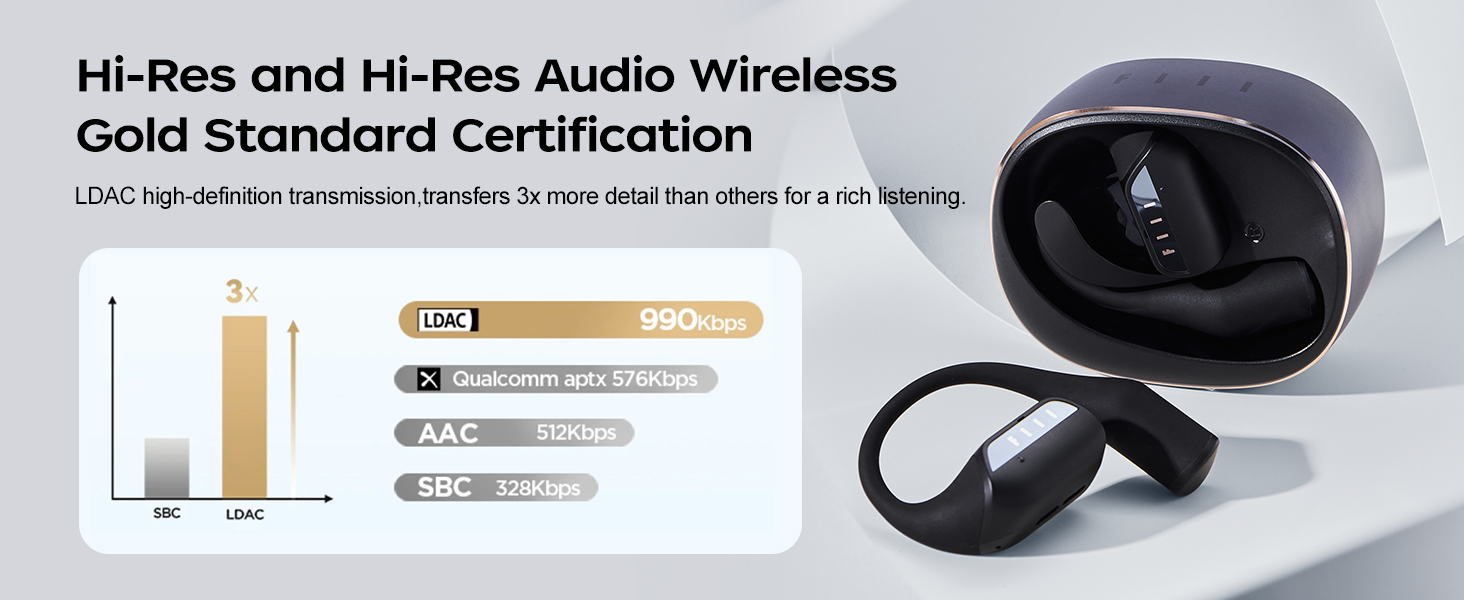
Image: A comparison chart showing LDAC's higher bitrate compared to other audio codecs like AAC and SBC.
การจัดการการโทร
The earbuds feature ENC Dual-Mic Call Noise Cancellation for clear calls.
- การรับ / วางสาย: แตะเพียงครั้งเดียวที่หูฟังข้างใดข้างหนึ่ง
- การปฏิเสธการโทร: กดและค้างไว้ที่หูฟังข้างใดข้างหนึ่ง

Image: Diagram illustrating the ENC Dual-Mic Call Noise Cancellation feature for improved call quality.
การซ่อมบำรุง
การทำความสะอาด
- ทำความสะอาดหูฟังและกล่องชาร์จเป็นประจำด้วยผ้าแห้งนุ่มที่ไม่เป็นขุย
- หลีกเลี่ยงการใช้สารกัดกร่อน ตัวทำละลาย หรือสารเคมีทำความสะอาด
- โปรดตรวจสอบให้แน่ใจว่าขั้วชาร์จทั้งบนหูฟังและเคสสะอาดและแห้ง เพื่อการชาร์จที่ถูกต้อง
ความต้านทานต่อน้ำ (IPX5)
The FIIL GS earbuds are IPX5 water-resistant, meaning they can withstand splashes of water and sweat. They are not designed for submersion in water.
- Do not expose the earbuds to running water or wear them while swimming or showering.
- หากหูฟังเปียก ให้เช็ดให้แห้งสนิทก่อนใส่กลับเข้าไปในกล่องชาร์จหรือใช้งาน

Image: The FIIL GS earbuds in their case, showing resistance to water splashes, highlighting the IPX5 rating.
การดูแลแบตเตอรี่
- ควรเก็บหูฟังและเคสไว้ในที่แห้งและเย็นเมื่อไม่ใช้งาน
- หลีกเลี่ยงอุณหภูมิที่สูงเกินไปซึ่งอาจทำให้แบตเตอรี่มีอายุการใช้งานลดลง
- ชาร์จอุปกรณ์เป็นประจำ แม้จะไม่ได้ใช้งานบ่อยก็ตาม เพื่อรักษาสุขภาพแบตเตอรี่
การแก้ไขปัญหา
| ปัญหา | วิธีแก้ปัญหาที่เป็นไปได้ |
|---|---|
| หูฟังเอียร์บัดไม่จับคู่ |
|
| ไม่มีเสียงหรือเสียงเบา |
|
| ปัญหาการชาร์จ |
|
| ระบบควบคุมแบบสัมผัสไม่ตอบสนอง |
|
ข้อมูลจำเพาะ
| คุณสมบัติ | รายละเอียด |
|---|---|
| ชื่อรุ่น | GS |
| หมายเลขรุ่นสินค้า | เอฟ043 |
| เทคโนโลยีการเชื่อมต่อ | ไร้สาย (บลูทูธ 5.3) |
| รองรับตัวแปลงสัญญาณเสียง | LDAC (Hi-Res Audio Wireless Certified) |
| ความต้านทานต่อน้ำ | IPX5 |
| อายุการใช้งานแบตเตอรี่ (หูฟัง) | สูงสุด 9.8 ชั่วโมง (ชาร์จครั้งเดียว) |
| อายุการใช้งานแบตเตอรี่ทั้งหมด (รวมเคส) | นานถึง 32 ชั่วโมง |
| ระยะเวลาในการชาร์จ (เคส) | ประมาณ 1.5 ชั่วโมง |
| การวางตำแหน่งหู | หูเปิด |
| ประเภทการควบคุม | การควบคุมแบบสัมผัส, การควบคุมแอพ |
| คุณสมบัติพิเศษ | Lightweight, Microphone Included, Multipoint Pairing, Sweatproof |
| ช่วงความถี่ | 20 เฮิรตซ์ - 20,000 เฮิรตซ์ |
| อิมพีแดนซ์ | 16 โอห์ม |
| น้ำหนักสินค้า | 5.6 ออนซ์ |
| วัสดุ | พลาสติก |
ข้อมูลการรับประกัน
FIIL products are typically covered by a limited warranty against defects in materials and workmanship. Please refer to the warranty card included with your product or visit the official FIIL webดูรายละเอียดข้อกำหนดและเงื่อนไขการรับประกันโดยละเอียดได้ที่เว็บไซต์ รวมถึงระยะเวลาและขอบเขตความคุ้มครอง
เก็บหลักฐานการซื้อของคุณไว้เพื่อเรียกร้องการรับประกัน
สนับสนุน
For further assistance, technical support, or frequently asked questions, please visit the official FIIL webเว็บไซต์หรือติดต่อฝ่ายบริการลูกค้าของพวกเขา
- FIIL Official Store: Visit FIIL Store on Amazon
- การสนับสนุนทางออนไลน์: Refer to the official FIIL webเว็บไซต์สำหรับทรัพยากรสนับสนุน