1. บทนำ
Thank you for choosing the ORICO 9928RU3 2-Bay RAID HDD Enclosure. This device is designed to provide a reliable and efficient solution for your data storage needs, supporting both 2.5-inch SSD/HDD and 3.5-inch HDD with advanced RAID functionality. Please read this manual carefully to ensure proper installation and operation.

ภาพที่ 1.1: ด้านหน้า view of the ORICO 9928RU3 2-Bay RAID HDD Enclosure, showcasing its sleek silver design and two drive bays.
2. คุณสมบัติหลัก
- ระบบจัดเก็บข้อมูลความจุสูง: Supports up to 22TB per drive, totaling 44TB for extensive data storage requirements.
- การจัดการข้อมูลอย่างมีประสิทธิภาพ: Offers PM (Port Multiplier), RAID 0, RAID 1, and SPAN (JBOD) modes for flexible data organization and protection. This is ideal for video editing and critical data backup.
- 2.5/3.5-inch Drive Compatibility: Includes brackets to securely mount both 3.5-inch HDDs and 2.5-inch SSD/HDDs. A 48W external power supply ensures stable operation even with multiple disks.
- การกระจายความร้อนที่เหนือกว่า: Constructed with an aluminum alloy body and equipped with a 40mm silent fan, along with front and rear ventilation holes, to effectively dissipate heat. This maintains low operating temperatures and prevents performance degradation.
- การถ่ายโอนข้อมูล 5Gbps: Features a USB 3.0 interface compatible with SATA 6Gbps and supports the UASP acceleration protocol, delivering transfer speeds up to 235MB/s for rapid backups and file การโอนย้าย
- การออกแบบที่ทันสมัยและมีประโยชน์ใช้สอย: The silver-white aluminum alloy casing complements any desktop setup. Non-slip feet provide stability, and individual LED indicators for each disk slot offer clear operational status.

Image 2.1: Illustration of the ORICO 9928RU3's large storage capacity, indicating support for up to 44TB total.
3. คู่มือการติดตั้ง
3.1 เนื้อหาบรรจุภัณฑ์
โปรดตรวจสอบว่าสินค้าทั้งหมดมีอยู่ในแพ็คเกจ:
- ORICO 9928RU3 2-Bay RAID HDD Enclosure
- สายข้อมูล USB 3.0
- อะแดปเตอร์ไฟ 12V/4A
- สกรูยึดฮาร์ดดิสก์
- ไขควง
- คู่มือการใช้งาน
3.2 HDD/SSD Installation
- Gently pull the handle of the drive bay to open it.
- For 2.5-inch SSD/HDD, attach the provided bracket to the drive using screws. For 3.5-inch HDD, the bracket may not be necessary.
- Slide the prepared drive into the open bay until it is firmly seated.
- Secure the drive within the bay using the provided screws.
- Close the drive bay by pushing the handle back into place.

ภาพที่ 3.1: รายละเอียด view of installing a hard drive into the ORICO 9928RU3 enclosure, showing the spring-loaded switch and screw fixation points.
3.3 การกำหนดค่าโหมด RAID
The ORICO 9928RU3 supports multiple RAID modes configured via DIP switches located on the rear panel. Important: Always back up your data before changing RAID modes, as this process will erase all data on the drives.
- PM (ตัวคูณพอร์ต): แต่ละไดรฟ์จะถูกมองว่าเป็นดิสก์อิสระ
- RAID 0 (การแบ่งสตริป): Combines drives for maximum speed and capacity, but offers no data redundancy.
- RAID 1 (การมิเรอร์): Duplicates data across drives for redundancy, protecting against single drive failure. Capacity is limited to the smallest drive.
- SPAN (JBOD - Just a Bunch Of Disks): Concatenates drives to form one large volume without performance or redundancy benefits.
Refer to the diagram below for DIP switch settings for each RAID mode:
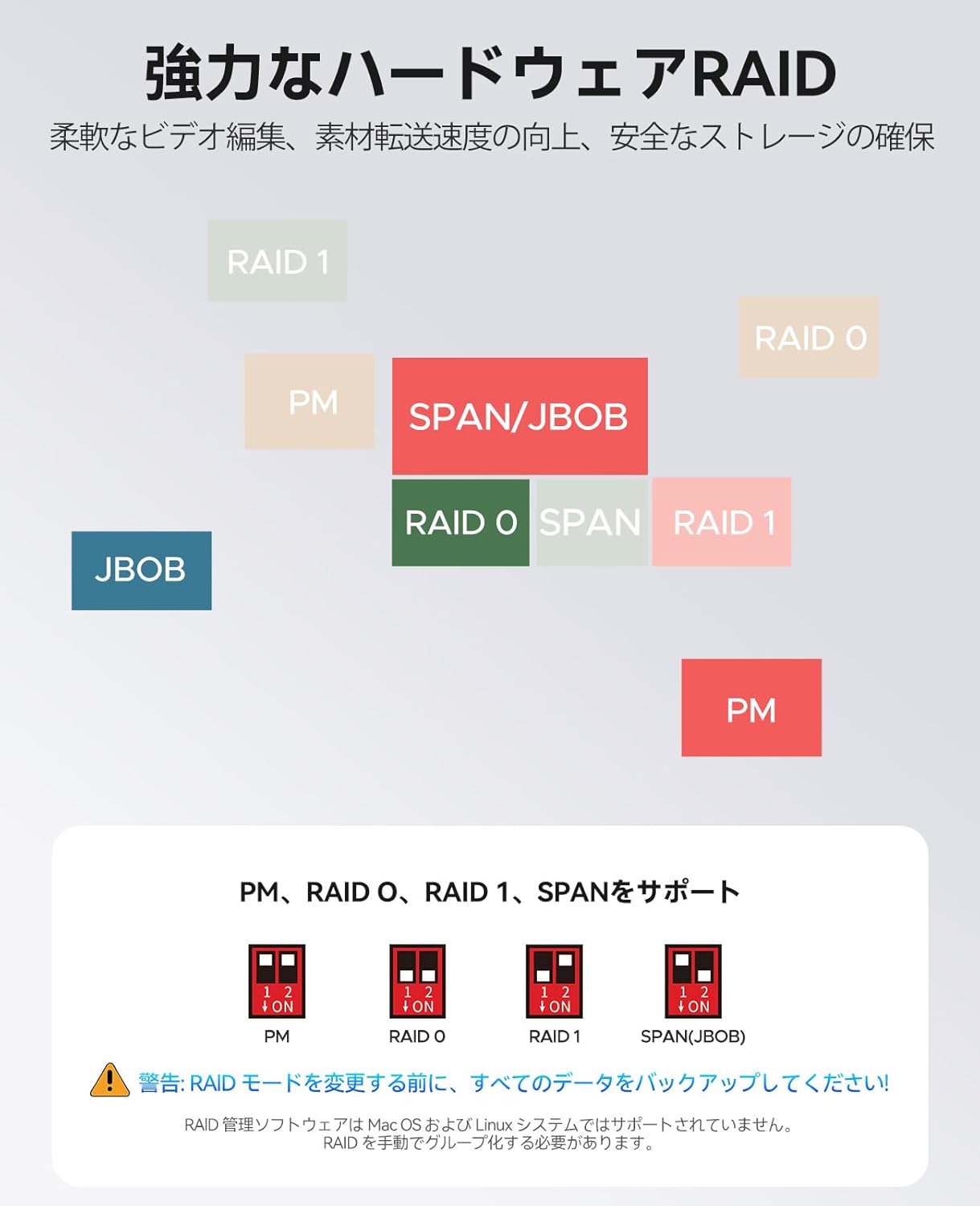
Image 3.2: Diagram illustrating the DIP switch configurations for PM, RAID 0, RAID 1, and SPAN (JBOD) modes.
3.4 Power and Computer Connection
- Connect the 12V/4A power adapter to the DC input port on the rear of the enclosure and then to a power outlet.
- Connect the USB 3.0 data cable from the enclosure's USB 3.0 port to an available USB port on your computer.
- Power on the enclosure using the power button.

Image 3.3: The ORICO 9928RU3 connected to its 48W external power adapter and a computer via USB, ensuring stable data flow.
4. คู่มือการใช้งาน
4.1 Power On and Drive Recognition
Once connected and powered on, your operating system should detect the enclosure and its installed drives (or RAID volume, depending on your configuration). The LED indicators on the front panel will illuminate to show the status of each drive bay.
4.2 การถ่ายโอนข้อมูล
Utilize the USB 3.0 connection for high-speed data transfer. The enclosure supports UASP (USB Attached SCSI Protocol) for optimized performance, reaching speeds up to 235MB/s for both reading and writing data.

Image 4.1: The ORICO 9928RU3 connected to a computer, demonstrating its 5Gbps data transfer capability for efficient file การจัดการ.
5. การบำรุงรักษา
5.1 การกระจายความร้อน
The enclosure features an aluminum alloy body and an integrated 40mm silent fan to maintain optimal operating temperatures. Ensure that the front and rear ventilation holes are not obstructed to allow for proper airflow.

Image 5.1: Illustration of the ORICO 9928RU3's cooling system, highlighting the internal fan and airflow for efficient heat dissipation.
5.2 การทำความสะอาด
To clean the exterior of the enclosure, use a soft, dry cloth. Avoid using liquid cleaners or abrasive materials that could damage the finish.
6 การแก้ไขปัญหา
- ไม่พบไดรฟ์:
- Ensure the enclosure is powered on and connected correctly to your computer.
- Verify that the drives are properly seated in their bays.
- Check the RAID mode settings via the DIP switches. If you changed modes, ensure the drives are initialized or formatted as required by the new mode (this will erase data). - ความเร็วในการถ่ายโอนข้อมูลช้า:
- Confirm that the enclosure is connected to a USB 3.0 port on your computer.
- Ensure your operating system and drivers support UASP for optimal performance. - Difficulty Removing Drives:
- If a drive feels stuck, try gently tilting the drive bay handle slightly up or down while pulling it out. This can help disengage any internal catches. - เสียงพัดลม:
- The enclosure includes an internal cooling fan. Some users may perceive a high-pitched noise during operation. This is a characteristic of the fan and is generally within normal operating parameters. Ensure ventilation is not obstructed.
7. ข้อมูลจำเพาะ
| แบบอย่าง | 9928RU 3 |
| ยี่ห้อ | โอริโก้ |
| อุปกรณ์ที่รองรับ | เดสก์ท็อป, โน๊ตบุ๊ก |
| สี | เงิน |
| วัสดุ | อลูมิเนียม |
| ขนาดสินค้า (กว้าง x ยาว x สูง) | 23.7 x 13.5 x 9 ซม. |
| น้ำหนักผลิตภัณฑ์ | 2.43 กก. |
| คุณสมบัติอื่น ๆ | พัดลมในตัว |
| ประเภทแหล่งจ่ายไฟ | Rear Mount (External 12V/4A, 48W adapter) |
| พอร์ต USB | 1 (ยูเอสบี 3.0) |
| ปัจจัยรูปแบบฮาร์ดดิสก์ | 3.5 inches (supports 2.5 inches with bracket) |
| รองรับโหมด RAID | PM, RAID 0, RAID 1, SPAN (JBOD) |
| อินเทอร์เฟซ | USB 3.0 (SATA 6Gbps compatible), UASP support |
| ความเร็วในการถ่ายโอนสูงสุด | ความเร็วสูงสุด 235 MB/s (อ่าน/เขียน) |
| ความจุสูงสุด | 22TB per drive, 44TB total |
8. การรับประกันและการสนับสนุน
สำหรับข้อมูลการรับประกันและการสนับสนุนทางเทคนิค โปรดดูเอกสารที่แนบมากับสินค้าที่ซื้อ หรือเยี่ยมชมเว็บไซต์อย่างเป็นทางการของ ORICO webหากคุณพบปัญหาใดๆ ที่ไม่ได้กล่าวถึงในคู่มือนี้ โปรดติดต่อฝ่ายบริการลูกค้าของ ORICO เพื่อขอความช่วยเหลือ