
การแนะนำ
The Wireless Express Sing-Along Bling Karaoke Microphone and Stereo Speaker is a versatile 2-in-1 device designed for entertainment. It combines a microphone with a Bluetooth speaker, allowing users to sing along to music from various compatible devices. This manual provides essential information for setup, operation, and maintenance of your device.
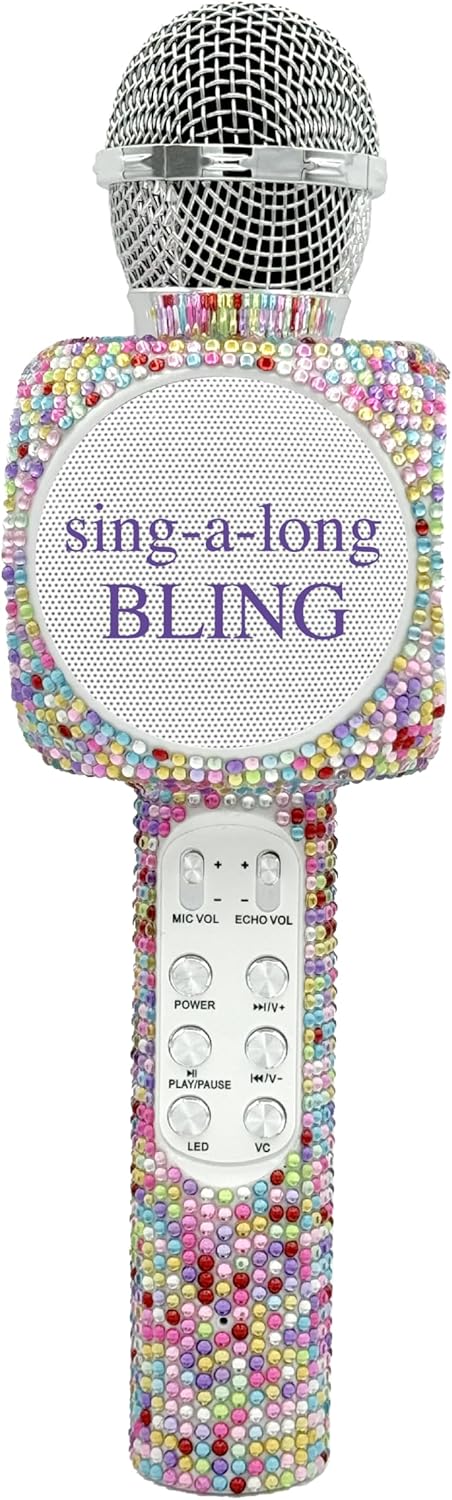
The Sing-Along Bling Karaoke Microphone, featuring its unique Confetti Bling design.
คุณสมบัติหลัก
- การออกแบบ 2-in-1: Combines a microphone and a Bluetooth stereo speaker for integrated audio and vocal performance.
- การเชื่อมต่อบลูทูธ: Easily connects wirelessly to smartphones, tablets, and computers (Android & Apple compatible) for streaming music.
- ไฟ LED แบบไดนามิก: Features dazzling LED lights that enhance the karaoke experience.
- เอฟเฟกต์เสียง: Includes echo effects and voice changers for varied vocal styles.
- การควบคุมแบบบูรณาการ: Offers convenient buttons for volume control, track skipping (previous/next), and recording.
- การออกแบบพกพา: ขนาดกะทัดรัดและน้ำหนักเบา เหมาะสำหรับใช้งานทั้งในร่มและกลางแจ้ง
- แบตเตอรี่แบบชาร์จไฟได้: Powered by a battery for wireless operation.
- ช่องเสียบการ์ด SD: Allows for playback from an SD card.
- แจ็คหูฟัง: Provides an option for private listening or monitoring.

โอเวอร์view of the microphone's features, highlighting its Bluetooth capability, voice changer, LED lights, portability, and rechargeable battery.
คู่มือการติดตั้ง
1. การชาร์จไมโครโฟน
- Locate the Micro USB charging port on the microphone.
- Connect the provided charging cable to the microphone and a compatible USB power source (e.g., computer, USB wall adapter).
- The LED indicator will show charging status (refer to product-specific LED behavior for details, usually red for charging, off/blue for full).
- ให้เวลาเพียงพอสำหรับการชาร์จเต็มก่อนใช้งานครั้งแรก
2. การเปิด/ปิดเครื่อง
- To power on, press and hold the Power button (usually marked with a power symbol) until the device activates and the LED lights illuminate.
- หากต้องการปิดเครื่อง ให้กดปุ่มเปิด/ปิดค้างไว้จนกว่าเครื่องจะปิดลง
3. การจับคู่บลูทู ธ
- Ensure the microphone is powered on and in pairing mode (indicated by a flashing LED light, often blue).
- บนสมาร์ทโฟน แท็บเล็ต หรือคอมพิวเตอร์ของคุณ ให้เปิดใช้งานบลูทูธ แล้วค้นหาอุปกรณ์ที่ใช้งานได้
- Select "WE-BLING-MIC" or a similar device name from the list.
- Once paired, the microphone will usually emit an audible confirmation and the LED light will become solid.
คำแนะนำการใช้งาน
1. การควบคุมพื้นฐาน
- การควบคุมระดับเสียง: Use the "VOL+" and "VOL-" buttons to adjust the overall speaker volume.
- ปริมาณไมโครโฟน: Use the "MIC VOL" slider or buttons to adjust your vocal volume.
- เอฟเฟกต์เสียงสะท้อน: Use the "ECHO VOL" slider or buttons to add or reduce echo to your voice.
- การเล่นเพลง:
- เล่น/หยุดชั่วคราว: Press the "PLAY/PAUSE" button.
- แทร็กก่อนหน้า: Press the "PREV" button.
- เพลงถัดไป: Press the "NEXT" button.
- ไฟ LED: Press the "LED" button to cycle through different light modes or turn them off.
- โปรแกรมเปลี่ยนเสียง: Press the "VC" button to activate and cycle through various voice changing effects.
2. Singing with Music
Once connected via Bluetooth, open your preferred karaoke app or music streaming service on your device. Play a song, and the music will stream through the microphone's speaker. You can then sing into the microphone, adjusting your vocal volume and echo as desired.
3. Recording Your Performance
The microphone supports recording. Connect an audio cable from the microphone's audio output to your recording device (e.g., smartphone with a recording app). Alternatively, some karaoke apps may allow direct recording through the Bluetooth connection.
4. Using the SD Card Slot
Insert a compatible SD card loaded with MP3 files into the designated slot. The microphone will automatically detect and begin playing music from the SD card. Use the music playback controls to manage tracks.
Demonstration of a similar wireless microphone's sound quality and features in a car environment, including FM radio connectivity and various sound modes. This video is provided by a seller and offers insights into potential usage scenarios and audio performance.
การซ่อมบำรุง
- การทำความสะอาด: Use a soft, dry cloth to clean the exterior of the microphone. Do not use harsh chemicals or abrasive cleaners.
- พื้นที่จัดเก็บ: Store the microphone in a cool, dry place away from direct sunlight and extreme temperatures. If a carrying case is provided, utilize it for protection during storage and transport.
- การดูแลแบตเตอรี่ เพื่อยืดอายุการใช้งานแบตเตอรี่ ควรหลีกเลี่ยงการคายประจุแบตเตอรี่จนหมดบ่อยๆ ควรชาร์จอุปกรณ์เป็นประจำ แม้ว่าจะไม่ได้ใช้งานเป็นเวลานานก็ตาม
การแก้ไขปัญหา
| ปัญหา | สารละลาย |
|---|---|
| ไมโครโฟนไม่เปิดใช้งาน | ตรวจสอบให้แน่ใจว่าแบตเตอรี่ชาร์จเต็มแล้ว เสียบสายชาร์จแล้วลองใหม่อีกครั้ง |
| ไม่สามารถจับคู่ผ่านบลูทูธได้ | Make sure the microphone is in pairing mode (flashing LED). Ensure Bluetooth is enabled on your device and it's within range. Try restarting both devices. |
| ไม่มีเสียงจากลำโพง | Check the volume levels on both the microphone and your connected device. Ensure the microphone is properly paired. |
| Echo/Voice Changer not working. | Ensure the "ECHO VOL" or "VC" functions are activated and adjusted to an audible level. |
ข้อมูลจำเพาะ
| คุณสมบัติ | รายละเอียด |
|---|---|
| ยี่ห้อ | ไร้สายด่วน |
| หมายเลขรุ่น | WE-BLING-MIC |
| เทคโนโลยีการเชื่อมต่อ | บลูทูธ |
| แหล่งพลังงาน | ใช้พลังงานจากแบตเตอรี่ |
| วัสดุ | Plastic And Metal |
| แพลตฟอร์มฮาร์ดแวร์ | Karaoke Machine, Smartphone, Tablet |
| น้ำหนักสินค้า | 1.46 ปอนด์ |
| ขนาดแพ็คเกจ | 15.04 x 5.71 x 3.7 นิ้ว |
| รูปแบบขั้ว | ทิศทางเดียว |
| ปัจจัยรูปแบบไมโครโฟน | แบบถือด้วยมือ |
| คุณสมบัติพิเศษ | การควบคุมระดับเสียง |
| ประเภทขั้วต่อ | ไมโคร USB |
มีอะไรอยู่ในกล่อง
- Sing-Along Bling Bluetooth ไมโครโฟนคาราโอเกะ
- สายชาร์จ
การรับประกันและการสนับสนุน
For warranty information or technical support, please refer to the product packaging or contact Wireless Express customer service directly. Contact details can typically be found on the manufacturer's official webเว็บไซต์หรือในเอกสารประกอบผลิตภัณฑ์