
1. บทนำ
The PEAKMETER PM8250 is a professional handheld digital multimeter designed for accurate and reliable electrical measurements, particularly in photovoltaic (PV) systems. It features a high DC voltage measurement capability up to 1700V, auto and manual ranging, and various functions including AC/DC voltage, current, resistance, capacitance, frequency, temperature, and specialized functions like LPF, MAX/MIN/PEAK, Continuity, Diode, and NCV detection. This manual provides essential information for the safe and effective operation of your PM8250 multimeter.

รูปที่ 1 : ด้านหน้า view of the PEAKMETER PM8250 Multimeter, showing the display, rotary switch, and function buttons.
2. ข้อมูลด้านความปลอดภัย
To ensure safe operation and service of the multimeter, follow these safety precautions:
- ปฏิบัติตามรหัสความปลอดภัยระดับท้องถิ่นและระดับประเทศเสมอ
- อย่าใช้มิเตอร์หากพบว่ามีความเสียหายหรือหากตัวเครื่องเปิดอยู่
- Verify the meter's operation by measuring a known voltage or current before use.
- Observe the input limits for each measurement range. The maximum DC voltage คือ 1700V
- ใช้ความระมัดระวังเมื่อทำงานกับ voltagสูงกว่า 60V DC หรือ 30V AC RMS เนื่องจากอาจเกิดอันตรายจากไฟฟ้าช็อตได้
- ตรวจสอบให้แน่ใจว่าสายทดสอบอยู่ในสภาพดีและเชื่อมต่ออย่างถูกต้อง
- ควรเปลี่ยนแบตเตอรี่ทันทีที่ไฟแสดงสถานะแบตเตอรี่ต่ำปรากฏขึ้น เพื่อหลีกเลี่ยงการอ่านค่าที่ไม่ถูกต้อง
- The device complies with safety ratings EN61010-1, EN61010-2-030, EN61326, and CAT III 1000V.
3. คุณสมบัติของผลิตภัณฑ์
The PM8250 multimeter offers a range of features for versatile measurement:
- แสดง: จอแสดงผลดิจิทัล 6000 หลัก
- ตั้งแต่: Automatic and Manual range selection.
- เล่มสูงtagอี DC: วัดปริมาตร DCtage up to 1700V, suitable for photovoltaic panels.
- การวัดแบบสัมพันธ์: วัดความแตกต่างระหว่างค่าที่บันทึกไว้กับค่าที่อ่านได้ในปัจจุบัน
- MAX/MIN/PEAK: Records maximum, minimum, and peak values during a measurement session.
- LPF (ฟิลเตอร์ผ่านความถี่ต่ำ): Filters out high-frequency interference for accurate AC voltage measurements in variable frequency drive (VFD) environments.
- การทดสอบความต่อเนื่อง: สัญญาณเสียงแสดงสถานะความต่อเนื่องของวงจร
- การทดสอบไดโอด: ตรวจสอบการทำงานของไดโอด
- NCV (Non-Contact Vol .)tage) การตรวจจับ: ตรวจจับปริมาณ ACtagอีโดยไม่ต้องมีการสัมผัสโดยตรง
- การวัดอุณหภูมิ: Measures temperature using a K-type probe.
- ปิดเครื่องอัตโนมัติ: Automatically powers off after approximately 10 minutes of inactivity to conserve battery life.
- แสงไฟด้านหลัง: เพิ่มความสว่างให้หน้าจอเพื่อใช้งานในสภาพแสงน้อย
- การเก็บข้อมูล: หยุดการอ่านค่าปัจจุบันบนจอแสดงผล
4. การตั้งค่า
4.1 การติดตั้งแบตเตอรี่
The PM8250 requires four 1.5V AA batteries for operation. To install or replace batteries:
- ตรวจสอบให้แน่ใจว่ามัลติมิเตอร์ปิดอยู่และถอดสายวัดออกแล้ว
- ค้นหาฝาครอบช่องใส่แบตเตอรี่ที่ด้านหลังของมิเตอร์
- คลายสกรูยึดออก แล้วถอดฝาครอบออก
- Insert four 1.5V AA batteries, observing the correct polarity (+/-) as indicated inside the compartment.
- ปิดฝาช่องใส่แบตเตอรี่และขันสกรูให้แน่น
4.2 การเชื่อมต่อสายทดสอบ
Connect the test leads to the appropriate input jacks for your desired measurement:
- ใส่สายวัดทดสอบสีดำลงใน คอม (แจ็คธรรมดา)
- สำหรับเล่มtage, resistance, capacitance, frequency, diode, continuity, and temperature measurements, insert the red test lead into the VΩHzTemp แจ็ค.
- สำหรับการวัดกระแสไฟฟ้าสูงสุด 600mA ให้เสียบสายวัดสีแดงเข้าไปในช่อง mA แจ็ค.
- สำหรับการวัดกระแสไฟฟ้าสูงสุด 10A ให้เสียบสายวัดสีแดงเข้าไปในช่อง 10เอ jack (if applicable, refer to meter markings).

รูปที่ 2: ย้อนกลับ view of the multimeter showing the battery compartment and test lead connections.
5. คู่มือการใช้งาน
To operate the multimeter, turn the rotary switch to the desired function. The meter will typically default to auto-ranging. Press the 'RANGE' button to switch between auto and manual ranging if needed.
5.1 DC ฉบับที่tagการวัด (V–)
การวัด DC voltage, including high voltage PV systems:
- ตั้งสวิตช์โรตารี่ไปที่ วี– position (1700V range).
- ต่อสายทดสอบแบบขนานเข้ากับวงจรหรือชิ้นส่วนที่ต้องการทดสอบ
- อ่านเล่มที่tagค่า e บนจอแสดงผล

รูปที่ 3: การวัดปริมาตร DCtage of a battery using the multimeter.
5.2 AC โวลtagการวัด (V∼)
เพื่อวัดกระแสไฟ AC voltage:
- ตั้งสวิตช์โรตารี่ไปที่ หว่อ ตำแหน่ง.
- Connect the test leads in parallel to the AC source.
- อ่านเล่มที่tagค่า e บนจอแสดงผล
- กดปุ่ม กบข. button to activate the Low Pass Filter for measurements in noisy environments (e.g., VFD outputs).
5.3 การวัดค่าความต้านทาน (โอห์ม)
การวัดความต้านทาน:
- ตั้งสวิตช์โรตารี่ไปที่ โอเมก้า ตำแหน่ง.
- Ensure the circuit is de-energized before connecting the test leads across the component.
- อ่านค่าความต้านทานบนจอแสดงผล

Figure 4: Measuring resistance using the multimeter.
5.4 Current Measurement (mA/A)
To measure DC or AC current:
- ตั้งสวิตช์โรตารี่ไปที่ mA or A ตำแหน่ง ใช้ ฟังค์ชั่น button to select AC or DC current.
- Connect the test leads in series with the circuit. Ensure the correct input jack (mA or 10A) is used.
- อ่านค่าปัจจุบันบนจอแสดงผล
- คำเตือน: Never connect the meter in parallel when measuring current, as this can blow the fuse or damage the meter.
5.5 Temperature Measurement (Temp)
ในการวัดอุณหภูมิ:
- ตั้งสวิตช์โรตารี่ไปที่ ชั่วคราว ตำแหน่ง.
- Insert the K-type thermocouple probe into the VΩHzTemp และ คอม แจ็ค
- วางปลายเทอร์โมคัปเปิลลงบนวัตถุที่ต้องการวัด
- Press the ℃/℉ button to switch between Celsius and Fahrenheit units.
5.6 ฟังก์ชั่นอื่น ๆ
- ความต่อเนื่อง/ไดโอด: Set the rotary switch to the continuity/diode position. Use the ฟังค์ชั่น button to toggle between modes.
- เอ็นซีวี: ตั้งสวิตช์โรตารี่ไปที่ เอ็นซีวี position. Bring the top of the meter near an AC voltage source to detect its presence.
- MAX/MIN/PEAK: กดปุ่ม MAX/MIN/PEAK button to cycle through maximum, minimum, and peak hold readings.
- สัมพัทธ์: กดปุ่ม เรล button to store the current reading as a reference and display subsequent measurements relative to it.
- การเก็บข้อมูล: กดปุ่ม ถือ ปุ่มนี้ใช้เพื่อหยุดการอ่านค่าปัจจุบันของหน้าจอ กดอีกครั้งเพื่อปล่อย
- แสงไฟด้านหลัง: Press the backlight button (often combined with another function) to turn the display backlight on/off.
6. การบำรุงรักษา
6.1 การทำความสะอาด
เช็ดเคสด้วยโฆษณาamp ใช้ผ้าและผงซักฟอกอ่อนๆ เช็ดทำความสะอาด ห้ามใช้สารขัดถูหรือตัวทำละลาย ตรวจสอบให้แน่ใจว่ามิเตอร์แห้งสนิทก่อนใช้งาน
6.2 การเปลี่ยนแบตเตอรี่
เปลี่ยนแบตเตอรี่เมื่อไฟแสดงสถานะแบตเตอรี่ต่ำปรากฏขึ้นบนหน้าจอ โปรดดูคำแนะนำในหัวข้อ 4.1
6.3 การเปลี่ยนฟิวส์
If the current measurement function fails, the fuse may need replacement. The meter uses a 600mA FUSED input for mA ranges and a 10A MAX input for higher current ranges. Fuse replacement should only be performed by qualified personnel. Use only fuses of the specified type and rating.
6.4 พื้นที่จัดเก็บ
If the meter is not used for an extended period, remove the batteries to prevent leakage and damage.
7 การแก้ไขปัญหา
- ไม่มีจอแสดงผล: ตรวจสอบการติดตั้งแบตเตอรี่และการชาร์จ เปลี่ยนแบตเตอรี่หากจำเป็น
- การอ่านไม่ถูกต้อง: Ensure test leads are properly connected and not damaged. Verify the correct function and range are selected. Check for blown fuses in current modes.
- ปิดเครื่องอัตโนมัติ: This is a normal function. Press any button or turn the rotary switch to reactivate the meter.
8. ข้อมูลจำเพาะ
| การวัด | พิสัย | ความแม่นยำ |
|---|---|---|
| DC ฉบับที่tage | 600mV/6V/60V/600V/1700V | ±(0.8%+3) |
| ฉบับ ACtage | 600mV/6V/60V/600V/1000V | ±(1.0%+3) |
| กระแสไฟฟ้าตรง | 60mA / 600mA | ±(1.2%+3) |
| กระแสไฟ AC | 60mA / 600mA | ±(1.5%+3) |
| ความต้านทาน | 600Ω/6kΩ/60kΩ/600kΩ/6MΩ | ±(1.2%+5) |
| 60 เมกะโอห์ม | ±(2.0%+5) | |
| ความจุ | 10nF/100nF/1µF/10µF/100µF | ±(3.0%+5) |
| 1mF/10mF | ±(4.0%+5) | |
| 100 ม | ±(5.0%+5) | |
| ความถี่ | 10Hz ถึง 10MHz | ±(1.0%+5) |
| รอบการทำงาน | 5%~95% | ±(3.0%+5) |
| อุณหภูมิ | -20 ℃ ~ 1000 ℃ (-4 ℉ ~ 1832 ℉) | ±(2.0%+2) |
ข้อมูลจำเพาะทั่วไป:
- แสดง: 6000 นับ
- แหล่งจ่ายไฟ: แบตเตอรี่ AA 1.5V จำนวน 4 ก้อน
- ขนาด: 204มม. x 94มม. x 57มม.
- น้ำหนัก: ประมาณ 410กรัม
- ระดับความปลอดภัย: EN61010-1, EN61010-2-030, EN61326, CAT III 1000V
- ปิดเครื่องอัตโนมัติ: หลังจากไม่มีการใช้งานประมาณ 10 นาที
- ปริมาณการใช้งานสูงสุดtage: 1700 โวลต์ (กระแสตรง)
- คะแนนอุณหภูมิด้านบน: 60 องศาเซลเซียส
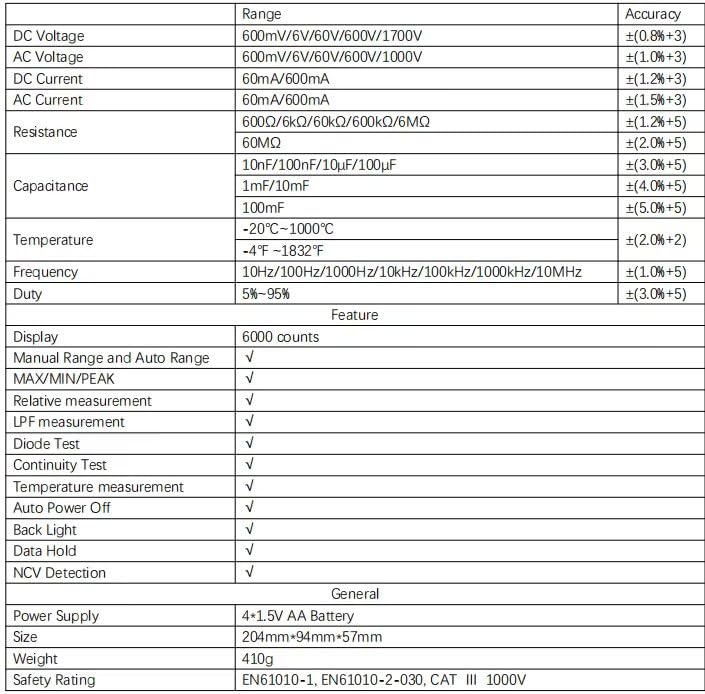
Figure 5: Detailed specifications table for the PM8250 multimeter.
9. การรับประกันและการสนับสนุน
The PEAKMETER PM8250 multimeter comes with an EU Spare Part Availability Duration of 1 year. For warranty claims, technical support, or service inquiries, please contact your original point of purchase or the manufacturer directly. Keep your purchase receipt as proof of purchase.