
การแนะนำ
This manual provides instructions for the VIVO Electric Standing Desk, Model DESK-KIT-1B6C-30. This desk is designed to offer a versatile and ergonomic workspace, allowing users to easily switch between sitting and standing positions.
- Active Standing: Transition smoothly from sitting to standing for comfortable viewing angles and customized user heights.
- ท็อปโต๊ะขนาดใหญ่ 3 ชิ้น ขนาด 59 นิ้ว: A 59” x 29.5” surface with extra depth for monitors, accessories, and supplies. The desktop is made of particle board for a scratch-resistant surface.
- มอเตอร์ไฟฟ้าทรงพลัง: Enjoy a height range of 29.2” to 48.4” with precise telescopic height adjustment.
- โครงสร้างโต๊ะแข็งแรงทนทาน: All-steel construction supports up to 220 lbs, ensuring stability for various setups.
- ตัวควบคุมหน่วยความจำ: Easy-to-use push-button controller with 4 memory presets to save desired heights.
ข้อมูลด้านความปลอดภัย
Please read and understand all instructions before use. Failure to follow these instructions may result in injury or damage to the product.
- Do not exceed the weight capacity of 220 lbs to ensure stability and safety.
- Ensure all cables are managed to prevent pinching or entanglement during height adjustments.
- Keep children and pets away from the desk during operation to avoid injury from moving parts.
- Ensure there are no obstructions above or below the desk when adjusting height.
เนื้อหาแพ็คเกจ
The VIVO Electric Standing Desk (Model DESK-KIT-1B6C-30) includes the following components:
- โครงโต๊ะมอเตอร์ไฟฟ้าเดี่ยวสีดำ
- Light Wood 60" x 30" Table Top (3-piece design)
- ควบคุมหน่วยความจำ
- Assembly Hardware and Tools (as specified in the included manual)
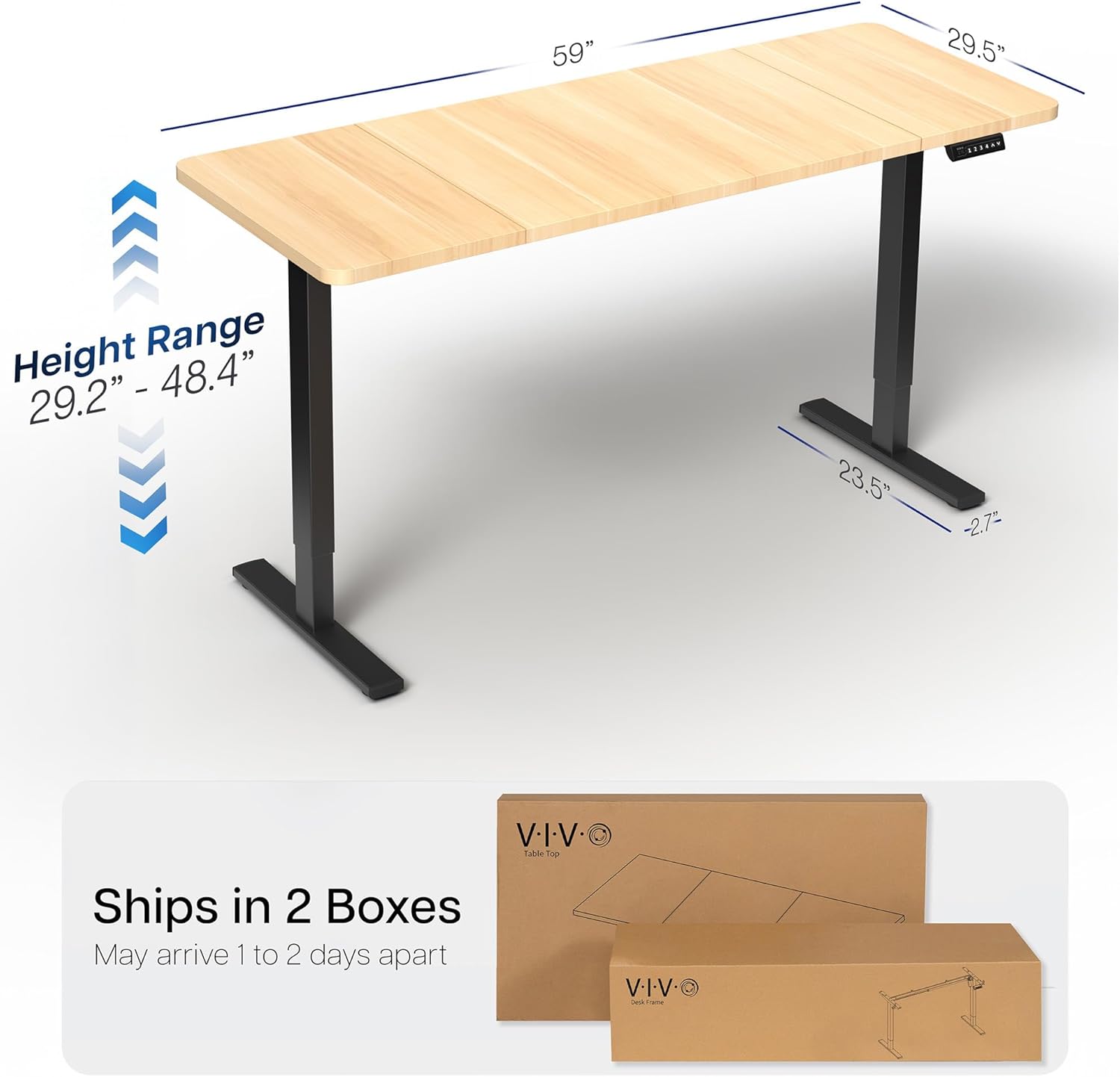
Figure 1: The VIVO Electric Standing Desk ships in two separate boxes, typically containing the table top and the frame components.
การติดตั้งและการประกอบ
Assembly of the VIVO Electric Standing Desk is required. It is recommended to follow the detailed instructions provided in the included physical manual. Key steps involve:
- แกะส่วนประกอบทั้งหมดออกและตรวจสอบกับรายการชิ้นส่วน
- Assemble the desk frame, ensuring all screws are securely tightened.
- Attach the three-piece table top to the assembled frame. Ensure proper alignment for a seamless surface.
- Install the memory controller to the underside of the desk.
- Connect all necessary cables for the electric motor and controller.
- เสียบโต๊ะทำงานเข้ากับปลั๊กไฟ
Video 1: Official VIVO Brand Video demonstrating the assembly process and features of a VIVO standing desk. This video provides a visual guide to setting up your new desk.
คำแนะนำการใช้งาน
The VIVO Electric Standing Desk features an intuitive memory controller for easy height adjustment.
การปรับความสูงขั้นพื้นฐาน
- ใช้ ขึ้น (^) และ ลง (กริยา) arrow buttons on the controller to manually adjust the desk height.
- The current height will be displayed on the LED screen.
- The desk offers a height range of 29.2 inches (minimum) to 48.4 inches (maximum).
หน่วยความจำที่ตั้งไว้ล่วงหน้า
The controller allows you to save up to 4 preferred height settings:
- ปรับความสูงของโต๊ะตามต้องการโดยใช้ปุ่มขึ้น/ลง
- กดปุ่ม "เอ็ม" button (Memory) once. The LED display will flash.
- Immediately press one of the numbered preset buttons (1, 2, 3 หรือ 4) เพื่อบันทึกความสูงปัจจุบันลงในค่าที่ตั้งไว้ล่วงหน้านั้น
- หากต้องการเรียกความสูงที่บันทึกไว้ เพียงกดปุ่มตั้งค่าล่วงหน้าที่มีหมายเลขตรงกัน โต๊ะจะเลื่อนไปยังตำแหน่งที่ตั้งบันทึกไว้โดยอัตโนมัติ

Figure 2: The memory controller with LED display and preset buttons for convenient height adjustment.
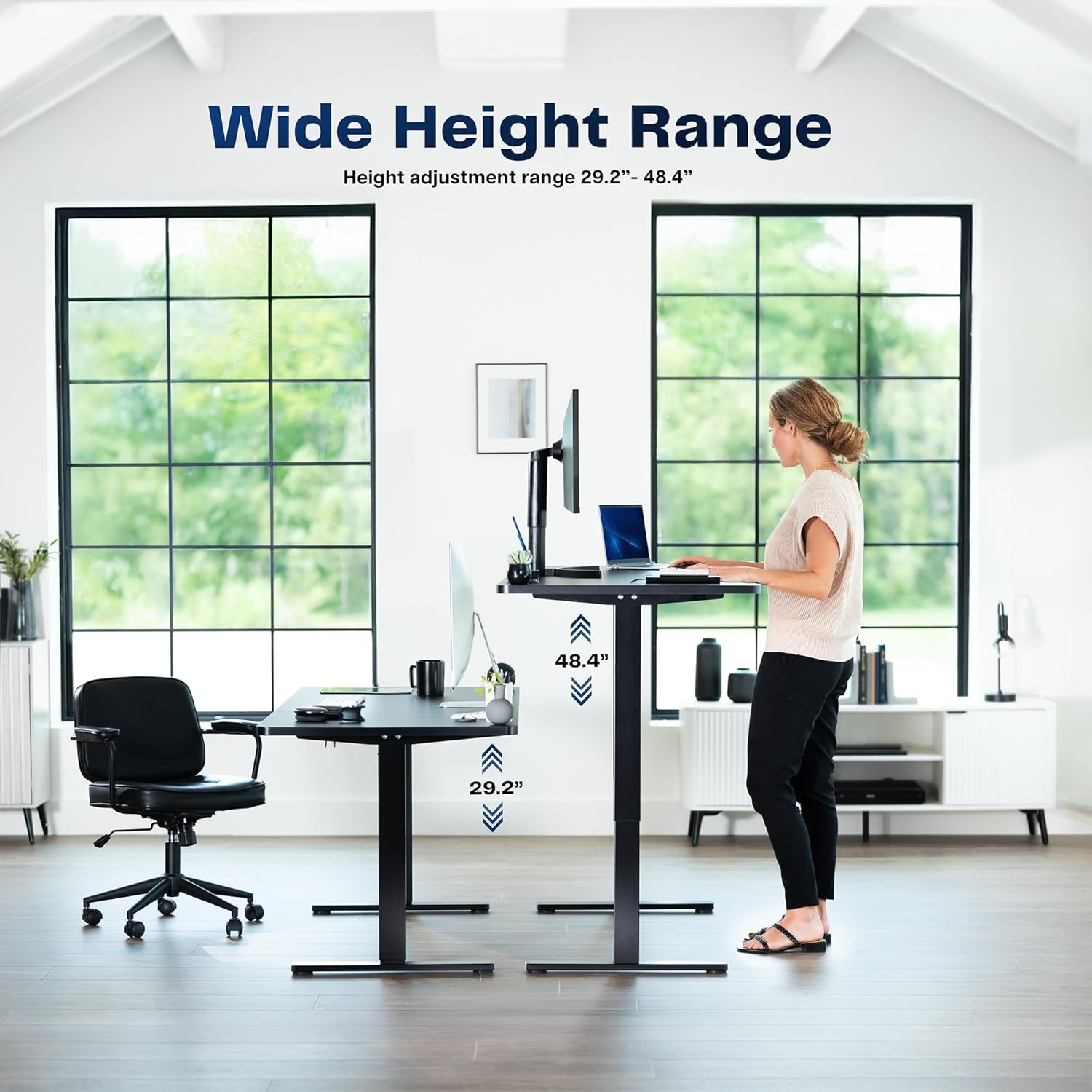
Figure 3: The VIVO Electric Standing Desk offers a wide height range to accommodate both sitting and standing preferences.
การซ่อมบำรุง
การบำรุงรักษาอย่างสม่ำเสมอจะช่วยให้โต๊ะยืนทำงานไฟฟ้า VIVO ของคุณมีอายุการใช้งานยาวนานและทำงานได้อย่างมีประสิทธิภาพสูงสุด
- การทำความสะอาด: เช็ดพื้นผิวโต๊ะด้วยผ้าเนื้อนุ่มและแห้งamp เช็ดด้วยผ้า หลีกเลี่ยงการใช้สารทำความสะอาดที่มีฤทธิ์กัดกร่อน ซึ่งอาจทำให้พื้นผิวเคลือบเสียหายได้
- การจัดการสายเคเบิล: Periodically check and organize cables to prevent tangling or damage, especially around moving parts of the desk frame.
- การตรวจสอบตัวยึด: ตรวจสอบสกรูและน็อตทั้งหมดเป็นระยะเพื่อให้แน่ใจว่ายังแน่นอยู่ ขันให้แน่นอีกครั้งหากจำเป็น
- ความจุน้ำหนัก: Adhere to the maximum weight recommendation of 220 lbs to prevent strain on the motor and frame.
การแก้ไขปัญหา
If you encounter issues with your VIVO Electric Standing Desk, refer to the following common troubleshooting steps:
- โต๊ะไม่เคลื่อนไหว:
- ตรวจสอบว่าสายไฟเสียบเข้ากับโต๊ะและเต้ารับที่ผนังอย่างแน่นหนาแล้ว
- ตรวจสอบให้แน่ใจว่าไม่มีสิ่งกีดขวางใดๆ ที่ขัดขวางการเลื่อนโต๊ะขึ้นหรือลง
- If the controller displays an error code, consult the full manual for specific error resolution.
- ความสูงไม่เท่ากัน:
- Perform a reset procedure (refer to your full manual for specific steps).
- Ensure the desk is on a level surface. Adjust the leveling feet if necessary.
- เสียงที่ผิดปกติ:
- Minor motor sounds are normal during operation.
- If noises are loud or unusual, check for loose fasteners or obstructions.
For persistent issues, please contact VIVO Customer Support.
ข้อมูลจำเพาะ
| คุณสมบัติ | รายละเอียด |
|---|---|
| ยี่ห้อ | วีโว่ |
| หมายเลขรุ่น | DESK-KIT-1B6C-30 |
| การออกแบบโต๊ะทำงาน | โต๊ะคอมพิวเตอร์ |
| ขนาดสินค้า | ลึก 29.5 นิ้ว x กว้าง 59 นิ้ว x สูง 29.2 นิ้ว |
| สี | Light Wood Top / Black Frame |
| ประเภทวัสดุยอดนิยม | ไม้แปรรูป (ลามิเนต) |
| วัสดุฐาน | เหล็กอัลลอยด์ |
| คุณสมบัติพิเศษ | Adjustable Height, Memory Presets |
| ความสูงขั้นต่ำ | 29.2 นิ้ว |
| ความสูงสูงสุด | 48.4 นิ้ว |
| คำแนะนำน้ำหนักสูงสุด | 220 ปอนด์ |
| จำเป็นต้องประกอบ | ใช่ |
| ได้รับการรับรองจาก UL | ใช่ |
การรับประกันและการสนับสนุน
VIVO offers a Limited Warranty for this product. For detailed warranty information, please refer to the documentation included with your purchase or visit the official VIVO webเว็บไซต์.
For any questions, technical assistance, or support, please contact VIVO Customer Support. Our US-based team is available to assist you.
- นโยบายการคืนสินค้า: คืนสินค้าได้ง่ายภายใน 30 วัน
- การสนับสนุนลูกค้า: Available for assistance with product inquiries and troubleshooting.

Figure 4: VIVO provides dedicated US-based customer support for all products.