
1. บทนำ
The IROK MT87 is an 80% TKL (Tenkeyless) mechanical keyboard designed for versatility and performance. It features a durable CNC aluminum alloy frame, tri-mode connectivity, hot-swappable switches, and customizable RGB lighting. This manual provides essential information for setting up, operating, and maintaining your keyboard.
2. เนื้อหาบรรจุภัณฑ์
- IROK MT87 Tri-Mode Mechanical Keyboard
- สาย USB-C
- ตัวดึงกุญแจ
- คู่มือการใช้งาน (เอกสารนี้)
3. คุณสมบัติของผลิตภัณฑ์
- CNC Full Aluminum Alloy Body: Precision-engraved aluminum alloy with high mesh anodic oxidation for a lustrous metallic feel and smooth touch.
- Comfortable Liquid Silicone Keycaps: Skin-like material, gentle to the touch, resistant to oil, and protective for knuckles.
- High Performance Yellow Switches: Full POM switches for enhanced oxidation resistance, sensitivity, and a longer mechanical life (50 million cycles). Features a linear feel with 45g pressure and 1.7mm trigger stroke.
- การเชื่อมต่อสามโหมด: Supports USB-C wired, Bluetooth 5.0, and 2.4GHz wireless modes. Can memorize up to 5 devices.
- Large 10000 mAh Battery: More than double the capacity of conventional keyboards for extended wireless use.
- 5-Layer Sound Optimization: Padded structure design reduces chamber noise, enhancing sound quality for a cleaner, quieter typing sensation.
- การออกแบบ TKL 87 คีย์แบบกะทัดรัด: Streamlined layout saves 20% desktop space compared to full-size keyboards.
- แผงวงจรพิมพ์แบบ Hot-Swappable: Allows for easy customization and replacement of switches without soldering.
- ไฟแบ็คไลท์ RGB: Customizable RGB lighting with multiple effects.
4. การตั้งค่าและการเชื่อมต่อ
4.1 โหมดการเชื่อมต่อ
The MT87 keyboard supports three connection modes: Wired (USB-C), 2.4GHz Wireless, and Bluetooth 5.0.

Image: Diagram illustrating the three connection modes: 2.4GHz wireless, USB-C wired, and low power BT 5.0. It also highlights Win/Mac dual system compatibility.
4.1.1 การเชื่อมต่อแบบมีสาย
- เชื่อมต่อสาย USB-C ที่ให้มาเข้ากับพอร์ต USB-C ของแป้นพิมพ์
- เชื่อมต่อปลายอีกด้านหนึ่งของสาย USB-C เข้ากับพอร์ต USB ที่ว่างอยู่บนคอมพิวเตอร์ของคุณ
- แป้นพิมพ์จะถูกจดจำและพร้อมใช้งานโดยอัตโนมัติ
4.1.2 การเชื่อมต่อไร้สาย 2.4GHz
- ค้นหาตัวรับสัญญาณ USB 2.4GHz ซึ่งโดยปกติจะอยู่ในช่องเก็บของบนแป้นพิมพ์
- เสียบตัวรับสัญญาณ USB 2.4GHz เข้ากับพอร์ต USB ที่มีอยู่ในคอมพิวเตอร์ของคุณ
- Switch the keyboard to 2.4GHz mode using the mode switch (refer to the keyboard's physical layout for exact location, often on the side or bottom).
- แป้นพิมพ์ควรเชื่อมต่อโดยอัตโนมัติ
4.1.3 การเชื่อมต่อบลูทูธ 5.0
The keyboard can memorize up to 3 Bluetooth devices.
- เปลี่ยนแป้นพิมพ์เป็นโหมดบลูทูธโดยใช้สวิตช์โหมด
- บนคอมพิวเตอร์หรืออุปกรณ์ของคุณ เปิดใช้งานบลูทูธและค้นหาอุปกรณ์ใหม่
- Select "IROK MT87" (or similar name) from the list of available devices to pair.
- ปฏิบัติตามคำแนะนำบนหน้าจอเพื่อดำเนินการจับคู่ให้เสร็จสมบูรณ์
- To switch between memorized Bluetooth devices, use the designated function key combinations (e.g., Fn + 1, Fn + 2, Fn + 3).
4.2 ความเข้ากันได้ของระบบ
The IROK MT87 is compatible with both Windows and Mac operating systems.
- เพื่อเปลี่ยนเป็นโหมด Mac: กด Fn + พี
- To switch back to Windows mode: Press fn+0
5. การดำเนินการ
5.1 ฟังก์ชันหลักและการใช้งานร่วมกัน
The MT87 keyboard features an 87-key TKL layout. Many keys have secondary functions accessible via the Fn สำคัญ.

ภาพ: เหนือศีรษะ view of the IROK MT87 keyboard, highlighting its compact 87-key TKL layout which saves desktop space.
Refer to the keycap legends for specific Fn combinations for multimedia control, lighting adjustments, and other functions.
5.2 การควบคุมแสง RGB
The keyboard offers customizable RGB backlighting with various effects.
- เปลี่ยนโหมดแสงสว่าง: Use specific Fn key combinations (e.g., Fn + Right Arrow, Fn + Left Arrow) to cycle through different lighting effects.
- ปรับความสว่าง: Use Fn key combinations (e.g., Fn + Up Arrow, Fn + Down Arrow) to increase or decrease brightness.
- ปรับความเร็ว: Use Fn key combinations to change the speed of dynamic lighting effects.
5.3 Liquid Silicone Keycaps and Yellow Switches
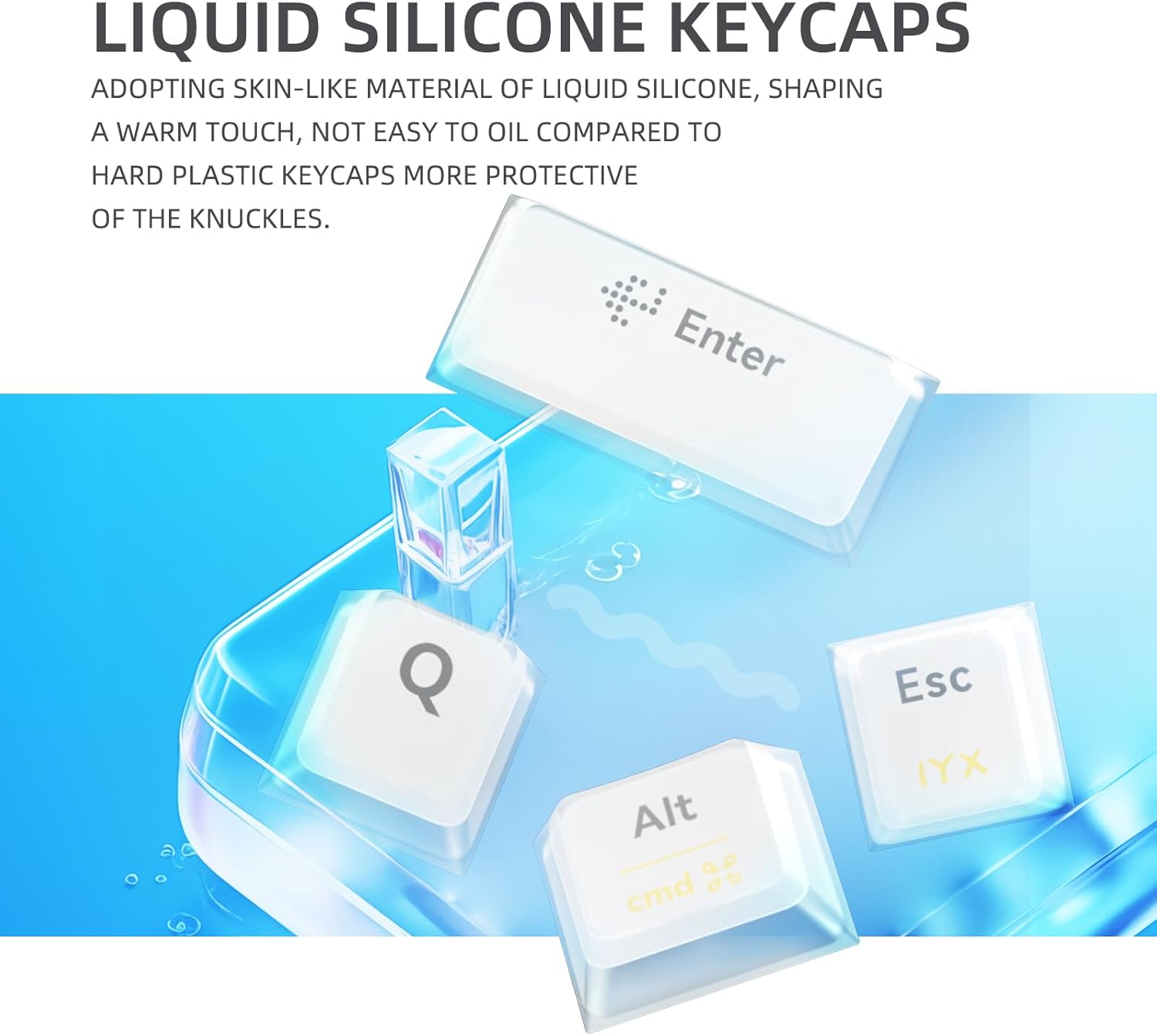
ภาพ: ระยะใกล้ view of the liquid silicone keycaps, emphasizing their skin-like material and gentle touch.

Image: Close-up of the yellow switches, highlighting their linear feel, 45g pressure, 1.7mm trigger stroke, and 50 million cycle mechanical life.
6. การบำรุงรักษา
6.1 การทำความสะอาดแป้นพิมพ์
- ถอดแป้นพิมพ์ออกจากคอมพิวเตอร์ของคุณก่อนทำความสะอาด
- ใช้ผ้านุ่มไม่เป็นขุยเช็ดเล็กน้อยampล้างด้วยน้ำหรือน้ำยาทำความสะอาดอ่อนๆ เพื่อเช็ดปุ่มกดและตัวเครื่องให้สะอาด
- หลีกเลี่ยงการฉีดของเหลวลงบนแป้นพิมพ์โดยตรง
- For deeper cleaning, use the provided keycap puller to remove keycaps and clean underneath with compressed air.
6.2 การดูแลแบตเตอรี่
The MT87 features a 10000 mAh battery.
- ชาร์จคีย์บอร์ดโดยใช้สาย USB-C ที่ให้มาเชื่อมต่อกับแหล่งจ่ายไฟ USB มาตรฐาน
- หลีกเลี่ยงการปล่อยแบตเตอรี่จนหมดบ่อยครั้งเพื่อยืดอายุการใช้งาน
- เก็บแป้นพิมพ์ไว้ในที่แห้งและเย็นเมื่อไม่ได้ใช้งานเป็นเวลานาน
7 การแก้ไขปัญหา
7.1 แป้นพิมพ์ไม่ตอบสนอง
- โหมดสาย: ตรวจสอบให้แน่ใจว่าสาย USB-C เชื่อมต่อกับทั้งคีย์บอร์ดและคอมพิวเตอร์อย่างแน่นหนา ลองใช้พอร์ต USB หรือสายอื่น
- โหมดไร้สาย 2.4GHz: Ensure the 2.4GHz receiver is plugged in and the keyboard is switched to 2.4GHz mode. Try re-pairing by unplugging and re-plugging the receiver.
- โหมดบลูทู ธ : ตรวจสอบให้แน่ใจว่าได้เปิดใช้งานบลูทูธบนอุปกรณ์ของคุณและแป้นพิมพ์อยู่ในโหมดบลูทูธแล้ว หากจำเป็นให้เชื่อมต่ออุปกรณ์ใหม่ ตรวจสอบระดับแบตเตอรี่
7.2 ความล่าช้าของอินพุตหรือการตัดการเชื่อมต่อ
- โหมดไร้สาย: Ensure there are no strong interferences (e.g., other wireless devices, large metal objects) between the keyboard and the receiver/device. Move closer to the receiver/device.
- แบตเตอรี่: แบตเตอรี่เหลือน้อยอาจส่งผลต่อประสิทธิภาพการทำงานแบบไร้สาย โปรดชาร์จคีย์บอร์ดให้เต็ม
7.3 แสง RGB ไม่ทำงาน
- ตรวจสอบให้แน่ใจว่าแป้นพิมพ์เปิดอยู่
- ตรวจสอบว่าไฟปิดอยู่หรือตั้งค่าความสว่างต่ำสุดแล้วหรือไม่ โดยใช้ปุ่ม Fn ร่วมกับปุ่มอื่นๆ
8. ข้อมูลจำเพาะ
| คุณสมบัติ | รายละเอียด |
|---|---|
| หมายเลขรุ่น | MT87 |
| เค้าโครง | 87-key TKL |
| วัสดุกรอบ | โลหะผสมอลูมิเนียม CNC |
| ปุ่มกด | ซิลิโคนเหลว |
| สวิตซ์ | Yellow Switches (Full POM) |
| การเชื่อมต่อ | USB-C Wired, Bluetooth 5.0, 2.4GHz Wireless |
| ความจุของแบตเตอรี่ | 10000 มิลลิแอมป์ |
| การแบ็คไลท์ | RGB (16.8 ล้านสี) |
| อุปกรณ์ที่รองรับ | แล็ปท็อปพีซี |
| ขนาดสินค้า | 15.75 x 7.87 x 1.18 นิ้ว |
| น้ำหนักสินค้า | 5.95 ปอนด์ |

ภาพ: รายละเอียด view of the keyboard's features including metal swivel foot support, metal textured logo, 2.4GHz receiver compartment with physical switch, and air plug connection cord.
9. การรับประกันและการสนับสนุน
For warranty information and technical support, please refer to the official IROK webหรือติดต่อผู้ค้าปลีกของคุณ เก็บใบเสร็จรับเงินไว้เพื่อใช้ในการเคลมประกัน