
1. บทนำ
ขอบคุณสำหรับการซื้อasing the RCA 50-inch UHD 4K LCD TV. This manual provides essential information for setting up, operating, and maintaining your television. Please read this manual thoroughly before using the product to ensure safe and optimal performance. Keep this manual for future reference.
2. ข้อมูลด้านความปลอดภัยที่สำคัญ
ปฏิบัติตามข้อควรระวังด้านความปลอดภัยพื้นฐานเหล่านี้เสมอเมื่อใช้โทรทัศน์:
- อย่านำโทรทัศน์ไปวางไว้กลางฝนหรือความชื้น เพื่อป้องกันไฟไหม้หรือไฟฟ้าช็อต
- อย่าปิดกั้นช่องระบายอากาศ ควรมีพื้นที่รอบทีวีเพียงพอเพื่อให้อากาศถ่ายเทได้สะดวก
- วางทีวีบนพื้นผิวที่มั่นคงและเรียบเพื่อป้องกันไม่ให้ทีวีล้ม
- ใช้เฉพาะสายไฟที่มาพร้อมกับทีวีเท่านั้น ห้ามเสียบปลั๊กไฟหลายตัวพร้อมกัน
- ถอดปลั๊กทีวีในระหว่างที่มีพายุฝนฟ้าคะนองหรือเมื่อไม่ได้ใช้งานเป็นเวลานาน
- ห้ามเปิดตู้ทีวี ควรส่งซ่อมโดยช่างผู้ชำนาญการเท่านั้น
- เก็บชิ้นส่วนเล็กๆ และแบตเตอรี่ให้พ้นมือเด็ก
3. เนื้อหาบรรจุภัณฑ์
Carefully unpack your television and check that all items are included. If any items are missing or damaged, please contact your retailer.

รูปที่ 3.1: อุปกรณ์เสริมที่รวมอยู่
- RCA 50-inch UHD 4K LCD TV
- รีโมทคอนโทรล (ต้องใช้แบตเตอรี่ AAA 2 ก้อน รวมอยู่ด้วย)
- สายไฟ
- TV Stand Bases (x2)
- Screws for Stand Installation (x4)
- Anti-tip Screw (x1) and Clips (x3)
- คู่มือการใช้งาน (ภาษาญี่ปุ่น)
4. การตั้งค่า
4.1. Physical Setup (Stand / Wall Mount)
You can install your TV on the included stand or mount it on a wall using a VESA-compatible bracket (sold separately).

Figure 4.1: TV Dimensions and Stand Installation
การติดตั้งขาตั้ง:
- วางจอทีวีลงบนพื้นผิวที่นุ่มและเรียบเพื่อป้องกันความเสียหาย
- จัดวางฐานขาตั้งให้ตรงกับรูสกรูที่ด้านล่างของทีวี
- ยึดฐานขาตั้งให้แน่นโดยใช้สกรูที่ให้มา
การติดตั้งบนผนัง:
This TV supports VESA mount standard 400x300mm. Use a compatible wall mount bracket and follow the instructions provided with the bracket. Ensure the wall can support the TV's weight (approximately 9 kg).

Figure 4.2: Wall Mounting Options
4.2. การเชื่อมต่ออุปกรณ์ภายนอก
Connect your external devices to the appropriate ports on the TV's rear and side panels.

รูปที่ 4.3: พอร์ตเชื่อมต่อทีวี

Figure 4.4: Rear Panel and Connection Terminals
| ประเภทพอร์ต | คำอธิบาย |
|---|---|
| เอชดีเอ็มไอ (x3) | Connect to Blu-ray players, game consoles, set-top boxes, etc. HDMI 2 supports ARC. |
| ยูเอสบี (x2) | Connect external USB HDD for recording (FAT32 format compatible). |
| อินพุต AV | เชื่อมต่ออุปกรณ์รุ่นเก่าโดยใช้สายวิดีโอคอมโพสิตและสายเสียงสเตอริโอ |
| ออปติคัลดิจิตอลออดิโอเอาท์ | เชื่อมต่อกับซาวด์บาร์หรือระบบโฮมเธียเตอร์เพื่อรับเสียงดิจิทัล |
| แลน | For service or firmware updates. This TV does not support internet streaming services. |
| mini B-CAS Slot | Insert your mini B-CAS card for digital broadcast reception. |
| BS/CS Antenna Input | Connect to a BS/CS satellite antenna. |
| Terrestrial Digital Antenna Input | Connect to a terrestrial digital antenna. |
| อินพุตเสียงขนาด 3.5 มม. | เชื่อมต่อแหล่งสัญญาณเสียงภายนอก |
4.3. Initial Power On and Channel Setup
- After connecting all necessary cables, plug the power cord into an electrical outlet.
- กดปุ่มเปิด/ปิดบนรีโมทคอนโทรลหรือบนทีวี
- Follow the on-screen instructions to perform initial setup, including language selection and channel scanning.
5. คู่มือการใช้งาน
5.1. ฟังก์ชั่นการควบคุมระยะไกล
The remote control allows you to access all TV functions. Insert two AAA batteries (included) into the remote control before use.

Figure 5.1: Remote Control Layout and Key Functions
- พลัง: เปิดหรือปิดทีวี
- ปุ่มตัวเลข (0-12): เลือกช่องรายการได้โดยตรง
- ป้อนข้อมูล: Select input source (HDMI, AV, etc.).
- ปริมาณ (+/-): ปรับระดับเสียง
- ช่อง (ขึ้น/ลง): Change channels sequentially.
- Directional Buttons (Up/Down/Left/Right) & OK: นำทางเมนูและยืนยันการเลือก
- เมนู: เข้าถึงเมนูการตั้งค่าหลัก
- EPG (คู่มือรายการอิเล็กทรอนิกส์): แสดงคู่มือโปรแกรม
- บันทึก: เริ่มบันทึกรายการปัจจุบัน
- การควบคุมการเล่น: Play, Pause, Stop, Fast Forward, Rewind for recorded content.
5.2. Background Program Recording
Your RCA TV is equipped with dual tuners, allowing you to record one digital broadcast program while watching another. An external USB Hard Disk Drive (HDD) is required for recording (FAT32 format compatible, up to 6TB).

Figure 5.2: Dual Tuner Recording Function

Figure 5.3: External HDD Recording
ขั้นตอนการบันทึก:
- Connect a FAT32-formatted external USB HDD to one of the TV's USB ports.
- Access the program guide (EPG) to select a program for recording.
- Use the remote control to set a recording timer or initiate instant recording.
- The TV supports series recording and automatically adjusts for broadcast time changes or extended final episodes.
5.3. การตั้งค่าภาพและเสียง
เพิ่มประสิทธิภาพของคุณ viewเพิ่มประสบการณ์ด้วยการปรับแต่งการตั้งค่าภาพและเสียง
คุณภาพของภาพ:
This TV features a high-performance image processing engine that reproduces fine details and natural colors. It supports UHD 4K resolution and HDR content for enhanced contrast and vibrant colors.
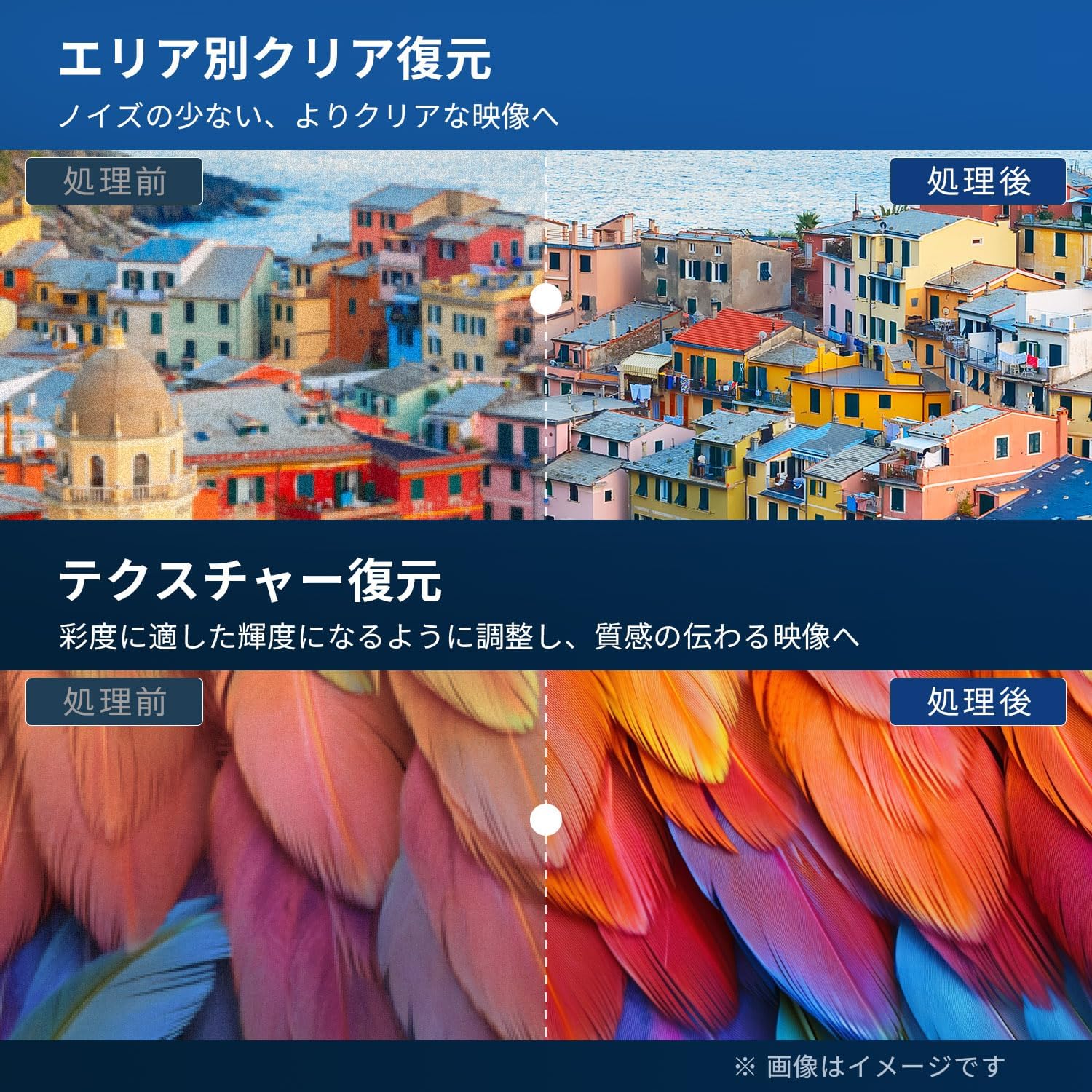
Figure 5.4: Image Processing for Clarity and Texture

Figure 5.5: High-Performance Multi-Speed Processing for Motion Clarity
โหมดเกม:
Activate Game Mode to reduce input lag and image processing delay, providing a smoother and more responsive gaming experience, especially for fast-paced games like FPS and fighting games.
ระบบเสียง Dolby:
Experience immersive, high-quality sound with built-in Dolby Audio technology. Adjust sound modes in the audio settings menu to suit your preferences.

Figure 5.6: Dolby Audio for Immersive Sound
6. การบำรุงรักษา
การบำรุงรักษาอย่างถูกวิธีจะช่วยให้ทีวีของคุณมีอายุการใช้งานยาวนานและรักษาประสิทธิภาพการทำงานได้ดี
- การทำความสะอาดหน้าจอ: Gently wipe the screen with a soft, lint-free cloth. For stubborn marks, use a screen cleaner specifically designed for LCD/LED displays. Do not spray cleaner directly onto the screen.
- ทำความสะอาดตู้: ใช้ผ้าแห้งนุ่มเช็ดทำความสะอาดตู้ทีวี ห้ามใช้สารทำความสะอาดที่มีฤทธิ์กัดกร่อน แว็กซ์ หรือตัวทำละลาย
- การระบายอากาศ : ตรวจสอบให้แน่ใจว่าช่องระบายอากาศด้านหลังทีวีไม่มีสิ่งกีดขวาง
- สายไฟ: ตรวจสอบสายไฟเป็นประจำว่ามีรอยชำรุดหรือไม่ หากพบรอยชำรุด โปรดติดต่อฝ่ายบริการลูกค้าเพื่อขอเปลี่ยนสินค้า
7 การแก้ไขปัญหา
ก่อนติดต่อฝ่ายสนับสนุนลูกค้า ให้ลองใช้วิธีแก้ปัญหาทั่วไปดังต่อไปนี้:
| ปัญหา | วิธีแก้ปัญหาที่เป็นไปได้ |
|---|---|
| ไม่มีไฟฟ้า | Check if the power cord is securely plugged into the TV and the outlet. Press the power button on the remote or TV. |
| ไม่มีภาพแต่มีเสียง | ตรวจสอบแหล่งสัญญาณเข้า ตรวจสอบให้แน่ใจว่าอุปกรณ์ภายนอกเปิดอยู่และเชื่อมต่ออย่างถูกต้อง |
| ไม่มีเสียงแต่มีภาพ | ตรวจสอบระดับเสียง ตรวจสอบให้แน่ใจว่าไม่ได้เปิดใช้งานฟังก์ชันปิดเสียง ตรวจสอบสายสัญญาณเสียงสำหรับอุปกรณ์ภายนอก |
| รีโมตคอนโทรลไม่ทำงาน | เปลี่ยนแบตเตอรี่ ตรวจสอบให้แน่ใจว่าไม่มีสิ่งกีดขวางระหว่างรีโมทและเซ็นเซอร์อินฟราเรดของทีวี |
| คุณภาพของภาพไม่ดี / ภาพบิดเบี้ยว | Check antenna connection. Adjust picture settings in the menu. Try a different input source. |
| ไม่สามารถบันทึกรายการได้ | Ensure an external USB HDD is connected and formatted to FAT32. Check available storage space. Verify tuner reception. |
| TV freezes or becomes unresponsive | Unplug the TV from the power outlet, wait for 1 minute, then plug it back in and power on. |
8. ข้อมูลจำเพาะ
| คุณสมบัติ | รายละเอียด |
|---|---|
| หมายเลขรุ่น | RCA-NS-50Q1 |
| ขนาดหน้าจอ | 50 นิ้ว |
| เทคโนโลยีการแสดงผล | โมดูล LED |
| ปณิธาน | 4K UHD (3840 x 2160) |
| อัตราการรีเฟรช | 60 เฮิรตซ์ |
| อัตราส่วนภาพ | 16:9 น. |
| Viewอิงแองเกิล | 178 องศา |
| เวลาตอบสนอง | 2 มิลลิวินาที |
| อัตราส่วนคอนทราสต์ | 200:1 น. |
| ความสว่างสูงสุด | 220 ซีดี/ตรม. |
| รองรับ HDR | เอชดีอาร์ |
| จูนเนอร์ | Dual Terrestrial/BS/110-degree CS Digital Tuners (ISDB-T) |
| การบันทึก | External USB HDD Recording (FAT32 compatible, up to 6TB) |
| เสียง | Dolby Audio, Built-in Speakers (Max Output: 10W) |
| การเชื่อมต่อ | HDMI (x3), USB (x2), AV Input, Optical Digital Audio Out, LAN, 3.5mm Audio Input |
| มาตรฐาน VESA Mount | 400 x 300 มม. |
| แหล่งจ่ายไฟ | ไฟฟ้ากระแสสลับ 100-240 โวลต์, 50/60 เฮิรตซ์ |
| การใช้พลังงาน | 120 วัตต์ |
| ขนาด (รวมขาตั้ง) | 111.8 ซม. (ก) x 69.6 ซม. (ส) x 21.5 ซม. (ล) |
| น้ำหนัก (รวมขาตั้ง) | ประมาณ 9 กก. |
| คุณสมบัติของสมาร์ททีวี | None. This TV does not support internet connection or streaming services. |
9. การรับประกันและการสนับสนุน
9.1. การรับประกันสินค้า
This RCA television comes with a รับประกันสามปี from the date of purchase, covering manufacturing defects. Please retain your proof of purchase for warranty claims. Note that some specific components may have a 12-month quality guarantee.

รูปที่ 9.1: ข้อมูลการรับประกัน
9.2. การสนับสนุนลูกค้า
For any inquiries, technical assistance, or warranty claims, please contact our customer support team. Our offices are located in Tokyo, and our customer service team provides nationwide support.

Figure 9.2: RCA Customer Support Network
ช่องทางการติดต่อ :
- LINE Support: Scan the QR code below to add our after-sales service account on LINE for quick assistance.
- การสนับสนุนทางอีเมล์: Send your inquiries to our dedicated email address. We aim to respond within 24 hours.

Scan for LINE Support: https://lin.ee/AOq4pQs

อีเมล: tutu@tutuelec.com