การแนะนำ
The E-FAST Smart Battery Charger is an all-in-one solution designed for charging, maintaining, trickle charging, and desulfating various types of 12V and 24V batteries. It is ideal for automotive, RV, Powersports, and deep cycle batteries, including flooded, gel, AGM, SLA, GEL, and LiFePO4 batteries.
This intelligent charger features advanced pulse repair technology to help restore lost performance in old or idle batteries. It provides comprehensive charging protections to ensure safety and extend battery life. The large digital display offers clear information on charging status, voltagกระแสไฟฟ้า และเปอร์เซ็นต์แบตเตอรี่tage, with easy one-click mode selection.
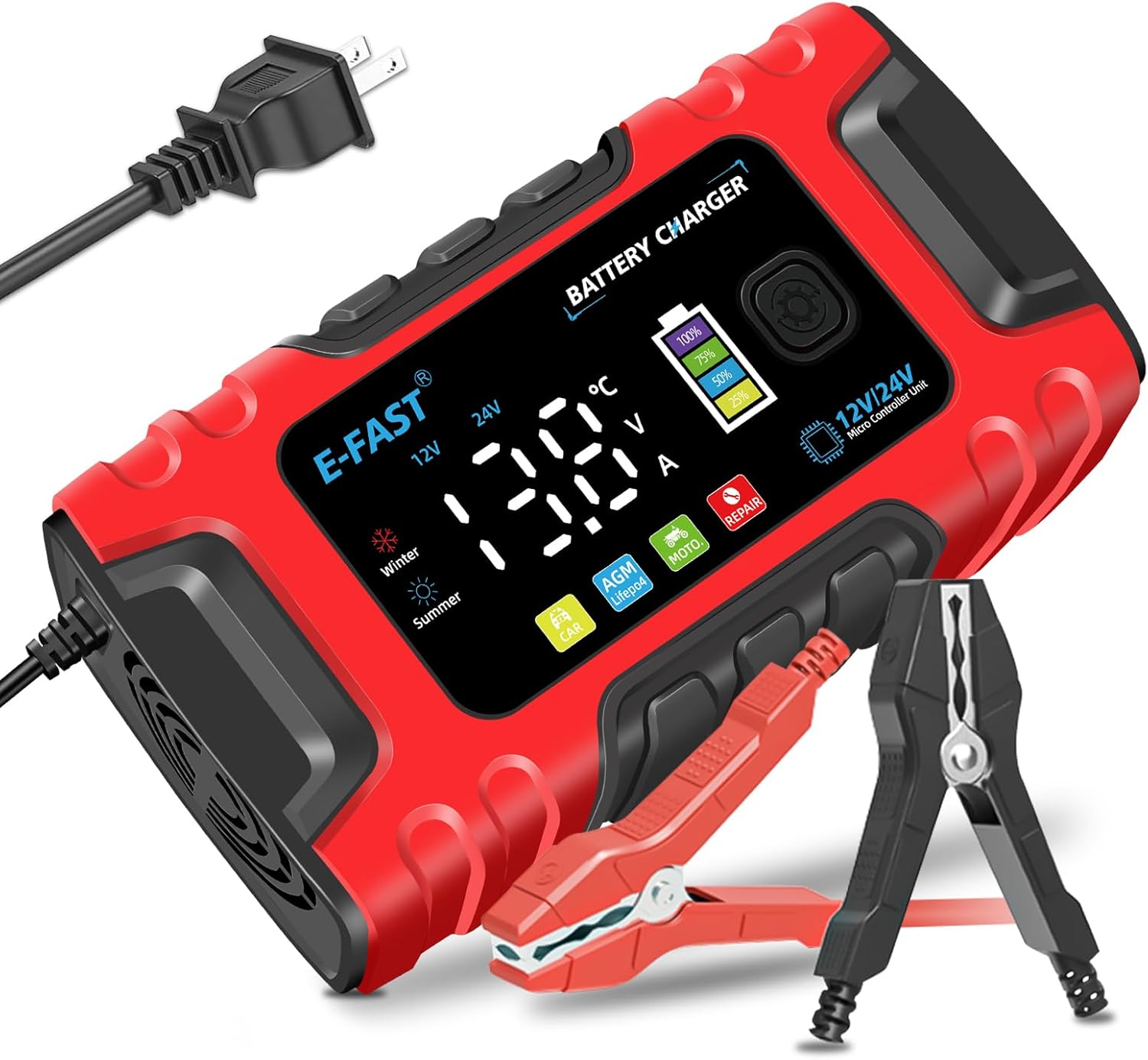
Figure 1: E-FAST Smart Battery Charger with its components.
คุณสมบัติหลัก
- เข้ากันได้สากล: Supports 12V and 24V lead-acid batteries, including flooded, gel, AGM, SLA, GEL, and LiFePO4 types, suitable for cars, trucks, motorcycles, boats, and more.
- Efficient Pulse Repair: Utilizes high-power, high-frequency, low-frequency pulse technology to desulfate batteries and restore performance. Note: This function cannot activate completely dead batteries or repair severely damaged ones.
- จอแสดงผลดิจิตอลขนาดใหญ่: Features a clear color screen showing charging status, battery voltagอี กระแส และเปอร์เซ็นต์tage. Easy one-click mode switching.
- การป้องกันขั้นสูง: Includes cooling, overcurrent, fireproof materials, overvoltage, and short-circuit protection for safe and reliable operation.
- การชดเชยอุณหภูมิ: Automatically adjusts charging parameters based on ambient temperature for optimal performance in both winter and summer conditions.
- น้ำหนักเบาและพกพาสะดวก: Weighing only 1.4 lbs, it is easy to carry and store. Features an automatic stop function upon full charge.

Figure 2: All-round protection features of the E-FAST Smart Battery Charger.

Figure 3: The E-FAST charger is compatible with a wide range of battery types and vehicles.
การตั้งค่า
การเชื่อมต่อเครื่องชาร์จ
- เตรียมแบตเตอรี่: Ensure the battery terminals are clean and free of corrosion. For vehicle batteries, ensure the vehicle is turned off.
- เชื่อมต่อกับแบตเตอรี่: เชื่อมต่อสีแดง (+) clamp of the charger to the positive (+) terminal of the battery. Connect the black (-) clamp to the negative (-) terminal of the battery. Ensure a secure connection.
- เชื่อมต่อกับพลังงาน: Plug the charger's power cord into a standard 100-240V AC electrical outlet. The charger's display will illuminate.
- เลือกโหมด: Use the mode button on the charger to select the appropriate charging mode for your battery type (e.g., Car, Moto, AGM/LiFePO4, Repair). The charger will automatically detect 12V or 24V.
- เริ่มต้นการชาร์จ: The charger will automatically begin the charging process. Monitor the display for charging status and battery percentage.
- การตัดการเชื่อมต่อ: Once charging is complete (display shows "FUL" or 100%), first unplug the charger from the AC outlet, then disconnect the black (-) clamp, and finally the red (+) clamp จากแบตเตอรี่

Figure 4: Proper connection of the charger to a car battery.
คำแนะนำการใช้งาน
ทำความเข้าใจเกี่ยวกับจอแสดงผลดิจิทัล
The E-FAST Smart Battery Charger features a large, intuitive digital display that provides real-time information about the charging process. The display shows:
- สถานะการชาร์จ: Indicates if the charger is active, in repair mode, or fully charged ("FUL").
- ปริมาณแบตเตอรี่tagอี (วี): แสดงฉบับปัจจุบันtage ของแบตเตอรี่ที่เชื่อมต่อ
- กระแสไฟชาร์จ (A): แสดงให้เห็นถึง ampพลังงานถูกส่งไปยังแบตเตอรี่
- เปอร์เซ็นต์แบตเตอรี่tage: A visual battery icon with percentage indicators (25%, 50%, 75%, 100%) to show charge level.
- อุณหภูมิ: Displays the ambient temperature, which influences the automatic temperature compensation.
- โหมดที่เลือก: Icons for Car, Moto, AGM/LiFePO4, and Repair modes.
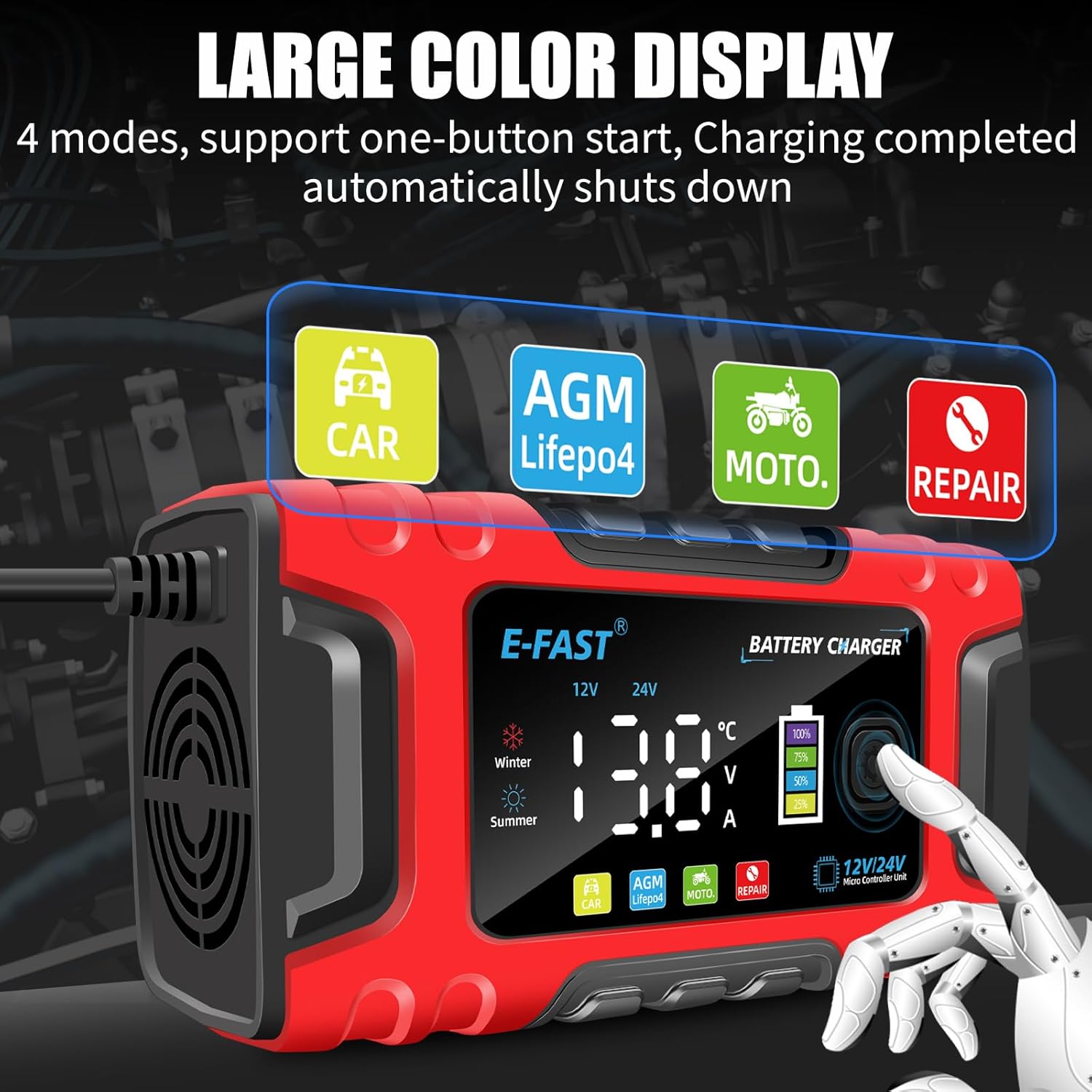
Figure 5: The charger's display provides clear information and mode selection.

Figure 6: The large screen digital display allows intuitive monitoring and mode selection.
โหมดการชาร์จ
Press the "MODE" button to cycle through the available charging modes:
- CAR Mode: Standard charging mode for 12V/24V automotive batteries.
- MOTO Mode: Optimized charging for 12V/24V motorcycle batteries.
- AGM/LiFePO4 Mode: Specific charging profile for AGM and Lithium Iron Phosphate (LiFePO4) batteries.
- โหมดการซ่อมแซม: Pulse repair function for desulfating and restoring old or idle batteries. This process can take up to 24 hours.
การชดเชยอุณหภูมิ
เครื่องชาร์จจะตรวจจับอุณหภูมิแวดล้อมโดยอัตโนมัติและปรับแรงดันไฟฟ้าในการชาร์จtage accordingly. This ensures efficient and safe charging in varying climates:
- Winter Mode (below 10°C/50°F): The charger enters a powerful winter charging mode.
- Summer Mode (above 28°C/82.4°F): The charger automatically switches to a safety charging mode to prevent overcharging in high temperatures.

รูปที่ 7: ระบบชดเชยอุณหภูมิอัตโนมัติเพื่อการชาร์จที่เหมาะสมที่สุด
สินค้าเกินview วีดีโอ
วิดีโอ 1: จบแล้วview of the E-FAST Smart Battery Charger, demonstrating its features and operation. This video is provided by the seller.
การซ่อมบำรุง
- การทำความสะอาด: Regularly wipe the charger's exterior with a soft, dry cloth. Do not use harsh chemicals or abrasive cleaners. Ensure the cooling vents are clear of dust and debris.
- การตรวจสอบสายเคเบิล: ตรวจสอบสายไฟและขั้วแบตเตอรี่เป็นระยะamps เพื่อดูว่ามีร่องรอยความเสียหาย สึกกร่อน หรือสึกกร่อนใดๆ เปลี่ยนใหม่หากจำเป็น
- พื้นที่จัดเก็บ: Store the charger in a cool, dry place away from direct sunlight and extreme temperatures when not in use. Ensure cables are neatly coiled to prevent damage.
- ขั้วแบตเตอรี่: Keep battery terminals clean to ensure optimal contact and charging efficiency.
การแก้ไขปัญหา
| ปัญหา | สาเหตุที่เป็นไปได้ | สารละลาย |
|---|---|---|
| Charger display is OFF or unresponsive. | ไม่มีไฟเลี้ยง; การเชื่อมต่อหลวม; ความผิดพลาดภายใน | Ensure the charger is securely plugged into a live AC outlet. Check all cable connections. If the issue persists, contact customer support. |
| Charger not charging or showing "FUL" when battery is low. | Incorrect mode selected; severely discharged or damaged battery; poor connection. | Verify the correct charging mode is selected for your battery type. Ensure clamps are securely attached to clean battery terminals. The charger cannot activate completely dead or severely damaged batteries. |
| Display shows error code or unusual readings. | Internal error; battery fault; short circuit. | Disconnect the charger from both power and battery. Reconnect after a few minutes. If the error persists, consult the manufacturer's support. |
| ที่ชาร์จร้อนจัดเกินไป | Blocked ventilation; prolonged use in high temperatures; internal issue. | Ensure cooling vents are not obstructed. Use in a well-ventilated area. The charger has built-in thermal protection and will reduce output or shut down if overheating. If it frequently overheats, contact support. |
ข้อมูลจำเพาะ
| คุณสมบัติ | รายละเอียด |
|---|---|
| หมายเลขรุ่น | TK600 |
| อินพุต Voltage | แรงดันไฟฟ้า 100-240 โวลต์ 50/60 เฮิรตซ์ |
| ปริมาณการส่งออกtage | 12V / 24V (Auto-detection) |
| กระแสไฟขาออก | 12V 10A, 24V 5A |
| ช่วงแบตเตอรี่ | 6-180 อา |
| การป้องกันความร้อน | 65°ซ +/- 5°ซ |
| ขนาดสินค้า | 2.4 x 6.7 x 3.5 นิ้ว (6.1 x 17 x 8.9 ซม.) |
| น้ำหนักสินค้า | 1.4 ปอนด์ (0.64 กก.) |
| สี | สีแดง, สีดำ |
| ประเทศต้นกำเนิด | จีน |

Figure 8: Key electrical specifications of the E-FAST Smart Battery Charger.

Figure 9: Physical dimensions of the E-FAST Smart Battery Charger.
การรับประกันและการสนับสนุน
For warranty information, technical support, or any inquiries regarding your E-FAST Smart Battery Charger, please contact the manufacturer directly through the retailer's platform or the contact information provided with your purchase. Keep your purchase receipt as proof of purchase for warranty claims.