
การแนะนำ
This manual provides detailed instructions for setting up and operating your Majority Frameo Snap10 WiFi Digital Picture Frame. This 10.1-inch digital frame allows you to display photos and videos shared via the Frameo app, offering a convenient way to share memories with family and friends. It features a touchscreen, 32GB of internal storage, auto-rotate functionality, and a motion sensor for efficient use.

The Majority Frameo Snap10 Digital Picture Frame, showcasing a family photo on its 10.1-inch screen.
มีอะไรอยู่ในกล่อง
กรุณาตรวจสอบเนื้อหาในแพ็คเกจเพื่อให้แน่ใจว่ามีสินค้าครบทั้งหมด:
- Majority Frameo Snap10 Digital Picture Frame
- ขาตั้ง
- อะแดปเตอร์แปลงไฟ
- รีโมทคอนโทรล
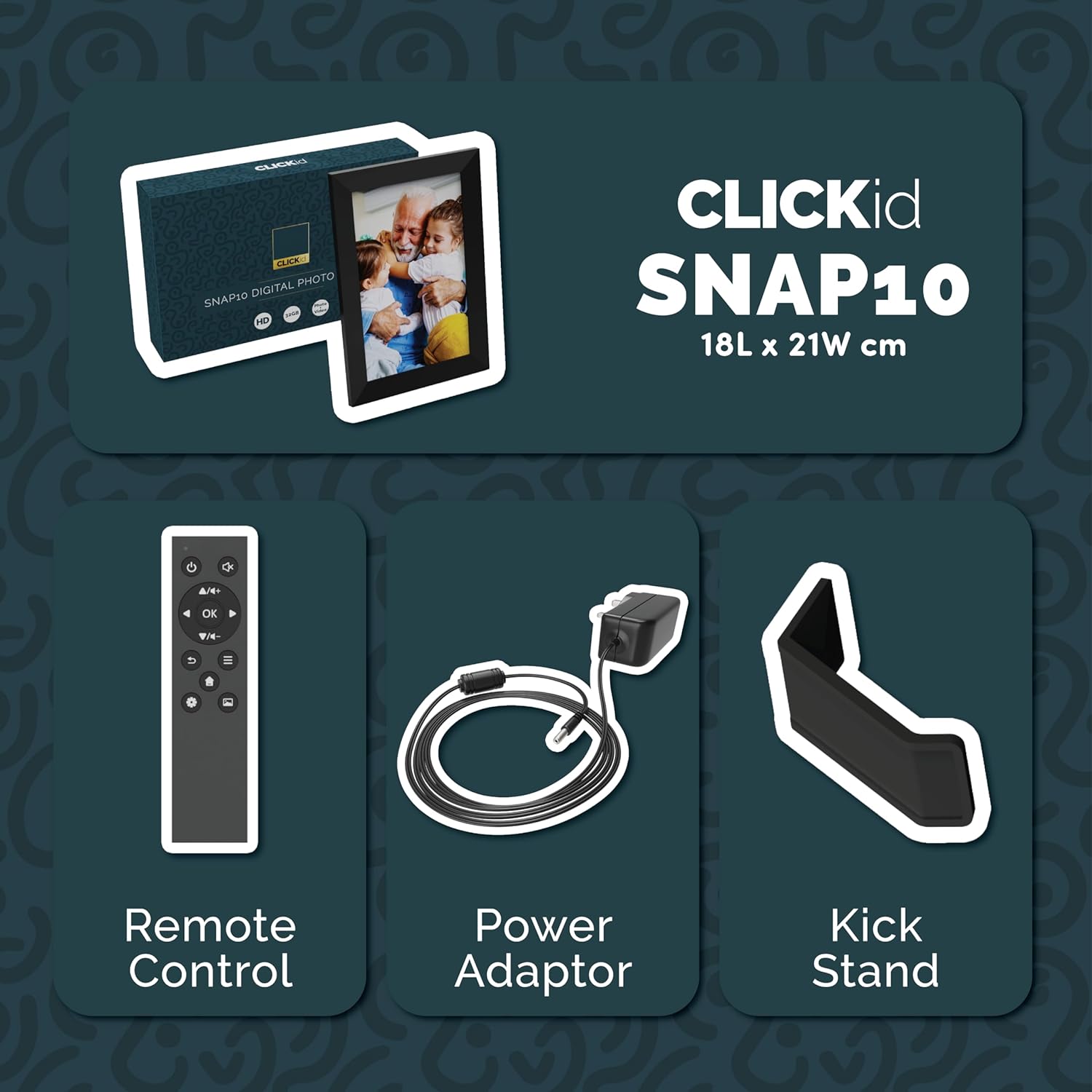
Included accessories: Remote Control, Power Adapter, and Kickstand.
คู่มือการติดตั้ง
- แกะกล่องเฟรม: นำกรอบรูปดิจิทัลและอุปกรณ์เสริมทั้งหมดออกจากบรรจุภัณฑ์อย่างระมัดระวัง
- Attach the Kickstand: Insert the kickstand into the designated slot on the back of the frame. The frame supports both horizontal and vertical orientations.
- เชื่อมต่อพลังงาน: Plug the power adapter into the DC port on the back of the frame, then connect it to a power outlet. The frame will automatically power on.
- ตั้งค่าเริ่มต้น: ทำตามคำแนะนำบนหน้าจอเพื่อเลือกภาษา เขตเวลา และเชื่อมต่อกับเครือข่าย Wi-Fi
- Install Frameo App: Download the "Frameo" app from your smartphone's app store (available for iOS and Android).
- Connect Frame to App: Open the Frameo app and create an account. On your digital frame, tap "Add Friend" to get a unique code. Enter this code into the Frameo app on your smartphone to link the devices.

The back of the frame features essential ports for power, USB, and Micro SD card.
คำแนะนำการใช้งาน
การส่งรูปภาพและวิดีโอ
Once your frame is connected to the Frameo app, you can easily send photos and short videos from your smartphone.
- เปิดแอป Frameo บนสมาร์ทโฟนของคุณ
- เลือกรูปภาพหรือวิดีโอที่คุณต้องการส่ง
- Choose the connected digital frame as the recipient.
- Add a caption if desired, then tap "Send."

The Frameo app simplifies photo and video uploads from your smartphone.
การใช้หน้าจอสัมผัส
The 10.1-inch LCD touchscreen allows for intuitive navigation. Swipe left or right to browse photos, tap to view options, and pinch to zoom.
ฟังก์ชั่นการควบคุมระยะไกล
The included remote control provides convenient access to various frame functions from a distance.
- การนำทาง: Use arrow keys to move through menus and photos.
- ตกลง/ป้อน: ยืนยันการเลือก
- กลับ: กลับไปยังหน้าจอที่แล้ว
- เล่น/หยุดชั่วคราว: Control slideshows or video playback.
- ปริมาณ: Adjust audio for videos.

มีรีโมตคอนโทรลให้มาด้วยเพื่อความสะดวกในการใช้งาน
เซ็นเซอร์ตรวจจับความเคลื่อนไหว
The integrated motion sensor can be enabled to automatically turn the display on when movement is detected and off when the area is vacant, conserving energy. This setting can be adjusted in the frame's system settings.
ฟังก์ชั่นหมุนอัตโนมัติ
The frame automatically adjusts the photo orientation (portrait or landscape) based on how the frame is positioned. Ensure the auto-rotate feature is enabled in the settings for optimal display.

The auto-rotate feature adjusts display based on frame orientation.
คุณสมบัติมากกว่าview
- หน้าจอสัมผัส LCD ขนาด 10.1 นิ้ว: Provides a clear display and interactive control.
- พื้นที่เก็บข้อมูลภายใน 32GB: Ampพื้นที่เพียงพอสำหรับจัดเก็บรูปภาพและวิดีโอหลายพันรายการ
- การเชื่อมต่อ Wi-Fi: Enables seamless photo and video sharing from anywhere via the Frameo app.
- การผสานรวมแอป Frameo: Manage your frame, send media, and invite friends/family to share their moments.
- เซ็นเซอร์ตรวจจับการเคลื่อนไหว: Automatically turns the screen on/off to save energy.
- หมุนอัตโนมัติ: Adjusts photo orientation automatically.
- Weather and Calendar Display: Integrated widgets provide current weather and calendar information.
- ช่องเสียบการ์ดหน่วยความจำ: Supports Micro SD cards for additional storage or direct media import.
การซ่อมบำรุง
- การทำความสะอาด: ใช้ผ้าแห้งนุ่มๆ เช็ดทำความสะอาดหน้าจอและกรอบ หลีกเลี่ยงการใช้สารทำความสะอาดที่มีฤทธิ์กัดกร่อนหรือสเปรย์ฉีดลงบนหน้าจอโดยตรง
- การอัปเดตซอฟต์แวร์: The frame may receive automatic software updates via Wi-Fi. Ensure your frame is connected to the internet to receive the latest features and improvements.
- การจัดการพื้นที่เก็บข้อมูล: รีเป็นระยะๆview your stored photos and videos. You can delete unwanted media directly from the frame or through the Frameo app to free up space.
การแก้ไขปัญหา
- เฟรมไม่เปิดเครื่อง:
- ตรวจสอบให้แน่ใจว่าได้เสียบอะแดปเตอร์แปลงไฟเข้ากับโครงและเต้ารับไฟฟ้าที่ใช้งานได้สนิทแล้ว
- ไม่สามารถเชื่อมต่อกับ Wi-Fi:
- Verify your Wi-Fi password. Ensure the frame is within range of your Wi-Fi router. Try restarting your router and the frame.
- Photos not appearing on the frame:
- Confirm that the frame is connected to Wi-Fi and linked to your Frameo app account. Check the Frameo app to ensure photos were successfully sent. Allow some time for photos to download, especially large batches.
- Frame is stuck on a white screen with a loading bar:
- This may indicate a software issue. Try performing a soft reset by disconnecting the power for 30 seconds and then reconnecting. If the issue persists, a factory reset might be necessary (refer to the frame's settings for this option, noting it will erase all data).
- การควบคุมระยะไกลไม่ทำงาน:
- Check if the batteries in the remote control need replacement. Ensure there are no obstructions between the remote and the frame's IR receiver.
ข้อมูลจำเพาะ
| ยี่ห้อ | ส่วนใหญ่ |
| หมายเลขรุ่น | Snap10 |
| สี | สีดำ |
| ขนาดหน้าจอ | 10.1 นิ้ว |
| ปณิธาน | 800*1280 |
| อัตราส่วนภาพ | 2.10:1 น. |
| ความจุของหน่วยความจำ | 32GB |
| เทคโนโลยีการเชื่อมต่อ | ไวไฟ |
| วิธีการควบคุม | App, Touchscreen, Remote |
| แหล่งพลังงาน | สายไฟ |
| น้ำหนักสินค้า | 491 กรัม |
| ขนาดสินค้า (กว้าง x ยาว) | ยาว 7.08 นิ้ว x กว้าง 8.26 นิ้ว |
การรับประกันและการสนับสนุน
The Majority Frameo Snap10 Digital Picture Frame comes with a ขยายการรับประกัน 2 ปี. Registration is required to activate the extended warranty. Please refer to the product packaging or the manufacturer's website for details on how to register your product.
For technical support, troubleshooting assistance, or warranty claims, please contact Majority customer service through their official webไซต์หรือข้อมูลการติดต่อที่ระบุไว้ในเอกสารผลิตภัณฑ์ของคุณ
วิดีโอสินค้า
This video demonstrates the ease of sharing photos and videos with the Frameo app and viewing them on the digital picture frame, highlighting its use for connecting family members.