
1. บทนำ
Thank you for choosing the HETP Magnetic Portable Charger Power Bank. This compact and powerful device is designed to provide convenient and efficient charging for your compatible iPhone models and other USB-C devices. Featuring a strong magnetic attachment for wireless charging and a clear LCD display, it ensures you stay powered on the go. Please read this manual carefully to ensure proper use and maintenance of your power bank.

Figure 1.1: HETP Magnetic Portable Charger Power Bank
2. คุณสมบัติของผลิตภัณฑ์
- การชาร์จแบบแม่เหล็ก: Specifically designed for iPhone 16/16 Plus/16 Pro/16 Pro Max/15/15 Plus/15 Pro/15 Pro Max/14/13/12 series and MagSafe compatible cases.
- ความจุสูง: Built-in 10800mAh battery capacity, capable of fully charging an iPhone 15 Pro up to 1.9 times.
- Ultra-Strong Magnetic Attachment: Ensures secure and stable 7.5W magnetic wireless charging, preventing disconnection issues.
- เอาต์พุต USB-C PD 20W: Allows for fast wired charging of other devices simultaneously with magnetic charging.
- ขนาดกะทัดรัดและพกพาสะดวก: Measures approximately 3.99 x 2.59 x 0.78 inches and weighs 0.39 lb, ideal for travel and daily use.
- จอแสดงผล LCD: Provides a clear digital readout of the remaining battery percentage.
- ระบบความปลอดภัย Multi-Protect: Incorporates over-voltage, over-charge, over-current, and short-circuit protection for safe charging.

รูปที่ 2.1: ความเข้ากันได้กับ iPhone ซีรีส์ 12-16 และเคส MagSafe

Figure 2.2: Charging Through Magnetic Cases
3. อะไรอยู่ในกล่อง
เมื่อเปิดกล่องพัสดุ โปรดตรวจสอบว่ามีสิ่งของต่อไปนี้ครบถ้วนหรือไม่:
- 1 x HETP Magnetic Wireless Power Bank
- สายชาร์จ 1 x USB-C
- 1 x คู่มือผู้ใช้ (เอกสารนี้)
- 1 x Dust-proof Portable Storage Bag
4. การตั้งค่า
4.1 การชาร์จ Power Bank ครั้งแรก
- เชื่อมต่อสายชาร์จ USB-C ที่ให้มากับพอร์ต USB-C บนพาวเวอร์แบงค์
- Plug the other end of the USB-C cable into a compatible USB-C wall adapter (not included).
- The LCD display on the power bank will show the charging percentage. Charge the power bank until it reaches 100% for optimal performance.
4.2 การเชื่อมต่อกับ iPhone ของคุณ
Ensure your iPhone is a 12 series or newer, or is equipped with a MagSafe compatible case.
- Align the back of the power bank with the MagSafe area on your iPhone.
- The power bank will magnetically snap into place, and wireless charging will begin automatically.

รูปที่ 4.1: การยึดติดด้วยแม่เหล็ก
5. คู่มือการใช้งาน
5.1 การชาร์จไร้สาย (MagSafe)
Once the power bank is magnetically attached to your compatible iPhone, wireless charging will commence. The LCD display will show the power bank's remaining charge, and your iPhone will indicate that it is charging.
5.2 การชาร์จแบบมีสาย (USB-C)
To charge devices via cable:
- Connect one end of a USB-C cable to the power bank's USB-C port.
- ต่อปลายอีกด้านหนึ่งเข้ากับพอร์ตชาร์จของอุปกรณ์ของคุณ
- The power bank will automatically detect the device and begin charging.
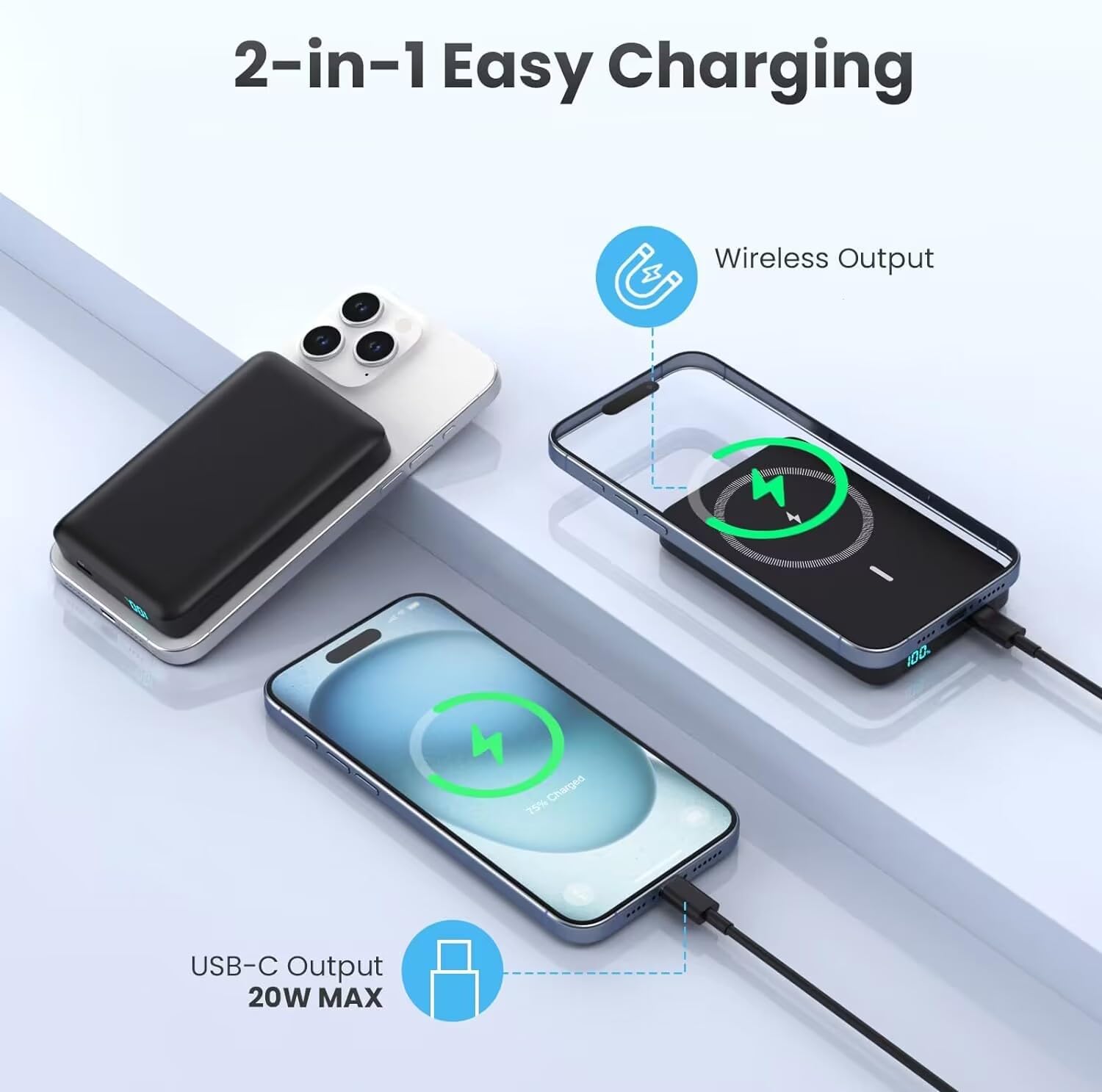
Figure 5.1: 2-in-1 Charging Capability
5.3 การชาร์จแบบผ่าน
The HETP power bank supports pass-through charging, allowing you to charge your phone wirelessly while simultaneously recharging the power bank itself via the USB-C input. This provides uninterrupted power for both devices.

Figure 5.2: Pass-Through Charging in Action
5.4 จอแสดงผล LCD
The integrated LCD display shows the precise percentage of battery remaining in the power bank. This allows you to easily monitor its charge level and know when it needs to be recharged.
6. การบำรุงรักษา
- การทำความสะอาด: ใช้ผ้านุ่มและแห้งเช็ดทำความสะอาดพื้นผิวของพาวเวอร์แบงค์ หลีกเลี่ยงการใช้สารเคมีรุนแรงหรือวัสดุที่มีฤทธิ์กัดกร่อน
- พื้นที่จัดเก็บ: เก็บพาวเวอร์แบงค์ไว้ในที่แห้งและเย็น หลีกเลี่ยงแสงแดดโดยตรงและอุณหภูมิที่สูงหรือต่ำเกินไป
- การดูแลแบตเตอรี่ To prolong battery life, avoid fully discharging the power bank frequently. Recharge it when the battery level is low. If storing for extended periods, charge it to about 50-70% every 3 months.
- หลีกเลี่ยงการหยด: While durable, dropping the power bank can damage internal components. Handle with care.

Figure 6.1: Internal Battery Design for Longevity
7 การแก้ไขปัญหา
| ปัญหา | สาเหตุที่เป็นไปได้ | สารละลาย |
|---|---|---|
| พาวเวอร์แบงค์ชาร์จไม่เข้า | ปัญหาเกี่ยวกับสายเคเบิลหรืออะแดปเตอร์; พาวเวอร์แบงค์แบตหมด; พอร์ตมีปัญหา | Try a different USB-C cable and wall adapter. Ensure the power bank is not completely depleted before attempting to charge. |
| การชาร์จแบบไร้สายไม่ทำงาน | Misalignment; non-MagSafe case; phone not compatible; foreign object. | Ensure proper alignment of the power bank with your iPhone's MagSafe area. Use a MagSafe compatible case or no case. Remove any foreign objects between the power bank and phone. Confirm your iPhone model is 12 series or newer. |
| Wired charging not working | ปัญหาสายเคเบิล อุปกรณ์ไม่เข้ากัน พาวเวอร์แบงค์ชาร์จจนใกล้หมด | Try a different USB-C cable. Ensure your device is compatible with USB-C charging. Check the power bank's LCD display for sufficient charge. |
| พาวเวอร์แบงค์จะร้อนขึ้นขณะใช้งาน | การทำงานปกติ โหลดมากเกินไป การระบายอากาศไม่ดี | It is normal for the power bank to get slightly warm during charging or discharging. If it becomes excessively hot, disconnect it immediately and allow it to cool down. Ensure adequate ventilation and avoid covering the power bank during use. |
| LCD display not showing charge | พาวเวอร์แบงค์ปิดอยู่ แบตเตอรี่อ่อน | Connect the power bank to a charger to activate the display. If the battery is completely drained, it may take a few minutes for the display to light up. |
8. ข้อมูลจำเพาะ
- หมายเลขรุ่น: HX100M7
- ความจุแบตเตอรี่: 10800 มิลลิวินาทีamp ชั่วโมง (มิลลิแอมป์)
- ประเภทแบตเตอรี่: ลิเธียมโพลีเมอร์
- เอาต์พุตการชาร์จแบบไร้สาย: 7.5W (Magnetic)
- ช่องเสียบชาร์จแบบมีสาย: 20W PD (USB Type C)
- ประเภทตัวเชื่อมต่อ: USB ประเภท C
- ขนาดสินค้า : ประมาณ 4 x 1 x 0.5 นิ้ว
- น้ำหนักสินค้า: ประมาณ 6.2 ออนซ์
- ผู้ผลิต: ตงกวน Yuanhaoxun เทคโนโลยี จำกัด
- วันที่เข้าใช้งานครั้งแรก: 26 กุมภาพันธ์ 2024
9. การรับประกันและการสนับสนุน
Your HETP Magnetic Portable Charger Power Bank comes with a worry-free รับประกัน 24 เดือน นับจากวันที่ซื้อ การรับประกันนี้ครอบคลุมถึงข้อบกพร่องจากการผลิตและรับประกันประสิทธิภาพการทำงานที่เชื่อถือได้ของอุปกรณ์ของคุณ
For any technical assistance, product inquiries, or warranty claims, please contact our customer service team. We provide การสนับสนุนทางเทคนิคตลอดอายุการใช้งาน and friendly customer services to ensure your satisfaction.
Please refer to the contact information provided on the product packaging or the official HETP webเว็บไซต์นี้เป็นแหล่งรวมช่องทางการสนับสนุนที่ทันสมัยที่สุด