
HONOR CHOICE BOT-WB01
คู่มือผู้ใช้ HONOR CHOICE Watch
Model: BOT-WB01
การแนะนำ
Welcome to your new HONOR CHOICE Watch. This manual provides essential information for setting up, operating, and maintaining your device, ensuring you get the most out of its advanced features.

ภาพ: ด้านหน้า view of the HONOR CHOICE Watch, showcasing its 1.95-inch AMOLED display and black silicone strap.
คุณสมบัติหลัก
- จอแสดงผล AMOLED ขนาด 1.95 นิ้ว: Vibrant colors and high resolution (410*502) with a smooth 60Hz refresh rate.
- การโทรด้วยบลูทูธ: โทรออกและรับสายได้โดยตรงจากข้อมือของคุณ
- โหมดการออกกำลังกาย 120 โหมด: ระบบติดตามกิจกรรมทางกายภาพที่ครอบคลุมหลากหลายประเภท
- 5ATM Swim-Ready: Water resistance suitable for swimming and water sports.
- Up to 12 Days Battery Life: ใช้งานได้ยาวนานขึ้นด้วยการชาร์จเพียงครั้งเดียว
- Built-in Multi-System GNSS: Precise outdoor activity tracking with GPS, GLONASS, GALILEO, BDS, and QZSS.
- การติดตามสุขภาพ: SpO2, Heart Rate, and Sleep Tracking for comprehensive health insights.

Image: Infographic highlighting the 1.95-inch AMOLED display, outdoor workout satellite positioning, Bluetooth calling, ultra-long battery life, all-day health monitoring, and 5ATM water resistance.
การตั้งค่า
เปิดเครื่องเบื้องต้น
To power on your HONOR CHOICE Watch, press and hold the side button for 3 seconds. The watch will display a QR code for pairing. If not connected within 5 minutes, it will shut down to conserve power.
Downloading the HONOR Health App
The HONOR Health app is essential for managing your watch and viewการประมวลผลข้อมูลสุขภาพของคุณ
- ค้นหา "HONOR Health" on your phone's Play Store (Android) or App Store (iOS).
- Alternatively, scan the QR code displayed on the watch using your phone's browser to download the app or navigate to the app store page.
จับคู่นาฬิกาของคุณ
Follow these steps to pair your HONOR CHOICE Watch with your Android or iOS device:
- Access your phone's Bluetooth settings.
- Locate the corresponding device name (e.g., "HONOR CHOICE Watch") and click on it to initiate pairing.
- Open the "HONOR Health" App on your phone.
- Navigate to the device interface and click "Add Device" or scan the QR code.
- Select the corresponding device name or choose "Scan Code to Add" and scan the QR code on the watch to initiate the binding process.
- Confirm device pairing on the watch to complete the binding.

Image: Step-by-step guide illustrating how to initiate the watch, download the HONOR Health app, and pair the watch with a smartphone.
Download the HONOR Health App from: Google Play | แอปสโตร์
คำแนะนำการใช้งาน
การนำทาง
The HONOR CHOICE Watch features a responsive 1.95-inch AMOLED touchscreen and a side button for navigation.
- ปัดขึ้น/ลง: เลื่อนดูการแจ้งเตือน การตั้งค่าด่วน หรือตัวเลือกเมนู
- ปัดไปทางซ้าย/ขวา: เข้าถึงวิดเจ็ตต่างๆ เช่น อัตราการเต้นของหัวใจ สภาพอากาศ สรุปกิจกรรม เป็นต้น
- แตะ: เลือกสินค้าหรือยืนยันการดำเนินการ
- กดปุ่มด้านข้าง: Return to the watch face, or open the app list from the watch face.
- กดปุ่มด้านข้างค้างไว้: Power on/off or restart the watch.
ฟังก์ชั่นพื้นฐาน
Your watch includes several handy tools accessible from the app list:
- สภาพอากาศ: Get live weather updates.
- ไฟฉาย: ใช้หน้าจอเป็นแหล่งกำเนิดแสง
- เตือน: ตั้งนาฬิกาปลุกได้โดยตรงจากข้อมือของคุณ
- การควบคุมเพลง: Control music playback on your paired phone.
- ชัตเตอร์ระยะไกล: ทริกเกอร์กล้องโทรศัพท์ของคุณจากระยะไกล
- นาฬิกาจับเวลา/จับเวลา: สำหรับการจับเวลาในการทำกิจกรรม
- ค้นหาหมายเลขโทรศัพท์: ค้นหาโทรศัพท์ที่หายไปของคุณ
- เครื่องคิดเลข: ดำเนินการคำนวณขั้นพื้นฐาน
- บันทึกเสียง: Record short voice notes.
- การระบายแรงสั่นสะเทือน: Expel water after swimming.
- เข็มทิศ: สำหรับการนำทาง

Image: Icons representing various thoughtful wrist assistant features such as Weather, Flashlight, Alarm, Music control, Remote shutter, Stopwatch, Timer, and Find phone.
การติดตามสุขภาพ
The HONOR CHOICE Watch provides comprehensive health tracking features:
- การตรวจสอบอัตราการเต้นของหัวใจ: การติดตามอัตราการเต้นของหัวใจอย่างต่อเนื่องตลอดทั้งวัน
- การตรวจสอบ SpO2: วัดระดับความอิ่มตัวของออกซิเจนในเลือดของคุณ
- การติดตามความเครียด: Track your stress levels and receive guidance for relaxation.
- การติดตามการนอนหลับ: ตรวจสอบการนอนหลับtagและคุณภาพ
- การติดตามรอบเดือน: For female users to track cycles.
ข้อมูลสุขภาพทั้งหมดสามารถ viewed and analyzed in detail within the HONOR Health app.

Image: Visual representation of Heart Rate, SpO2, and Stress monitoring icons, indicating the watch's health tracking capabilities.
โหมดการออกกำลังกายและ GPS
The watch supports 120 workout modes to track various physical activities.
- Indoor/Outdoor Workouts: Track activities like running, cycling, swimming, and more.
- Multi-System GNSS: Built-in GPS, GLONASS, GALILEO, BDS, and QZSS for precise outdoor activity tracking and route mapping.
- ความต้านทานน้ำ 5ATM: Suitable for swimming and water sports.

Image: A visual demonstrating the watch's outdoor workout satellite positioning feature, showing a mapped exercise path.

Image: A person engaged in a workout, wearing the HONOR CHOICE Watch, illustrating its use during physical activity.
การเชื่อมต่อ
การโทรด้วยบลูทูธ
Make and receive calls directly from your watch when connected to your smartphone via Bluetooth 5.3.

Image: A person using the HONOR CHOICE Watch for Bluetooth calling, demonstrating the convenience of hands-free communication.
HONOR Health App Sync
The HONOR Health app serves as your central hub for all watch data. It records and syncs health and fitness data, providing personalized guidance.
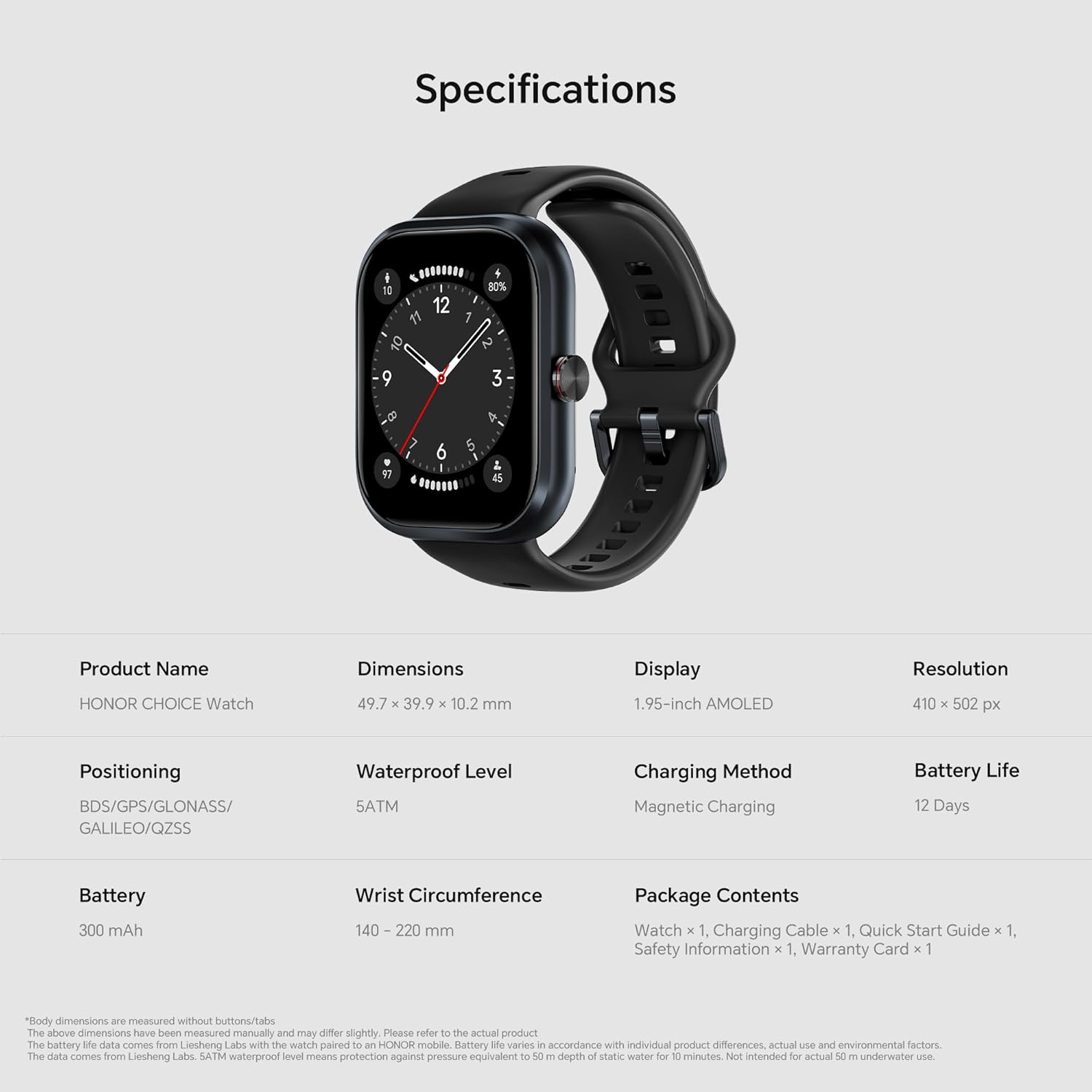
Image: A smartphone screen displaying the HONOR Health app interface alongside the HONOR CHOICE Watch, illustrating data synchronization and health insights.
อายุการใช้งานแบตเตอรี่
The HONOR CHOICE Watch is equipped with a 300mAh battery, offering impressive endurance:
- Up to 12 days of typical usage on a single charge.
- Up to 9 days of intense functionality (e.g., with continuous sleep monitoring and frequent GPS use).
Charging is done via the provided magnetic charging cable.

Image: A visual emphasizing the 12-day battery life of the HONOR CHOICE Watch, with a charging animation on the watch screen.
การซ่อมบำรุง
การทำความสะอาด
Regularly clean your watch and strap to ensure optimal performance and hygiene.
- เช็ดหน้าจอและตัวเรือนนาฬิกาด้วยผ้าเนื้อนุ่มที่ไม่เป็นขุย
- สำหรับสายรัดซิลิโคน ให้ใช้สบู่และน้ำอ่อนๆ ล้างให้สะอาด แล้วเช็ดให้แห้ง
- หลีกเลี่ยงการใช้สารเคมีรุนแรงหรือวัสดุที่มีฤทธิ์กัดกร่อน
ความต้านทานต่อน้ำ
The watch is 5ATM water-resistant, meaning it can withstand pressures equivalent to a depth of 50 meters. It is suitable for swimming and showering but not for diving or high-pressure water activities. After exposure to water, especially saltwater, rinse the watch with fresh water and dry it thoroughly.
การชาร์จไฟ
ใช้เฉพาะสายชาร์จแม่เหล็กที่ให้มาเท่านั้น ตรวจสอบให้แน่ใจว่าขั้วชาร์จบนนาฬิกาและสายชาร์จสะอาดและแห้งก่อนทำการชาร์จ
การแก้ไขปัญหา
นาฬิกาไม่เปิดเครื่อง
- ตรวจสอบให้แน่ใจว่านาฬิกาชาร์จเต็มแล้ว เชื่อมต่อกับแท่นชาร์จแม่เหล็กและรอสักครู่
- Press and hold the side button for at least 10 seconds to force a restart.
ปัญหาการเชื่อมต่อ (บลูทูธ)
- ตรวจสอบให้แน่ใจว่าได้เปิดใช้งานบลูทูธบนโทรศัพท์และนาฬิกาของคุณแล้ว
- ตรวจสอบให้แน่ใจว่านาฬิกาอยู่ในระยะของโทรศัพท์ของคุณ
- รีสตาร์ททั้งโทรศัพท์และนาฬิกาของคุณ
- If issues persist, unpair the watch from your phone's Bluetooth settings and re-pair it through the HONOR Health app.
ข้อมูลสุขภาพที่ไม่ถูกต้อง
- ตรวจสอบให้แน่ใจว่าสวมนาฬิกาให้กระชับกับข้อมือ โดยให้สูงกว่ากระดูกข้อมือประมาณ 1 นิ้ว
- รักษาบริเวณเซ็นเซอร์ให้สะอาด
- หลีกเลี่ยงการเคลื่อนไหวมากเกินไปในระหว่างการวัด
ปัญหาการซิงค์แอป
- Ensure the HONOR Health app is updated to the latest version.
- ตรวจสอบการเชื่อมต่ออินเทอร์เน็ตของโทรศัพท์ของคุณ
- ปิดและเปิดแอปใหม่อีกครั้ง
- Clear the app's cache (Android) or reinstall the app (iOS/Android as a last resort).
ข้อมูลจำเพาะ
| คุณสมบัติ | รายละเอียด |
|---|---|
| ชื่อสินค้า | นาฬิกา HONOR CHOICE |
| หมายเลขรุ่น | บอท-WB01 |
| ขนาด | 49.7 x 39.9 x 10.2 มม. |
| แสดง | 1.95-inch AMOLED, 410 x 502 px |
| แบตเตอรี่ | 300 mAh, Up to 12 Days Battery Life |
| วิธีการชาร์จ | การชาร์จด้วยแม่เหล็ก |
| ระดับการกันน้ำ | 5ตู้เอทีเอ็ม |
| การวางตำแหน่ง | BDS/GPS/GLONASS/GALILEO/QZSS |
| เส้นรอบวงข้อมือ | 140 - 220 มม. |
| ส่วนประกอบที่รวมอยู่ | Watch, Charging Cable, Quick Start Guide, Safety Information, Warranty Card |
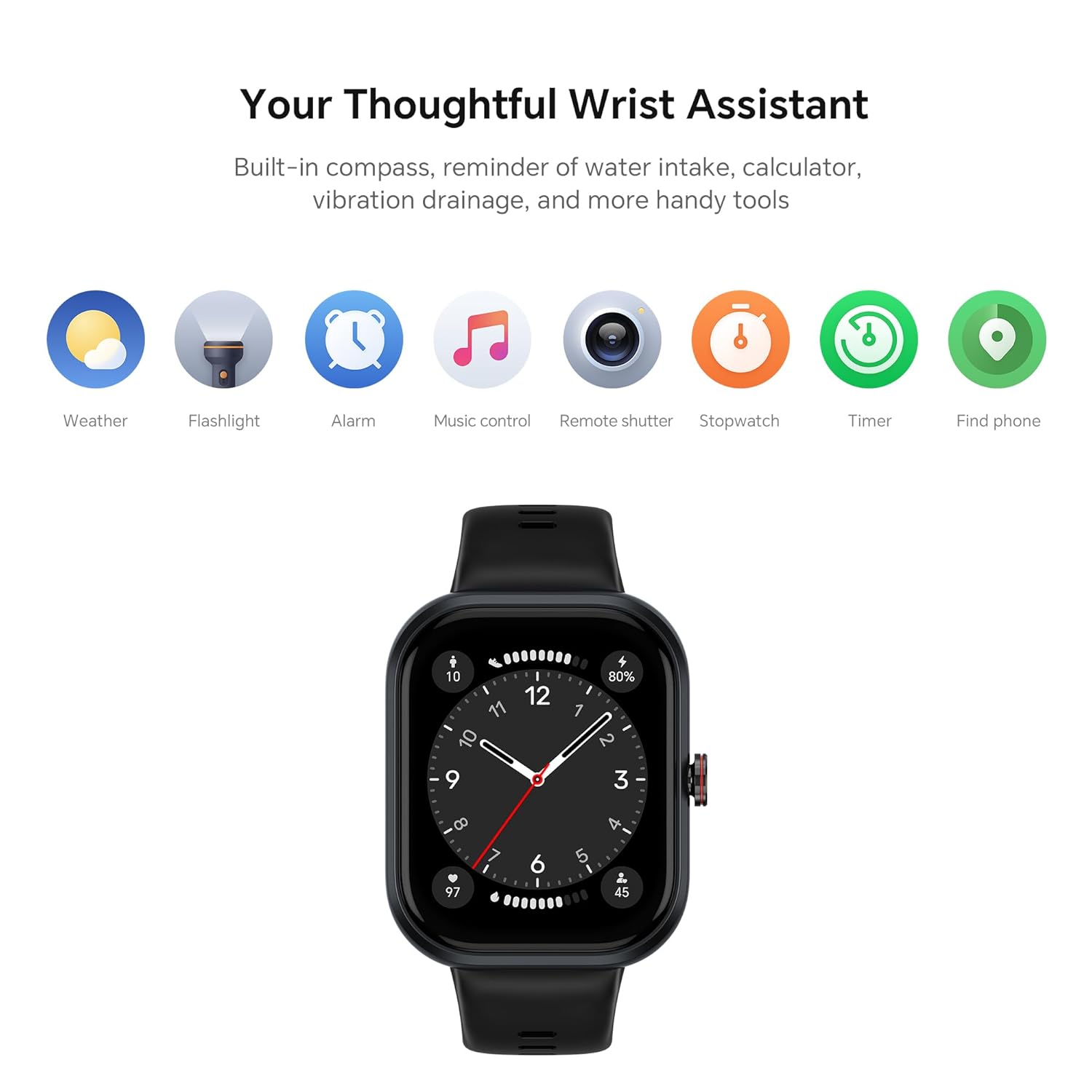
Image: A visual summary of the HONOR CHOICE Watch specifications, including dimensions, display type, resolution, battery life, and included components.
การรับประกันและการสนับสนุน
ข้อมูลการรับประกัน
Your HONOR CHOICE Watch comes with a limited warranty. Please refer to the included Warranty Card for detailed terms and conditions.
การสนับสนุนลูกค้า
For technical assistance, troubleshooting, or warranty claims, please contact HONOR CHOICE customer support:
- หมายเลขฝ่ายบริการลูกค้า: 1800-309-8970
- หมายเลขแชท WhatsApp: 9990466166
- อีเมล: customersupport@psavglobaltech.com & feedback@honortech.com
- การสนับสนุนทางออนไลน์: เยี่ยมชม HONOR อย่างเป็นทางการ webเว็บไซต์สำหรับแหล่งข้อมูลเพิ่มเติม: explorehonor.com
ผู้ผลิต: Dongguan Zhengrong Electronics Co. Ltd.
ผู้นำเข้า: PSAV Global Tech Private Limited, BR - 12, Sector - 45, Noida, Gautam Buddh Nagar, Uttar Pradesh (India) - 201301
Ask a question about this manual
Ask about setup, troubleshooting, compatibility, parts, safety, or missing instructions. Manuals+ will review the question and use this page’s manual context to help answer it.