
1. บทนำ
The OSD Audio DAC-X200 is a powerful 2-channel Class D stereo amplifier designed to deliver high-fidelity audio. It features a built-in Hi-Res 24bit/192khz DAC, offering superior digital audio conversion. With versatile input options including USB, Optical, and RCA, and A/B speaker switching, this amplifier is suitable for various home audio setups, from driving bookshelf speakers to powering floorstanding units.
2. คำแนะนำด้านความปลอดภัย
- แหล่งพลังงาน: เชื่อมต่อเครื่องเข้ากับแหล่งจ่ายไฟที่ระบุเท่านั้นtage.
- การระบายอากาศ : ตรวจสอบให้แน่ใจว่ามีการระบายอากาศที่เพียงพอ อย่าปิดกั้นช่องระบายอากาศ
- น้ำและความชื้น: อย่าวางเครื่องไว้ในที่ที่มีฝน ความชื้น หรือความชื้นสูงเกินไป
- แหล่งความร้อน: ควรวางเครื่องให้ห่างจากแหล่งความร้อน เช่น เครื่องทำความร้อน ช่องระบายความร้อน เตา หรือเครื่องใช้ไฟฟ้าอื่นๆ ที่ให้ความร้อน
- การทำความสะอาด: ทำความสะอาดด้วยผ้าแห้งเท่านั้น
- การบริการ: อย่าพยายามให้บริการผลิตภัณฑ์นี้ด้วยตนเอง ส่งต่อการบริการทั้งหมดไปยังช่างบริการที่ผ่านการรับรอง
- การจัดวาง: Place the unit on a stable, flat surface. Avoid placing heavy objects on top of the ampชีวิต.
3. เนื้อหาบรรจุภัณฑ์
ตรวจสอบว่ามีรายการทั้งหมดอยู่ในแพ็คเกจ:
- OSD Audio DAC-X200 Ampชีวิต
- คู่มือเริ่มต้นอย่างรวดเร็ว
- สายไฟ
- รีโมทคอนโทรล (หากรวมอยู่กับรุ่นของคุณ)
4. สินค้าหมดview
4.1 แผงด้านหน้า
The front panel provides access to essential controls for daily operation.

รูปที่ 4.1: ด้านหน้า view of the DAC-X200 amplifier, showing the power button, speaker selectors, balance, and volume controls.

รูปที่ 4.2: Detail of the front panel, highlighting the Power button and Speaker A/B selection buttons.

รูปที่ 4.3: Detail of the front panel, showing the Balance and Volume control knobs.
4.2 แผงด้านหลัง
The rear panel houses all input and output connections for audio sources and speakers.
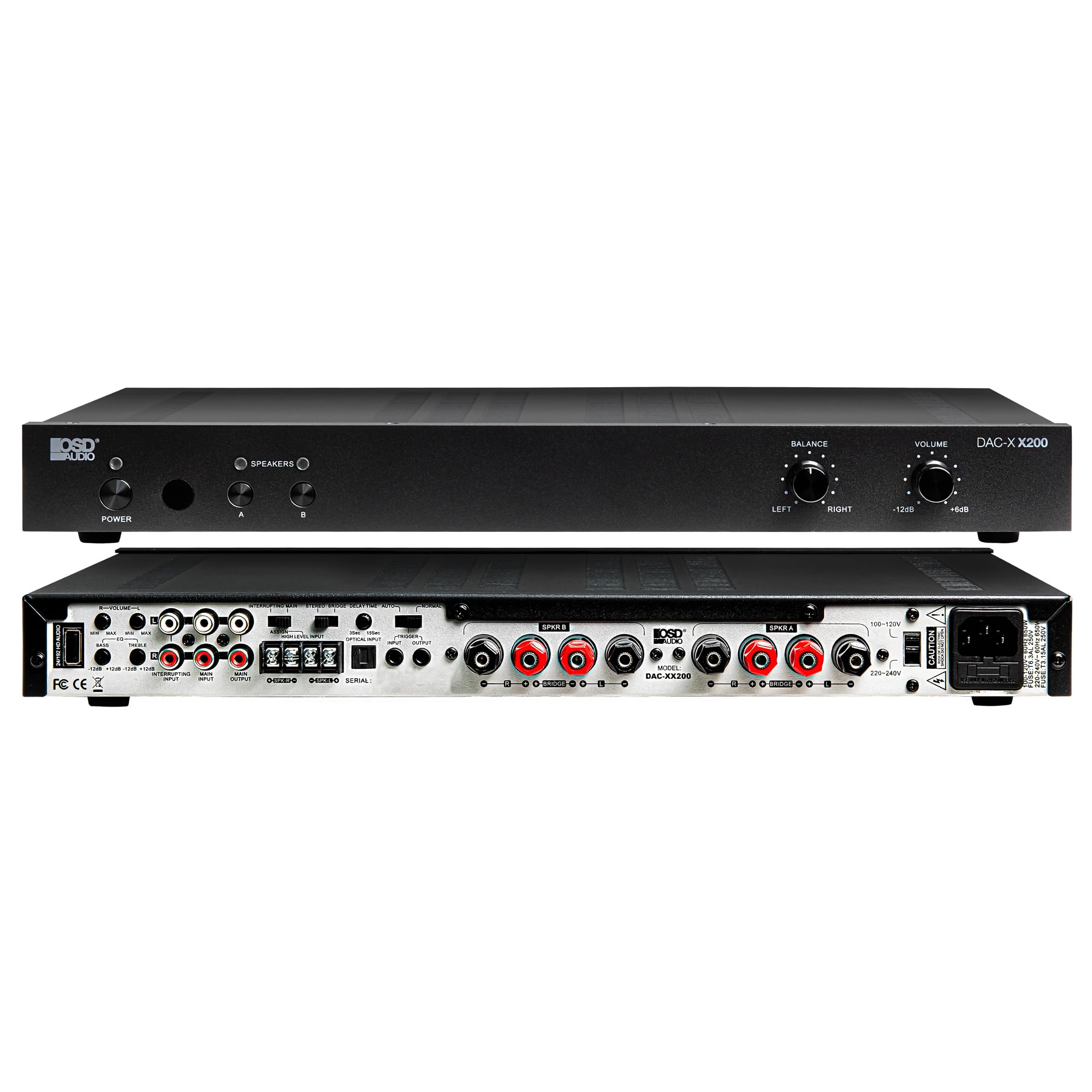
รูปที่ 4.4: หลัง view of the DAC-X200 amplifier, displaying various audio inputs (USB, Optical, RCA), speaker outputs, and power input.

รูปที่ 4.5: Detail of the rear panel inputs, including USB, Optical, and RCA connections.

รูปที่ 4.6: Detail of the rear panel speaker output terminals for Speaker A and Speaker B.
5. การตั้งค่า
5.1 การจัดวาง
Place the DAC-X200 on a flat, stable surface with adequate space around it for ventilation. Avoid enclosed cabinets or areas with poor airflow to prevent overheating.
5.2 การเชื่อมต่อลำโพง
- ให้แน่ใจว่า ampเครื่องขยายเสียงถูกปิดและถอดปลั๊กออก
- เชื่อมต่อลำโพงพาสซีฟของคุณเข้ากับ ผู้พูด เอ และ/หรือ ผู้พูด บี terminals on the rear panel. Observe correct polarity (+ to + and - to -).
- For optimal performance, use high-quality speaker wire.
5.3 การเชื่อมต่อแหล่งเสียง
The DAC-X200 supports multiple input types:
- ช่องต่อ USB: Connect a computer or other USB audio source using a Type A to Type A USB 2.0 cable.
- อินพุตออปติคัล: เชื่อมต่อแหล่งสัญญาณเสียงดิจิทัล เช่น โทรทัศน์หรือเครื่องเล่นซีดี โดยใช้สายเคเบิลออปติคอล
- อาร์ซีเออินพุต: Connect analog audio sources such as music streamers, turntables (with a pre-amp), or other devices using RCA cables.
5.4 การเชื่อมต่อสายไฟ
After all audio and speaker connections are made, connect the supplied power cable to the ampเสียบสายไฟเข้ากับช่องเสียบไฟของเครื่องขยายเสียง แล้วต่อเข้ากับเต้ารับไฟฟ้ากระแสสลับที่เหมาะสม
6. คู่มือการใช้งาน
6.1 เปิด/ปิดเครื่อง
กดปุ่ม พลัง กดปุ่มบนแผงด้านหน้าเพื่อเปิด/ปิด ampเปิดหรือปิดเครื่องขยายเสียง ไฟแสดงสถานะจะสว่างขึ้นเมื่อเครื่องเปิดอยู่
6.2 การเลือกอินพุต
The DAC-X200 features smart source switching, automatically detecting and switching to an active input. If multiple inputs are active, you may need to manually select the desired input using the remote control (if applicable) or by cycling through inputs.
6.3 การควบคุมระดับเสียง
ปรับระดับเสียงโดยรวมโดยใช้ ปริมาณ knob on the front panel. Rotate clockwise to increase volume and counter-clockwise to decrease it.
6.4 การควบคุมโทนเสียง
ใช้ สมดุล knob to adjust the left/right channel balance. The DAC-X200 also includes bass and treble adjustment knobs (located on the rear panel or accessible via remote, depending on model variation) to fine-tune the sound to your preference or room acoustics.
6.5 A/B Speaker Switching
กดปุ่ม A or B buttons on the front panel to select which set of speakers (Speaker A, Speaker B, or both) are active. This allows for multi-room audio configurations.
7. การบำรุงรักษา
- การทำความสะอาด: ใช้ผ้าแห้งเนื้อนุ่มทำความสะอาดด้านนอกของตัวเครื่อง ampห้ามใช้น้ำยาทำความสะอาดชนิดเหลวหรือสเปรย์กระป๋อง
- การระบายอากาศ : ตรวจสอบเป็นระยะว่าช่องระบายอากาศไม่มีฝุ่นและเศษสิ่งสกปรกอุดตัน
- พื้นที่จัดเก็บ: หากจะเก็บเครื่องไว้เป็นเวลานาน ควรถอดปลั๊กออกจากเต้ารับไฟฟ้าและเก็บไว้ในที่แห้งและเย็น
8 การแก้ไขปัญหา
| ปัญหา | สาเหตุที่เป็นไปได้ | สารละลาย |
|---|---|---|
| ไม่มีไฟฟ้า | Power cable not connected; Power outlet not active; Amplifier ปิด | Check power cable connection; Test power outlet; Press the Power button. |
| ไม่มีเสียง | Incorrect input selected; Speaker cables loose; Volume too low; Speakers A/B not selected. | Select correct input; Check speaker connections; Increase volume; Ensure Speaker A or B is active. |
| เสียงเพี้ยน | Input signal too high; Speaker impedance mismatch; Faulty cable. | Reduce source volume; Verify speaker impedance (8̣ or 4̣); Replace audio cables. |
| Input not switching automatically | Multiple active sources; Specific source not detected. | Manually select input; Ensure only one source is playing if auto-switching is desired. |
9. ข้อมูลจำเพาะ
- แบบอย่าง: DAC-X200
- กำลังขับ: 100W RMS per channel at 8̣; 225W RMS per channel at 4̣; 450W bridged mono
- จำนวนช่องสัญญาณ: 2
- ดีเอซี: Hi-Res 24bit/192khz, DSD formats supported
- ข้อมูลอินพุต: USB, Optical, RCA
- Speaker Zones: A/B Switching
- ขนาด (ยาว x กว้าง x สูง): 16.7 x 10 x 2 นิ้ว
- ประเภทวัสดุ : พลาสติก
- ยูพีซี: 810074881173
10. ข้อมูลการรับประกัน
OSD Audio products are designed for reliability and performance. This product is covered by a limited warranty against defects in materials and workmanship. Please refer to the official OSD Audio webดูรายละเอียดเงื่อนไขและข้อกำหนดการรับประกันเฉพาะเจาะจงได้จากเว็บไซต์หรือเอกสารการซื้อของคุณ รวมถึงระยะเวลาและรายละเอียดความคุ้มครอง เก็บหลักฐานการซื้อไว้เพื่อใช้ในการเรียกร้องการรับประกัน
11. การสนับสนุน
For technical assistance, troubleshooting not covered in this manual, or service inquiries, please contact OSD Audio customer support. You can find contact information, FAQs, and additional resources on the official OSD Audio webเว็บไซต์.
Webเว็บไซต์: www.osdaudio.com