
1. บทนำ
The LEAUDIO XDUOO XD05 Plus 2 is a high-performance portable Digital-to-Analog Converter (DAC) and headphone amplifier designed to deliver exceptional audio quality. It features advanced decoding capabilities, powerful output, and versatile connectivity options for various audio sources and headphones.
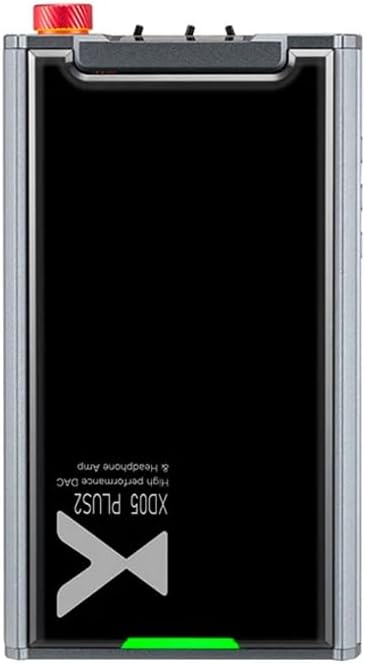
รูปที่ 1: ด้านบน view of the XDUOO XD05 Plus 2, highlighting its compact design and model branding.
2. เนื้อหาบรรจุภัณฑ์
กรุณาตรวจสอบแพ็คเกจสำหรับรายการต่อไปนี้:
- XDUOO XD05 Plus 2 Portable DAC Headphone Ampชีวิต
- สาย USB
- คู่มือการใช้งาน (เอกสารนี้)
3. เค้าโครงอุปกรณ์
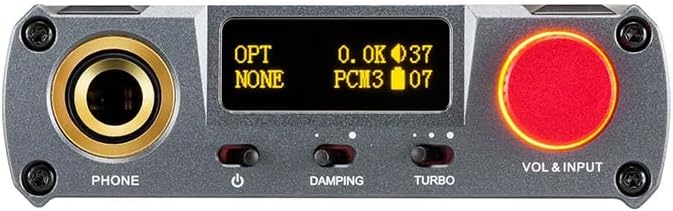
Figure 2: Front panel controls including the headphone output, OLED display, Damping switch, Turbo switch, and Volume/Input knob.

Figure 3: Rear panel connections featuring AUX In/Out, USB In, UAC 1.0/2.0 switch, Charge port, and Digital In (Optical/Coaxial).
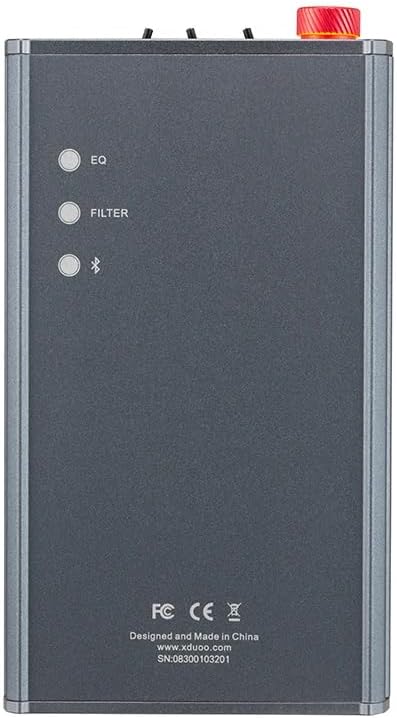
Figure 4: Side panel buttons for EQ, Filter, and Bluetooth functions.
4. การตั้งค่าและการเชื่อมต่อ
4.1 การชาร์จอุปกรณ์
Connect the provided USB cable to the 'CHARGE' port on the rear panel (Figure 3) and plug the other end into a USB power adapter (not included) or a computer's USB port. The charging time is approximately 3 hours for fast charging and 5 hours for slow charging.
4.2 การเชื่อมต่อกับแหล่งกำเนิดเสียง
The XD05 Plus 2 offers multiple input options:
- ช่องต่อ USB: Connect to computers (Windows/Linux/Mac OSX), smartphones (iOS/Android), or other USB audio sources using the 'USB IN' port (Figure 3). Ensure the UAC switch is set to the appropriate mode (UAC 1.0 or UAC 2.0) for your device.
- Digital Input (Optical/Coaxial): Connect to desktop CDs, Hi-Fi players, or digital turntables via the 'DIGITAL IN' port (Figure 3).
- อินพุตบลูทู ธ : For wireless audio streaming, refer to Section 5.4 for Bluetooth pairing instructions.
- AUX In/Out: Use the 'AUX IN/OUT' port (Figure 3) for analog input or output connections.
4.3 การเชื่อมต่อหูฟัง
Plug your headphones into the 'PHONE' output jack on the front panel (Figure 2).
5. คู่มือการใช้งาน
5.1 การเปิด/ปิดเครื่องและการเลือกแหล่งสัญญาณเข้า
Press and hold the power button (located near the 'PHONE' jack, Figure 2) to turn the device on or off. Rotate the 'VOL & INPUT' knob (Figure 2) to adjust the volume. Press the 'VOL & INPUT' knob to cycle through available input sources (USB, Optical, Coaxial, Bluetooth, AUX).
5.2 การควบคุมระดับเสียง
The device features a 99-level digital volume adjustment, ensuring balanced left and right channels at any volume setting. Rotate the 'VOL & INPUT' knob to precisely set your desired listening level.
5.3 Sound Adjustments (EQ, Filter, Damping, Turbo)
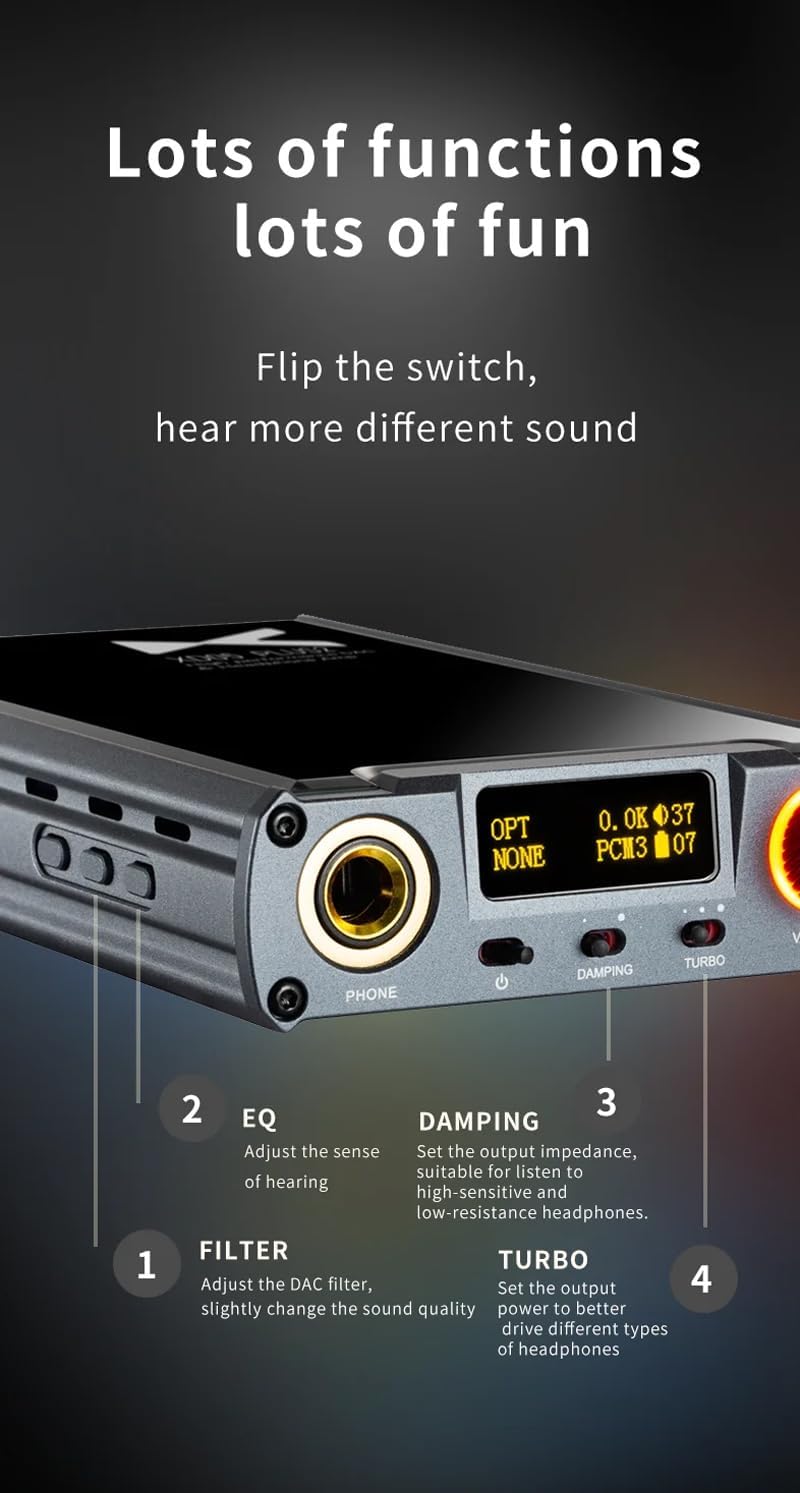
รูปที่ 5: รายละเอียด view of sound adjustment controls and their functions.
- อีคิว (อีควอไลเซอร์) : Press the 'EQ' button (Figure 4) to adjust the sense of hearing and tailor the sound to your preference.
- กรอง: Press the 'FILTER' button (Figure 4) to slightly change the sound quality by adjusting the DAC filter settings.
- Dampการลง: Use the 'DAMPING' switch (Figure 2) to set the output impedance, suitable for high-sensitivity and low-resistance headphones.
- เทอร์โบ: Use the 'TURBO' switch (Figure 2) to set the output power, allowing the device to better drive different types of headphones.
5.4 การจับคู่บลูทูธ
To pair your device via Bluetooth 5.1:
- Ensure the XD05 Plus 2 is powered on and Bluetooth input is selected.
- Press the 'Bluetooth' button (Figure 4) to enter pairing mode. The Bluetooth indicator on the OLED screen will flash.
- On your source device (e.g., smartphone, tablet), search for available Bluetooth devices and select "XDUOO XD05 Plus 2".
- เมื่อเชื่อมต่อแล้ว ไฟแสดงสถานะบลูทูธจะหยุดกะพริบ
Supported Bluetooth formats include AAC, SBC, aptX, aptX LL, aptX HD, and LDAC.
5.5 การเปลี่ยน Ampชิปลิฟายเออร์
การ amplifier chip is user-replaceable, allowing for customization of your audio experience. Refer to the manufacturer's guidelines or a qualified technician for instructions on safely replacing the op-amp ชิป.
6. ข้อมูลจำเพาะ
| คุณสมบัติ | ข้อมูลจำเพาะ |
|---|---|
| แบตเตอรี่ | 3.8V/5000mAh |
| หน้าจอ | จอ OLED ขนาด 0.91 นิ้ว |
| ระบบปฏิบัติการที่รองรับ | Windows/Linux/Mac OSX/iOS/Android |
| Frequency Response (USB/SPDIF) | 20Hz~20kHz (±0.5dB) |
| การตอบสนองความถี่ (AMP) | 10Hz~80kHz (±0.5dB) |
| ยูเอสบีampอัตราการไหล (PCM) | 16-32BIT/44.1-384KHZ |
| ยูเอสบีampอัตราความเร็วสัญญาณ (DSD) | DOP/NATIVE DSD64-256 |
| ยูเอสบีampling Rate (MQA) | OFS rendering layer decoding |
| OPT/COA Sampอัตราการไหล (PCM) | 16-24BIT/44.1-192KHZ |
| OPT/COA Sampอัตราความเร็วสัญญาณ (DSD) | DSD64 (DOP) |
| Bluetooth Formats | AAC/SBC/aptX/aptX LL/aptX HD/LDAC |
| ได้รับ | +0dB/3dB/6dB |
| กำลังขับของหูฟัง | 1200mW (โหลด32Ω) |
| Headphone THD+N | 0.0015%@1kHz |
| Headphone S/N | 121เดซิเบล |
| Headphone Crosstalk | มากกว่า 76 เดซิเบล |
| AUX OUT Output Level | 2.0Vrms |
| AUX OUT THD+N | 0.0009%@1kHz |
| AUX OUT S/N | 122เดซิเบล |
| AUX OUT Crosstalk | ≥109เดซิเบล |
| Battery Life (USB IN) | ≥9ชม. |
| Battery Life (SPDIF IN) | ≥15ชม. |
| Battery Life (BT IN) | ≥18ชม. |
| Charging Time (Fast) | ≤3 ชั่วโมง |
| Charging Time (Slow) | ≤5 ชั่วโมง |
| ขนาด | 13.0 x 7.5 x 2.2 ซม. |
| น้ำหนัก | 0.29 กก. |
7. การบำรุงรักษา
To ensure the longevity and optimal performance of your XDUOO XD05 Plus 2, follow these maintenance guidelines:
- รักษาความสะอาดของอุปกรณ์ด้วยการเช็ดด้วยผ้านุ่มและแห้ง หลีกเลี่ยงการใช้สารเคมีรุนแรงหรือวัสดุที่มีฤทธิ์กัดกร่อน
- ควรปกป้องอุปกรณ์จากอุณหภูมิที่สูงหรือต่ำเกินไป แสงแดดโดยตรง และความชื้น
- หลีกเลี่ยงการทำอุปกรณ์หล่นหรือกระแทกอย่างรุนแรง
- เมื่อไม่ได้ใช้งานเป็นเวลานาน ควรเก็บอุปกรณ์ไว้ในที่แห้งและเย็น
8 การแก้ไขปัญหา
If you encounter issues with your XDUOO XD05 Plus 2, please refer to the following common troubleshooting steps:
- ไม่มีเสียง:
- ตรวจสอบว่าอุปกรณ์เปิดอยู่หรือไม่
- ตรวจสอบให้แน่ใจว่าได้เสียบหูฟังอย่างถูกต้องแล้ว
- ตรวจสอบว่าเลือกแหล่งอินพุตที่ถูกต้อง
- ปรับระดับเสียง.
- Check the audio source device for proper playback and volume settings.
- คุณภาพเสียงไม่ดี:
- ตรวจสอบให้แน่ใจว่าสายเคเบิลทั้งหมดเชื่อมต่ออย่างแน่นหนา
- Try a different audio cable or source.
- Check EQ and Filter settings; reset them to default if necessary.
- Ensure the UAC switch is set correctly for your USB connection.
- ปัญหาการเชื่อมต่อบลูทูธ:
- Ensure the device is in Bluetooth pairing mode.
- ย้ายอุปกรณ์ต้นทางให้เข้ามาใกล้มากขึ้น ampชีวิต.
- Clear previous Bluetooth pairings on both devices and try pairing again.
- อุปกรณ์ไม่ชาร์จ:
- Verify the USB cable is connected to the 'CHARGE' port.
- ลองใช้สาย USB หรืออะแดปเตอร์จ่ายไฟอื่น
- ตรวจสอบให้แน่ใจว่าแหล่งจ่ายไฟสามารถใช้งานได้
9. วิดีโอผลิตภัณฑ์อย่างเป็นทางการ
วิดีโอ 1: จบแล้วview of the LEAUDIO XDUOO XD05 Plus 2 DAC Amp, แสดงasing its features and design. This video provides a visual guide to the product's capabilities and physical aspects.
10. การรับประกันและการสนับสนุน
For warranty information and technical support, please refer to the documentation included with your product or contact LEAUDIO customer service directly. You may also visit the official LEAUDIO webเว็บไซต์นี้เป็นแหล่งรวบรวมข้อมูลสนับสนุนที่ทันสมัยที่สุด