
SZSINOCAM B0CPXDFVRP
Szsinocam Wi-Fi Camera Outdoor/Indoor User Manual
Model: B0CPXDFVRP | Brand: SZSINOCAM
1. บทนำ
This manual provides detailed instructions for the installation, operation, and maintenance of your Szsinocam Wi-Fi Camera. Designed for both outdoor and indoor surveillance, this camera offers advanced features to enhance your security and monitoring needs. Please read this manual thoroughly before using the product to ensure proper setup and optimal performance.

Figure 1: Szsinocam Wi-Fi Camera and Mobile Application Interface
2. คุณสมบัติของผลิตภัณฑ์
The Szsinocam Wi-Fi Camera is equipped with a range of features designed for comprehensive surveillance:
- Dual Lens & Dual Screen Monitoring: Features two independent lenses allowing simultaneous monitoring of two different areas.
- การถ่ายภาพความละเอียดสูง: บันทึกภาพอาหารได้อย่างชัดเจนและละเอียดtage with 4-megapixel resolution.
- สามารถปรับมุมกล้องและมุมเอียงได้อย่างยืดหยุ่น: Offers a 355° horizontal rotation and 60° vertical tilt for extensive coverage.
- ซูมดิจิตอล 6 เท่า: Allows for closer inspection of details within the monitored area.
- โหมดการมองเห็นในเวลากลางคืน 3 โหมด: Supports infrared, full-color, and intelligent night vision for clear viewในสภาพแสงน้อย
- การตรวจจับการเคลื่อนไหวและการแจ้งเตือน: Automatically detects movement and sends instant notifications to your connected device.
- เสียงสองทาง: Enables real-time communication through the camera's built-in microphone and speaker.
- ตัวเลือกการจัดเก็บข้อมูลหลากหลาย: Supports both cloud storage and local storage via a Micro SD card (up to 256GB, sold separately).
- การติดตั้งอเนกประสงค์: Can be mounted on a wall, placed on a flat surface, or installed on the ceiling.

Figure 2: Dual Lens and Dual Screen Capability

Figure 3: High-Resolution 4MP Image Quality
รูปที่ 4: โหมดการมองเห็นในเวลากลางคืนสามแบบ
3. คู่มือการติดตั้ง
3.1 เนื้อหาบรรจุภัณฑ์
ก่อนดำเนินการต่อ โปรดตรวจสอบให้แน่ใจว่ามีรายการทั้งหมดอยู่ในบรรจุภัณฑ์:
- Szsinocam Wi-Fi Camera
- อะแดปเตอร์แปลงไฟ
- สาย USB
- ตัวยึดและสกรู
- คู่มือการใช้งาน (เอกสารนี้)
3.2 การเปิดกล้อง
- เสียบสาย USB เข้ากับพอร์ตจ่ายไฟของกล้อง
- เสียบปลายอีกด้านของสาย USB เข้ากับอะแดปเตอร์แปลงไฟที่ให้มา
- เสียบอะแดปเตอร์แปลงไฟเข้ากับเต้ารับไฟฟ้าทั่วไป กล้องจะเปิดทำงานและเริ่มกระบวนการเริ่มต้นระบบ
3.3 การติดตั้งแอปพลิเคชันบนมือถือ
เพื่อควบคุมและ view your camera, you need to install the dedicated mobile application:
- Scan the QR code provided on the camera packaging or in the quick start guide to download the official application. Alternatively, search for the application name (e.g., "OKAM PRO" or similar) in your device's app store (App Store for iOS, Google Play Store for Android).
- ติดตั้งแอพพลิเคชั่นบนสมาร์ทโฟนหรือแท็บเล็ตของคุณ
- ลงทะเบียนบัญชีใหม่หรือเข้าสู่ระบบหากคุณมีบัญชีอยู่แล้ว
3.4 การจับคู่กล้อง
Follow these steps to pair your camera with the mobile application:
- Ensure your mobile device is connected to a 2.4GHz Wi-Fi network. The camera supports both 2.4GHz and 5GHz Wi-Fi.
- Open the mobile application and select "Add Device" or the '+' icon.
- Choose the camera type (e.g., "Wi-Fi Camera" or "Smart Camera").
- Follow the on-screen prompts to enter your Wi-Fi network name (SSID) and password.
- The application will generate a QR code. Position your camera's lens approximately 15-20 cm (6-8 inches) in front of your phone screen, ensuring the QR code is clearly visible to the camera.
- Wait for the camera to emit a confirmation sound or voice prompt indicating successful connection.
- เมื่อเชื่อมต่อแล้ว คุณสามารถตั้งชื่อกล้องและเริ่มถ่ายทอดสดได้ viewการไอเอ็นจี
4. คู่มือการใช้งาน
4.1 สด View และการควบคุม
After successful pairing, tap on the camera's name in the application to access the live viewจากตรงนี้ คุณสามารถ:
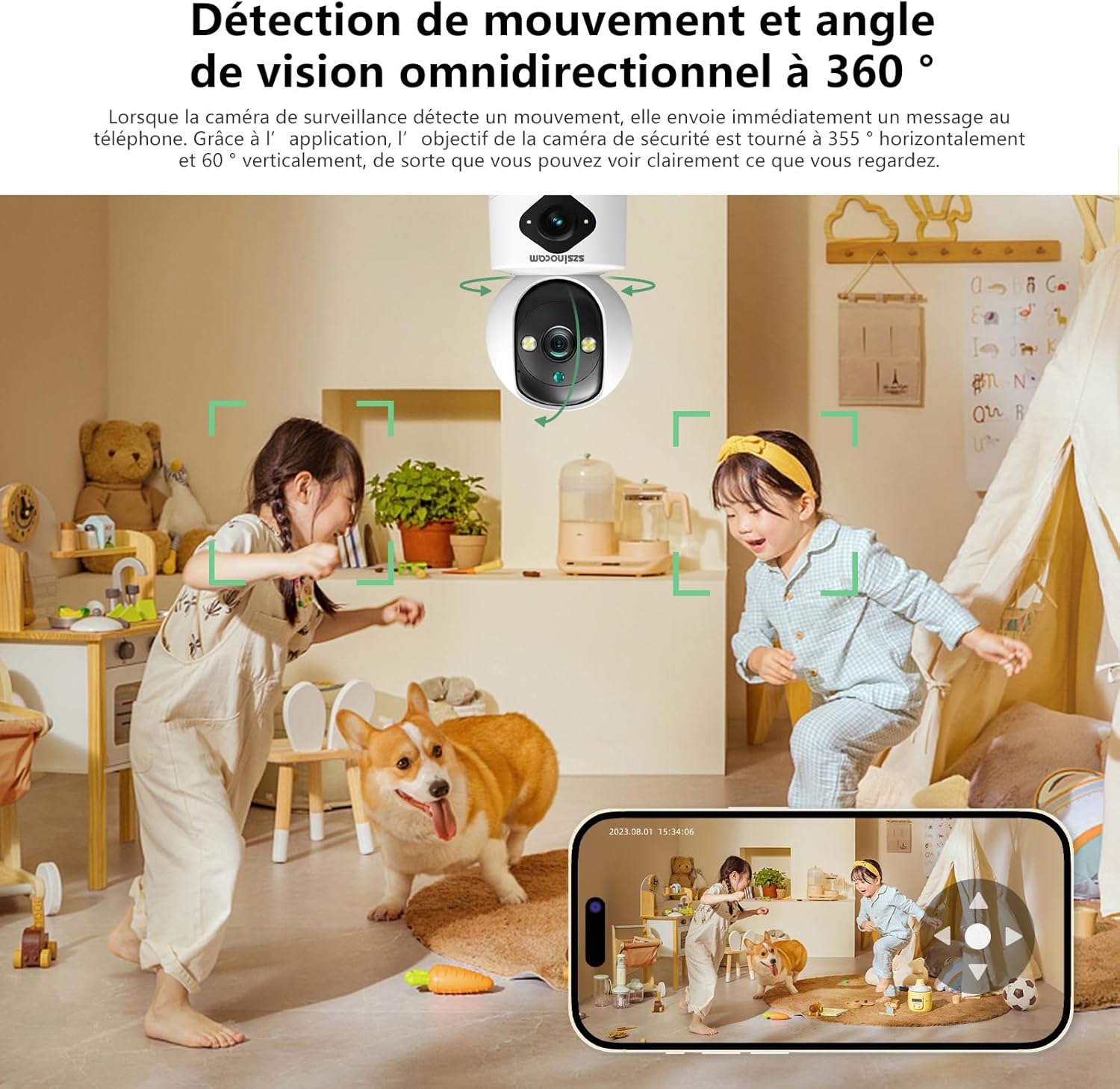
- เอียงกระทะ: Use the directional controls on the screen to rotate the camera horizontally (355°) and vertically (60°).
- ซูมดิจิตอล: Pinch to zoom in or out on the live feed (up to 6x).
- เสียงสองทาง: Tap the microphone icon to speak through the camera's speaker, and listen through your phone's speaker.
- ถ่ายภาพและบันทึก: Capture still images or record video clips directly to your phone's gallery.
4.2 การบันทึกและการเก็บรักษา
The camera supports two primary recording methods:
- ที่เก็บข้อมูลไมโคร SD การ์ด: Insert a Micro SD card (up to 256GB, Class 10 or higher recommended) into the designated slot on the camera. The camera will automatically begin recording based on your settings (continuous, motion-triggered).
- การเก็บข้อมูลบนคลาวด์: Subscribe to the cloud storage service through the mobile application for secure, off-site video backup. This ensures your footagกล้องจะปลอดภัยแม้ว่าตัวกล้องจะเสียหายหรือถูกขโมยก็ตาม

Figure 5: Recording Options: Cloud and Micro SD Card
4.3 การตรวจจับการเคลื่อนไหวและการแจ้งเตือน
Configure motion detection settings in the application:
- เปิด/ปิด: Turn motion detection on or off.
- ความไว: ปรับความไวในการตรวจจับเพื่อลดการแจ้งเตือนที่ผิดพลาดให้น้อยที่สุด
- การแจ้งเตือน: Receive push notifications on your mobile device when motion is detected.
- โซนกิจกรรม: กำหนดพื้นที่เฉพาะภายในกล้อง view สำหรับการตรวจจับความเคลื่อนไหว

Figure 6: Motion Detection and Wide Angle View
4.4 โหมดการมองเห็นตอนกลางคืน
The camera offers three night vision modes for optimal viewing in various low-light conditions:
- โหมดอินฟราเรด: Provides clear black and white images in complete darkness using infrared LEDs.
- การมองเห็นตอนกลางคืนแบบสีเต็มรูปแบบ: Utilizes built-in spotlights to provide full-color images even in very low light.
- โหมดอัจฉริยะ: สลับระหว่างโหมดอินฟราเรดและโหมดสีเต็มรูปแบบโดยอัตโนมัติตามการตรวจจับการเคลื่อนไหวหรือสภาพแสง
5. ตัวเลือกการติดตั้ง
The Szsinocam Wi-Fi Camera offers flexible installation to suit your needs:
- การติดตั้งบนผนัง: ใช้ขายึดและสกรูที่ให้มาเพื่อยึดกล้องเข้ากับผนัง
- ตำแหน่งพื้นผิวเรียบ: Simply place the camera on any flat surface like a table, shelf, or desk.
- การติดตั้งบนเพดาน: Attach the camera to the ceiling using the mounting bracket for an overhead view.

รูปที่ 7: ตัวเลือกการติดตั้งที่ยืดหยุ่น
6. การบำรุงรักษา
- การทำความสะอาด: ใช้ผ้านุ่มและแห้งเช็ดเลนส์และตัวกล้อง ห้ามใช้น้ำยาทำความสะอาดหรือวัสดุขัดถู
- อัพเดตเฟิร์มแวร์: Regularly check the mobile application for firmware updates. Keeping your camera's firmware updated ensures optimal performance, new features, and security enhancements.
- สภาพแวดล้อม : Ensure the camera is operated within its specified temperature and humidity ranges. Avoid direct exposure to extreme weather conditions if installed outdoors without proper protection.
7 การแก้ไขปัญหา
| ปัญหา | สาเหตุที่เป็นไปได้ | สารละลาย |
|---|---|---|
| กล้องไม่สามารถเปิดได้ | Power adapter or cable faulty; no power from outlet. | Check power connection. Try a different outlet or USB cable/adapter. |
| Unable to pair camera with app. | Incorrect Wi-Fi password; camera too far from router; 5GHz network used; QR code not scanned properly. | Ensure correct 2.4GHz Wi-Fi password. Move camera closer to router. Ensure QR code is clear and camera lens is clean. Reset camera if necessary. |
| คุณภาพของภาพไม่ดี | เลนส์สกปรก; แสงสว่างไม่เพียงพอ; ปัญหาเรื่องแบนด์วิดท์เครือข่าย | Clean the camera lens. Ensure adequate lighting or enable appropriate night vision mode. Check Wi-Fi signal strength. |
| ไม่ได้รับการแจ้งเตือนการตรวจจับการเคลื่อนไหว | Motion detection disabled; app notifications turned off; incorrect sensitivity. | Enable motion detection in app. Check phone notification settings. Adjust sensitivity. |
| ไม่สามารถบันทึกข้อมูลลงการ์ด SD ได้ | SD card full, faulty, or not formatted; recording settings incorrect. | Format SD card via app. Replace SD card if faulty. Check recording schedule/settings. |
8. ข้อมูลจำเพาะ
| คุณสมบัติ | รายละเอียด |
|---|---|
| ยี่ห้อ | SZSINOCAM |
| แบบอย่าง | B0CPXDFVRP |
| ความละเอียดของภาพนิ่งที่มีประสิทธิภาพ | 3 MP |
| ความเร็วชัตเตอร์สูงสุด | 1/30 วินาที |
| ขนาดบรรจุภัณฑ์ (ยาว x กว้าง x สูง) | 12.8 x 10.6 x 8.7 เซนติเมตร |
| น้ำหนักแพ็คเกจ | 0.36 กิโลกรัม |
| การเชื่อมต่อ | ไวไฟ (2.4GHz/5GHz) |
| พื้นที่จัดเก็บ | การ์ด Micro SD (สูงสุด 256GB), พื้นที่จัดเก็บข้อมูลบนคลาวด์ |
| วันที่พร้อมใช้งานครั้งแรก | 16 ธ.ค. 2023 |
หมายเหตุ: ข้อมูลจำเพาะอาจมีการเปลี่ยนแปลงได้โดยไม่ต้องแจ้งให้ทราบล่วงหน้า
9. การรับประกันและการสนับสนุน
For warranty information and technical support, please refer to the contact details provided with your purchase or visit the official SZSINOCAM webไซต์ โปรดเก็บใบเสร็จรับเงินไว้เป็นหลักฐานการซื้อสำหรับการเรียกร้องการรับประกัน
หากต้องการความช่วยเหลือเพิ่มเติม คุณสามารถติดต่อผู้ขายผ่านแพลตฟอร์มที่คุณซื้อสินค้าได้เช่นกัน
เอกสารที่เกี่ยวข้อง - B0CPXDFVRP
 |
คู่มือสไตล์แบรนด์ Wi-Fi Alliance: แนวทางอย่างเป็นทางการสำหรับเครื่องหมายรับรอง คู่มือครอบคลุมจาก Wi-Fi Alliance ที่ให้รายละเอียดเกี่ยวกับการใช้งาน ตำแหน่ง และข้อกำหนดที่ถูกต้องสำหรับโลโก้ เครื่องหมาย และการสร้างแบรนด์สมาชิกที่ได้รับการรับรอง Wi-Fi |
 |
คู่มือผู้ใช้ระบบ Mesh Wi-Fi 6 ของ TP-Link Deco WM9000 AX3000 ทั้งบ้าน คู่มือผู้ใช้สำหรับระบบ TP-Link Deco WM9000 AX3000 Indoor/Outdoor Whole Home Mesh Wi-Fi 6 ครอบคลุมการตั้งค่า รูปลักษณ์ การแก้ไขปัญหา และข้อมูลด้านความปลอดภัย |
 |
คู่มือผู้ใช้ TP-Link Deco XM73 AX5400: การตั้งค่าและการใช้งาน คู่มือผู้ใช้ฉบับสมบูรณ์สำหรับระบบ Mesh Wi-Fi 6 ทั้งบ้านสำหรับภายใน/ภายนอกอาคาร TP-Link Deco XM73 AX5400 เรียนรู้วิธีการตั้งค่า กำหนดค่า และแก้ไขปัญหาเครือข่าย Mesh Wi-Fi ของคุณ |
 |
ข้อมูลจำเพาะและคุณสมบัติของ Intelbras AP 7739 Wi-Fi 7 Access Point ข้อมูลจำเพาะและคุณสมบัติโดยละเอียดของ Intelbras AP 7739 ซึ่งเป็นจุดเชื่อมต่อ Wi-Fi 7 (802.11be) รุ่นใหม่ล่าสุดสำหรับใช้งานภายในอาคาร ครอบคลุมทั้งฮาร์ดแวร์ ซอฟต์แวร์ ความปลอดภัย คุณภาพการบริการ (QoS) และรูปแบบเสาอากาศ |
 |
คู่มือผู้ใช้ TP-Link Deco X20-Outdoor AX1800 Mesh Wi-Fi 6 คู่มือผู้ใช้สำหรับอุปกรณ์ TP-Link Deco X20-Outdoor AX1800 Mesh Wi-Fi 6 สำหรับใช้งานภายนอก/ภายในอาคาร ครอบคลุมการตั้งค่า การติดตั้ง การกันน้ำ การแก้ไขปัญหา และข้อมูลด้านความปลอดภัย |
 |
คู่มือการตั้งค่าอุปกรณ์อัจฉริยะ myTouchSmart Wi-Fi A comprehensive guide for setting up myTouchSmart Wi-Fi smart plugs and switches, covering app installation, device pairing with Alexa and Google Assistant, and troubleshooting, along with FCC compliance information and product specifications. |
Ask a question about this manual
Ask about setup, troubleshooting, compatibility, parts, safety, or missing instructions. Manuals+ will review the question and use this page’s manual context to help answer it.