
1. สินค้าหมดview
This manual provides instructions for the CHUNGHOP ASK-STI6220 Voice Remote Control. This remote is designed as a replacement for specific Verizon Stream TV Box models, offering intelligent voice control and responsive button functionality for an enhanced entertainment experience.
2. ข้อมูลความเข้ากันได้
The ASK-STI6220 Voice Remote Control is specifically designed to work ONLY with Verizon Stream TV Box voice remote control V2 ARRIS CCAM21LP1890T2, 2AGOFRC451A, RC451A, STI6220-D315, ASK-STI6220. It is NOT a universal remote for Verizon FiOS and is NOT compatible with Verizon Stream TV JS8V, Verizon FiOS TV 2019 - MG3-R32140B VRC4100 BLE Remote, or any Verizon remote with a "LAST" button. Please ensure your original remote's design and button layout match this model for proper functionality.
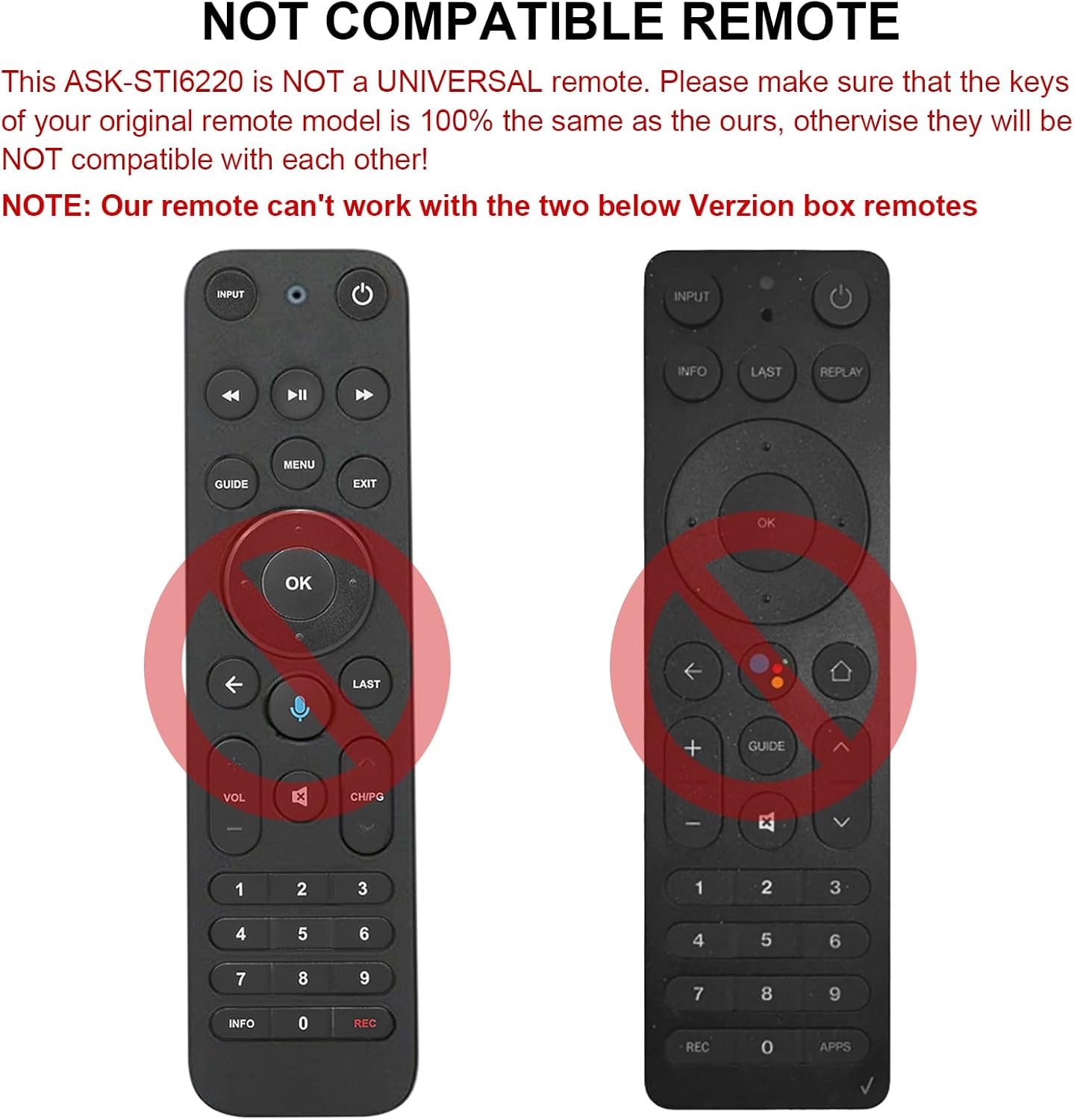
รูปที่ 2.1: อดีตamples of incompatible Verizon remotes. Ensure your original remote's buttons match the ASK-STI6220 model.

Figure 2.2: The ASK-STI6220 Voice Remote Control, compatible with Verizon Stream TV Box.
3. การตั้งค่าและการติดตั้ง
3.1 การติดตั้งแบตเตอรี่
รีโมทคอนโทรลต้องใช้แบตเตอรี่ AAA สองก้อน (ไม่รวม) วิธีติดตั้งแบตเตอรี่:
- ถอดฝาครอบแบตเตอรี่ออกจากด้านหลังของรีโมทคอนโทรล
- Insert two AAA batteries, ensuring correct polarity (+ and - ends match the markings inside the compartment).
- ใส่ฝาครอบแบตเตอรี่กลับเข้าที่อย่างแน่นหนา

รูปที่ 3.1: ช่องใส่แบตเตอรี่ AAA สองก้อน
Video 3.1: Demonstration of battery installation and initial setup for the ASK-STI6220 Voice Remote.
3.2 คำแนะนำในการจับคู่
To use the voice remote, it must first be paired with your Verizon Stream TV Box. Follow one of the methods below:
- วิธีที่ 1: กด "กลับ" และ "ปพลิเคชัน" buttons simultaneously to initiate pairing.
- วิธีที่ 2: Alternatively, press the "OK" และ "บ้าน" buttons simultaneously to initiate pairing.
หมายเหตุสำคัญ:
- A device can only be paired with one voice remote at a time. Before pairing this new remote, please disconnect your old remote control (e.g., by removing its batteries).
- If pairing fails on the first attempt, try turning your TV Box off and then back on. If you continue to experience issues, clear any existing remote settings on your TV Box before attempting to pair again.

Figure 3.2: Visual guide for pairing the remote control.
4. คู่มือการใช้งาน
4.1 General Button Functions
The ASK-STI6220 remote features a standard layout for easy navigation and control of your Verizon Stream TV Box:
- ปุ่มเปิด/ปิด: เปิดหรือปิดกล่องทีวี
- ปุ่มป้อนข้อมูล: Switches input sources on your TV.
- แผงนำทาง (ขึ้น/ลง/ซ้าย/ขวา/ตกลง): ใช้สำหรับการนำทางและเลือกเมนู
- เพิ่ม/ลดระดับเสียง: ปรับระดับเสียง.
- ช่องขึ้น/ลง: เปลี่ยนช่อง
- เล่น/หยุดชั่วคราว, กรอไปข้างหน้า, กรอถอยหลัง: ปุ่มควบคุมการเล่นสื่อ
- ปุ่มโฮม: กลับสู่หน้าจอหลัก
- ปุ่มคำแนะนำ: Accesses the program guide.
- แป้นตัวเลข (0-9): เข้าช่องทางตรง
- ปุ่มข้อมูล: แสดงข้อมูลโปรแกรม
- APPs Button: Accesses applications.
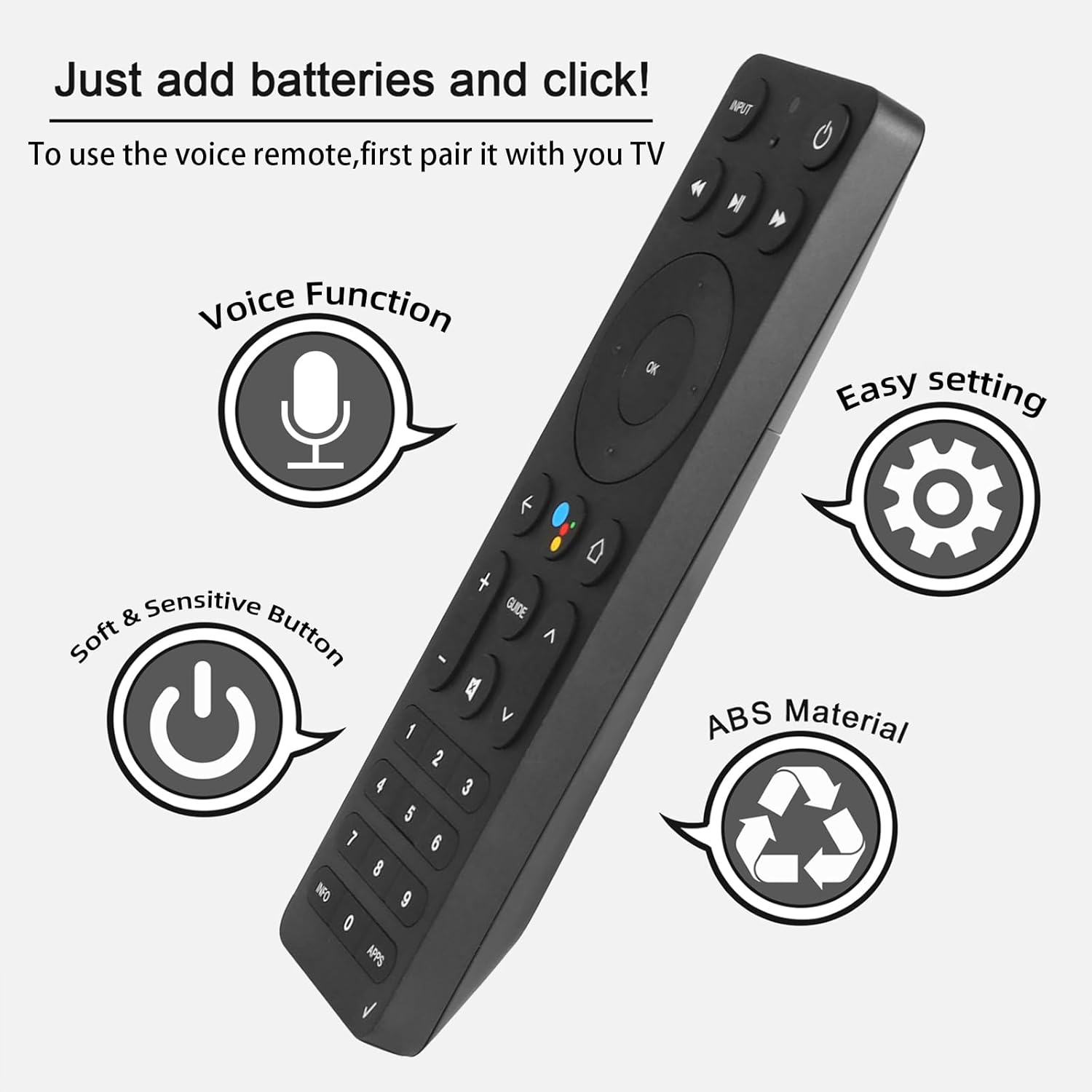
Figure 4.1: Key features and button layout of the remote control.
4.2 ระบบควบคุมด้วยเสียงอัจฉริยะ
The remote features an intelligent voice function, allowing you to control your TV Box with voice commands. Press the dedicated voice button (often represented by a microphone icon) and speak clearly into the remote.
Exampคำสั่งเสียง:
- "Launch channels"
- "Lower the volume"
- "Play action movie"
If the voice function does not work correctly, follow these steps:
- Go to the home page of your TV Box.
- Press the "Settings" button on the remote control.
- Select "Remote Controls and Accessories" and then "Remote Controls."
- Select to add a new remote control and follow the on-screen steps to complete the setup.

Figure 4.2: Using intelligent voice search and control.

Figure 4.3: The remote offers a 0.2-second fast response and a 33-foot transmitting distance for accurate control.
5. การบำรุงรักษา
เพื่อให้มั่นใจถึงอายุการใช้งานที่ยาวนานและประสิทธิภาพสูงสุดของรีโมทคอนโทรลของคุณ:
- ควรทำความสะอาดรีโมทด้วยผ้าแห้งนุ่มๆ หลีกเลี่ยงการใช้น้ำยาทำความสะอาดหรือวัสดุที่มีฤทธิ์กัดกร่อน
- Replace batteries promptly when the remote's responsiveness decreases. Always use fresh AAA batteries.
- ควรหลีกเลี่ยงการวางรีโมทไว้ในที่ที่มีอุณหภูมิสูงหรือต่ำเกินไป แสงแดดโดยตรง หรือความชื้น
- อย่าทำรีโมทตกหรือกระแทกอย่างแรง
6 การแก้ไขปัญหา
If you encounter issues with your ASK-STI6220 remote control, please refer to the following common solutions:
- รีโมตไม่ตอบสนอง:
- ตรวจสอบให้แน่ใจว่าได้ติดตั้งแบตเตอรี่อย่างถูกต้องและแบตเตอรี่ไม่หมด หากจำเป็นให้เปลี่ยนเป็นแบตเตอรี่ AAA ใหม่
- Verify that the remote is properly paired with your Verizon Stream TV Box (refer to Section 3.2).
- ตรวจสอบให้แน่ใจว่าไม่มีสิ่งกีดขวางระหว่างรีโมทและกล่องทีวี
- ปัญหาการจับคู่:
- Confirm that your original remote is disconnected (e.g., by removing its batteries) as only one Bluetooth remote can be paired at a time.
- If pairing fails, try turning the TV Box off and on again, then re-attempt the pairing process.
- Clear existing remote settings on your TV Box before trying to pair again.
- การควบคุมด้วยเสียงไม่ทำงาน:
- Ensure the remote is successfully paired and the voice function is enabled on your TV Box.
- Follow the voice control setup steps outlined in Section 4.2.
- พูดให้ชัดเจนและตรงไปยังไมโครโฟนของรีโมท
- Remote not compatible with my device:
- This remote is specifically designed for Verizon Stream TV Box voice remote control V2 ARRIS CCAM21LP1890T2, 2AGOFRC451A, RC451A, STI6220-D315, ASK-STI6220. It is not a universal remote. Please verify your device's model number and compare your original remote's buttons with the ASK-STI6220.

Figure 6.1: Common questions and answers regarding the remote's functionality and compatibility.
7. ข้อมูลจำเพาะ
| คุณสมบัติ | รายละเอียด |
|---|---|
| ยี่ห้อ | CHUNGHOP |
| หมายเลขรุ่น | ASK-STI6220 |
| อุปกรณ์ที่รองรับ | Verizon Stream TV Box (specific models as listed in Section 2) |
| จำนวนอุปกรณ์ที่รองรับสูงสุด | 1 |
| คุณสมบัติพิเศษ | Ergonomic, Voice Control |
| สี | As Shown (typically black) |
| แบตเตอรี่ที่จำเป็น | ถ่าน AAA จำนวน 2 ก้อน |
| น้ำหนักสินค้า | 3.2 ออนซ์ |
| ขนาดแพ็คเกจ | 8.19 x 3.54 x 0.94 นิ้ว |
8. การรับประกันและการสนับสนุน
For any questions or concerns regarding your CHUNGHOP ASK-STI6220 Voice Remote Control, including pairing, setup, or functionality, please contact the seller directly. Refer to your purchase documentation for specific warranty details, as these may vary.
The manufacturer, CHUNGHOP, is committed to providing support for their products.