1. บทนำ
This manual provides essential information for the safe and efficient use of your Infinix Hot 40i smartphone. Please read this guide thoroughly before operating your device to ensure optimal performance and longevity. Keep this manual for future reference.
2. สินค้าหมดview
Familiarize yourself with the main components of your Infinix Hot 40i smartphone.

รูปที่ 2.1: Infinix Hot 40i showing both front display and rear camera module.
- จอแสดงผลด้านหน้า: 6.6-inch HD+ Punch-Hole Screen with 90Hz refresh rate. Features the Magic Ring for notifications and status.
- กล้องหน้า: 32MP Crystal-Clear Front Camera, located within the punch-hole cutout.
- โมดูลกล้องหลัง: Houses the 50MP Dual AI Rear Camera system and LED flash.
- ปุ่มเปิด/ปิดเครื่อง/เซ็นเซอร์ลายนิ้วมือ: Located on the side, used to power on/off the device and for biometric authentication.
- ปุ่มปรับระดับเสียง: อยู่ด้านข้าง ใช้สำหรับปรับระดับเสียงสื่อและระดับเสียงสนทนา
- พอร์ต USB Type-C: สำหรับการชาร์จและถ่ายโอนข้อมูล
- ผู้บรรยาย: เอาท์พุตเสียง
- ถาดใส่ซิม/SDการ์ด: For inserting Nano-SIM cards and a microSD card for expandable storage.
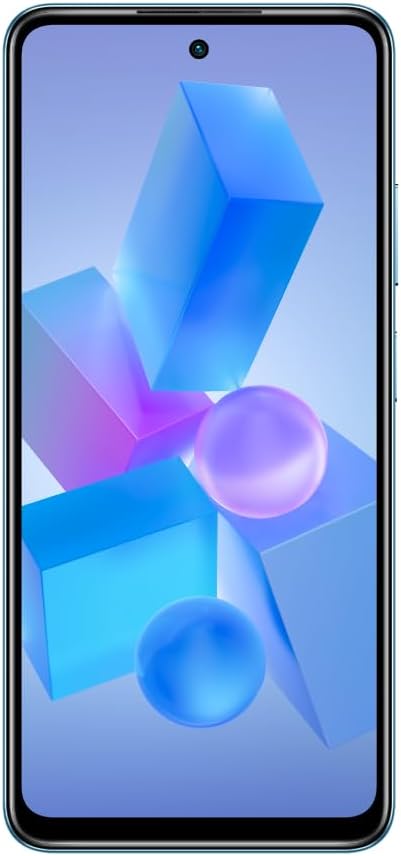
รูปที่ 2.2: ด้านหน้า view of the Infinix Hot 40i, highlighting the display and front camera.

รูปที่ 2.3: กลับ view of the Infinix Hot 40i, showing the camera array and Infinix branding.

รูปที่ 2.4: ด้านข้าง view of the Infinix Hot 40i, illustrating the power and volume buttons.
3. การตั้งค่า
3.1. การใส่ซิมและการ์ด SD
- ค้นหาถาดใส่การ์ด SIM/SD ที่ด้านข้างอุปกรณ์ของคุณ
- ใส่เครื่องมือถอดซิมเข้าไปในรูเล็ก ๆ ข้างถาดและกดเบา ๆ จนถาดหลุดออกมา
- ใส่การ์ด Nano-SIM และ/หรือการ์ด microSD ลงในช่องที่กำหนดบนถาด ตรวจสอบให้แน่ใจว่าหน้าสัมผัสสีทองคว่ำลง
- ใส่ถาดกลับเข้าไปในอุปกรณ์อย่างระมัดระวังจนกระทั่งล็อคเข้าที่
3.2. การเปิดเครื่องครั้งแรกและการตั้งค่า
- กดปุ่มเปิด/ปิดค้างไว้จนกว่าโลโก้ Infinix จะปรากฏขึ้น
- ปฏิบัติตามคำแนะนำบนหน้าจอเพื่อเลือกภาษา เชื่อมต่อกับเครือข่าย Wi-Fi และตั้งค่าบัญชี Google ของคุณ
- คุณจะได้รับคำแนะนำเกี่ยวกับการตั้งค่าคุณสมบัติด้านความปลอดภัย เช่น การปลดล็อคด้วยลายนิ้วมือ และการล็อคหน้าจอ (PIN, รูปแบบ หรือรหัสผ่าน)
3.3. การชาร์จอุปกรณ์
- Connect the USB Type-C cable to the charging port on your phone and the other end to the 18W fast charger.
- เสียบที่ชาร์จเข้ากับเต้ารับไฟฟ้า ไอคอนแบตเตอรี่บนหน้าจอจะแสดงสถานะการชาร์จ
- เพื่ออายุการใช้งานแบตเตอรี่ที่ดีที่สุด ควรหลีกเลี่ยงการระบายแบตเตอรี่จนหมดบ่อยครั้ง
4. คู่มือการใช้งาน
4.1. การนำทางพื้นฐาน
- ท่าทางสัมผัส: Swipe, tap, pinch, and spread to navigate the interface, open apps, zoom, and scroll.
- หน้าจอหลัก: Access your apps, widgets, and notifications. Swipe down from the top for the notification panel and quick settings.
- ลิ้นชักแอป: ปัดขึ้นจากด้านล่างของหน้าจอหลักเพื่อเข้าถึงแอปพลิเคชันที่ติดตั้งทั้งหมด
4.2. การปลดล็อคด้วยลายนิ้วมือ
Your Infinix Hot 40i features a side-mounted fingerprint sensor for quick and secure unlocking. To set up:
- ไปที่ ตั้งค่า > ความปลอดภัย > ลายนิ้วมือ.
- ทำตามคำแนะนำบนหน้าจอเพื่อลงทะเบียนลายนิ้วมือของคุณ ตรวจสอบให้แน่ใจว่านิ้วของคุณครอบคลุมพื้นที่เซ็นเซอร์ทั้งหมดระหว่างการลงทะเบียน
4.3. การใช้กล้อง
The device is equipped with a 50MP Dual AI Rear Camera and a 32MP Crystal-Clear Front Camera.
- เปิด กล้อง แอปพลิเคชันจากหน้าจอหลักหรือลิ้นชักแอปของคุณ
- สลับระหว่างกล้องด้านหน้าและด้านหลังโดยใช้ไอคอนสลับกล้อง
- Select different modes (e.g., Photo, Video, Portrait, Night) from the bottom menu.
- แตะปุ่มชัตเตอร์เพื่อถ่ายภาพหรือเริ่ม/หยุดการบันทึกวิดีโอ
4.4. การจัดการแบตเตอรี่
Your phone features a 5000 mAh long-lasting battery with 18W Fast Charge support.
- ถึง view battery usage and optimize settings, go to ตั้งค่า > แบตเตอรี่.
- เปิดใช้งาน โหมดประหยัดพลังงาน to extend battery life when needed.
- Use the provided 18W charger for fast charging capabilities.
4.5. XBOOST Gaming Engine
The XBOOST Gaming Engine optimizes performance for a smoother gaming experience. It automatically activates when you launch supported games, prioritizing system resources.
4.6.แหวนวิเศษ
The Magic Ring feature around the front camera provides dynamic visual notifications for calls, charging status, and other alerts.
5. การบำรุงรักษา
5.1. การทำความสะอาดอุปกรณ์ของคุณ
- ใช้ผ้านุ่มที่ไม่เป็นขุยเช็ดหน้าจอและแผงด้านหลัง
- หลีกเลี่ยงการใช้สารเคมีรุนแรง วัสดุที่มีฤทธิ์กัดกร่อน หรือสเปรย์แอโรซอล
- ตรวจสอบให้แน่ใจว่าไม่มีความชื้นเข้าไปในช่องหรือรูต่างๆ
5.2. การอัปเดตซอฟต์แวร์
ตรวจสอบและติดตั้งการอัพเดตซอฟต์แวร์เป็นประจำเพื่อให้แน่ใจว่าอุปกรณ์ของคุณมีคุณลักษณะล่าสุด แพตช์ความปลอดภัย และการปรับปรุงประสิทธิภาพ
- ไปที่ การตั้งค่า > ระบบ > อัปเดตระบบ.
- เชื่อมต่อกับเครือข่าย Wi-Fi ที่เสถียรก่อนดาวน์โหลดการอัปเดต
5.3. การจัดการการจัดเก็บข้อมูล
อุปกรณ์ของคุณมีพื้นที่เก็บข้อมูลภายใน 128GB เพื่อจัดการพื้นที่เก็บข้อมูลอย่างมีประสิทธิภาพ:
- ไปที่ การตั้งค่า > การจัดเก็บข้อมูล to see what is using space.
- ล้างข้อมูลแคชจากแอปเป็นประจำ
- โอนย้ายขนาดใหญ่ file(ภาพถ่าย วิดีโอ) ไปยังคอมพิวเตอร์หรือที่เก็บข้อมูลบนคลาวด์
- ใช้การ์ด microSD เพื่อพื้นที่จัดเก็บเพิ่มเติมหากจำเป็น
6 การแก้ไขปัญหา
ส่วนนี้จะกล่าวถึงปัญหาทั่วไปที่คุณอาจพบเจอขณะใช้งาน Infinix Hot 40i
- อุปกรณ์ไม่เปิด: ตรวจสอบให้แน่ใจว่าแบตเตอรี่ชาร์จเต็มแล้ว เสียบที่ชาร์จและรอสักครู่ก่อนลองเปิดเครื่องอีกครั้ง หากเครื่องไม่ตอบสนอง ให้กดปุ่มเปิด/ปิดค้างไว้ 10-15 วินาทีเพื่อบังคับรีสตาร์ท
- แอปขัดข้องหรือค้าง: Close the problematic app and reopen it. Clear the app's cache (Settings > Apps > [App Name] > Storage > Clear cache). If the issue persists, uninstall and reinstall the app.
- Poor Wi-Fi/Bluetooth connectivity: Toggle Wi-Fi/Bluetooth off and on. Restart your phone. Ensure you are within range of the network/device.
- ประสิทธิภาพช้า: ปิดแอปพื้นหลังที่ไม่จำเป็น ล้างแคชและแอปชั่วคราว files. Check for available storage space. Restart your device regularly.
- เซ็นเซอร์ลายนิ้วมือไม่ทำงาน: ตรวจสอบให้แน่ใจว่านิ้วของคุณสะอาดและแห้ง ลงทะเบียนลายนิ้วมือของคุณอีกครั้งใน การตั้งค่า > ความปลอดภัย > ลายนิ้วมือ
- รีเซ็ตเป็นค่าโรงงาน (ทางเลือกสุดท้าย): หากปัญหายังคงมีอยู่ คุณอาจต้องดำเนินการรีเซ็ตเป็นค่าจากโรงงาน คำเตือน: การดำเนินการนี้จะลบข้อมูลทั้งหมดในโทรศัพท์ของคุณ โปรดสำรองข้อมูลสำคัญก่อนดำเนินการต่อ ไปที่ การตั้งค่า > ระบบ > ตัวเลือกการรีเซ็ต > ลบข้อมูลทั้งหมด (รีเซ็ตเป็นค่าโรงงาน).
7. ข้อมูลจำเพาะ
Key technical specifications for the Infinix Hot 40i:
| คุณสมบัติ | ข้อมูลจำเพาะ |
|---|---|
| ยี่ห้อ | อินฟินิกซ์ |
| ชื่อรุ่น | ฮอต 40i |
| ระบบปฏิบัติการ | แอนดรอยด์ 13.0 |
| ขนาดหน่วยความจำ RAM ที่ติดตั้ง | 4 GB (สามารถเพิ่ม RAM ได้สูงสุดถึง 8 GB) |
| ความจุของหน่วยความจำ | 128GB |
| รุ่นซีพียู | Octa-Core Chipset (Snapdragon) |
| ความเร็วซีพียู | 2.2 กิกะเฮิรตซ์ |
| ขนาดหน้าจอ | 6.56 นิ้ว |
| ปณิธาน | 1920 x 1080 |
| อัตราการรีเฟรช | 90 เฮิรตซ์ |
| กล้องหลัง | 50MP Dual AI Cam |
| กล้องหน้า | 32MP Crystal-Clear |
| ความจุของแบตเตอรี่ | 5000 มิลลิแอมป์ |
| การชาร์จไฟ | โหลดเร็ว 18W |
| ความปลอดภัย | ปลดล็อคด้วยลายนิ้วมือด้านข้าง |
8. การรับประกันและการสนับสนุน
Your Infinix Hot 40i is covered by a limited warranty. For detailed warranty terms and conditions, please refer to the warranty card included in your product packaging or visit the official Infinix webเว็บไซต์.
For technical support, frequently asked questions, or to find service centers, please visit the official Infinix support webหรือติดต่อฝ่ายบริการลูกค้า เก็บหลักฐานการซื้อไว้เพื่อใช้ในการเคลมประกัน