
1. บทนำ
ขอบคุณสำหรับการซื้อasing the Samsung WW90CGC04DTH Front Load Washing Machine. This appliance is designed to provide efficient and effective laundry care with advanced features. Please read this manual thoroughly before operating your washing machine to ensure safe and optimal performance. Keep this manual for future reference.
คุณสมบัติหลักของเครื่องซักผ้าของคุณได้แก่:
- เทคโนโลยี EcoBubble™: Transforms detergent into active foam for powerful cleaning even at low temperatures.
- โหมดพลังงาน AI: Helps monitor and reduce energy consumption.
- รอบการใช้ไมโครไฟเบอร์น้อยลง: Reduces microplastic dispersion during washing.
- มอเตอร์อินเวอร์เตอร์ดิจิตอล: Ensures quiet operation and energy efficiency, backed by a 20-year warranty.
- Sanitizing Steam: เพื่อสุขอนามัยที่ดีขึ้น

รูปที่ 1.1 : ด้านหน้า view of the Samsung WW90CGC04DTH washing machine, showcasing the control panel, detergent drawer, and front-loading door.
2. ข้อมูลด้านความปลอดภัยที่สำคัญ
Always follow basic safety precautions when using any electrical appliance to reduce the risk of fire, electric shock, or injury. This section outlines critical safety guidelines.
2.1 ความปลอดภัยทั่วไป
- ห้ามปล่อยให้เด็กหรือบุคคลที่มีความบกพร่องทางร่างกาย ประสาทสัมผัส หรือจิตใจ ใช้งานเครื่องใช้ไฟฟ้าโดยไม่มีผู้ดูแล
- ตรวจสอบให้แน่ใจว่าอุปกรณ์ต่อสายดินอย่างถูกต้อง
- Do not install the washing machine in areas where it may be exposed to water or extreme temperatures.
- ถอดปลั๊กเครื่องก่อนทำความสะอาดหรือดำเนินการบำรุงรักษาใดๆ
2.2 ความปลอดภัยทางไฟฟ้า
- Use only a dedicated, grounded electrical outlet.
- ห้ามใช้สายไฟต่อพ่วงหรือตัวแปลงไฟ
- หากสายไฟเสียหาย จะต้องเปลี่ยนโดยผู้ผลิต ตัวแทนให้บริการ หรือบุคคลที่มีคุณสมบัติใกล้เคียงเพื่อหลีกเลี่ยงอันตราย
3. การตั้งค่าและการติดตั้ง
Proper installation is crucial for the performance and longevity of your washing machine. Follow these steps carefully.
3.1 การแกะกล่อง
- ถอดวัสดุบรรจุภัณฑ์ทั้งหมดออก รวมถึงฐานโพลีสไตรีนและฟิล์มป้องกัน
- Locate and remove the transit bolts from the rear of the machine. These bolts secure the drum during transport and must be removed before use. Keep them for future transport.

รูปที่ 3.1: ด้านหลัง view of the washing machine, highlighting the water inlet and drain hose connections, and the locations for transit bolt removal.
3.2 การวางตำแหน่งและการปรับระดับ
- Place the washing machine on a firm, level surface. Avoid carpets or soft flooring that could obstruct ventilation.
- Ensure there is adequate space around the machine for air circulation and maintenance.
- ปรับขาปรับระดับที่ด้านล่างของเครื่องจนกระทั่งเครื่องตั้งได้อย่างมั่นคงและได้ระดับ ใช้ระดับน้ำตรวจสอบความถูกต้อง

รูปที่ 3.2: ด้านข้าง view of the washing machine, illustrating its compact design and the adjustable leveling feet at the base.
3.3 การเชื่อมต่อน้ำและท่อระบายน้ำ
- Connect the cold water inlet hose to the cold water tap and the corresponding inlet on the back of the machine. Ensure connections are tight to prevent leaks.
- วางท่อระบายน้ำลงในท่อตั้งหรือพาดไว้บนขอบอ่างล้างจาน ตรวจสอบให้แน่ใจว่ายึดแน่นดีแล้วเพื่อป้องกันไม่ให้หลุดระหว่างการใช้งาน
3.4 การเชื่อมต่อสายไฟ
- เสียบสายไฟเข้ากับเต้ารับไฟฟ้า 220 โวลต์ที่มีสายดิน
- Do not overload the circuit or use extension cords.
4. คู่มือการใช้งาน
ส่วนนี้จะแนะนำวิธีการใช้งานเครื่องซักผ้า Samsung ในแต่ละวัน
4.1 แผงควบคุมโอเวอร์view
The control panel features a program selection dial, an LED display, and touch-sensitive buttons for various functions and settings.
4.2 การโหลดผ้าซัก
- เปิดประตูเครื่องซักผ้า
- Load laundry loosely into the drum, ensuring not to overfill. The maximum capacity is 9 kg.
- ปิดประตูให้แน่นจนกว่าจะมีเสียงคลิก
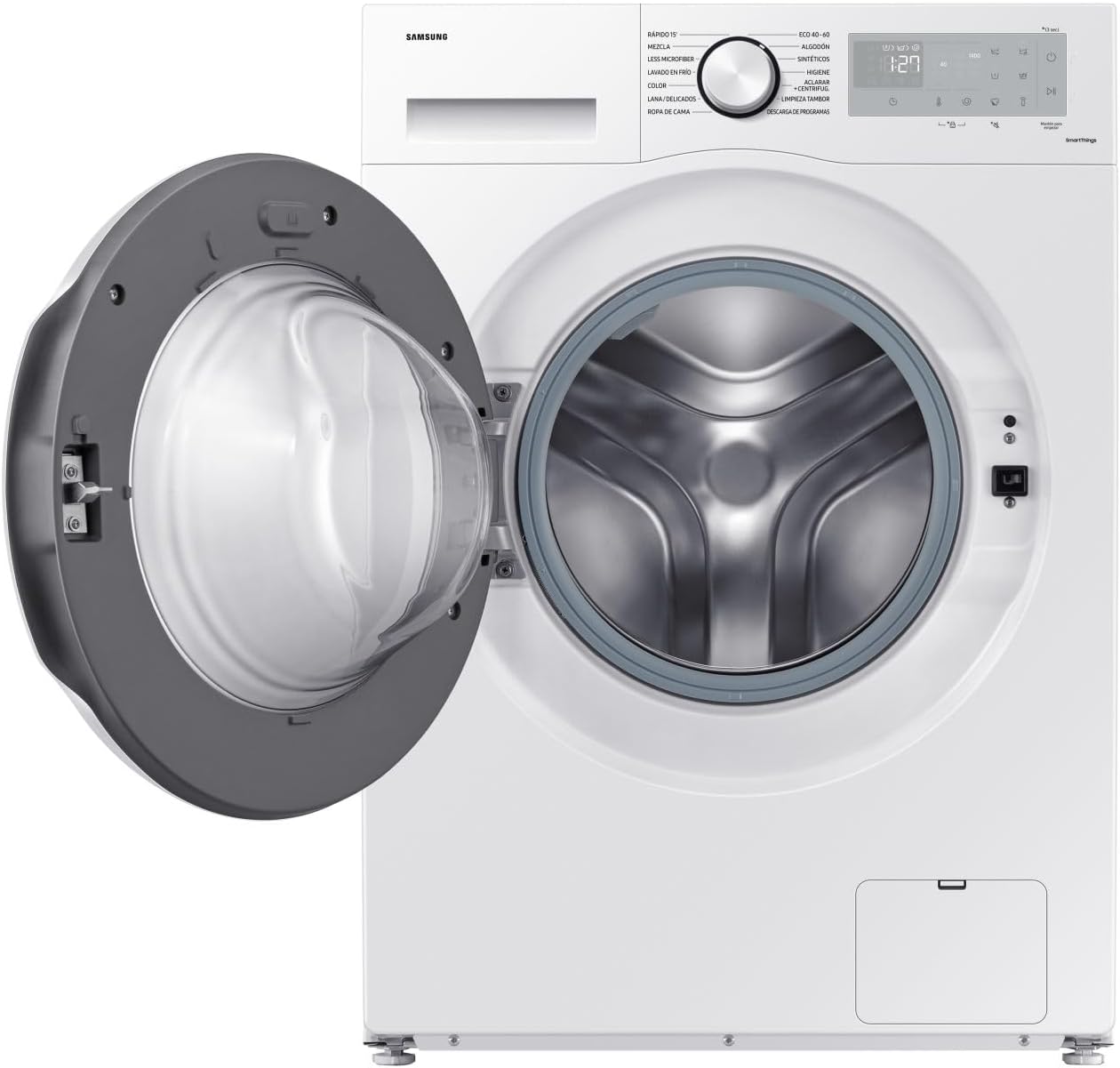
รูปที่ 4.1 : ด้านหน้า view of the washing machine with the door open, showing the drum ready for laundry loading.
4.3 การเติมผงซักฟอกและน้ำยาปรับผ้านุ่ม
Pull out the detergent drawer located on the top left of the control panel. Add appropriate amounts of detergent to the main wash compartment and fabric softener to its designated compartment.
4.4 การเลือกโปรแกรมการซัก
Turn the program selection dial to choose from available cycles:
- ฝ้าย: สำหรับสินค้าที่ทำจากผ้าฝ้าย
- อีโค 40-60: Energy-efficient cycle for normally soiled cotton laundry.
- ผสม: สำหรับบรรทุกผ้าหลายชนิดรวมกัน
- ผ้าเนื้อละเอียด/ผ้าไหม: ซักด้วยโปรแกรมซักเบาสำหรับผ้าที่บอบบาง
- ล้างอย่างรวดเร็ว: สำหรับสิ่งของที่สกปรกน้อยที่ต้องการซักอย่างรวดเร็ว
- ไอน้ำสุขอนามัย: เพื่อการทำความสะอาดและฆ่าเชื้ออย่างล้ำลึก
- ลดปริมาณไมโครไฟเบอร์: Reduces microplastic release.
- ล้าง + ปั่น: สำหรับการล้างและปั่นเท่านั้น
- สปิน: สำหรับใช้หมุนเท่านั้น
Additional options like temperature, spin speed, and delayed start can be adjusted using the touch buttons on the display.
4.5 การเริ่มรอบการทำงาน
กดปุ่ม Start/Pause เพื่อเริ่มรอบการซักที่เลือกไว้ หน้าจอจะแสดงเวลาที่เหลือ
4.6 โหมดพลังงาน AI
Activate AI Energy Mode via the SmartThings app (if connected) or the control panel to optimize energy consumption based on your usage patterns.
5. การบำรุงรักษาและการทำความสะอาด
การบำรุงรักษาตามปกติจะช่วยให้เครื่องซักผ้าของคุณทำงานได้อย่างมีประสิทธิภาพและยืดอายุการใช้งาน
5.1 การทำความสะอาดช่องใส่ผงซักฟอก
ถอดช่องใส่ผงซักฟอกออกเป็นระยะๆ แล้วล้างออกด้วยน้ำสะอาดเพื่อขจัดคราบผงซักฟอกที่ตกค้าง ใช้แปรงขัดถ้าจำเป็น
5.2 การทำความสะอาดกลอง
Run a 'Drum Clean' or 'Eco Drum Clean' cycle (if available) regularly to remove detergent buildup and bacteria from the drum. Refer to your control panel for this specific program.
5.3 การทำความสะอาดตัวกรองท่อระบายน้ำ
The drain filter, located at the bottom front of the machine (behind a small access panel), should be cleaned every few months to prevent blockages. Place a shallow tray underneath to catch any residual water before unscrewing the filter.
5.4 การทำความสะอาดภายนอก
เช็ดพื้นผิวภายนอกด้วยผ้านุ่ม damp ผ้า ห้ามใช้สารทำความสะอาดที่มีฤทธิ์กัดกร่อนหรือตัวทำละลาย
6 การแก้ไขปัญหา
ก่อนติดต่อฝ่ายบริการ โปรดอ่านส่วนนี้เพื่อดูปัญหาที่พบบ่อยและวิธีแก้ไข
| ปัญหา | สาเหตุที่เป็นไปได้ | สารละลาย |
|---|---|---|
| เครื่องซักผ้าไม่เริ่มทำงาน | Power cord unplugged; Door not closed properly; Delayed start activated. | Check power connection; Ensure door is latched; Cancel or wait for delayed start. |
| ไม่มีน้ำประปา | ก๊อกน้ำปิดอยู่; สายยางต่อท่อน้ำบิดงอ; แรงดันน้ำต่ำเกินไป | เปิดก๊อกน้ำ; ยืดท่อ; ตรวจสอบแรงดันน้ำภายในบ้าน |
| การสั่นสะเทือน/เสียงรบกวนมากเกินไป | ไม่ได้ถอดสลักยึดในการขนส่ง เครื่องจักรไม่อยู่ในระดับ โหลดไม่เท่ากัน | ถอดสลักยึดสำหรับขนส่งออก ปรับขาปรับระดับ และจัดเรียงผ้าในถังซักใหม่ |
| การรั่วซึมของน้ำ | Hose connections loose; Drain filter clogged; Detergent drawer overflowing. | Tighten hose connections; Clean drain filter; Do not overfill detergent drawer. |
| แสดงรหัสข้อผิดพลาด | ปัญหาเฉพาะที่ระบุโดยรหัส | โปรดดูคู่มือผู้ใช้ฉบับเต็มเพื่อดูรายการรหัสข้อผิดพลาดและวิธีแก้ไข |
7. ข้อมูลจำเพาะ
Detailed technical specifications for the Samsung WW90CGC04DTH washing machine.
| คุณสมบัติ | ข้อมูลจำเพาะ |
|---|---|
| ชื่อรุ่น | คริสตัล คลีน |
| หมายเลขรุ่น | WW90CGC04D |
| ประเภทการติดตั้ง | แบบตั้งอิสระ |
| ประเภทโหลด | ด้านหน้าโหลด |
| ความจุ | 9 กก. |
| ความเร็วการหมุนสูงสุด | 1400 รอบ/นาที |
| ระดับประสิทธิภาพการใช้พลังงาน | A |
| ระดับประสิทธิภาพการปั่นแห้ง | B |
| Noise Class (Spin) | A (72 dB) |
| ขนาด (กว้าง x ลึก x สูง) | 60 cm x 55 cm x 85 cm (approximate, based on 55 x 67 x 89 cm product dimensions) |
| น้ำหนัก | 69.41 กก. |
| เล่มที่tage | 220 โวลต์ |
| ประเภทการควบคุม | ปุ่มหมุน, ระบบสัมผัส |
| ประเภทจอภาพ | นำ |
| บานพับประตู | ซ้าย |
| ประเภทกลอง | กลองเพชร |
8. ข้อมูลการรับประกัน
Your Samsung WW90CGC04DTH washing machine comes with a standard manufacturer's warranty. The Digital Inverter Motor is specifically guaranteed for 20 years. For detailed terms and conditions, including warranty period and coverage, please refer to the warranty card included with your product or visit the official Samsung webไซต์สำหรับภูมิภาคของคุณ โปรดเก็บหลักฐานการซื้อไว้เพื่อใช้ในการเรียกร้องการรับประกัน
9. การสนับสนุนลูกค้า
If you encounter any issues that cannot be resolved using the troubleshooting guide, or if you require technical assistance, please contact Samsung Customer Service.
- เยี่ยมชม Samsung อย่างเป็นทางการ website for your region for support contact details, FAQs, and additional resources.
- Have your model number (WW90CGC04D) and serial number ready when contacting support.