
ยูกรีน PB770
คู่มือการใช้งานพาวเวอร์แบงค์พกพา UGREEN 300W 48,000mAh
รุ่น : PB770
1. สินค้าหมดview
The UGREEN 300W 48,000mAh Portable Charger Power Bank (Model PB770) is a high-capacity power solution designed for charging multiple devices simultaneously. It features a smart digital display, integrated lighting with SOS mode, and supports PD3.1 140W bidirectional charging, making it suitable for outdoor camping, home backup, and powering laptops and other electronic devices.

Figure 1: UGREEN 300W 48,000mAh Portable Charger Power Bank (Model PB770)
2. เนื้อหาบรรจุภัณฑ์
กรุณาตรวจสอบเนื้อหาแพ็คเกจเมื่อแกะกล่อง:
- UGREEN 300W 48,000mAh Power Bank (3 USB-C, 2 USB-A ports)
- 1 x 6A 240W USB-C to USB-C charger cable
- คู่มือการใช้งาน
Note: Wall charger and USB-A to USB-C cable are not included. OUT1 & OUT2 ports are not suitable for charging low-current devices. Remove USB-C to Lightning cable immediately after use.
3. คุณสมบัติหลัก
- Fast Charging, Up to 300W: Maximum total output of 300W, with PD3.1 140W bidirectional charging.
- ความจุสูง: Massive 48,000mAh (153Wh) capacity provides extended power for multiple devices.
- แบตเตอรี่ LiFePO4 ที่ใช้งานได้ยาวนาน: Automotive-grade, high energy-density Lifepo4 batteries offer improved safety and a longer lifespan (over 3,000 cycles with >80% capacity retention).
- จอแสดงผลดิจิตอลอัจฉริยะ: Clear display shows remaining battery, input wattage และเอาต์พุต wattage.
- ไฟ LED ในตัว: Features 3 modes: high light, low light, and SOS mode for various environments and emergencies.
- การออกแบบพกพา: Lightweight and compact with a convenient carrying handle and non-slip mat.
- การป้องกันความปลอดภัยหลายอย่าง: รวมถึงปริมาณเกินtage, over-current, over-charge, over-discharge, high-temperature, and short-circuit protection.

Figure 2: 300W Max Output Capability

Figure 3: 48,000mAh Super High Capacity

Figure 4: 6X Long-lasting with LiFePO4 Batteries

Figure 5: PD3.1 140W Two-way Fast Charging

Figure 6: Multiple Safety Protection Features
4. เค้าโครงผลิตภัณฑ์
The UGREEN Power Bank features a user-friendly design with clearly labeled ports and a smart digital display for easy monitoring.
รูปที่ 7 : ด้านหน้า View of the Power Bank
- จอแสดงผลดิจิตอลอัจฉริยะ: แสดงเปอร์เซ็นต์แบตเตอรี่tage, วัดอินพุตtage และเอาต์พุต wattage.
- USB-C Ports (3): For high-speed charging and recharging.
- พอร์ต USB-A (2): สำหรับชาร์จอุปกรณ์ต่างๆ ที่รองรับ USB-A
- ปุ่มเปิด/ปิด: เปิดใช้งานอุปกรณ์และควบคุมแสงไฟ LED
- ไฟ LED ในตัว: Located on the side, offering multiple brightness and SOS modes.
- ที่จับ: เพื่อการพกพาที่สะดวก
5. การตั้งค่า
- ค่าใช้จ่ายเริ่มต้น: Before first use, fully charge the power bank using a PD3.1 140W compatible wall charger (not included) and the provided USB-C to USB-C cable. A full charge takes approximately 1.5 hours.
- เปิดเครื่อง: Press the power button once to activate the power bank and view จอแสดงผลแบบดิจิตอล
6. คู่มือการใช้งาน
6.1 อุปกรณ์ชาร์จ
Connect your devices to the available USB-C or USB-A output ports using appropriate charging cables. The power bank can charge up to 5 devices simultaneously. The digital display will show the total output wattage.
- พอร์ต USB-C: Ideal for fast charging laptops, tablets, and smartphones.
- พอร์ต USB-A: Suitable for charging various USB-A compatible devices.
Video 1: Demonstrates the UGREEN power bank charging multiple devices simultaneously, including a laptop and tablet, highlighting its versatility and the smart digital display.
6.2 การชาร์จพาวเวอร์แบงค์
To recharge the power bank, connect it to a power source using the provided USB-C to USB-C cable and a compatible wall charger. The digital display will show the input wattage and battery charging status.
6.3 LED Light Functionality
ไฟ LED ในตัวมีสามโหมดสำหรับการใช้งานในสถานการณ์ต่างๆ:
- โหมดแสงน้อย: Single-click the power button to activate. Ideal for ambient lighting.
- โหมดแสงสูง: Click the power button again to switch to high brightness. Provides stronger illumination.
- โหมด SOS: Click the power button a third time to activate SOS flashing mode. Useful for emergencies.
- ปิด: Click the power button a fourth time to turn off the LED light.
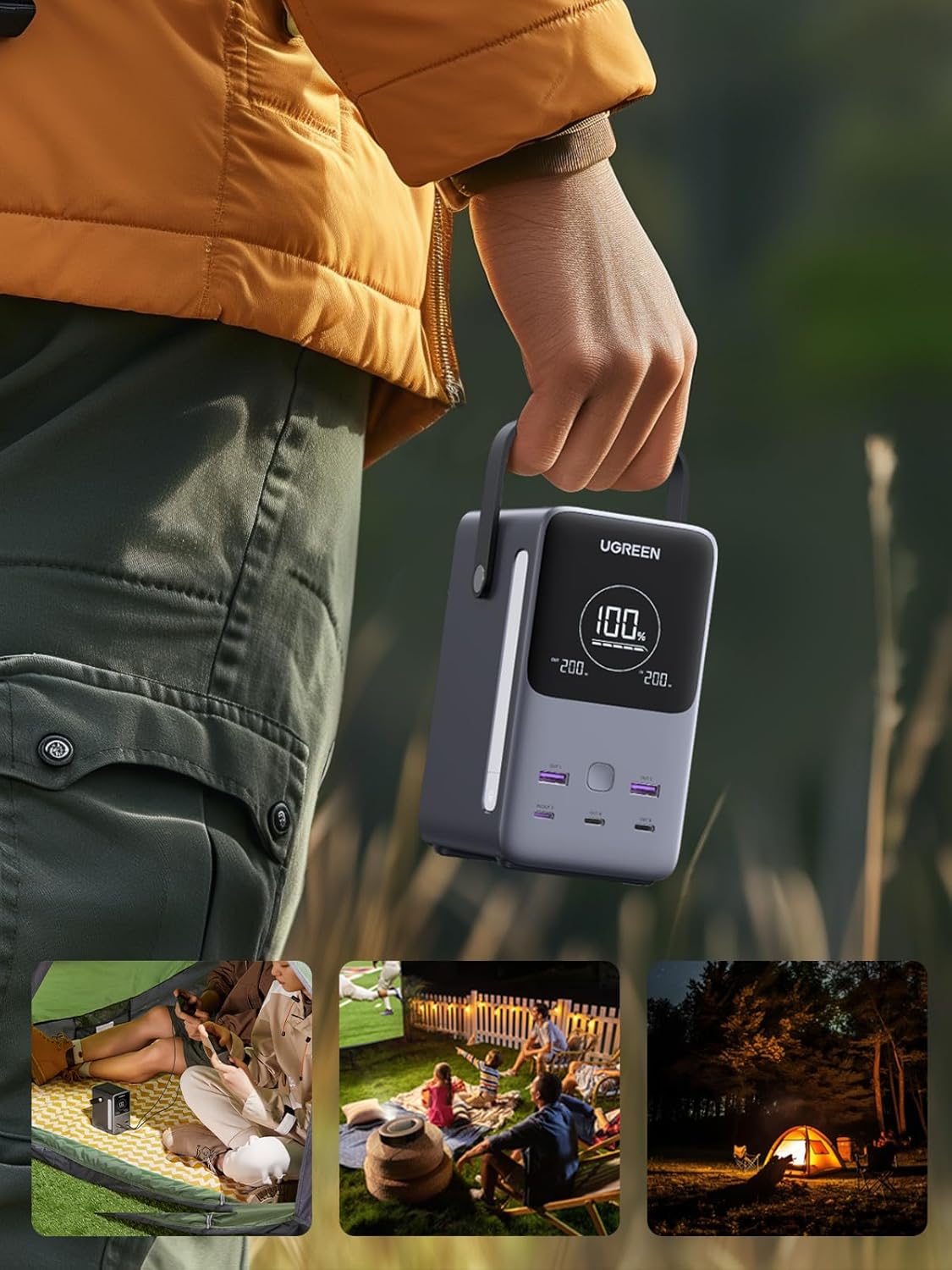
Figure 8: Power Bank LED Light in use
7. การบำรุงรักษา
- การทำความสะอาด: ใช้ผ้านุ่มและแห้งเช็ดทำความสะอาดพื้นผิวของพาวเวอร์แบงค์ หลีกเลี่ยงการใช้สารเคมีรุนแรงหรือวัสดุที่มีฤทธิ์กัดกร่อน
- พื้นที่จัดเก็บ: เก็บพาวเวอร์แบงค์ไว้ในที่แห้งและเย็น หลีกเลี่ยงแสงแดดโดยตรง อุณหภูมิที่สูงและสูงเกินไป และความชื้น
- การดูแลแบตเตอรี่ เพื่อให้แบตเตอรี่ใช้งานได้นานที่สุด ควรชาร์จแบตเตอรี่สำรองให้เต็มอย่างน้อยทุกๆ สามเดือน หากไม่ได้ใช้งานเป็นประจำ
- หลีกเลี่ยงการหยด: อย่าทำตกหรือให้พาวเวอร์แบงค์ได้รับแรงกระแทกรุนแรง
8 การแก้ไขปัญหา
If you encounter issues with your UGREEN Power Bank, please refer to the following common troubleshooting steps:
- พาวเวอร์แบงค์ไม่ชาร์จ:
- ตรวจสอบให้แน่ใจว่าสายชาร์จเชื่อมต่อกับพาวเวอร์แบงค์และเครื่องชาร์จติดผนังอย่างแน่นหนา
- Verify that the wall charger is functioning correctly and is compatible with PD3.1 140W input.
- ลองใช้สาย USB-C หรือที่ชาร์จติดผนังแบบอื่น
- Devices Not Charging or Charging Slowly:
- ตรวจสอบว่าพาวเวอร์แบงค์มีประจุเพียงพอหรือไม่
- Ensure the charging cable for your device is not damaged and is properly connected.
- Some devices, especially low-current ones, may not be compatible with OUT1 & OUT2 ports. Try other ports.
- Verify that your device supports the power output of the connected port.
- จอแสดงผลดิจิตอลไม่ทำงาน:
- กดปุ่มเปิด/ปิดเพื่อเปิดใช้งานจอแสดงผล
- If the issue persists, the unit may require service.
- ความร้อนสูงเกินไป:
- Disconnect all devices and allow the power bank to cool down.
- Ensure proper ventilation and avoid placing the power bank in enclosed spaces while in use or charging.
- If overheating is frequent, discontinue use and contact support.
For further assistance, please refer to the official UGREEN support channels.
9. ข้อมูลจำเพาะ
| คุณสมบัติ | รายละเอียด |
|---|---|
| ขนาดสินค้า | 5.71 x 6.31 x 3.03 นิ้ว |
| น้ำหนักสินค้า | 3.97 ปอนด์ |
| หมายเลขรุ่น | พีบี770 |
| ความจุของแบตเตอรี่ | 48,000mAh (153 วัตต์ชั่วโมง) |
| ประเภทแบตเตอรี่ | Lithium Polymer (LiFePO4) |
| ผลผลิตรวมสูงสุด | 300วัตต์ |
| อินพุตสูงสุด (การชาร์จ) | PD3.1 140W |
| พอร์ต | พอร์ต USB-C 3 พอร์ต, พอร์ต USB-A 2 พอร์ต |
| คุณสมบัติพิเศษ | Portable Handle, LED Light (High, Low, SOS modes), Smart Digital Display |
| สี | สีเทา |
| ผู้ผลิต | ยูกรีน กรุ๊ป จำกัด |
10. การรับประกันและการสนับสนุน
ผลิตภัณฑ์ UGREEN มาพร้อมกับการรับประกันจากผู้ผลิตตามมาตรฐาน สำหรับข้อมูลการรับประกันโดยละเอียด การสนับสนุนผลิตภัณฑ์ หรือความช่วยเหลือทางเทคนิค โปรดเยี่ยมชมเว็บไซต์อย่างเป็นทางการของ UGREEN webหรือติดต่อฝ่ายบริการลูกค้าโดยตรง เก็บใบเสร็จรับเงินไว้เพื่อใช้ในการเคลมประกัน
UGREEN อย่างเป็นทางการ Webเว็บไซต์: www.ugreen.com
เอกสารที่เกี่ยวข้อง - พีบี770
 |
คู่มือการแก้ไขปัญหาสวิตช์ UGREEN KVM คู่มือการแก้ไขปัญหาที่ครอบคลุมสำหรับสวิตช์ UGREEN KVM ซึ่งกล่าวถึงปัญหาทั่วไป เช่น จอภาพกระพริบ ปัญหาความละเอียด 4K 60Hz และความผิดปกติของพอร์ต USB |
 |
UGREEN Revodok Pro 210 USB C Docking Station: Leitfaden zur Fehlerbehebung Umfassender Leitfaden zur Fehlerbehebung für die UGREEN Revodok Pro 210 USB C Docking Station. Beheben Sie Probleme mit Dual HDMI, Gigabit Ethernet, USB-Ports, PD 100W Schnellladen und SD/TF-Kartenleser. Finden Sie Lösungen für Display-, Lade-, Treiber-, Datenübertragungs- und Kompatibilitätsprobleme. |
 |
UGREEN 13-in-1 USB Hub User Manual and Specifications Detailed user manual and technical specifications for the UGREEN 13-in-1 USB Hub, featuring triple display support (4K60Hz DP, 2xHDMI), RJ45 Ethernet, SD/TF card readers, and 10Gbps data ports. |
 |
คู่มือผู้ใช้แบตเตอรี่สำรองไฟ DC UPS 120W UGREEN รุ่น US3000 คู่มือผู้ใช้สำหรับแบตเตอรี่สำรอง UGREEN 120W DC UPS (รุ่น US3000) เรียนรู้เกี่ยวกับการเชื่อมต่อ การทำงาน ไฟ LED และข้อควรระวังด้านความปลอดภัยเพื่อปกป้อง NAS ของคุณในระหว่างที่ไฟฟ้าดับtagใช่ |
 |
UGREEN NAS Knowledge Center: Troubleshooting and User Guide A comprehensive troubleshooting and configuration guide for UGREEN NAS devices. Covers network connectivity, hard disk management, RAID configuration, SMB file sharing, system maintenance, and smart home integration via Home Assistant. |
 |
คู่มือการใช้งานและคำแนะนำสำหรับอุปกรณ์จัดเก็บข้อมูลเครือข่าย UGREEN NAS DXP4800 Plus คู่มือการใช้งานฉบับสมบูรณ์สำหรับ UGREEN NAS DXP4800 Plus ครอบคลุมการติดตั้ง การตั้งค่า คุณสมบัติ และข้อมูลจำเพาะของอุปกรณ์จัดเก็บข้อมูลเครือข่ายนี้ รวมถึงคำแนะนำโดยละเอียดสำหรับการติดตั้งฮาร์ดไดรฟ์และ M.2 SSD การตั้งค่าระบบ และคำอธิบายคุณสมบัติ |
Ask a question about this manual
Ask about setup, troubleshooting, compatibility, parts, safety, or missing instructions. Manuals+ will review the question and use this page’s manual context to help answer it.