
1. บทนำ
This manual provides essential information for the safe and efficient use of your TCL 32L5AG 32-inch Full HD Smart Google TV. Please read these instructions thoroughly before operating the device and retain them for future reference. This television combines a Full HD display with Google TV functionality, offering a wide range of entertainment options and smart features.
2. ข้อมูลด้านความปลอดภัย
โปรดปฏิบัติตามข้อควรระวังด้านความปลอดภัยต่อไปนี้เสมอ เพื่อป้องกันไฟฟ้าช็อต ไฟไหม้ หรือความเสียหายต่อผลิตภัณฑ์:
- อย่าให้ทีวีโดนฝนหรือความชื้น
- ตรวจสอบให้แน่ใจว่ามีการระบายอากาศที่เหมาะสม อย่าปิดกั้นช่องระบายอากาศ
- ใช้เฉพาะสายไฟที่ให้มาพร้อมกับทีวีเท่านั้น
- อย่าเปิดทีวีasinง. ส่งต่อการบริการทั้งหมดให้กับบุคลากรที่มีคุณสมบัติ
- เก็บทีวีให้ห่างจากแสงแดดโดยตรง แหล่งความร้อน และสนามแม่เหล็กแรงสูง
- Place the TV on a stable, level surface or mount it securely to a wall using a VESA-compliant bracket.
3. สินค้าหมดview
The TCL 32L5AG is a 32-inch Full HD Smart Google TV designed for an immersive viewing experience. It features a sleek, bezel-less design and integrates advanced image processing technologies.

ภาพ: ด้านหน้า view of the TCL 32L5AG 32-inch Full HD Smart Google TV.
4. การตั้งค่า
4.1 การแกะกล่อง
นำทีวีและอุปกรณ์เสริมทั้งหมดออกจากบรรจุภัณฑ์อย่างระมัดระวัง ตรวจสอบให้แน่ใจว่ามีอุปกรณ์ครบถ้วน:
- TCL 32L5AG TV unit
- รีโมทคอนโทรล
- สายไฟ
- TV stand components and screws
- คู่มือการใช้งาน (เอกสารนี้)
4.2 การติดตั้งขาตั้ง
การติดตั้งขาตั้งทีวี:
- วางทีวีคว่ำหน้าลงบนพื้นผิวที่นุ่มและเรียบเพื่อป้องกันหน้าจอเสียหาย
- จัดวางฐานขาตั้งให้ตรงกับช่องที่ตรงกันที่ด้านล่างของทีวี
- ยึดขาตั้งโดยใช้สกรูที่ให้มา

Image: Diagram showing the TV dimensions and how the stand attaches to the base of the television.
4.3 สายเชื่อมต่อ
Connect necessary cables to the TV's rear ports:
- พลัง: ต่อสายไฟเข้ากับทีวีและปลั๊กไฟที่ผนัง
- เสาอากาศ: Connect your terrestrial or satellite antenna cable to the ANTENNA INPUT port.
- ช่องต่อ HDMI: For external devices like Blu-ray players or game consoles, use the HDMI INPUT 1 or 2 ports.
- LAN: สำหรับการเชื่อมต่ออินเทอร์เน็ตแบบใช้สาย ให้เชื่อมต่อสายอีเทอร์เน็ตเข้ากับพอร์ต LAN
- ยูเอสบี: For external storage (e.g., HDD for recording), use the USB port.
- เอาต์พุตเสียงดิจิตอลออปติคอล: สำหรับเชื่อมต่อกับซาวด์บาร์หรือระบบโฮมเธียเตอร์
- เอาท์พุตหูฟัง: สำหรับเชื่อมต่อหูฟัง.
- อินพุตวิดีโอ: สำหรับอุปกรณ์รุ่นเก่าที่ใช้การ์ดจอคอมโพสิต
- miniB-CAS Card Slot: Insert your miniB-CAS card for digital broadcast reception (required for digital broadcasting in Japan).
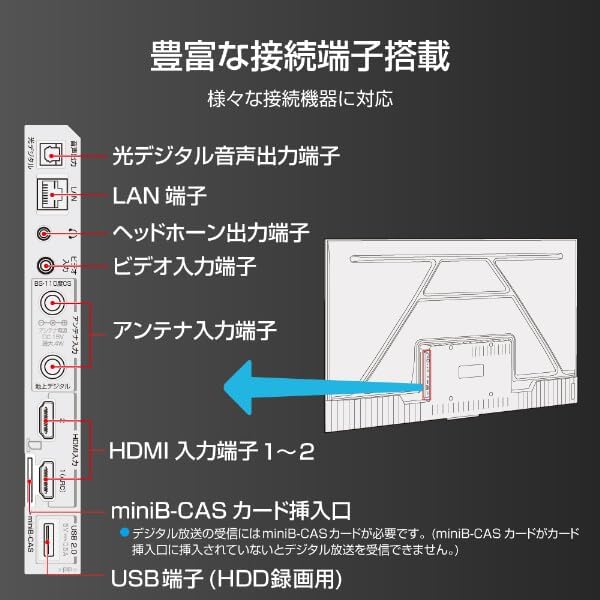
Image: Diagram illustrating the various input and output ports on the back of the TCL 32L5AG TV, including HDMI, USB, LAN, antenna, and audio outputs.
4.4 การตั้งค่าเริ่มต้น
After connecting all cables and powering on the TV for the first time, follow the on-screen instructions to complete the initial setup, which includes:
- การเลือกภาษา
- การเชื่อมต่อเครือข่าย (Wi-Fi หรือ LAN แบบมีสาย)
- Google account login for Google TV features.
- กำลังค้นหาช่องทีวีออกอากาศ
5. คู่มือการใช้งาน
5.1 การใช้งานทีวีขั้นพื้นฐาน
- เปิด/ปิดเครื่อง: กดปุ่มเปิด/ปิดบนรีโมทคอนโทรล
- การเลือกอินพุต: Use the 'Input' button on the remote to switch between HDMI, TV, and other sources.
- การควบคุมระดับเสียง: ใช้ปุ่ม 'เพิ่ม/ลดระดับเสียง'
- เปลี่ยนช่อง: ใช้ปุ่ม 'เพิ่ม/ลดช่อง' เพื่อออกอากาศทีวี
5.2 คุณสมบัติของ Google TV
Your TCL 32L5AG comes with Google TV, providing a personalized and integrated entertainment experience.
- Content Browsing: The home screen displays recommended content based on your viewing history and preferences from various streaming services.
- Voice Search (OK Google): Press the Google Assistant button on your remote and speak into the microphone to search for movies, shows, or control your TV.
- แอปสตรีมมิ่ง: Access popular services like Netflix, YouTube, Amazon Prime Video, Disney+, Hulu, and more directly from the TV.

Image: Screenshot of the Google TV home screen displaying various streaming applications and content recommendations.
5.3 Chromecast ในตัว
The TV includes Chromecast built-in, allowing you to cast content from your smartphone, tablet, or computer directly to the TV screen.
- โปรดตรวจสอบให้แน่ใจว่าอุปกรณ์มือถือและทีวีของคุณเชื่อมต่อกับเครือข่าย Wi-Fi เดียวกัน
- Open a Chromecast-enabled app (e.g., YouTube, Netflix) on your mobile device.
- แตะไอคอน Cast (
 ) ภายในแอป
 - Select your TCL TV from the list of devices to start casting.

Image: A smartphone displaying a video, with an arrow indicating it is casting to the larger TCL TV screen.
6. คุณสมบัติ
6.1 Algo Engine Lite
The Algo Engine Lite utilizes an advanced image analysis algorithm to enhance picture quality for both broadcast TV and streaming services, delivering a high-quality visual experience.

Image: A close-up of a microchip labeled "Algo Engine Lite" on a circuit board, representing the TV's image processing unit.
6.1.1 Detail Restoration
The Algo Engine effectively suppresses noise around text and edges, as well as wave-like noise in flat image areas. It also intelligently upscales HD and 2K images to 4K resolution, reproducing high-definition visuals.

Image: A split image showing a cityscape. The 'Before' side appears less sharp with more noise, while the 'After' side, processed by Algo Engine, shows improved detail and reduced noise.
6.1.2 Superior Contrast (Micro Dimming)
Equipped with a "Micro Dimming" function, the Algo Engine analyzes image information in detail for each zone. By clearly distinguishing brightness and darkness down to fine details, it renders landscapes with a more realistic sense of depth.

Image: A split image of a night city scene. The 'Without Micro Dimming' side shows less defined lights and shadows, while the 'With Micro Dimming' side exhibits enhanced contrast and clearer details in both bright and dark areas.
6.1.3 Precise Color Management
With 3D color management, the Algo Engine suppresses color gamut loss during color transitions, accurately reproducing tones and colors from dark to bright areas.

Image: A split image showing various food bowls. The 'Before' side has muted or inaccurate colors, while the 'After' side, processed by Algo Engine, displays vibrant and accurate colors with a wider color spectrum indicated by a gradient bar.
6.1.4 Enhanced HDR Expression
The Algo Engine analyzes High Dynamic Range (HDR) images without omission, flexibly adapting to a wide range of brightness levels. It faithfully reproduces the bright and dark areas of the image, supporting HDR10 and HLG formats (1080p only).

Image: A split image of a sunset landscape. The 'Before' side shows less dynamic range, while the 'After' side, processed by Algo Engine, reveals richer colors, brighter highlights, and deeper shadows, enhancing the HDR effect.
6.2 Full HD LCD Display
The TV features a Full HD LCD panel with direct-lit LED backlighting, providing bright and high-quality images across the entire screen. The panel resolution is twice that of standard HD, allowing for detailed visuals and rich content expression.

Image: A split image comparing an HD display to a Full HD display, showing the difference in pixel density and clarity, particularly visible in magnified sections of the image.
6.3 ระบบเสียง Dolby
Experience clear and powerful sound with Dolby Audio support, enhancing your overall entertainment experience.

Image: A visual representation of sound waves emanating from a waterfall, illustrating the immersive audio experience provided by Dolby Audio.
6.4 ดีไซน์ไร้ขอบ
The TV features a metal bezel-less frame, maximizing the screen area and enhancing the aesthetic presence in your living space.

Image: Three close-up views of the TCL TV, highlighting its thin metal frame and minimal bezels, showcasing the bezel-less design from different angles.
7. ข้อมูลจำเพาะ
| คุณสมบัติ | คำอธิบาย |
|---|---|
| ยี่ห้อ | ทีซีแอล |
| ชื่อรุ่น | 32L5AG |
| เทคโนโลยีการแสดงผล | จอแอลซีดี |
| ปณิธาน | ฟูลเอชดี (1920 x 1080) |
| อัตราการรีเฟรช | 120 เฮิรตซ์ |
| อัตราส่วนภาพ | 1.78:1 น. |
| อัตราส่วนคอนทราสต์ | 4000:1 น. |
| รองรับ HDR | HDR10 |
| Motion Enhancement Technology | Algo Engine Lite |
| Image Quality Enhancement Technology | Algo Engine |
| เทคโนโลยีการเชื่อมต่อ | บลูทู ธ Wi-Fi |
| Recommended Internet Services | YouTube, Netflix |
| อินพุตเสียง | อาร์ซีเอ, บลูทูธ |
| รูปแบบสัญญาณ | Composite, HDMI |
| พอร์ต HDMI | 2 |
| พอร์ต USB 3.0 | 1 |
| ขนาดสินค้า (ลึก x กว้าง x สูง) | 18 x 71.6 x 46.8 ซม. |
| น้ำหนักผลิตภัณฑ์ | 5 กก. |
| คุณสมบัติลำโพง | ลำโพง 10 วัตต์ |
| การกำหนดค่าช่องลำโพง | 2.0 |
| วัดtage | 65 วัตต์ |
| การใช้พลังงาน | 64 กิโลวัตต์ชั่วโมง/ปี |
| วิธีการควบคุม | ระยะไกล |
| รูปแบบการเข้ารหัสวิดีโอ | H.264, H.265 (HEVC) |
| Release Year / Model Year | 2021 |
| มาตรฐาน VESA Mount | 100x100มม. |
8. การบำรุงรักษา
เพื่อให้ทีวีของคุณมีอายุการใช้งานยาวนานและมีประสิทธิภาพสูงสุด โปรดปฏิบัติตามคำแนะนำในการบำรุงรักษาดังต่อไปนี้:
- การทำความสะอาดหน้าจอ: เช็ดหน้าจอเบาๆ ด้วยผ้านุ่มที่ไม่เป็นขุย สำหรับรอยฝังแน่น ให้เช็ดเบาๆampชุบผ้าด้วยน้ำหรือน้ำยาทำความสะอาดหน้าจอชนิดพิเศษ ห้ามฉีดน้ำยาลงบนหน้าจอโดยตรง
- การทำความสะอาด Casing: ใช้ผ้าแห้งนุ่มๆ เช็ดทำความสะอาดทีวีasinก. หลีกเลี่ยงน้ำยาทำความสะอาดหรือตัวทำละลายที่มีฤทธิ์กัดกร่อน
- การระบายอากาศ : Ensure the ventilation openings on the back of the TV are not blocked by dust or objects. Regularly clean any dust accumulation.
- สายไฟ: Periodically check the power cord for any damage. If damaged, contact customer support for a replacement.
9 การแก้ไขปัญหา
หากคุณประสบปัญหาเกี่ยวกับทีวี โปรดดูปัญหาทั่วไปและวิธีแก้ไขต่อไปนี้:
| ปัญหา | วิธีแก้ปัญหาที่เป็นไปได้ |
|---|---|
| ไม่มีไฟฟ้า | ตรวจสอบว่าสายไฟเสียบเข้ากับทีวีและเต้ารับที่ผนังแน่นดีแล้วหรือไม่ ลองใช้เต้ารับอื่น |
| ไม่มีภาพแต่มีเสียง | ตรวจสอบให้แน่ใจว่าได้เลือกแหล่งสัญญาณเข้าที่ถูกต้อง ตรวจสอบการเชื่อมต่อสายเคเบิลกับอุปกรณ์ภายนอก |
| ไม่มีเสียงแต่มีภาพ | Check volume level and mute settings. Ensure external audio systems are correctly connected and powered on. |
| รีโมตคอนโทรลไม่ทำงาน | เปลี่ยนแบตเตอรี่ ตรวจสอบให้แน่ใจว่าไม่มีสิ่งกีดขวางระหว่างรีโมทและเซ็นเซอร์อินฟราเรดของทีวี |
| ไม่สามารถเชื่อมต่อ Wi-Fi ได้ | ตรวจสอบเราเตอร์และโมเด็มของคุณ ป้อนรหัสผ่าน Wi-Fi อีกครั้ง ลองรีสตาร์ททีวีและเราเตอร์ |
| Google TV features not working | Ensure you are logged into your Google account and have an active internet connection. |
หากปัญหายังคงมีอยู่หลังจากลองวิธีแก้ไขเหล่านี้แล้ว โปรดติดต่อฝ่ายสนับสนุนลูกค้า
10. การรับประกันและการสนับสนุน
Your TCL 32L5AG TV comes with a limited warranty. Please refer to the warranty card included in your product packaging for specific terms and conditions. For technical support, service, or warranty claims, please contact TCL customer service through their official webไซต์หรือข้อมูลการติดต่อที่ระบุไว้ในเอกสารการรับประกันของคุณ
For the latest information and support, visit the official TCL webเว็บไซต์: www.tcl.com