
1. บทนำ
This manual provides detailed instructions for the installation, operation, and maintenance of your Ymlike Bluetooth Smart Hose Water Timer with Wi-Fi Hub. Please read this manual thoroughly before use to ensure proper function and longevity of the device.
2. ข้อมูลด้านความปลอดภัย
- ตรวจสอบให้แน่ใจว่าการเชื่อมต่อทั้งหมดมีความปลอดภัยเพื่อป้องกันการรั่วไหล
- Do not immerse the Wi-Fi Hub in water. The water timer is IP54 waterproof, but the hub is not.
- Use only specified batteries (2 AAA) for the water timer.
- Operate within the specified temperature range of 3℃ - 50℃ (37 °F-122 °F).
- เก็บอุปกรณ์ให้พ้นจากมือเด็ก
3. เนื้อหาบรรจุภัณฑ์
ตรวจสอบว่ามีรายการทั้งหมดอยู่ในแพ็คเกจของคุณ:
- Ymlike Bluetooth Smart Hose Water Timer (SWV-02)
- ฮับ Wi-Fi
- คู่มือการใช้งาน (เอกสารนี้)
- Note: 2 AAA batteries for the water timer are not included.

ภาพที่ 3.1: Components of the Ymlike Smart Hose Water Timer system, including the timer, Wi-Fi hub, and a smartphone displaying the control application.
4. คุณสมบัติของผลิตภัณฑ์
- การเชื่อมต่อบลูทูธและไวไฟ: Connects to your smartphone via Bluetooth and remotely via the Wi-Fi Hub (2.4GHz network required).
- Two Irrigation Modes: Supports Normal and Cycle & Soak watering schedules.
- การกำหนดตารางเวลาที่ยืดหยุ่น: Set up to 20 separate watering schedules with options for daily, weekdays, or specific periods.
- รดน้ำด้วยตนเอง: Initiate watering instantly via the device button or the app.
- ฟังก์ชั่นหน่วงเวลาฝน: Automatically skips watering based on local weather forecasts.
- โครงสร้างทนทาน: IP54 waterproof ABS plastic with anti-UV coating.
- ใช้แบตเตอรี่: Requires 2 AAA batteries (not included) for up to 12 months of operation.
- รองรับหลายอุปกรณ์: Connect up to 4 water timers to a single Wi-Fi hub.
- App Control & Sharing: Manage watering schedules and share control with family members via the Tuya app.
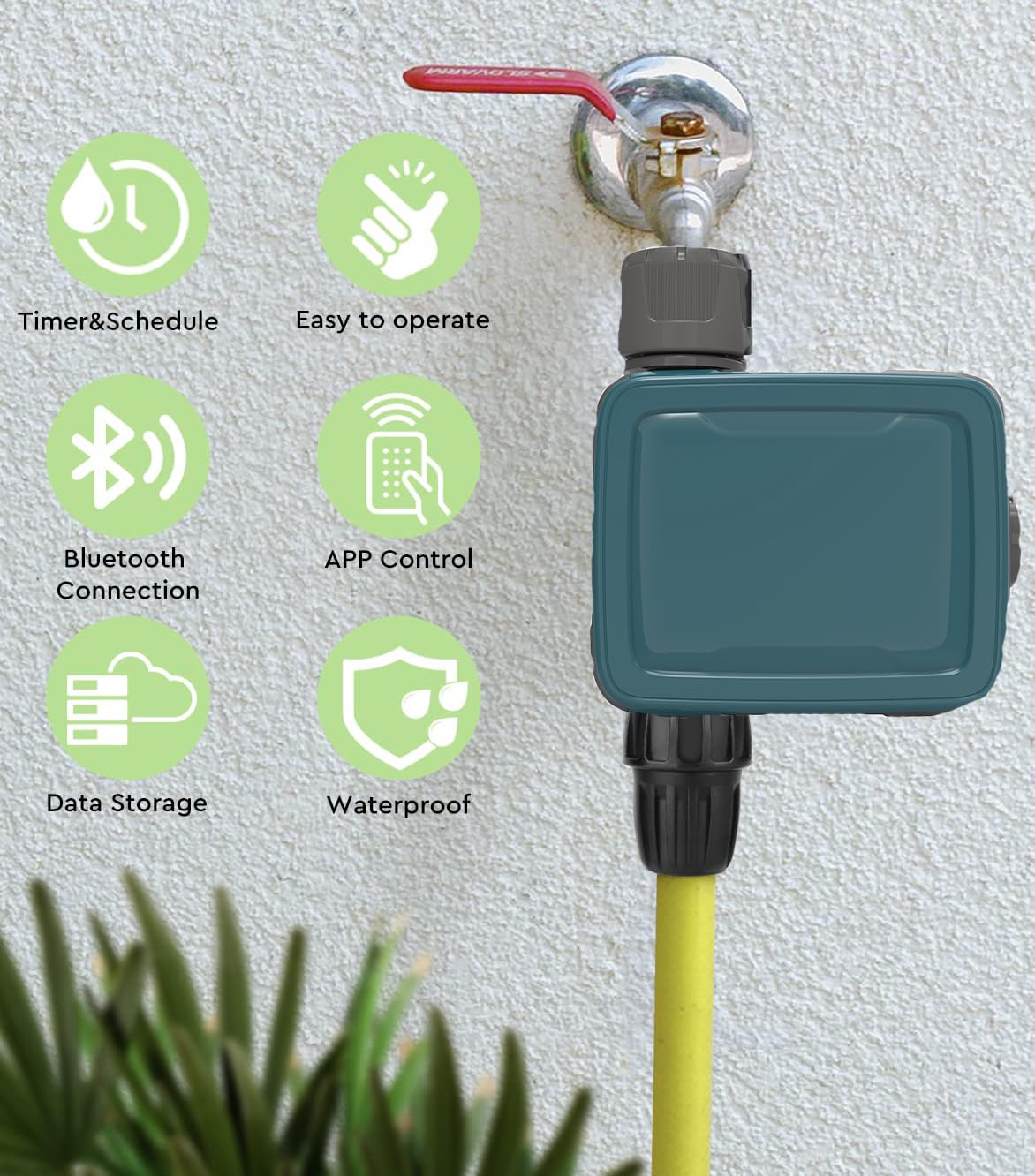
ภาพที่ 4.1: Visual representation of key product features, including scheduling, ease of use, Bluetooth and app control, data storage, and waterproof design.
5. การตั้งค่าและการติดตั้ง
5.1 Install Batteries in Water Timer
- ค้นหาช่องใส่แบตเตอรี่บนตัวตั้งเวลาใช้น้ำ
- Open the compartment and insert 2 new AAA alkaline batteries, ensuring correct polarity.
- Securely close the battery compartment, ensuring the two shields are properly seated to maintain IP54 waterproof rating.
5.2 Install Water Timer
- Screw the water timer onto your outdoor faucet (tap). The inlet thread is 3/4'' F. A reduction to 3/4'' F is also provided if needed.
- Connect your garden hose to the outlet of the water timer.
- Ensure all connections are hand-tight to prevent leaks.
5.3 Wi-Fi Hub Connection
- Plug the Wi-Fi Hub into a standard electrical outlet indoors, within range of your home's 2.4GHz Wi-Fi network.
- Ensure the hub is placed in a location that allows for good signal strength to both your Wi-Fi router and the water timer (via Bluetooth).

ภาพที่ 5.1: Illustration of the remote connectivity setup, demonstrating the Wi-Fi Hub's role in enabling remote control of the water timer via a smartphone application. Note: Only supports 2.4GHz Wi-Fi.
5.4 การติดตั้งและการจับคู่แอป
- Download the "Tuya" app from your smartphone's app store (iOS or Android).
- ลงทะเบียนหรือเข้าสู่ระบบบัญชี Tuya ของคุณ
- In the app, add the Wi-Fi Hub by following the on-screen instructions. Ensure your phone is connected to a 2.4GHz Wi-Fi network during this process.
- Once the Wi-Fi Hub is added, use the app to pair the water timer to the hub via Bluetooth. The app will guide you through the pairing process.
- You can connect up to 4 water timers to a single Wi-Fi hub.
6. คู่มือการใช้งาน
6.1 Setting Watering Schedules
The Tuya app allows for flexible scheduling with two main irrigation modes:
- โหมดปกติ: Set a specific start time and duration for watering.
- โหมดการปั่นและการแช่: Ideal for sloped areas or dense soil, this mode allows you to set a watering duration, followed by a soak time, repeated over a set period. This helps prevent runoff and promotes deeper water penetration.
ในการตั้งตารางเวลา:
- Open the Tuya app and select your water timer.
- ไปที่ส่วน "ตัวจับเวลา" หรือ "กำหนดการ"
- Choose your desired irrigation mode (Normal or Cycle & Soak).
- Set the start time, duration (1 minute to 11 hours 59 minutes), and frequency (once, daily, weekdays, or specific days).
- Save the schedule. You can set up to 20 separate schedules.

ภาพที่ 6.1: App interface demonstrating how to configure watering schedules, including Normal and Cycle & Soak modes, with options for start times and durations.
6.2 การรดน้ำด้วยตนเอง
You can initiate watering instantly without affecting your programmed schedules:
- ผ่านแอป: In the Tuya app, select your water timer and look for a "Manual" or "Water Now" option. Set the desired duration (1 minute to 60 minutes) and confirm.
- ผ่านทางอุปกรณ์: Press the button on the water timer to start or stop manual watering. The default manual watering duration can usually be configured in the app.
6.3 ฟังก์ชันหน่วงเวลาฝน
The smart timer can automatically adjust to local weather conditions:
- The timer uses local weather forecasts to detect rain or snow.
- If precipitation is expected, the timer can automatically skip scheduled watering cycles to conserve water. This function does not disrupt your existing programmed schedules; it only postpones them.
- This feature can typically be enabled or disabled within the Tuya app settings for your water timer.
6.4 Water Usage Monitoring
The Tuya app provides insights into your water consumption:
- View the last watering run time and duration.
- Check the total water usage over a period (e.g., daily, weekly, monthly).
- Monitor upcoming schedules and local weather forecasts directly in the app.

ภาพที่ 6.2: App screen displaying water usage monitoring features, including historical data and future schedule information, integrated with local weather forecasts.
7. การบำรุงรักษา
7.1 การทำความสะอาด
- Wipe the exterior of the water timer with a damp ผ้าตามที่ต้องการ
- ห้ามใช้น้ำยาทำความสะอาดที่มีฤทธิ์กัดกร่อนหรือตัวทำละลาย
- Ensure the Wi-Fi Hub remains dry and clean.
7.2 การเปลี่ยนแบตเตอรี่
- When the battery indicator in the app shows low power, replace the 2 AAA alkaline batteries in the water timer.
- Follow the steps in Section 5.1 for battery installation, ensuring the compartment is sealed correctly.
- กำจัดแบตเตอรี่เก่าตามข้อบังคับท้องถิ่น
7.3 ฤดูหนาว
- Before the first frost, disconnect the water timer from the faucet and store it indoors in a dry, protected area.
- Remove batteries if storing for an extended period.
8 การแก้ไขปัญหา
| ปัญหา | สาเหตุที่เป็นไปได้ | สารละลาย |
|---|---|---|
| Water timer not responding. | แบตเตอรี่เหลือน้อยหรือหมด | เปลี่ยนแบตเตอรี่เป็นแบตเตอรี่อัลคาไลน์ AAA ใหม่ |
| น้ำไม่ไหล. | Faucet is off; timer is not scheduled; manual watering not activated; low water pressure. | Ensure faucet is fully open. Check app schedule or activate manual watering. Verify water pressure. |
| App cannot connect to Wi-Fi Hub. | Hub is unplugged; incorrect Wi-Fi network (not 2.4GHz); poor Wi-Fi signal. | Ensure hub is plugged in. Confirm your router is broadcasting a 2.4GHz network and your phone is connected to it during setup. Move hub closer to router. |
| Water timer not pairing with Wi-Fi Hub. | Timer out of Bluetooth range of hub; batteries low. | Move timer closer to hub during pairing. Replace batteries. |
| รั่วจากการเชื่อมต่อ | Loose connections; missing or damaged washer. | Tighten connections. Check for and replace any damaged rubber washers. |
9. ข้อมูลจำเพาะ
| คุณสมบัติ | รายละเอียด |
|---|---|
| หมายเลขรุ่น | SWV-02 |
| ยี่ห้อ | Ymlike |
| วัสดุ | อะคริโลไนไตรล์ บิวทาไดอีน สไตรีน (ABS) |
| ด้ายเข้า | 3/4'' F (with 3/4'' F reduction) |
| การไหลสูงสุด | 35 L/min @ 3 bar |
| แรงดันการทำงานสูงสุด | 8 บาร์ |
| อุณหภูมิในการทำงาน | 3℃ - 50℃ (37 °F-122 °F) |
| ความถี่ในการชลประทาน | ทุก 1-7 วัน |
| Auto Irrigation Duration | 1 นาทีถึง 11 ชั่วโมง 59 นาที |
| ระยะเวลารดน้ำด้วยตนเอง | 1 นาทีถึง 60 นาที |
| Waterproof Rating (Timer) | IP54 |
| Power Source (Timer) | แบตเตอรี่ AAA 2 ก้อน (ไม่รวม) |
| Communication (Hub) | Wi-Fi 2.4 GHz |
| Connectable Timers per Hub | สูงถึง 4 |
| Item Weight (Timer) | 0.5 กิโลกรัม (ประมาณ 500 กรัม) |

ภาพที่ 9.1: Physical dimensions of the Ymlike water timer and its accompanying Wi-Fi hub.
10. การรับประกันและการสนับสนุน
ผลิตภัณฑ์นี้มาพร้อมกับ รับประกัน 1 ปี from the date of purchase. If you encounter any issues or require technical assistance, please contact Ymlike customer support through your retailer or the contact information provided with your purchase documentation.
Your satisfaction is our priority. Please retain your proof of purchase for warranty claims.